



Overview

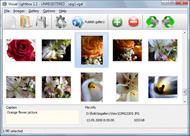
It's no secret that adding photos to your blog posts is one of the most effective ways to enhance your blog and attract attention to your writing. Flickr has millions of photos available in its database. A simple FREE tool called Flickr Gallery allows you to create a custom image gallery with a cool slide show of the most recent and most interesting photos from Flickr on your website or blog in a few easy steps. Just visit Flickr website and find photostream, photoset or a single photo you like. Enter the address of flickr page to add all photos from this page in your gallery, select the style of thumbnails and the overlay window and add the HTML embed code on your website or blog.
A few clicks and you'll see a stylish photo gallery with beautifull lightbox and zoom effects on your own website or blog!


Flickr Gallery for Windows   Flickr Gallery for MAC

Want more?

Example

Lightbox gallery sample

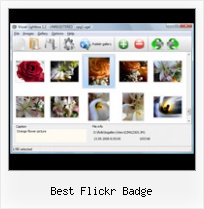
The following image set is generated by Flickr Gallery tool. Click any picture to run Lightbox gallery.

The photo gallery above is an in-page usage demo of Lightbox script with Flickr images. The photo gallery created with Flickr Gallery application is placed inside the html page. You can also check the full-page demo web gallery. This example takes whole browser area to show the gallery.Flickr Widget Embeded

How to Use

Step 1. Adding flickr images to your own gallery.


Locate the photo, photoset or photostream you want to use in your Flickr slideshow. Click on it to see the photo on its own page.

Copy URL of the flickr page.

Select Add images from Flickr... from the 'Add' button on the Toolbar.

Add images from Flickr

In the appeared window paste URL of the flickr page. Specify also the number of photos you want to add from the flickr page. Flickr Gallery will now include these photos in your project.

Add images from Flickr

If you have included the photos that you do not wish to be in your web gallery, you can easily remove them. Select all images that you wish to remove from photo gallery, and select Delete images. from the Images menu. You can pick and choose pictures by holding the CTRL while clicking the pictures you like.

Step 2. Adding caption.

The name of the photo on flickr page will automatically appear in the caption. When you select a photo you'll see the various info about it, such as: Path, Size, date of last change and Caption. You can add any comment or text about the photo (up to 512 symbols).

Step 3. Gallery properties.

Change the name of your flickr album, the size and quality of your pictures with Flickr Gallery. From the Gallery menu, select Properties or use "Edit Gallery Properties" button on the toolbar.

On the first tab of the Gallery Properties window you can change the name of your photo album and enable/disable the following properties: Slide Show, Auto play Slide Show, Zoom effect, Overlay Shadow. You can also set the Overlay shadow color and select the Engine you want to use (jQuery or Prototype + script.aculo.us).

On the second tab of the Gallery Properties window you can select the thumbnail you want to use, set the Thumbnails Resolution, Thumbnails Quality, Thumbnails Titles. Select Thumbnails Format (save in PNG or JPG format). Specify the Number of columns in you photo album and the Page color.

On the third tab of the Gallery Properties window you can select the template, Image resolution and Image quality of your pictures and change the Watermark.

You can set up the various sizes for exported images.

Control the quality of output PNG or JPEG format image by defining output "Image quality" and "Thumbnail quality" parameters (0%…100%).

Step 4. Save your photo gallery as project file.

When you exit Flickr Gallery application, you'll be asked if you want to save your project. The project consists of the pictures you choose to put on your web photo gallery and all your settings. It's a good idea to save the project, because that will allow you to change the project in case you decide to do something different with future galleries. So click Yes, then enter a name for your project. To select the location of your project, just click the Browse folders button and choose a different location. Then click Save.

Background Gallery Flickr Jquery Best Flickr Badge

Download Flickr Gallery


Download Flickr Gallery Download Free Edition
for Windows
Download Flickr Gallery Download Free Edition
for MAC

Flickr Gallery is free for non - commercial use.

A small fee is required for business use. Flickr Gallery Business Edition additionally provides an option to remove the Flickr Gallery. Com credit string as well as a feature to put your own logo to images. After you conclude the payment via the secure form, you will receive a license key instantly by e-mail that turns the Flickr Gallery Free Edition into a Business one. You can select the most appropriate payment procedure: PayPal, bank transfer, check, credit card etc. Also you can get Business Edition for free if you help with translating Flickr Gallery into your native language, please contact us at for more info.

Flickr Polaroid Flash

Buy Flickr GalleryBuy Business Edition
for Windows

$49
Single Website
$69
Unlimited Websites
Buy Flickr GalleryBuy Business Edition
for MAC

$49
Single Website
$69
Unlimited Websites

Support

For general help, troubleshooting and feature requests contact Customer Support at . Make sure to include details on your Flickr Gallery version, operating system, browser and a link (or relevant code).Flickr Embed Photos Thumbnails

Feedback

    * I'd like to express my gratitude to your efforts on creating such a nice piece of program and best of all it's free! Keep out the good work and I hope to see new features in the near coming future to rate you 5 star!

    * I ran into your website wile looking for a JavaScript to manage a personal Photo Gallery. I downloaded the trial version and immediately fell in love with your Flickr Gallery, it is one of the best products I’ve ever found; it is very user friendly and easy to use and creates great Photo Galleries.

    * Another programmes have incredible functionality but no fantastic interface like your product!Rokin Gallery Flickr Video

    * I just tried the application, It is wonderful idea. Like you said in the website "few clicks without writing a single line of code" because most of the people is not web designers".

FAQ

Q:I would like to center all the thumbnails and I cannot figure out how.Can you please help?

A:Try to use <div> tag or <table> tag to center your thumbnails. Flickr Gallery generates a special code.
Just paste it in <div> tag.
You can also place in <dierates a special code.
Just paste it in <div> tag.
You can also place in <div> tag your iframe.
And then use the alignment that you ned.


RELATED

How to Post a Flickr Photo Badge on your Wordpress Blog How to Post a Flickr Photo Badge on your Wordpress Blog. Do you want to show your best photos from your Flickr page on your Wordpress blog sidebar? Follow these easy steps and you'll soon share your photos with your blog

New unobtrusive dynamic flickr badge | Christian Heilmann's Ayer xyberneticos nos recomendo una galería dinámica en JavaScript "Flickr badge v2 " que nos permitirá incluir las ultimas imágenes almacenadas e [ ] http://www.lostnode.com/2007/10/09/best-of-september-2007/ lost node " Blog Archive " Best of September 2007

How to Create a Flickr Badge on Vimeo Vimeo is a respectful community of creative people who are passionate about sharing the videos they make. Use Vimeo if you want the best tools and highest quality video in the universe. How to Create a Flickr Badge

Flickr: Using Pictures on Your Web Site | AssortedStuff For this you are going to create a flickr badge using the picture or pictures you want to use in your page. options. In all these sites you'll enter some information about where your pictures can be found in flickr (it's best if you have your photos in sets), set some options, and click a button

BicycleSmile - Real Riders, Real Reviews This is a Flickr badge showing public photos and videos from Bicycle Smile. May 15, 2009. The Cyclist's Training Bible has become, over the past 14 years, a cyclist best chance at achieving their goals

How to: Add a Styled Flickr Photo Stream to Your Blog Adding uniquely-styled Flickr photo streams to your blog is easy, and it's just another thing you can leverage to make your blog stand out among the crowd. Today, my goal is simply to walk you through the process of creating

NOAA Ocean Explorer: For Fun We have collected some of Ocean Explorer's best photo's and established a NOAA, Ocean Explorer Flickr Photostream. Get your own NOAA Ocean Explorer Flickr badge or subscribe to the RSS feed. Creatures and Features Game. Discover unique video clips from various expeditions as part of

Displaying your flickr photos in an unobtrusive manner Here you can download a script to add a flickr badge like the following to any HTML document or blog with some HTML and a JavaScript include. My latest photos on flickr. You only need to insert the SCRIPT once, and the best option is to add it to the end of the document, just before the

Best Western India - Best Western Resort Country Club Explore everything from Humayun's Tomb to shopping malls when you're a guest at the Best Western Resort Country Club in Gurgaon, India, which is within close proximity of Delhi and many tourist attractions and fun things to do

ctorg index CTorg Home. www.flickr.com. This is a Flickr badge showing photos in a set called Best Of. Make your own badge here. York Mail. Devil's Creek

Flickriver: Random photos from Best Of Flickr © Invite Only pool Badge creator. Use Flickriver Badge Creator to create a badge linking to your photos, your group or any other Flickriver view. You can place your badge on your Flickr profile, Blog or Website. Add to your iGoogle or Netvibes page preview: Best Of Flickr © Invite Only random group photos on Flickriver

FlickrIn: Embed Your Favorite Flickr Photos In Your Blog Best Of. Get 30+ Exclusive MakeUseOf Guides. Click Like to Download Now. FlickrIn: Embed Your Favorite Flickr Photos In Your Blog. FlickrIn is a nice web app which lets you add a badge to your blog or website well as javascript code for the Flickr photos badge which can then be easily embedded in

This. Is. Where. Shit. Happens Art. Life. Weed. Dinosaurs. www.flickr.com This is a Flickr badge showing items in a set called Best. Make your own badge here. This is a Flickr badge showing items in a set called Best

OUR AWESOME PLANET: my flickr badge This is yet another awesome application for the flickr lovers out there. Flickr people are really creative and it continues to amaze me that the 3rd party applications are innovative. Try it out too and post your badge in the flickr badge

Flash Flickr Badge Widget for WordPress | American in Spain ATTENTION: I now recommend that you use the Javascript Flickr Badge widget instead. I love the Flickr Flash Badges, but the content of the iframe that you have

Welcome to Americas Best value Inn Livonia, Detroit MI www.flickr.com. This is a Flickr badge showing public photos and videos from Americas Best Value Inn Hotel in Livonia,MI. Make your own badge here. ABVI Motel Livonia - Welcome to Livonia MI and Livonia MI Hotel. Get information on Livonia MI Hotel and Livonia MI from www.abvilivonia.com

Best Flickr Badge : Flickr Gallery Best Flickr Badge. Flickr Gallery is an excellent program that is friendly to amateur web developers, but at the same time is powerful enough to meet the needs of more advanced users.. Random Flickr Slideshow Using Feed

Flickr: Flickr Badge Flickr is almost certainly the best online photo management and sharing application in the world. Show off your favorite photos and videos to the world, securely and privately show content to your friends and family, or blog the photos and videos

Flickr Guide: How to Do Everything with Flickr Flickr Guide will show you how to do everything on Flickr. You can download and backup flickr pictures, set them as rotating wallpapers, browse pictures in 3D, make a screensaver and more

MooTools Forge | Flickrbadge all you have to provide is a link to your Flickr stream or the tagged images with the ID in your stream as a text link with a DIV with the class the whole badge can be styled by you, just change the CSS to your needs. the only need to insert the SCRIPT once, and the best option is to add it to

Silverlight Flickr Badge The web site and blog of Tim Heuer, Program Manager for Microsoft Silverlight. A resource to learn how to develop software with Microsoft Silverlight. This blog provides information on how to get started with Silverlight, find Silverlight

Custom Flickr Badge API Documentation | Elliot Swan While Flickr has a nice little tool for making Flickr badges, Implementing the Flickr badge was quite easy, thanks to Elliot Swan's Custom Flickr Badge API Documentation,

Options for Easily Adding Flickr Photos to Your Website Many Flickr users also want to display their photos on their website or blog. Fortunately there are a number of different options for users. Here we'll take a look at some of the best choices. Official Flickr Badge – Flickr allows you to choose between two types of badges – HTML or Flash

Fuddland | Archives | 2005 | 04 | 06 | Use a Flickr feed to In order to display a Flickr photostream on a remote webpage, most people use the so-called Flickr badge code, which is Javascript-based, which But the best thing [I think] is that you can create a badge using any Flickr RSS photostream feed [I think]

Hotels in Tulsa OK, Tulsa Oklahoma Hotel This is a Flickr badge showing public photos and videos from Best Western Tulsa Inn & Suites. Welcome to the Best Western Tulsa Inn & Suites located off Interstate 44 and Highway 51 in Tulsa, Oklahoma

