



Overview

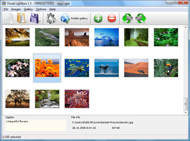
It's no secret that adding photos to your blog posts is one of the most effective ways to enhance your blog and attract attention to your writing. Flickr has millions of photos available in its database. A simple FREE tool called Flickr Gallery allows you to create a custom image gallery with a cool slide show of the most recent and most interesting photos from Flickr on your website or blog in a few easy steps. Just visit Flickr website and find photostream, photoset or a single photo you like. Enter the address of flickr page to add all photos from this page in your gallery, select the style of thumbnails and the overlay window and add the HTML embed code on your website or blog.
A few clicks and you'll see a stylish photo gallery with beautifull lightbox and zoom effects on your own website or blog!


Flickr Gallery for Windows   Flickr Gallery for MAC

Want more?

Example

Lightbox gallery sample

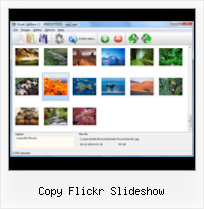
The following image set is generated by Flickr Gallery tool. Click any picture to run Lightbox gallery.

The example above is an in-page usage demo of Lightbox gallery that uses images from Flickr. The gallery created with Flickr Gallery application is placed inside the html page. You can also check the full-page demo gallery. This example takes whole browser area to show the slideshow.Jquery Flickr Scroll Thumbnail Effect

How to Use

Step 1. Adding flickr images to your own gallery.


Locate the photo, photoset or photostream you want to use in your Flickr slideshow. Click on it to see the photo on its own page.

Copy URL of the flickr page.

Select Add images from Flickr... from the 'Add' button on the Toolbar.

Add images from Flickr

In the appeared window paste URL of the flickr page. Specify also the number of photos you want to add from the flickr page. Flickr Gallery will now include these photos in your project.

Add images from Flickr

If you have included the photos that you do not wish to be in your web gallery, you can easily remove them. Select all images that you wish to remove from photo gallery, and select Delete images. from the Images menu. You can pick and choose pictures by holding the CTRL while clicking the pictures you like.

Step 2. Adding caption.

The name of the photo on flickr page will automatically appear in the caption. When you select a photo you'll see the various info about it, such as: Path, Size, date of last change and Caption. You can add any comment or text about the photo (up to 512 symbols).

Step 3. Gallery properties.

Change the name of your flickr album, the size and quality of your pictures with Flickr Gallery. From the Gallery menu, select Properties or use "Edit Gallery Properties" button on the toolbar.

On the first tab of the Gallery Properties window you can change the name of your photo album and enable/disable the following properties: Slide Show, Auto play Slide Show, Zoom effect, Overlay Shadow. You can also set the Overlay shadow color and select the Engine you want to use (jQuery or Prototype + script.aculo.us).

On the second tab of the Gallery Properties window you can select the thumbnail you want to use, set the Thumbnails Resolution, Thumbnails Quality, Thumbnails Titles. Select Thumbnails Format (save in PNG or JPG format). Specify the Number of columns in you photo album and the Page color.

On the third tab of the Gallery Properties window you can select the template, Image resolution and Image quality of your pictures and change the Watermark.

You can set up the various sizes for exported images.

Control the quality of output PNG or JPEG format image by defining output "Image quality" and "Thumbnail quality" parameters (0%…100%).

Step 4. Save your photo gallery as project file.

When you exit Flickr Gallery application, you'll be asked if you want to save your project. The project consists of the pictures you choose to put on your web photo gallery and all your settings. It's a good idea to save the project, because that will allow you to change the project in case you decide to do something different with future galleries. So click Yes, then enter a name for your project. To select the location of your project, just click the Browse folders button and choose a different location. Then click Save.

Flickr Photostream Url Copy Flickr Slideshow

Download Flickr Gallery


Download Flickr Gallery Download Free Edition
for Windows
Download Flickr Gallery Download Free Edition
for MAC

Flickr Gallery is free for non-commercial use.

A small fee is required for business use. Flickr Gallery Business Edition additionally provides an option to remove the Flickr Gallery. Com credit line as well as a feature to put your own logo to images. After you finish the payment via the secure order form, you will receive a license key instantly by e-mail that turns the Flickr Gallery Free Edition into a Business one. You can select the most suitable payment mode: credit card, PayPal, check, bank transfer etc. Also you can get Business Edition for free if you help with translating Flickr Gallery into your native language, please contact us at for more info.

Flickr Badge Html

Buy Flickr GalleryBuy Business Edition
for Windows

$49
Single Website
$69
Unlimited Websites
Buy Flickr GalleryBuy Business Edition
for MAC

$49
Single Website
$69
Unlimited Websites

Support

For general help, feature requests, troubleshooting contact Customer Support at . Make sure to include details on your operating system, browser, a link (or relevant code) and Flickr Gallery version.Flickr Slideshow No Full Screen

Feedback

    * I would like to say that Flickr Gallery is a stunning lil program! Its almost too good to be true i'd say! I've been looking for tutorials to create a lightbox gallery, but just couldnt come right. Im so glad i found Flickr Gallery!

    * First of all, your product is fantasitc. I looked at the others and your code generator app was insanely easy to use.

    * I LOVE your free Lightbox2 software tool and will purchase the business version shortly. I have seen the Lightbox JS effect used with video tutorials and I was hoping you have a version for video that I can purchase.
Video LightBox: http://videolightbox.comFree Ajax Flickr Lightbox Gallery Dreamweaver

    * I have installed Flickr Gallery to trial. All good, loving it!! I want to get an business version of your great programm. I love it - soo easy to use!!

FAQ

Q:Instead of making one page with 40 photos, is there no property to make 2 or more pages?

A:You can do it in the following way:

1. Create your gallery in Flickr Gallery and publish it on a local drive in any test folder.
2. Make two copies of the generated index.html file (for example index1.html and index2.html).
3. Open index.html, index1.html and index2.html files in any text editor.
4. Find code for the gallery inside the BODY tag and cut some part of the images, so you'll have different images on each page.

<!-- Start Flickr Gallery.com BODY section -->
<div class="gallery">
<!-- leave the following code on index.html page -->
<a href="./data/images/1.jpg" rel="lightbox[sample]" title="Best Toy Ever"><img src="./data/thumbnails/1.png" /></a>
<a href="./data/images/8.jpg" rel="lightbox[sample]" title="PrueaMacro"><img src="./data/thumbnails/8.png" /></a>

<!-- leave the following code on index1.html page -->
<a href="./data/images/3.jpg" rel="lightbox[sample]" title="Macro Leaf."><img src="./data/thumbnails/3.png" /></a>
<a href="./data/images/11.jpg" rel="lightbox[sample]" title="Bell Pepper"><img src="./data/thumbnails/11.png" /></a>

<!-- leave the following code on index2.html page -->
<a href="./data/images/5_0.jpg" rel="lightbox[sample]" title="5"><img src="./data/thumbnails/5_0.png" /></a>
<a href="./data/images/6_0.jpg" rel="lightbox[sample]" title="6"><img src="./data/thumbnails/6_0.png" /></a>

<!--[if lte IE 6]><script src="engine/js/pngfix_vlb.js" type="text/javascript"></script><![endif]-->
<a id="vlightbox" href="http://Flickr Gallery.com/">Online Photo Album Sharing by Flickr Gallery.com</a>
</div>
<!-- End Flickr Gallery.com BODY section -->

5. Create links to switch between your pages, for example:
<a href="index.html">1</a>  <a href="index1.html">2</a>  <a href="index2.html">3</a> 


Q:I want to change color of the overlay shadow? How can I do this?

A:Open engine\css\Flickr Gallery.css and find the following code:

#overlay{
position: absolute;
top: 0;
left: 0;
z-index: 90;
width: 100%;
height: 500px;
background-color: #FFF;
filter:alpha(opacity=60);
-moz-opacity: 0.6;
opacity: 0.6;
}

set the background-color parameter :

#overlay{
position: absolute;
top: 0;
left: 0;
z-index: 90;
width: 100%;
height: 500px;
background-color: #FF00FF;
filter:alpha(opacity=60);
-moz-opacity: 0.6;
opacity: 0.6;
}


RELATED

Flickr Slideshow - create flickr photo slideshows for your The usage is very simple, open your Flickr photo web pages on the Internet Explorer, copy the web page address from the Address Bar, then paste on the "URL of User, Set or Group", click "Create Slideshow", and then you can get one HTML code form your photo album slide show

Building a Flickr Slideshow with NetBeans IDE 6.5 | PHP Zone In this screencast, Justin Bolter, Technology Evangelist at Sun Microsystems, shows you how to build a PHP Flickr slideshow using NetBeans IDE 6.5 . Bolter In this case I'm copying them to my Apache root directory

How to Embed a Flickr Slideshow in your Facebook Static FBML Embedding a Flickr Slideshow in your Facebook Static FBML Application Tab Page is easy. A tutorial on how to add your Flickr slideshow

Copy Flickr Photos : Flickr Gallery Copy Flickr Photos. How to make photo gallery for web site in minutes with Flickr Slideshow.. Script For Download Flickr Album

Buzz by Hubert Souchaud The plugin will be using Flickr's APIs and YQL to fetch the photos in the sets, after which it will create the markup of the slideshow and listen for events. The HTML Flickr Slideshow jQuery Plugin. The CSS. We need to provide the plugin with its own stylesheet, so it is easier to include into a

Use a Media RSS Feed for your Slideshow - Annuaire du Vin L'annuaire des liens du vin. Les négociants et les sites en ligne. Les produits du terroir. Découvrir les vins suisses et apprécier les vins du monde

Embed Powerpoint Slides as Flash Presentations in your Blog Copy the value of id and tags from the above text and paste it in the following iframe code. Excerpt -- Just two weeks ago, we shared a simple hack to embed Powerpoint presentations slides in your website using Flickr slideshow or Google Picasa web albums

How To Create Flickr Slideshows You know, the fact is that some folk just don't want to troll through your thousands of images. They like them, but they can't be bothered. What they want is a

Using Flickr Slideshows in Plone — LearnPlone Flickr is a great tool for organizing and managing your photos. Learn how to insert a Flickr slideshow into your Plone site

Photo Flash Gallery|PDF|Video: Embed the Flickr Photo Embed the Flickr Photo Slideshow to your Blog. Recently, I have been studying flickr and deeply in love with Now follow my steps and I am sure you will pick up to embed flickr slideshow to websites in just minutes. Copy and paste the following code to any place of the web page, blog post, etc, so

Custom Yahoo Pipes/ Flickr Slideshows For Your Blog | Tubetorial While you can take a straight photostream and use a variety of web-based slideshow services, I've used a specific set of tools: Yahoo Pipes – to control the Flickr stream. SplashCast – to build and display the Flickr slideshow. The reason for this is that

Artotems Flickr in iWeb 1.Click the "Slideshow" link on your Flickr page. ( see image below) 4. Once you are viewing the Slideshow click the "Share" button on the top right corner of the web page. Then click "Copy to Clipboard" as shown below to get the embed code. ( see image below)

Flickr: Using Pictures on Your Web Site | AssortedStuff The easiest is to let flickr create the slide show for you. As always, to place the slide show in your web site you'll need to copy the code generated by the site and paste into the page

FlickrSlidr - Embed Flickr Slideshows into Your Blog If you like those nifty Flickr slideshows and would like to be able to easily embed them into your website, seek no further. FlickrSlidr is a new tool

Our new slideshow: pass the popcorn! " Flickr Blog We've launched a new and improved fullscreen slideshow on Flickr, designed and rebuilt from the ground up to help you sit back and watch the world go by. click the "Share" link from any slideshow, then copy and paste the embed code wherever

Adding a Flickr Slide Show to Your Website Flickr offers a nice drag and drop feature for sorting and organizing your online photos. Simply go into the set and click on the SLIDESHOW option. Click on SHARE and select COPY TO CLIPBOARD under GRAB THE EMBED HTML

Embed Flickr slideshows in your Blog | Social Media Design I have just discovered that you can embed Flickr slideshows in your website or blog. Go to the photo set or group you'd like to embed, click slideshow, on the

Flickr Galleries for Your Blog | DailyApps Do you want to add that super cool Flickr Slideshow to your blog. While Flickr itself doesn't have any slideshow tool that you can embed in your blog. 123Flickr 123Flickr is a gallery creating utility that generates code for you to insert a cute

New Flickr Slideshow: Embed, view Fullscreen & more Flickr has finally woken up with the launch of its new and improved Flickr Slideshow. Number of 3rd party Flickr slideshow web services have popped up here and

IMG_1831 copy | Flickr - Photo Sharing! IMG_1831 copy

Flickr Slideshow in Flash - School of Pharmacy See how we use Flickr for more details. This is a Flickr slideshow for the Flickr group called UCSF School of Copy the Flickr group's URL from the list at Our Flickr Groups

Dailymotion - Best slideshow ever (review copy) - a Music video exo visualizer screen capture, featuring my art from flickr and the music of tigerside up. please let me know how to make this video better. I am sorry I can't do anything about the annoying home > music > videos > best slideshow ever (review copy)

Hot Links Tags : top via:infovore flickr photos photography gallery php mysql webdevelopment slideshow # copy. jQuery slideViewer 1.1. 23 jonhicks : flickrshow " Simple javascript slideshows for Flickr

Flickr Copy for iPhone, iPod touch, and iPad on the iTunes Learn more, read reviews, and download Flickr Copy by Leon Huang on the iTunes App Store

How to Add a Flickr Slideshow You can add a flickr slideshow to replace your rotating image in your your slideshow you'll see an option on the top right of the window that is labeled "share" and when you click on it you'll be given a number of options. Select "Customize this HTML". 3. Modify slideshow size and copy the code

Peter Liu Photography - How To Embed A Flickr Slideshow In A You are here: Home / Slideshow / How To Embed A Flickr Slideshow In A Tab On Your Facebook Page Feel free to copy and paste this code. Simply replace the location of my slideshow with the one Flickr gives you for yours

lib20 / flickr-slide-shows Resources for library and school technology workshops. Features sessions on WordPress in Libraries, Online Outreach, Google Tools and much more

Edit this Slideflickr SlideFlickr is an online Flickr slideshow generator that will help you create and embed Flickr slideshows in less than 10 seconds! Use this SlideFlickr ID to add the slideshow in your Facebook account or copy and paste the code below to embed the slideshow in your site and blog. Cancel

