
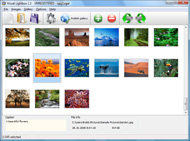
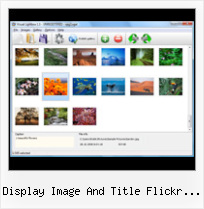



Overview

It's no secret that adding photos to your blog posts is one of the most effective ways to enhance your blog and attract attention to your writing. Flickr has millions of photos available in its database. A simple FREE tool called Flickr Gallery allows you to create a custom image gallery with a cool slide show of the most recent and most interesting photos from Flickr on your website or blog in a few easy steps. Just visit Flickr website and find photostream, photoset or a single photo you like. Enter the address of flickr page to add all photos from this page in your gallery, select the style of thumbnails and the overlay window and add the HTML embed code on your website or blog.
A few clicks and you'll see a stylish photo gallery with beautifull lightbox and zoom effects on your own website or blog!


Flickr Gallery for Windows   Flickr Gallery for MAC

Want more?

Example

Lightbox gallery sample

The following image set is generated by Flickr Gallery tool. Click any picture to run Lightbox gallery.

The photo gallery above is an in-page usage demo of Lightbox with images from Flickr. The web gallery created with Flickr Gallery wizard is placed inside the html page. You can also check the full-page demo web gallery. This example takes whole browser area to show the website gallery.Hack Flickr Album

How to Use

Step 1. Adding flickr images to your own gallery.


Locate the photo, photoset or photostream you want to use in your Flickr slideshow. Click on it to see the photo on its own page.

Copy URL of the flickr page.

Select Add images from Flickr... from the 'Add' button on the Toolbar.

Add images from Flickr

In the appeared window paste URL of the flickr page. Specify also the number of photos you want to add from the flickr page. Flickr Gallery will now include these photos in your project.

Add images from Flickr

If you have included the photos that you do not wish to be in your web gallery, you can easily remove them. Select all images that you wish to remove from photo gallery, and select Delete images. from the Images menu. You can pick and choose pictures by holding the CTRL while clicking the pictures you like.

Step 2. Adding caption.

The name of the photo on flickr page will automatically appear in the caption. When you select a photo you'll see the various info about it, such as: Path, Size, date of last change and Caption. You can add any comment or text about the photo (up to 512 symbols).

Step 3. Gallery properties.

Change the name of your flickr album, the size and quality of your pictures with Flickr Gallery. From the Gallery menu, select Properties or use "Edit Gallery Properties" button on the toolbar.

On the first tab of the Gallery Properties window you can change the name of your photo album and enable/disable the following properties: Slide Show, Auto play Slide Show, Zoom effect, Overlay Shadow. You can also set the Overlay shadow color and select the Engine you want to use (jQuery or Prototype + script.aculo.us).

On the second tab of the Gallery Properties window you can select the thumbnail you want to use, set the Thumbnails Resolution, Thumbnails Quality, Thumbnails Titles. Select Thumbnails Format (save in PNG or JPG format). Specify the Number of columns in you photo album and the Page color.

On the third tab of the Gallery Properties window you can select the template, Image resolution and Image quality of your pictures and change the Watermark.

You can set up the various sizes for exported images.

Control the quality of output PNG or JPEG format image by defining output "Image quality" and "Thumbnail quality" parameters (0%…100%).

Step 4. Save your photo gallery as project file.

When you exit Flickr Gallery application, you'll be asked if you want to save your project. The project consists of the pictures you choose to put on your web photo gallery and all your settings. It's a good idea to save the project, because that will allow you to change the project in case you decide to do something different with future galleries. So click Yes, then enter a name for your project. To select the location of your project, just click the Browse folders button and choose a different location. Then click Save.

Download Flickr Full Size Photos Secret Display Image And Title Flickr Feed

Download Flickr Gallery


Download Flickr Gallery Download Free Edition
for Windows
Download Flickr Gallery Download Free Edition
for MAC

Flickr Gallery is free for non - commercial use.

A small fee is required for business use. Flickr Gallery Business Edition additionally provides an option to remove the Flickr Gallery. Com credit line as well as a feature to put your own logo to images. After you finish the payment via the secure order form, you will receive a license key instantly by e-mail that turns the Flickr Gallery Free Edition into a Business one. You can select the most suitable payment method: bank transfer, PayPal, credit card, check etc. Also you can get Business Edition for free if you help with translating Flickr Gallery into your native language, please contact us at for more info.

Flickr Com Vertical Rtl Html

Buy Flickr GalleryBuy Business Edition
for Windows

$49
Single Website
$69
Unlimited Websites
Buy Flickr GalleryBuy Business Edition
for MAC

$49
Single Website
$69
Unlimited Websites

Support

For general help, feature requests, troubleshooting contact Customer Support at . Make sure to include details on your browser, operating system, a link (or relevant code) and Flickr Gallery version.Flickr For My Website

Feedback

    * I LOVE your free Lightbox2 software tool and will purchase the business version shortly. I have seen the Lightbox JS effect used with video tutorials and I was hoping you have a version for video that I can purchase.
Video LightBox: http://videolightbox.com

    * Another programmes have incredible functionality but no fantastic interface like your product!

    * I tried Flickr Gallery and for me its a very cool and usefull application. Its so easy to manage my galleries and it looks very nice.Jquery Flickr Apps

    * I downloaded your trial version to see if I could get it to work with my website, and I am almost there (I have been looking for something like this for ages)..

FAQ

Q:How can I set the number of thumbnails columns?

A:Open the generated 'engine\css\vlightbox.css' in any text editor and specify the width for your gallery,
for example:

#vlightbox { zoom:1; width: 650px;}

Change this value to have a different number of columns.


RELATED

RSS feed display | Flickr - Photo Sharing! This is how an RSS feed is displayed in the latest version of Flock that I downloaded this morning. AND this photo was uploaded to Flickr through Flock. A very cool feature I think

Live Theme User Guide Live Theme was built to make it simple to broadcast a live event, complete with community interaction, social networks, flickr feeds and more. video runs the feed provided by your video streaming service. Offline Mode: Instead of video, the display shows scrolling images to promote your

Creating a Web Slice for your flickr badge ยง The Adventures on Flickr 15

Art Pretty Photo - Joomla! extension to display images Art Pretty Photo - Joomla! extension to display images/galleries/videos/external/Flickr/Picasa pages in pretty highly customizable popup window

Art Pretty Photo - Joomla! extension to display images Art Pretty Photo - Joomla! extension to display images/galleries/videos/flash/external pages in pretty highly customizable popup window Can display images from Flickr feed: {artprettyphoto flickr="FLICKR_USER" /} Can display images from Flickr photo set: {artprettyphoto flickrApiKey

Nature Chronicles The images of the fauna are grouped for easy viewing. Select an album of your choice. Clicking the image would display images in a "lightbox" mode. Clicking the title would display images in "flickr" style Please check the sidebar for additional

Best of Joomla - Art Pretty Photo Commercial and Free Joomla templates, Joomla 1.6 Templates, Joomla 1.5 Templates, Joomla Extensions, Joomla Resources,Joomla Hosting, Tutorials and news Can display single images, image galleries, videos (youtube), external pages, Flickr feed, Flickr photo sets, Picasa albums

Feed Parser | Devot:ee | Devoted to ExpressionEngine The Feed Parser add-on for ExpressionEngine is a free plugin to fetch and read XML-based feeds and API results and display the contents in your templates. Flickr. Display images and descriptions from your flickr RSS feed. This example demonstrates how to access other XML elements and attributes, and

Ben Ramsey " Blog Archive " Flickr Namespace and I recently upgraded a few things around here (in particular, an upgrade to PHP 5.2), and I noticed two issues that occurred after the upgrade: The Flickr photo feed. I'm not entirely sure whether this problem was a result of the PHP

Version 1.0.0 RSS Feeds, easily display image albums already set up on RSS feed capable sites such as. Flickr and Picasa which supports the flash security sandbox. Objects allow for the perfect image display to fit your needs

Pulling Your Flickr Feed with jQuery | Viget Inspire However, you can also display feeds on your site using JavaScript, so in this post I'm going to be talking about a feed format called JSON and how you can use JavaScript to parse it out and display it. Now you've got yourself a nice feed of Flickr images and can all the CSS you want to make

Get Flickr Images Using SimpleXML How to get Flickr images from RSS feed and display them on your web page? Demo Source. What is SimpleXML? SimpleXML is a PHP extension used for XML parsing. It makes very easy to convert XML into a PHP object which can be used to display or process information in the XML

1 Homework: Flickr & Facebook mashup โ€“ an Ajax/JSON/Java c) uses the coordinates to retrieve up to 20 public images from Flickr, using the e) allows the user to select one image, and display a larger version of the selected

A jQuery Flickr Feed Plugin This jQuery Flickr plugin allows you to pull a public Flickr feed and display it however you like. Compatible with lightbox, colorbox, cycle, etc

Why am I only getting 21 images to display using jFlickr Feed http://www.gethifi.com/blog/a-jquery-flickr-feed-plugin. I am using their colobox mashup to display the thumbnails in an overlay when clicked. Problem When my photos load, the title of the image is seen before the photo

Windows Photo Gallery Flickr : Flickr Gallery Windows Photo Gallery Flickr. Flickr Gallery! Enhance your website with online photo album software!. Panoramio And Flickr Display Image And Title Flickr Feed

How to Display Thumbnail from WordPress RSS feed using I searched the web and found Flickr Gallery with SimplePie but it was for flickr feed. I needed one which can read WordPress RSS feed and display the image from the post as thumbnail. So i decided to build with this sample for WordPress RSS feed. Here is the final outcome

Build a Photo Gallery Using CakePHP and Flickr " SitePoint Is the Flickr interface doing justice to your stunning snaps? Lightbox uses the title attribute of the link to display a description when the larger image is viewed. And the rel attribute is required to tell Lightbox to include this image in the set

How to use jQuery with a JSON Flickr feed to display photos How to use jQuery with a JSON Flickr feed to display photos. So today I needed to display photos from our Flickr Group without using php or asp.net. I have a WordPress widget that does this job nicely, but no PHP was allowed. You can probably work out then what item.title and item.link would give us

php code for flickr | drupal.org Display the title and link to the feed -->

Create a Slick Flickr Gallery with SimplePie | Nettuts+ I've wanted to write a tutorial for quite some time now, and APIs have always been a particular interest of mine. So with my wife's recent foray into feed->get_title(); // Returns the title of the RSS feed $feed->get_image_url(); // Returns the image for the feed, in the case of Flickr, the

@renaun posts: Using QNX Image and ImageCache in List Custom This example application pulls down the Flickr image feed for the Adobe MAX flickr account. the RSS feed in rss2 format and creates a QNX DataProvider class with data objects holding the title and url

Flickr Widget " Support โ€” WordPress.com However, doing so will only result in the image titles being displayed within your widget. That is, no thumbnails will display (like when using the feed of your Photostream). This makes the use of sets with the Flickr widget rather unattractive

Feed Parser โ€” brandnewbox.co.uk Flickr. Display images and descriptions from your flickr RSS feed. example demonstrates how to access other XML elements and attributes, and using the date

Art Pretty Photo - Joomla! Extensions Directory Art Pretty Photo displays images, image galleries, videos (youtube), flash and external pages in pretty highly customizable popup window. Can display single images, image galleries, videos (youtube), external pages, Flickr feed, Flickr photo sets, Picasa albums, Bambuser video

Flickr: combining ALT and TITLE for images " blog.forret.com Flickr: combining ALT and TITLE for images. Published on September 12, As you can see, they combine both an anchor title (always "Photo Sharing") with an image alt text (Flickr uses the photo title for that)

com a resultat mostra determinades fotos en el lloc del mapa georss, style, styling, marker, flickr, thumbnail, image, rule. Display a flickr-feed on top of the map. The displayed GeoRSS feed has a property for each item. An extended with its thumbnail image. Also, to show how rules work, we defined a rule that if the title of an rss item

