


Overview

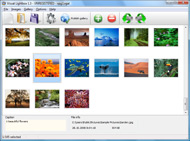
It's no secret that adding photos to your blog posts is one of the most effective ways to enhance your blog and attract attention to your writing. Flickr has millions of photos available in its database. A simple FREE tool called Flickr Gallery allows you to create a custom image gallery with a cool slide show of the most recent and most interesting photos from Flickr on your website or blog in a few easy steps. Just visit Flickr website and find photostream, photoset or a single photo you like. Enter the address of flickr page to add all photos from this page in your gallery, select the style of thumbnails and the overlay window and add the HTML embed code on your website or blog.
A few clicks and you'll see a stylish photo gallery with beautifull lightbox and zoom effects on your own website or blog!


Flickr Gallery for Windows   Flickr Gallery for MAC

Want more?

Example

Lightbox gallery sample

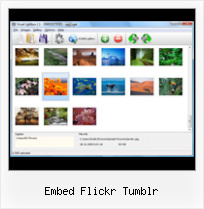
The following image set is generated by Flickr Gallery tool. Click any picture to run Lightbox gallery.

The sample above is an in-page usage demo of Lightbox tool with Flickr images. The slideshow created with Flickr Gallery software is placed inside the website page. You can also check the full-page demo web gallery. This example takes whole browser area to show the slideshow.Flickr How To Delete All Photo

How to Use

Step 1. Adding flickr images to your own gallery.


Locate the photo, photoset or photostream you want to use in your Flickr slideshow. Click on it to see the photo on its own page.

Copy URL of the flickr page.

Select Add images from Flickr... from the 'Add' button on the Toolbar.

Add images from Flickr

In the appeared window paste URL of the flickr page. Specify also the number of photos you want to add from the flickr page. Flickr Gallery will now include these photos in your project.

Add images from Flickr

If you have included the photos that you do not wish to be in your web gallery, you can easily remove them. Select all images that you wish to remove from photo gallery, and select Delete images. from the Images menu. You can pick and choose pictures by holding the CTRL while clicking the pictures you like.

Step 2. Adding caption.

The name of the photo on flickr page will automatically appear in the caption. When you select a photo you'll see the various info about it, such as: Path, Size, date of last change and Caption. You can add any comment or text about the photo (up to 512 symbols).

Step 3. Gallery properties.

Change the name of your flickr album, the size and quality of your pictures with Flickr Gallery. From the Gallery menu, select Properties or use "Edit Gallery Properties" button on the toolbar.

On the first tab of the Gallery Properties window you can change the name of your photo album and enable/disable the following properties: Slide Show, Auto play Slide Show, Zoom effect, Overlay Shadow. You can also set the Overlay shadow color and select the Engine you want to use (jQuery or Prototype + script.aculo.us).

On the second tab of the Gallery Properties window you can select the thumbnail you want to use, set the Thumbnails Resolution, Thumbnails Quality, Thumbnails Titles. Select Thumbnails Format (save in PNG or JPG format). Specify the Number of columns in you photo album and the Page color.

On the third tab of the Gallery Properties window you can select the template, Image resolution and Image quality of your pictures and change the Watermark.

You can set up the various sizes for exported images.

Control the quality of output PNG or JPEG format image by defining output "Image quality" and "Thumbnail quality" parameters (0%…100%).

Step 4. Save your photo gallery as project file.

When you exit Flickr Gallery application, you'll be asked if you want to save your project. The project consists of the pictures you choose to put on your web photo gallery and all your settings. It's a good idea to save the project, because that will allow you to change the project in case you decide to do something different with future galleries. So click Yes, then enter a name for your project. To select the location of your project, just click the Browse folders button and choose a different location. Then click Save.

Flickr Buttons For Blogger Embed Flickr Tumblr

Download Flickr Gallery


Download Flickr Gallery Download Free Edition
for Windows
Download Flickr Gallery Download Free Edition
for MAC

Flickr Gallery is free for non - commercial use.

A small fee is required for business use. Flickr Gallery Business Edition additionally provides an option to remove the Flickr Gallery. Com credit string as well as a feature to put your own logo to images. After you conclude the payment via the secure form, you will receive a license key instantly by email that turns the Flickr Gallery Free Edition into a Business one. You can select the most suitable payment mode: bank transfer, credit card, PayPal, check etc. Also you can get Business Edition for free if you help with translating Flickr Gallery into your native language, please contact us at for more info.

Jquery Flickr Fullscreen

Buy Flickr GalleryBuy Business Edition
for Windows

$49
Single Website
$69
Unlimited Websites
Buy Flickr GalleryBuy Business Edition
for MAC

$49
Single Website
$69
Unlimited Websites

Support

For troubleshooting, feature requests and general help contact Customer Support at . Make sure to include details on your Flickr Gallery version, operating system, browser and a link (or relevant code).Flickr Drupal Example

Feedback

    * I have installed Flickr Gallery to trial. All good, loving it!! I want to get an business version of your great programm. I love it - soo easy to use!!

    * I have purchased the business and LOVE IT..Your product appears easy to use and close to what I need to help several of my clients..

    * I downloaded your trial version to see if I could get it to work with my website, and I am almost there (I have been looking for something like this for ages)..How To Embed Flickr Photostream

    * Just bought the business version of Flickr Gallery and I just had to write and say how impressed I am with it. Really easy to use, intuitive interface and generates a truly professional presentation. Seldom have I been so pleased with a software purchase. Thank you.

FAQ

Q:How do I embed the lightbox image gallery into an existing page?

A:To install Flickr Gallery gallery on your page you should:

1. Create your gallery in Flickr Gallery and publish it on a local drive in any test folder.
2. Open index.html file from the saved folder in any text editor.
3. Copy code for the HEAD section and paste it inside the HEAD section of you own webpage, for example:

<head>
...
<!-- Start Flickr Gallery.com HEAD section -->
<link rel="stylesheet" href="engine/css/vlightbox.css" type="text/css" />
<style>#vlightbox a#vlb{display:none}</style>
<link rel="stylesheet" href="engine/css/Flickr Gallery.css" type="text/css" media="screen" />
<script src="engine/js/jquery.js" type="text/javascript"></script>
<script src="engine/js/jquery.tools.min.js" type="text/javascript"></script>
<script src="engine/js/visuallightbox.js" type="text/javascript"></script>
<!-- End Flickr Gallery.com HEAD section -->

...
</head>


4. Copy code for the BODY section and paste it inside the Body section of you own webpage in the place where you want to have a gallery, for example:

<body>
...
<!-- Start Flickr Gallery.com BODY section -->
<div id="vlightbox">
<a rel="lightbox_vlb" href="data/images/dscn6831.jpg" title="DSCN6831"><img src="data/thumbnails/dscn6831.png"><span></span></a>
<a rel="lightbox_vlb" href="data/images/dscn6823.jpg" title="DSCN6823"><img src="data/thumbnails/dscn6823.png"><span></span></a>
<a rel="lightbox_vlb" href="data/images/dscn6819.jpg" title="DSCN6819"><img src="data/thumbnails/dscn6819.png"><span></span></a>
<a id="vlb" href="http://Flickr Gallery.com">Photo Gallery For Web by Flickr Gallery.com v2.1</a>
</div>
<!-- End Flickr Gallery.com BODY section -->

...
</body>


5. Copy 'data' folder with images and thumbnails and 'engine' folder with .css and .js files into the same folder with your own webpage.
You can find the example on our website:
http://www.Flickr Gallery.com/#example


RELATED

No, Tumblr Not Charging $40 A Month For Unlimited Photo Uploads This is not a real Tumblr feature. Anyway, $39 per month is way too expensive, considering Flickr only charges $25 per year

Insert Flickr Slideshow Tumblr : Free SlideShow Software Free Slideshow Creator! Insert Flickr Slideshow Tumblr. Flash SlideShow Maker is a ready-made, professional solution that allows webmasters to create superior, cross-browser, fast-loading website photo galleries.. Windows Slideshow Software

embed-brainstorming · Microformats Wiki Embedding content across different publishers — such as showing YouTube videos in blog posts, Flickr photographs in Pownce, Sites such as YouTube, Flickr, Vimeo and others publish embed code' to aid users in copy+pasting content into their own repostings

Vimeo Tumblr Configuration Vimeo Tumblr Configuration Embed Myspace, Metcafe, Facebook Video in Your WebSite! Video To Website is a ready-made, professional solution that allows webmasters to create superior, cross-browser, fast-loading website video galleries

How to embed Flickr slideshows and add Shadow box for added How to embed Flickr slideshows and add Shadow box for added awesomeness Regarding Flickr and. Submitted by Design Eleven (not verified) on Mon, 06/01/2009 - 11:

Embed Yahoo Mp3 Player on Your Webpage Embed Yahoo Mp3 Player on Your Webpage. You want to put some music on your webpage(website or blog ), but you don't know how to manage it

27 Great Free Tumblr Widgets and Tools " Ijaar Music Widgets For Tumblr: MP3 Player: Embed an MP3 file on your Tumblr. You can also set it to auto-play and/or loop it. Flickr: Display your Flickr photos or photos from any other user on your Tumblelog. Netflix Queue: If you are a movie buff you'll

How to embed Flickr slideshows Blogger Paul Stamatiou details how to embed the default Flickr slideshows on your own web page or blog. All you need to do is embed the following on your page (minus the line breaks)

FlickrSlidr - Embed Flickr Slideshows into Your Blog If you like those nifty Flickr slideshows and would like to be able to easily embed them into your website, seek no further. FlickrSlidr is a new tool

Email Us & Submit a Ticket Please make sure that you have spent to time and reviewed the FAQs, Tutorials and User If your request is about a sale, please include your invoice number. Ensure that you

Matthew Buchanan • Tumblr Vimeo Embeds Tumblr Vimeo Embeds This script is the evolution of an original I wrote to process Vimeo Flash embed code in order to re-apply appearance customisations that were stripped out by Tumblr's

Flickr: Help: Blogging Flickr is almost certainly the best online photo management and sharing application in the world. Show off your favorite photos and videos to the world, securely and privately show content to your friends and family, or blog the photos and videos

Flickr There is an embedded lightbox script (SlimBox) for photo slideshows. By default, the plugin supports Twitter, Facebook, WordPress, Tumblr, Last.FM, Delicious and Flickr. In order to add more services, just digging the code and extending it with the same methodology will be

Embed Flickr Into Tumblr | Flickr Slideshow Embed Flickr Into Tumblr. Online photo albums created with jQuery Thickbox Alternative are fully compatible with all modern Windows and MAC browsers! xbmc flickr slideshow

9 alternate ways to embed flickr photos onto your webpages 9 alternate ways to embed flickr photos onto your webpages 9 alternate ways to embed flickr photos onto your webpages. Tumblr fun with tags and image

Flickr Adds HD Video Option For Pro Members The above embedded HD video is "Glowing Cities Under a Nighttime Sky", a beautiful time-lapse video made by James Leng on a flight from Amsterdam to San Francisco. Share on Tumblr. Follow @laughingsquid. Here enjoy: - Flickr Adds Fullscreen Photo Slideshow With Embed Option - Flickr Revamps Photos

Thoughts Is Tumblr // (via Flickr Video Embed: The Day There Posted 3 years ago (via Flickr Video Embed: The Day There Was No News) Posted on May 14th, 2008. Following Archive Mobile RSS Revista Theme Tumblr

YouTube - Tumblr/Flickr Meet up Flickr/Tumblr Meet Up March 2010 in West Palm Beach, Florida. anna szczekutowicz : http://www.flickr.com/photos/annaszczek/ alexis mire : http://www.flickr.c

Flickr Slideshow Embed Code : Flickr Gallery Flickr Slideshow Embed Code. Flickr Slideshow is a photo album maker, that allows you to create and publish splendid web photo galleries for your website!. Hot Flickr Bikini

Flash Slideshows - How To Information | eHow.com Flash Slideshows how to articles and videos including How to Embed a Flicker Set Into My Blog, How to Access BlogSpot, How to Remove a Tumblr Link and much more! Putting a Flickr viewer on a web page is simple to do using Flickr's built-in embed code

How to Embed Flickr Photos in Your WordPress Posts How to embed Flickr photos into your WordPress posts. I have never tried embedding a Flickr photo :) Usually my blog posts are pretty bland in that aspect as I use my own edited images

Watching David Karp reveal the latest Tumblr stats at Flickriver - view images as a 'river of photos' and more You can place your badge on your Flickr profile, Blog or Website. Add to your iGoogle or Netvibes page

