



Overview

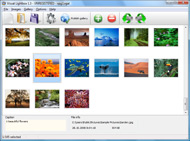
It's no secret that adding photos to your blog posts is one of the most effective ways to enhance your blog and attract attention to your writing. Flickr has millions of photos available in its database. A simple FREE tool called Flickr Gallery allows you to create a custom image gallery with a cool slide show of the most recent and most interesting photos from Flickr on your website or blog in a few easy steps. Just visit Flickr website and find photostream, photoset or a single photo you like. Enter the address of flickr page to add all photos from this page in your gallery, select the style of thumbnails and the overlay window and add the HTML embed code on your website or blog.
A few clicks and you'll see a stylish photo gallery with beautifull lightbox and zoom effects on your own website or blog!


Flickr Gallery for Windows   Flickr Gallery for MAC

Want more?

Example

Lightbox gallery sample

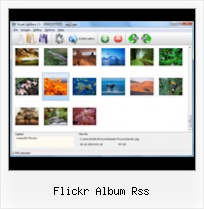
The following image set is generated by Flickr Gallery tool. Click any picture to run Lightbox gallery.

The example above is an in-page usage demo of Lightbox gallery that uses images from Flickr. The gallery created with Flickr Gallery application is placed inside the html page. You can also check the full-page demo gallery. This example takes whole browser area to show the slideshow.Flickr Hack To Show In Iframe

How to Use

Step 1. Adding flickr images to your own gallery.


Locate the photo, photoset or photostream you want to use in your Flickr slideshow. Click on it to see the photo on its own page.

Copy URL of the flickr page.

Select Add images from Flickr... from the 'Add' button on the Toolbar.

Add images from Flickr

In the appeared window paste URL of the flickr page. Specify also the number of photos you want to add from the flickr page. Flickr Gallery will now include these photos in your project.

Add images from Flickr

If you have included the photos that you do not wish to be in your web gallery, you can easily remove them. Select all images that you wish to remove from photo gallery, and select Delete images. from the Images menu. You can pick and choose pictures by holding the CTRL while clicking the pictures you like.

Step 2. Adding caption.

The name of the photo on flickr page will automatically appear in the caption. When you select a photo you'll see the various info about it, such as: Path, Size, date of last change and Caption. You can add any comment or text about the photo (up to 512 symbols).

Step 3. Gallery properties.

Change the name of your flickr album, the size and quality of your pictures with Flickr Gallery. From the Gallery menu, select Properties or use "Edit Gallery Properties" button on the toolbar.

On the first tab of the Gallery Properties window you can change the name of your photo album and enable/disable the following properties: Slide Show, Auto play Slide Show, Zoom effect, Overlay Shadow. You can also set the Overlay shadow color and select the Engine you want to use (jQuery or Prototype + script.aculo.us).

On the second tab of the Gallery Properties window you can select the thumbnail you want to use, set the Thumbnails Resolution, Thumbnails Quality, Thumbnails Titles. Select Thumbnails Format (save in PNG or JPG format). Specify the Number of columns in you photo album and the Page color.

On the third tab of the Gallery Properties window you can select the template, Image resolution and Image quality of your pictures and change the Watermark.

You can set up the various sizes for exported images.

Control the quality of output PNG or JPEG format image by defining output "Image quality" and "Thumbnail quality" parameters (0%…100%).

Step 4. Save your photo gallery as project file.

When you exit Flickr Gallery application, you'll be asked if you want to save your project. The project consists of the pictures you choose to put on your web photo gallery and all your settings. It's a good idea to save the project, because that will allow you to change the project in case you decide to do something different with future galleries. So click Yes, then enter a name for your project. To select the location of your project, just click the Browse folders button and choose a different location. Then click Save.

Flickr Gallery Slide Show Flickr Album Rss

Download Flickr Gallery


Download Flickr Gallery Download Free Edition
for Windows
Download Flickr Gallery Download Free Edition
for MAC

Flickr Gallery is free for non - commercial use.

A small fee is required for business use. Flickr Gallery Business Edition additionally provides an option to remove the Flickr Gallery. Com credit bar as well as a feature to put your own logo to images. After you conclude the payment via the secure order form, you will receive a license key instantly by e-mail that turns the Flickr Gallery Free Edition into a Business one. You can select the most suitable payment procedure: credit card, PayPal, bank transfer, check etc. Also you can get Business Edition for free if you help with translating Flickr Gallery into your native language, please contact us at for more info.

Flickr Gallery Change Main

Buy Flickr GalleryBuy Business Edition
for Windows

$49
Single Website
$69
Unlimited Websites
Buy Flickr GalleryBuy Business Edition
for MAC

$49
Single Website
$69
Unlimited Websites

Support

For troubleshooting, feature requests and general help contact Customer Support at . Make sure to include details on your operating system, browser, a link (or relevant code) and Flickr Gallery version.Flickr Json Gallery

Feedback

    * I would like to say that Flickr Gallery is a stunning lil program! Its almost too good to be true i'd say! I've been looking for tutorials to create a lightbox gallery, but just couldnt come right. Im so glad i found Flickr Gallery!

    * Just a quick thank you for the software though, It's not often you get a free software version of this quality and style! Well done and please continue this amazing gallery. Hope to see more advances.

    * I have just bought this product and think it is great. As it is extremely easy to use it is something I could get my clients to purchase to upload their own portfolio and latest projects etc.Flickr Private Exposed

    * This looks like EXACTLY what I need for my site. It would make my job much faster! Love your program. Thank you!!

FAQ

Q:Instead of making one page with 40 photos, is there no property to make 2 or more pages?

A:You can do it in the following way:

1. Create your gallery in Flickr Gallery and publish it on a local drive in any test folder.
2. Make two copies of the generated index.html file (for example index1.html and index2.html).
3. Open index.html, index1.html and index2.html files in any text editor.
4. Find code for the gallery inside the BODY tag and cut some part of the images, so you'll have different images on each page.

<!-- Start Flickr Gallery.com BODY section -->
<div class="gallery">
<!-- leave the following code on index.html page -->
<a href="./data/images/1.jpg" rel="lightbox[sample]" title="Best Toy Ever"><img src="./data/thumbnails/1.png" /></a>
<a href="./data/images/8.jpg" rel="lightbox[sample]" title="PrueaMacro"><img src="./data/thumbnails/8.png" /></a>

<!-- leave the following code on index1.html page -->
<a href="./data/images/3.jpg" rel="lightbox[sample]" title="Macro Leaf."><img src="./data/thumbnails/3.png" /></a>
<a href="./data/images/11.jpg" rel="lightbox[sample]" title="Bell Pepper"><img src="./data/thumbnails/11.png" /></a>

<!-- leave the following code on index2.html page -->
<a href="./data/images/5_0.jpg" rel="lightbox[sample]" title="5"><img src="./data/thumbnails/5_0.png" /></a>
<a href="./data/images/6_0.jpg" rel="lightbox[sample]" title="6"><img src="./data/thumbnails/6_0.png" /></a>

<!--[if lte IE 6]><script src="engine/js/pngfix_vlb.js" type="text/javascript"></script><![endif]-->
<a id="vlightbox" href="http://Flickr Gallery.com/">Online Photo Album Sharing by Flickr Gallery.com</a>
</div>
<!-- End Flickr Gallery.com BODY section -->

5. Create links to switch between your pages, for example:
<a href="index.html">1</a>  <a href="index1.html">2</a>  <a href="index2.html">3</a> 


Q:I want to change color of the overlay shadow? How can I do this?

A:Open engine\css\Flickr Gallery.css and find the following code:

#overlay{
position: absolute;
top: 0;
left: 0;
z-index: 90;
width: 100%;
height: 500px;
background-color: #FFF;
filter:alpha(opacity=60);
-moz-opacity: 0.6;
opacity: 0.6;
}

set the background-color parameter :

#overlay{
position: absolute;
top: 0;
left: 0;
z-index: 90;
width: 100%;
height: 500px;
background-color: #FF00FF;
filter:alpha(opacity=60);
-moz-opacity: 0.6;
opacity: 0.6;
}


RELATED

The Book and the Cover " jQuery: jqAlbumParser Plugin, parses The jQuery jqAlbumParser Plugin takes a link linking to your Flickr or Picasa photo album and parses it into your current layout as is or hook in To get the url for you Flickr album, go to the photo section of your account and go to the bottom left and copy the RSS link

How to Monitor Your Flickr Album - loose wire blog The best way to keep tabs on who is linking to your Flickr photo album is through Technorati, the blog-tracking service. But it's not as straightforward as it could be, so here's a guide, based almost entirely on that provided

Create a Slick Flickr Gallery with SimplePie | Nettuts+ I've wanted to write a tutorial for quite some time now, and APIs have always been a particular interest of mine. So with my wife's recent foray into Using RSS, Flickr and jQuery all together was pretty fun too. Ok, so we're going to be touching on a number of technologies for this tutorial. We'll

Download Flickr Uploadr 3.1.4 to Upload Images & Videos to Flickr Download Flickr Uploadr 3.1.4 to Upload Images & Videos to Flickr. Flickr Uploadr is desktop flicker uploader tool to upload images & videos

Album viewer for Flickr & Picasa | tools.forret.com Album viewer based on LightBox/Lytebox for photos in RSS feeds Create Lightbox slideshow page for pictures from Flickr, Picasa or any other image RSS feed

GeekTonic: The Ultimate Flickr Tools Hacks and Scripts Database Yahoo Pipes RSS Subscribe. Using yahoo pipes to subscribe to flickr photos. Slideshows, screensaver slideshow in windows. Slickr. Album app uses flickr photos - very customizable

Downlolad Anyone's Flickr Album | Save Flickr Photos using Download and save Flickr album photos using Flickr AutoDownloadr tool. Free Flickr AutoDownloader to download photos, photo albums from anyone's Flickr account

How To Download Flickr Album Of Any User in PDF Format There is a tool available known as RSS 2 PDF for Flickr users which directly converts the Flickr albums into PDF format. To convert the photo, you can enter Flickr username, Flickr user email address, or Flickr ID

pic description for Rss album > Support > Biz Modules Solutions Hi, Is it possible to retrieve the description of the pics as well along with the actual pics for Rss Feeds album like picasa, Flickr etc ? I am unable to see the description for a Flickr album. Plus please tell me the basic criteria of Feeds via

Put Flickr Album Photos in to WordPress Others that might interesting too: Copyright All scripts and techniques demonstrated on itx.web.id can be used in whatever manner you wish without attribution

España | Dreadlock Girl If you want to see our pictures of Spain in your google (or selected) reader sign up for the RSS for the España flickr album. I will try to post pictures here again, but I will be uploading them all to my flickr album España

WordPress " Flickr Photo Album " WordPress Plugins This Flickr plugin for WordPress will allow you to pull in your Flickr photosets and display them as albums on your WordPress a new Flickr icon to your WordPress edit screen which will allow you to easily insert your Flickr photos and albums into your

"iPod Family" Flickr album "iPod Family" Flickr album. by Dave Caolo (RSS feed) on Jul 6th 2005 at 5:00PM. Mac users love their machines. We put Mac bumper stickers on our cars. We wear Mac T-shirts and hats. And sometimes, we have our iPods play "house," photograph it, and post the photos to the web

WordPress photo gallery Plugin - Flickr | Wordpress4Dummies This Flickr plugin for WordPress will allow you to pull in your Flickr photosets and display them as albums on your WordPress site. There is a pretty simple

Updated Google Screensaver supports Picasa Web Albums and RSS 3. RSS feeds – You can grab feeds from Picasa Web Albums, Flickr, or from a whole range of professional photographers from here. The favorite RSS feed for a lot of people though is the Flickr Intertingness, which takes the best photos from around the world!

HowTo Display Flickr Photo album Inside Facebook ? Professional photographers mainly use Flickr to display their works. again on Facebook album, today let us see how to display your Flickr photo stream on

The Photo Album with Flickr RSS / RapidWeaver / FAQs The Photo Album with Flickr RSS. If you're encountering issues when trying to use a Flickr RSS feed with RapidWeaver 3.6 / 4.x's built-in Photo Slideshow you should make sure that the URL contains, or ends with: &format=rss_200. This tells Flickr

PmWiki | Cookbook / FlickrAlbum Using this recipe will allow you to have albums of Flickr photos in your wiki that update automatically when new photos are added to Flickr. flickralbum user=foo:) can, then, be used to create a similar album of recent photos by someone with the Flickr username foo, etc

Flickr Widget " Support — WordPress.com Flickr RSS URL – The RSS feed URL for your account on Flickr. Visit your photostream on Flickr (not a photo, album, tag, or any other page), scroll down to the bottom until you see the RSS icon or the Latest link (see below). Right click on it and copy the URL (link location)

How to Save or Download Protected Images in Flickr / Orkut You can also Subscribe via RSS Feed. How to Save or Download Protected Images in Flickr / Orkut Album ? Posted by Shekhar Saxena on April 1, 2009 in Orkut Hacks · 0 Comment. A friend ( reader) was asking me "How to Save or Download Protected Images in flickr ?

How to Integrate Flickr Album on Your Wordpress Blog or blog Integrate Flickr Album on Your Wordpress Blog or blog posts using these Wordpress Plugins

Flickr: Photos & video from everyone in Flickr Flickr is almost certainly the best online photo management and sharing application in the world. Show off your favorite photos and videos to the world, securely and privately show content to your friends and family, or blog the photos and videos

Flickr vs Picasa Web Albums: Where are tags, Photo notes We had a chance to try Picasa Web Albums and our first impression is that it is very inspired by Flickr but not anywhere near. Both Picasa Web Albums and Flickr provide RSS feed for all photos from a user or selected album (or photoset)

The New Flickr Photo Album Plugin for WordPress : tan tan The New Flickr Photo Album Plugin for WordPress. 14 Comments. 31 Mar The Flickr Photo Album plugin for WordPress is a plugin I developed at work

Flickr Album Rss : Flickr Gallery Flickr Album Rss. Flickr Gallery. The most powerful image gallery software on the Web.. Copy Group Into Set Flickr

APAD: Flickrss " Weblog Tools Collection It would also be nice to have integrated support with other Flickr plugins like Flickr Photo Album. alot of extra work that could be easily replaced by the standard RSS widget built into WP

