


Overview

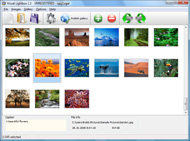
It's no secret that adding photos to your blog posts is one of the most effective ways to enhance your blog and attract attention to your writing. Flickr has millions of photos available in its database. A simple FREE tool called Flickr Gallery allows you to create a custom image gallery with a cool slide show of the most recent and most interesting photos from Flickr on your website or blog in a few easy steps. Just visit Flickr website and find photostream, photoset or a single photo you like. Enter the address of flickr page to add all photos from this page in your gallery, select the style of thumbnails and the overlay window and add the HTML embed code on your website or blog.
A few clicks and you'll see a stylish photo gallery with beautifull lightbox and zoom effects on your own website or blog!


Flickr Gallery for Windows   Flickr Gallery for MAC

Want more?

Example

Lightbox gallery sample

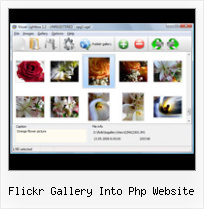
The following image set is generated by Flickr Gallery tool. Click any picture to run Lightbox gallery.

The photo gallery above is an in-page usage demo of Lightbox script with Flickr images. The website gallery created with Flickr Gallery software is placed inside the html page. You can also check the full-page demo website gallery. This example takes whole browser area to show the gallery.Get Single Image Jquery Flickr

How to Use

Step 1. Adding flickr images to your own gallery.


Locate the photo, photoset or photostream you want to use in your Flickr slideshow. Click on it to see the photo on its own page.

Copy URL of the flickr page.

Select Add images from Flickr... from the 'Add' button on the Toolbar.

Add images from Flickr

In the appeared window paste URL of the flickr page. Specify also the number of photos you want to add from the flickr page. Flickr Gallery will now include these photos in your project.

Add images from Flickr

If you have included the photos that you do not wish to be in your web gallery, you can easily remove them. Select all images that you wish to remove from photo gallery, and select Delete images. from the Images menu. You can pick and choose pictures by holding the CTRL while clicking the pictures you like.

Step 2. Adding caption.

The name of the photo on flickr page will automatically appear in the caption. When you select a photo you'll see the various info about it, such as: Path, Size, date of last change and Caption. You can add any comment or text about the photo (up to 512 symbols).

Step 3. Gallery properties.

Change the name of your flickr album, the size and quality of your pictures with Flickr Gallery. From the Gallery menu, select Properties or use "Edit Gallery Properties" button on the toolbar.

On the first tab of the Gallery Properties window you can change the name of your photo album and enable/disable the following properties: Slide Show, Auto play Slide Show, Zoom effect, Overlay Shadow. You can also set the Overlay shadow color and select the Engine you want to use (jQuery or Prototype + script.aculo.us).

On the second tab of the Gallery Properties window you can select the thumbnail you want to use, set the Thumbnails Resolution, Thumbnails Quality, Thumbnails Titles. Select Thumbnails Format (save in PNG or JPG format). Specify the Number of columns in you photo album and the Page color.

On the third tab of the Gallery Properties window you can select the template, Image resolution and Image quality of your pictures and change the Watermark.

You can set up the various sizes for exported images.

Control the quality of output PNG or JPEG format image by defining output "Image quality" and "Thumbnail quality" parameters (0%…100%).

Step 4. Save your photo gallery as project file.

When you exit Flickr Gallery application, you'll be asked if you want to save your project. The project consists of the pictures you choose to put on your web photo gallery and all your settings. It's a good idea to save the project, because that will allow you to change the project in case you decide to do something different with future galleries. So click Yes, then enter a name for your project. To select the location of your project, just click the Browse folders button and choose a different location. Then click Save.

Flickr Slideshow Randomise Embed Autoplay Flickr Gallery Into Php Website

Download Flickr Gallery


Download Flickr Gallery Download Free Edition
for Windows
Download Flickr Gallery Download Free Edition
for MAC

Flickr Gallery is free for non-commercial use.

A small fee is required for business use. Flickr Gallery Business Edition additionally provides an option to remove the Flickr Gallery. Com credit line as well as a feature to put your own logo to images. After you conclude the payment via the secure form, you will receive a license key instantly by e-mail that turns the Flickr Gallery Free Edition into a Business one. You can select the most suitable payment mode: bank transfer, credit card, PayPal, check etc. Also you can get Business Edition for free if you help with translating Flickr Gallery into your native language, please contact us at for more info.

Simple Flickr Webpage Maker

Buy Flickr GalleryBuy Business Edition
for Windows

$49
Single Website
$69
Unlimited Websites
Buy Flickr GalleryBuy Business Edition
for MAC

$49
Single Website
$69
Unlimited Websites

Support

For troubleshooting, feature requests and general help contact Customer Support at . Make sure to include details on your browser, a link (or relevant code), operating system and Flickr Gallery version.Wordpress Flickr Set Plugin Jquery

Feedback

    * I downloaded your trial version to see if I could get it to work with my website, and I am almost there (I have been looking for something like this for ages)..

    * I am thrilled with what this tool can do for me thanks for all the hard work that must have gone into it.

    * I would like to say that Flickr Gallery is a stunning lil program! Its almost too good to be true i'd say! I've been looking for tutorials to create a lightbox gallery, but just couldnt come right. Im so glad i found Flickr Gallery!Import Contacts Into Flickr

    * I'm absolutely loving Flickr Gallery Business and Video LightBox. Amazing, quick and painless, to create a custom, browser independent gallery. And it works first time - every time! Best value for money I've seen in quite a while...

FAQ

Q:Can this be adapted so only one image is shown and then the gallery opens to flick through the rest of the images..

A:You can use the following parameter to hide thumbnails you don't want to display on the page:

style="display: none;"

for example:

<!-- Start Flickr Gallery.com BODY section -->
<div id="vlightbox">
<a rel="lightbox_vlb" href="data/images/dscn6831.jpg" title="dscn6831" ><img src="data/thumbnails/dscn6831.png" ><span></span></a>
<a rel="lightbox_vlb" href="data/images/dscn6823.jpg" title="dscn6823"><img src="data/thumbnails/dscn6823.png" style="display: none"><span></span></a>
<a rel="lightbox_vlb" href="data/images/dscn6819.jpg" title="dscn6819"><img src="data/thumbnails/dscn6819.png" style="display:none"><span></span></a>
<a id="vlb" href="http://Flickr Gallery.com">Photo Gallery For Web by Flickr Gallery.com v2.0</a>
</div>
<!-- End Flickr Gallery.com BODY section -->


RELATED

So You Need A Photo Gallery Website? | Tutorial Blog Depending on the purpose at hand, an entire website can even become a photo gallery. However, if you want to find the best photo gallery for your website, first you need to narrow down your choices

Flickr - Wikipedia, the free encyclopedia Flickr is an image hosting and video hosting website, web services suite, and online community created by Ludicorp and later The resulting map can be embedded in a website.[25] Sets may be grouped into "collections", and collections further grouped into

Clever Flickr Open Source Flash Image Gallery For Your Flapi is an open source Flash image gallery by Frederik Vincx, Jesse Wynants and Lev Detrez that uses the popular You can integrate the viewer in your weblog, website or even in a Flash file to show your Flickr photo sets. The viewer is easily customizable via an XML file that describes the various

Flickr Free Web Resources Everyday - WebResourcesDepot Flogr is an open source PHP application that can display photos hosted on Flickr as a customizable gallery

4 tools to integrate Flickr photos into your website The installation is simple; all you need is Flickr account, Flickr API key and a PHP supported host. I want to integrate some photos in flickr journalism related pool into our free press release website

The Book and the Cover " PhotoXhibit PhotoXhibit, formally Benjamin Sterling Galleries, was born out of the fires of so many not-so-great gallery/image manager plugins for WordPress. I was able to fix it by copy/pasting the JS scripts from the gallery "preview" section of the admin page into the header.php file

Still Not Perfect " Blog Archive " Flickr Gallery 0.7 Put your Flickr photos into photosets. Extract flickr-gallery.php from the archive you download into your wp-content/plugins your flickr-gallery.php, it can easily corrected if you check out the knowledge base of your host's website

Flickr Gallery Into Php Website : Flickr Gallery Flickr Gallery Into Php Website. Flickr Slideshow is a photo album maker, that allows you to create and publish splendid web photo galleries for your website!. Flickr Slideshow Embed Change Background Color

How to Create a Photo Gallery using the Flickr API | Nettuts+ There are lots of widgets, badges and plugins which allow you to display your latest Flickr photos on your website, but we'll take it a step further by tapping straight into Flickr and integrating your photostream into your website, giving you a photo gallery that is a breeze to update

Flickr Flash As2 - Flash Photo Gallery Flickr Flash As2. Create free flash web photo gallery for your Website with Flash Photo Gallery!. Flash Gallery With Navigation Sample

Fetchr4SSP v1.4 // Combining Flickr and SlideShowPro for An onslaught of expository excellence covering web design and development, politics and current events, faith and religion, guitar and music, (TM) is a Fetchr(TM)-based PHP script that will fetch photos from Flickr to display as albums inside the awesome gallery software SlideShowPro!

:: Design for a better internet :: Open Source by Ted Forbes :: Satelliteâ„¢ is an all in one photo gallery website that takes advantage of Yahoo Flickr's image hosting and management tools. When you upload images to Flickr, your website is automatically updated!

Mauro Pirrone | Blog " Integrating Flickr with your PHP website To get you into perspective, here's the Flickr photoset which I am using, and here are the customised photo gallaries which I created using PHP: Photo gallery using PostCardViewer. Although I'm showing you how to integrate Flickr with Lightbox and PostCardViewer, this technique works with any

Discussion Forums @ Nikonians - Integrating Flickr into your This photographer has managed to fully integrate his Flickr photo sets into his website! 3. "RE: Integrating Flickr into your website" In response to Reply # 2. St. Austell, GB. Another easier way might be to use the popular Banana Album skin with JAlbum web gallery software (www.jalbum.net) If you

Flickr Photobar Gallery | Codrops After we got a lot of great feedback for our image galleries we decided to follow some of the suggestions and create a gallery that uses the Flickr API. The aim was to build a bottom photobar that one can easily integrate into a website. It is

Flickr Gallery – codememe Using the "shortcodes" system in WordPress 2.5 and up, this plugin will allow you to quickly and easily incorporate your Flickr photos into your WordPress pages and posts. Features. A quick gallery of your recent photos, photosets and most popular photos

Flickr Photo Slideshow Creator App, embed script code gallery slideshows for embedding into html web site page or the dynamic jsp, aspx (asp.net) , or asp website by using the best Yahoo Flickr flash slides script code generator. application on your PC. There are simple steps for you make your autoplay and loop image album slideshows for

xFlow! : A Javascript and PHP based Coverflow style multi Want a smart multi media gallery for your images, videos and music? You've come to the right place! Introducing xFlow!, the PHP and Javascript Coverflow replacement. 8. Condensed Flickr and Youtube pages into one 'Social' page, for extending later

Flickr Gallery Web Flickr Gallery Web. Improve your online photo gallery with Ajax Photo Gallery!. ajax tagged photogallery Just drag&drop your photos into Ajax Photo Gallery window, select the style of thumbnails and the overlay window and add the HTML embed code on your website or blog. No javascript,css,html

Pop Art Poster: Become a pop icon! Create a 9, 4, or 1-panel lo-fi, false-color version of one of your photos. Turn yourself and your friends into pop art instantly! Just choose a photo, select a size, and it is instantly transformed. Every poster is unique. Click Shuffle to see a

Flickr Gallery 3.2.3 Freeware Download - Add Flickr Slideshow Download Freeware Flickr Gallery. A simple FREE tool called Flickr Gallery allows you to embed a custom image gallery, or a cool slideshow with beautiful lightbox and zoom effects of the most interesting photos from Flickr.com on your website or

Php Flickr Gallery Into Website | Flickr Slideshow Php Flickr Gallery Into Website. Make superior ajax picture gallery for your web site with jQuery Thickbox Alternative! example of flickr slideshow

How to add a Flickr-based photo gallery to your website PhpFlickr is a class written by Dan Coulter to act as a wrapper to Flickr's API, and lightbox is a very simple and elegant way to display photos on a page. This tutorial will teach you how to quickly setup a photo gallery with phpflickr and lightbox on your own website. So what do you need?

