



Overview

It's no secret that adding photos to your blog posts is one of the most effective ways to enhance your blog and attract attention to your writing. Flickr has millions of photos available in its database. A simple FREE tool called Flickr Gallery allows you to create a custom image gallery with a cool slide show of the most recent and most interesting photos from Flickr on your website or blog in a few easy steps. Just visit Flickr website and find photostream, photoset or a single photo you like. Enter the address of flickr page to add all photos from this page in your gallery, select the style of thumbnails and the overlay window and add the HTML embed code on your website or blog.
A few clicks and you'll see a stylish photo gallery with beautifull lightbox and zoom effects on your own website or blog!


Flickr Gallery for Windows   Flickr Gallery for MAC

Want more?

Example

Lightbox gallery sample

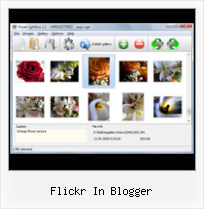
The following image set is generated by Flickr Gallery tool. Click any picture to run Lightbox gallery.

The sample above is an in-page usage demo of Lightbox script with Flickr images. The website gallery created with Flickr Gallery software is placed inside the page layout. You can also check the full-page demo slideshow. This example takes whole browser area to show the gallery.Embed Flickr Collection

How to Use

Step 1. Adding flickr images to your own gallery.


Locate the photo, photoset or photostream you want to use in your Flickr slideshow. Click on it to see the photo on its own page.

Copy URL of the flickr page.

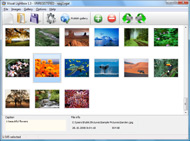
Select Add images from Flickr... from the 'Add' button on the Toolbar.

Add images from Flickr

In the appeared window paste URL of the flickr page. Specify also the number of photos you want to add from the flickr page. Flickr Gallery will now include these photos in your project.

Add images from Flickr

If you have included the photos that you do not wish to be in your web gallery, you can easily remove them. Select all images that you wish to remove from photo gallery, and select Delete images. from the Images menu. You can pick and choose pictures by holding the CTRL while clicking the pictures you like.

Step 2. Adding caption.

The name of the photo on flickr page will automatically appear in the caption. When you select a photo you'll see the various info about it, such as: Path, Size, date of last change and Caption. You can add any comment or text about the photo (up to 512 symbols).

Step 3. Gallery properties.

Change the name of your flickr album, the size and quality of your pictures with Flickr Gallery. From the Gallery menu, select Properties or use "Edit Gallery Properties" button on the toolbar.

On the first tab of the Gallery Properties window you can change the name of your photo album and enable/disable the following properties: Slide Show, Auto play Slide Show, Zoom effect, Overlay Shadow. You can also set the Overlay shadow color and select the Engine you want to use (jQuery or Prototype + script.aculo.us).

On the second tab of the Gallery Properties window you can select the thumbnail you want to use, set the Thumbnails Resolution, Thumbnails Quality, Thumbnails Titles. Select Thumbnails Format (save in PNG or JPG format). Specify the Number of columns in you photo album and the Page color.

On the third tab of the Gallery Properties window you can select the template, Image resolution and Image quality of your pictures and change the Watermark.

You can set up the various sizes for exported images.

Control the quality of output PNG or JPEG format image by defining output "Image quality" and "Thumbnail quality" parameters (0%…100%).

Step 4. Save your photo gallery as project file.

When you exit Flickr Gallery application, you'll be asked if you want to save your project. The project consists of the pictures you choose to put on your web photo gallery and all your settings. It's a good idea to save the project, because that will allow you to change the project in case you decide to do something different with future galleries. So click Yes, then enter a name for your project. To select the location of your project, just click the Browse folders button and choose a different location. Then click Save.

Windows 7 Slideshow Flickr Gadget Flickr In Blogger

Download Flickr Gallery


Download Flickr Gallery Download Free Edition
for Windows
Download Flickr Gallery Download Free Edition
for MAC

Flickr Gallery is free for non - commercial use.

A small fee is required for business use. Flickr Gallery Business Edition additionally provides an option to remove the Flickr Gallery. Com credit bar as well as a feature to put your own logo to images. After you conclude the payment via the secure order form, you will receive a license key instantly by e-mail that turns the Flickr Gallery Free Edition into a Business one. You can select the most suitable payment procedure: PayPal, bank transfer, credit card, check etc. Also you can get Business Edition for free if you help with translating Flickr Gallery into your native language, please contact us at for more info.

Flickr Widgets That Use Tags

Buy Flickr GalleryBuy Business Edition
for Windows

$49
Single Website
$69
Unlimited Websites
Buy Flickr GalleryBuy Business Edition
for MAC

$49
Single Website
$69
Unlimited Websites

Support

For feature requests, troubleshooting, general help contact Customer Support at . Make sure to include details on your operating system, a link (or relevant code), browser and Flickr Gallery version.Embed Flickr Album In Website Jpg

Feedback

    * I would like to say that Flickr Gallery is a stunning lil program! Its almost too good to be true i'd say! I've been looking for tutorials to create a lightbox gallery, but just couldnt come right. Im so glad i found Flickr Gallery!

    * First of all, your product is fantasitc. I looked at the others and your code generator app was insanely easy to use.

    * I have just bought this product and think it is great. As it is extremely easy to use it is something I could get my clients to purchase to upload their own portfolio and latest projects etc.Flickr Video Embed Autoplay

    * I ran into your website wile looking for a JavaScript to manage a personal Photo Gallery. I downloaded the trial version and immediately fell in love with your Flickr Gallery, it is one of the best products I’ve ever found; it is very user friendly and easy to use and creates great Photo Galleries.

FAQ

Q:Instead of making one page with 40 photos, is there no property to make 2 or more pages?

A:You can do it in the following way:

1. Create your gallery in Flickr Gallery and publish it on a local drive in any test folder.
2. Make two copies of the generated index.html file (for example index1.html and index2.html).
3. Open index.html, index1.html and index2.html files in any text editor.
4. Find code for the gallery inside the BODY tag and cut some part of the images, so you'll have different images on each page.

<!-- Start Flickr Gallery.com BODY section -->
<div class="gallery">
<!-- leave the following code on index.html page -->
<a href="./data/images/1.jpg" rel="lightbox[sample]" title="Best Toy Ever"><img src="./data/thumbnails/1.png" /></a>
<a href="./data/images/8.jpg" rel="lightbox[sample]" title="PrueaMacro"><img src="./data/thumbnails/8.png" /></a>

<!-- leave the following code on index1.html page -->
<a href="./data/images/3.jpg" rel="lightbox[sample]" title="Macro Leaf."><img src="./data/thumbnails/3.png" /></a>
<a href="./data/images/11.jpg" rel="lightbox[sample]" title="Bell Pepper"><img src="./data/thumbnails/11.png" /></a>

<!-- leave the following code on index2.html page -->
<a href="./data/images/5_0.jpg" rel="lightbox[sample]" title="5"><img src="./data/thumbnails/5_0.png" /></a>
<a href="./data/images/6_0.jpg" rel="lightbox[sample]" title="6"><img src="./data/thumbnails/6_0.png" /></a>

<!--[if lte IE 6]><script src="engine/js/pngfix_vlb.js" type="text/javascript"></script><![endif]-->
<a id="vlightbox" href="http://Flickr Gallery.com/">Online Photo Album Sharing by Flickr Gallery.com</a>
</div>
<!-- End Flickr Gallery.com BODY section -->

5. Create links to switch between your pages, for example:
<a href="index.html">1</a>  <a href="index1.html">2</a>  <a href="index2.html">3</a> 


Q:I want to change color of the overlay shadow? How can I do this?

A:Open engine\css\Flickr Gallery.css and find the following code:

#overlay{
position: absolute;
top: 0;
left: 0;
z-index: 90;
width: 100%;
height: 500px;
background-color: #FFF;
filter:alpha(opacity=60);
-moz-opacity: 0.6;
opacity: 0.6;
}

set the background-color parameter :

#overlay{
position: absolute;
top: 0;
left: 0;
z-index: 90;
width: 100%;
height: 500px;
background-color: #FF00FF;
filter:alpha(opacity=60);
-moz-opacity: 0.6;
opacity: 0.6;
}


RELATED

Inserting Images into the post Learn how to include images in the post of your blog and how to handle formatting it. flickr.com provides such a facility to post to blogger directly

Upload photos in blogger for LiveWriter via Flickr Upload photos in blogger for LiveWriter via Flickr. Saturday, July 28, 2007 | Blogger ftp upload, Flickr Tools, Picture folder Uploading Tools, tricks | 1 comments " Flickr should appear in the list of service providers - select it then click "Next". Step 8 - Log in to Flickr. You'll be asked to

Flickr Blogger : Flickr Gallery Flickr Blogger. Make superior ajax picture gallery for your web site with Flickr Gallery! Flickr: 中文Blogger Flickr is almost certainly the best online photo management and sharing application in the world

Compender: Display Your Photos By Adding A Flickr Badge To Displaying photos in your Blogger blog from your Flickr account is quite simple. All you need to do is get the Flickr Badge embed code from Flickr and paste it into an HTML/JavaScript page element. Of course, to get the Flickr badge to blend

Flickr supports the new Blogger beta Blogger and Flickr are not so strange bed-fellows now that Flickr has support for the new Blogger in beta. This is great news for

Blogger Buster: A Simple Flickr Photostream Widget for Blogger 51 A Simple Flickr Photostream Widget for Blogger. March 17, 2009 / Filed under: Gadgets. After posting about Roy Tanck's animated Flickr widget, I realized that I'd never actually written up a tutorial for the simple Flickr Photostream widget which I use in many of my premium templates

30+ Top Flickr Hacks for Bloggers, Photographers, and If you are a Flickr user or a blogger, put your content under partial or full creative commons license. As a general rule, after each Flickr download session, store all your flickr photos together in one folder

The BlogoGalaxy of Famous Bloggers on Flickr I have spend a few hours uploading our Famous Bloggers Club members photos to Flickr to share it with all of you Every talented blogger who is helpful for the community can be in this photos, contact me and we can arrange that

Photoblogging with Flickr and Blogger - Photoblog with Flickr Photoblog with Flickr, Blogger, TwitPic & Twitter Photoblogging with Flickr and Blogger This article, Photoblog with Flickr, Blogger, TwitPic & Twitter, was last updated on 11 May 2009 and is now out of date and held in our online archive for reference

Flickr tutorial for bloggers - posting images Video – 5min.com A quick and useful tutorial on how to post photos from flickr to your blog retaining the creative commons license

ShoZu - Tag & Upload Files To Flickr, Youtube, Blogger You get the picture. I just got an email from one of our readers, Derek, that the service finally went live. ShoZu lets you simply upload pictures from you

Embed flickr on blogger in style Ever wanted to make your flickr images appear on your blog? Like you saw in those wordpress blogs?(If you din't know flickr allows you to store images online

Christine: Caterina Fake and Meg Hourihan Share Flickr Did you know that two of Web 2.0's biggest success stories - Flickr and Blogger - were never meant to be? Caterina Fake, co-founder of Flickr, and Meg Hourihan, co-founder of Pyra Labs and Blogger, shared tantalizing tales of hard work and

Blogger Buzz: Flickr Support for Blogger in beta Flickr (and other websites that support this technology) will never see your username or password; all of that information is kept securely on Google's servers. In addition, these websites will only be authorized to post to your Blogger blog

China Blocks Twitter, Flickr, Others as Tiananmen Anniversary China Blocks Twitter, Flickr, Others as Tiananmen Anniversary Looms, Chinese users denied access to Blogger, Flickr, Twitter, Livejournal, Tumblr, YouTube and Microsoft's Live.com, Hotmail, its MSN Space blog tool and new search engine Bing

Consuming Flickr via RSS — Another Blogger As I've mentioned before, the power in Flickr lies in the community features, and I often visit my contacts In about 15 minutes I created a Flickr Portland Megafeed which mixes a half dozen Portland-related sources on Flickr, does some combining and

Flickr | SMO Blogger Flickr was posted to SMO Blogger on Monday, September 10th, 2007 at 8:28 pm and is filed under SMO. You can follow any comments to this entry through the RSS 2.0 feed. SMO Blogger is a do follow comment blog! In return for your excellent comments you can insert your link in your comment URL field

Improving DMCA Takedowns at Blogger, Flickr | Electronic In the past couple weeks, two major online service providers, Blogger and Flickr, announced improvements to their DMCA takedown policies. EFF had a hand in both: Blogger contacted us to discuss their improvements, and we contacted Flickr to raise

Top Blogger Wants Flickr To Pay | Pinoy Tech Blog - The Anil Dash, top blogger and SixApart (the company which offers MovableType, TypePad, and not-so-recently, Livejournal) Vice-President, is asking why Yahoo-owned much heat in the non-major players on the web services field for a while -however, as pointed out earlier, Yahoo does own Flickr- and this is

CJU.com - Parsing and Using Blogger & Flickr Feeds with Perl If you're reading this, you probably already know what Flickr and Blogger are, so I won't waste our time going into that, but you may not know Flickr, thankfully, provides flexibility to syndicate feeds in just

flickr // blog.rfquerin.org Normally I'd have to be switching back and forth between Flickr and Blogger to coordinate things. Thomas Hawk (who it should be said, is also the CEO of a competing service and a Flickr user) is probably the most prominent blogger engaged in this issue

Flickr @Techie Blogger Tag Archives: flickr. Top 10 free Image hosting and Photo sharing websites. 02. Sep, 2009 40 Comments. Image Hosting is always been a problem for bloggers who don't have a web hosting account. Even if you have private web hosting , Google translation Widget for Blogger – Translate any website in

How do I post pictures from Flickr? - Blogger Help Once you've logged into Flickr, add your Blogger blog to your Flickr account. ( we're just covering photo-blogging in this tutorial, but there's plenty more cool stuff to configure and do at Flickr, too) There are several ways to send photos to Flickr

Flickr: 中文Blogger Flickr is almost certainly the best online photo management and sharing application in the world. Show off your favorite photos and videos to the world, securely and privately show content to your friends and family, or blog the photos and videos

YouTube, Flickr in Blogger Beta. ~ The Blog Doctor The Blog Doctor, blogger Hacks, Blog design, Blog Template, SEO, Adsense, Blogging Tips and Tricks, Making money through blogs, PPC If beta Blogger Flickr will ask to have access to your beta account. Click the Head over to Google link. Click on Grant Access. Put in your Username and Password and

Slideroll Flickr Photos Flash Slideshows with Music Creator Slideroll Flickr Photos Flash Slideshows with Music Creator for MySpace, Xanga, Blogger, Blogs and Websites Currently, if you want to upload photos to Slideroll, the photos must be in JPEG format, or use your photos directly from Flickr

Canon Blogger: Home of the Learning Digital Photography Podcast Tags: Contest, eBook, Flickr, Giveaway, learning, Lightroom, photography, web links, workshop Flickr, learning, photography, web links First off, I'd not been back in nearly 4 years! Second, they had done some pretty extensive renovations

