



Overview

It's no secret that adding photos to your blog posts is one of the most effective ways to enhance your blog and attract attention to your writing. Flickr has millions of photos available in its database. A simple FREE tool called Flickr Gallery allows you to create a custom image gallery with a cool slide show of the most recent and most interesting photos from Flickr on your website or blog in a few easy steps. Just visit Flickr website and find photostream, photoset or a single photo you like. Enter the address of flickr page to add all photos from this page in your gallery, select the style of thumbnails and the overlay window and add the HTML embed code on your website or blog.
A few clicks and you'll see a stylish photo gallery with beautifull lightbox and zoom effects on your own website or blog!


Flickr Gallery for Windows   Flickr Gallery for MAC

Want more?

Example

Lightbox gallery sample

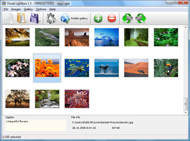
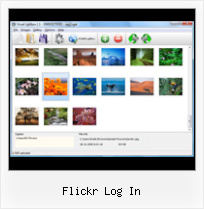
The following image set is generated by Flickr Gallery tool. Click any picture to run Lightbox gallery.

The example above is an in-page usage demo of Lightbox with images from Flickr. The lightbox gallery created with Flickr Gallery application is placed inside the page layout. You can also check the full-page demo website gallery. This example takes whole browser area to show the Lightbox gallery that uses images from Flickr.Silverstripe Flickr Widget Integration

How to Use

Step 1. Adding flickr images to your own gallery.


Locate the photo, photoset or photostream you want to use in your Flickr slideshow. Click on it to see the photo on its own page.

Copy URL of the flickr page.

Select Add images from Flickr... from the 'Add' button on the Toolbar.

Add images from Flickr

In the appeared window paste URL of the flickr page. Specify also the number of photos you want to add from the flickr page. Flickr Gallery will now include these photos in your project.

Add images from Flickr

If you have included the photos that you do not wish to be in your web gallery, you can easily remove them. Select all images that you wish to remove from photo gallery, and select Delete images. from the Images menu. You can pick and choose pictures by holding the CTRL while clicking the pictures you like.

Step 2. Adding caption.

The name of the photo on flickr page will automatically appear in the caption. When you select a photo you'll see the various info about it, such as: Path, Size, date of last change and Caption. You can add any comment or text about the photo (up to 512 symbols).

Step 3. Gallery properties.

Change the name of your flickr album, the size and quality of your pictures with Flickr Gallery. From the Gallery menu, select Properties or use "Edit Gallery Properties" button on the toolbar.

On the first tab of the Gallery Properties window you can change the name of your photo album and enable/disable the following properties: Slide Show, Auto play Slide Show, Zoom effect, Overlay Shadow. You can also set the Overlay shadow color and select the Engine you want to use (jQuery or Prototype + script.aculo.us).

On the second tab of the Gallery Properties window you can select the thumbnail you want to use, set the Thumbnails Resolution, Thumbnails Quality, Thumbnails Titles. Select Thumbnails Format (save in PNG or JPG format). Specify the Number of columns in you photo album and the Page color.

On the third tab of the Gallery Properties window you can select the template, Image resolution and Image quality of your pictures and change the Watermark.

You can set up the various sizes for exported images.

Control the quality of output PNG or JPEG format image by defining output "Image quality" and "Thumbnail quality" parameters (0%…100%).

Step 4. Save your photo gallery as project file.

When you exit Flickr Gallery application, you'll be asked if you want to save your project. The project consists of the pictures you choose to put on your web photo gallery and all your settings. It's a good idea to save the project, because that will allow you to change the project in case you decide to do something different with future galleries. So click Yes, then enter a name for your project. To select the location of your project, just click the Browse folders button and choose a different location. Then click Save.

Using Flickr In Websites Flickr Log In

Download Flickr Gallery


Download Flickr Gallery Download Free Edition
for Windows
Download Flickr Gallery Download Free Edition
for MAC

Flickr Gallery is free for non - commercial use.

A small fee is required for business use. Flickr Gallery Business Edition additionally provides an option to remove the Flickr Gallery. Com credit bar as well as a feature to put your own logo to images. After you finish the payment via the secure form, you will receive a license key instantly by e-mail that turns the Flickr Gallery Free Edition into a Business one. You can select the most appropriate payment procedure: credit card, bank transfer, check, PayPal etc. Also you can get Business Edition for free if you help with translating Flickr Gallery into your native language, please contact us at for more info.

Flickr Galleries For Your Website

Buy Flickr GalleryBuy Business Edition
for Windows

$49
Single Website
$69
Unlimited Websites
Buy Flickr GalleryBuy Business Edition
for MAC

$49
Single Website
$69
Unlimited Websites

Support

For general help, feature requests, troubleshooting contact Customer Support at . Make sure to include details on your Flickr Gallery version, operating system, a link (or relevant code) and a browser.Best Jquery Flickr Gallery To Embed

Feedback

    * Just bought the business version of Flickr Gallery and I just had to write and say how impressed I am with it. Really easy to use, intuitive interface and generates a truly professional presentation. Seldom have I been so pleased with a software purchase. Thank you.

    * Let me start just congratulating you, good job, really. I am trying out the free version before I buy it. It works great.

    * I tried Flickr Gallery and for me its a very cool and usefull application. Its so easy to manage my galleries and it looks very nice.Viewing Photos On Flickr

    * This looks like EXACTLY what I need for my site. It would make my job much faster! Love your program. Thank you!!

FAQ

Q:Instead of making one page with 40 photos, is there no property to make 2 or more pages?

A:You can do it in the following way:

1. Create your gallery in Flickr Gallery and publish it on a local drive in any test folder.
2. Make two copies of the generated index.html file (for example index1.html and index2.html).
3. Open index.html, index1.html and index2.html files in any text editor.
4. Find code for the gallery inside the BODY tag and cut some part of the images, so you'll have different images on each page.

<!-- Start Flickr Gallery.com BODY section -->
<div class="gallery">
<!-- leave the following code on index.html page -->
<a href="./data/images/1.jpg" rel="lightbox[sample]" title="Best Toy Ever"><img src="./data/thumbnails/1.png" /></a>
<a href="./data/images/8.jpg" rel="lightbox[sample]" title="PrueaMacro"><img src="./data/thumbnails/8.png" /></a>

<!-- leave the following code on index1.html page -->
<a href="./data/images/3.jpg" rel="lightbox[sample]" title="Macro Leaf."><img src="./data/thumbnails/3.png" /></a>
<a href="./data/images/11.jpg" rel="lightbox[sample]" title="Bell Pepper"><img src="./data/thumbnails/11.png" /></a>

<!-- leave the following code on index2.html page -->
<a href="./data/images/5_0.jpg" rel="lightbox[sample]" title="5"><img src="./data/thumbnails/5_0.png" /></a>
<a href="./data/images/6_0.jpg" rel="lightbox[sample]" title="6"><img src="./data/thumbnails/6_0.png" /></a>

<!--[if lte IE 6]><script src="engine/js/pngfix_vlb.js" type="text/javascript"></script><![endif]-->
<a id="vlightbox" href="http://Flickr Gallery.com/">Online Photo Album Sharing by Flickr Gallery.com</a>
</div>
<!-- End Flickr Gallery.com BODY section -->

5. Create links to switch between your pages, for example:
<a href="index.html">1</a>  <a href="index1.html">2</a>  <a href="index2.html">3</a> 


Q:I want to change color of the overlay shadow? How can I do this?

A:Open engine\css\Flickr Gallery.css and find the following code:

#overlay{
position: absolute;
top: 0;
left: 0;
z-index: 90;
width: 100%;
height: 500px;
background-color: #FFF;
filter:alpha(opacity=60);
-moz-opacity: 0.6;
opacity: 0.6;
}

set the background-color parameter :

#overlay{
position: absolute;
top: 0;
left: 0;
z-index: 90;
width: 100%;
height: 500px;
background-color: #FF00FF;
filter:alpha(opacity=60);
-moz-opacity: 0.6;
opacity: 0.6;
}


RELATED

Flickr Moving to Yahoo ID Login System | Search Engine Journal Flickr Moving to Yahoo ID Login System. Flickr, the photo publishing, sharing & tagging network, has just announced that they will be cancelling their older email address based login system, and migrating over to Yahoo registered ID's for users to sign in to Flickr

Flickriver: Today's most interesting photos Flickriver - view images as a 'river of photos' and more etc, allowing to quickly open the corresponding Flickriver view. Also, allows quickly viewing any Flickr photo on black background in large size

Buzz by Margarida Rebelo Login to Flickr with your Facebook Account! - Flickr Blog. Last October, we introduced the option to create an account on Flickr using a Google ID in an effort to make it Users can now setup logging in to their existing Flickr accounts through either Google or Facebook in addition to their Yahoo! ID

Flickr Login : Flickr Gallery Flickr Login. Web photo album? With Flickr Gallery, you need just 4 simple steps to get your web photo album ready!. Flickr Copy Protected But Other Sites

Flickpad Makes Sharing Facebook and Flickr Photos On Your Are most of your photos stored in the cloud with Facebook and Flickr? Have you ever wanted an easy way to show these photos off using your iPad? Well, Flickpad lets you d This happened to the first 7 or so times I attempted to log in, both in portrait and landscape mode

Facebook Login - Part 22 Moreover, members who use Facebook or Google IDs to log into Flickr can also share their public photo automatically on Facebook when they upload them to Flickr, once they configure the connection with Facebook in their Flickr account settings Page. { 1 comment }

Now You Can Log in to Flickr with Facebook Flickr has added the option to sign in to Flickr with a Facebook account in an effort to make Yahoo's popular photo-sharing site more accessible

Flickr Flickr is almost certainly the best online photo management and sharing application in the world. Show off your favorite photos and videos to the world, securely and privately show content to your friends and family, or blog the photos and videos

The World's Best Photos of bulge and speedo - Flickr Hive Mind Flickr Log In. Contacts Favorites Groups Interestingness Recent Tags Text User Advanced. Live view of the Jersey Shore (Ocean Grove) I am in the process of moving Flickr Hive Mind to flickrhivemind.net. For those of you that set preferences, you may need to do that twice, once for each site

How to Fix a Red Ring of Death What is the best way to allow friends and family to order prints from a Flickr set without requiring them to have a Flickr login?View All: Login Required Questionsstyle="padding-top: 1ex;"Didn't find what you were looking for?style="font-size:

How to get back Flickr Login | WebProNews Or how to un-merge your Flickr ID from your Yahoo ID? One fine evening, I saw that I could no longer find the usual Flickr login but was somehow made to look like I had to sign in through Yahoo and reluctantly I sign in, thus merging my Flickr ID with the Yahoo ID

7LogonChanger - Set Picasa and Flickr Images as Windows 7 7LogonChanger searches Flickr and Picasa photos based on tags and sets them as your Windows 7 Wallpaper or Windows 7 login screen

Sign in to Yahoo! Best in class Yahoo! Mail, breaking local, national and global news, finance, sports, OR. Sign in with: Facebook. Google. Sign in to Yahoo!. Login Form. Yahoo!

Turbanizer.com - Ever Wondered What You Looked Like In A Click on "Log-in" and the Yahoo!/Flickr log in page will appear. The above screen will differ based on whether you are logged into Yahoo! Follow the onscreen instructions and log into your Yahoo! account using your Yahoo! username and password

Moovida support forums • View topic - Flickr won't login No matter what I try, I can't log in to my Flickr account through Moovida. Flickr randomly changed their login API this week, a fix is in the works and will be coming shortly

Flickr Moving to Yahoo ID Login System Flickr, the photo publishing, sharing & tagging network, has just announced that they will be cancelling their older email address based login system, and migrating over to Yahoo registered ID’s for users to sign in to Flickr. We’re making

2007 March 08 " Flickr Blog An easy way to make sure you're only entering your Flickr login credentials where they should be entered is to check These are some examples of what a fake Flickr login screen might look like. Note that they're very similar in

Flickr Login Issue Fixed in Flock 2.5.1 Hey Flockstars, The Flickr login issue preventing Flickr from activating within Flock's features (as mentioned http://getsatisfaction.com/flock/topics/facebook_chat_fixed_flic

mosaickr.com - create mosaics from flickr photos, download In case you don't have a Flickr account take a moment to explore Flickr and the possibilities it offers for sharing and managing your photos. Login with Flickr account. If you already have a Flickr account or if you are already logged in at Flickr you can start right away. Flickr Login

flickr login | Tags | ComputerWeekly.com Results for the tag, flickr login. Find the latest news and information on flickr login from ComputerWeekly.com and the web

Saleen Flickr Downloader Change Log - build 121: 24 Apr 2011 bug fix: fixed rare exception in ResampleImage - build 120: 22 Apr 2011 update: can handle Medium640 photos addition: added start page setting, addition: added setting to disallow automatic 07 Feb 2011 addition: Flickr "Sign In" button - build 116: 07 Nov

Slideflickr.com SlideFlickr is an online Flickr slideshow generator that will help you create and embed Flickr slideshows in less than 10 seconds!

Flickr Allows Login via Google account Flickr popular photo sharing service from Yahoo! now allows login via Google account. Apart from Google login you can also use your Google apps account to login to Flickr now

Login to your Photobucket.com account Photobucket offers image hosting, free photo sharing and video sharing. Upload your photos, host your videos, and share them with friends and family

imageloopR Flickr slideshow | photos, images automatically Get your favourite Flickr photos in your slideshow - every day fresh and updated! Login to Flickr. If you login to Flickr, you can fetch all kinds of public photos. Without login you will only be able to retrieve photos with a creative commons license

Flickr - Blackboard HistoryA photowalk by the Flickr Group Photographers in Perth around Guildford, Western AustraliaFlickr was developed by Ludicorp, a Vancouver-based company, and launched in February 2004. The service emerged out of tools originally created for

