



Overview

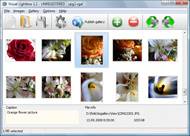
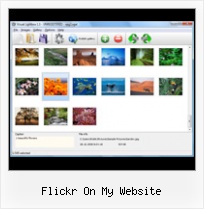
It's no secret that adding photos to your blog posts is one of the most effective ways to enhance your blog and attract attention to your writing. Flickr has millions of photos available in its database. A simple FREE tool called Flickr Gallery allows you to create a custom image gallery with a cool slide show of the most recent and most interesting photos from Flickr on your website or blog in a few easy steps. Just visit Flickr website and find photostream, photoset or a single photo you like. Enter the address of flickr page to add all photos from this page in your gallery, select the style of thumbnails and the overlay window and add the HTML embed code on your website or blog.
A few clicks and you'll see a stylish photo gallery with beautifull lightbox and zoom effects on your own website or blog!


Flickr Gallery for Windows   Flickr Gallery for MAC

Want more?

Example

Lightbox gallery sample

The following image set is generated by Flickr Gallery tool. Click any picture to run Lightbox gallery.

The sample above is an in-page usage demo of Lightbox script with Flickr images. The web gallery created with Flickr Gallery tool is placed inside the website page. You can also check the full-page demo web gallery. This example takes whole browser area to show the slideshow.Flickr Ass Gif Slideshow

How to Use

Step 1. Adding flickr images to your own gallery.


Locate the photo, photoset or photostream you want to use in your Flickr slideshow. Click on it to see the photo on its own page.

Copy URL of the flickr page.

Select Add images from Flickr... from the 'Add' button on the Toolbar.

Add images from Flickr

In the appeared window paste URL of the flickr page. Specify also the number of photos you want to add from the flickr page. Flickr Gallery will now include these photos in your project.

Add images from Flickr

If you have included the photos that you do not wish to be in your web gallery, you can easily remove them. Select all images that you wish to remove from photo gallery, and select Delete images. from the Images menu. You can pick and choose pictures by holding the CTRL while clicking the pictures you like.

Step 2. Adding caption.

The name of the photo on flickr page will automatically appear in the caption. When you select a photo you'll see the various info about it, such as: Path, Size, date of last change and Caption. You can add any comment or text about the photo (up to 512 symbols).

Step 3. Gallery properties.

Change the name of your flickr album, the size and quality of your pictures with Flickr Gallery. From the Gallery menu, select Properties or use "Edit Gallery Properties" button on the toolbar.

On the first tab of the Gallery Properties window you can change the name of your photo album and enable/disable the following properties: Slide Show, Auto play Slide Show, Zoom effect, Overlay Shadow. You can also set the Overlay shadow color and select the Engine you want to use (jQuery or Prototype + script.aculo.us).

On the second tab of the Gallery Properties window you can select the thumbnail you want to use, set the Thumbnails Resolution, Thumbnails Quality, Thumbnails Titles. Select Thumbnails Format (save in PNG or JPG format). Specify the Number of columns in you photo album and the Page color.

On the third tab of the Gallery Properties window you can select the template, Image resolution and Image quality of your pictures and change the Watermark.

You can set up the various sizes for exported images.

Control the quality of output PNG or JPEG format image by defining output "Image quality" and "Thumbnail quality" parameters (0%…100%).

Step 4. Save your photo gallery as project file.

When you exit Flickr Gallery application, you'll be asked if you want to save your project. The project consists of the pictures you choose to put on your web photo gallery and all your settings. It's a good idea to save the project, because that will allow you to change the project in case you decide to do something different with future galleries. So click Yes, then enter a name for your project. To select the location of your project, just click the Browse folders button and choose a different location. Then click Save.

Flickr Mac Widget Flickr On My Website

Download Flickr Gallery


Download Flickr Gallery Download Free Edition
for Windows
Download Flickr Gallery Download Free Edition
for MAC

Flickr Gallery is free for non-commercial use.

A small fee is required for business use. Flickr Gallery Business Edition additionally provides an option to remove the Flickr Gallery. Com credit string as well as a feature to put your own logo to images. After you finish the payment via the secure order form, you will receive a license key instantly by email that turns the Flickr Gallery Free Edition into a Business one. You can select the most appropriate payment mode: bank transfer, credit card, PayPal, check etc. Also you can get Business Edition for free if you help with translating Flickr Gallery into your native language, please contact us at for more info.

Flickr Stream Example

Buy Flickr GalleryBuy Business Edition
for Windows

$49
Single Website
$69
Unlimited Websites
Buy Flickr GalleryBuy Business Edition
for MAC

$49
Single Website
$69
Unlimited Websites

Support

For general help, troubleshooting and feature requests contact Customer Support at . Make sure to include details on your Flickr Gallery version, browser, operating system and a link (or relevant code).Flickr Set Generator

Feedback

    * I have installed Flickr Gallery to trial. All good, loving it!! I want to get an business version of your great programm. I love it - soo easy to use!!

    * Great product by the way and saved me loads of time. I really like your Flickr Gallery program! Very nice.

    * I ran into your website wile looking for a JavaScript to manage a personal Photo Gallery. I downloaded the trial version and immediately fell in love with your Flickr Gallery, it is one of the best products I’ve ever found; it is very user friendly and easy to use and creates great Photo Galleries.Flickr Random Set

    * Another programmes have incredible functionality but no fantastic interface like your product!

FAQ

Q:I would like to reposition the Previous and Next buttons to a position below the images and have them be visible all the time.Where do I have to go to make these changes in the code?

A:Find the css file in the folder generated by gallery:
engine\css\
or in the following folder:
c:\Program Files\Visual LightBox Business\templates\Default\engine\css\

To set their position you should change 15% to something different:
#prevLink:hover, #prevLink:visited:hover { background: url(../images/prevlabel.gif) left 15% no-repeat; }
#nextLink:hover, #nextLink:visited:hover { background: url(../images/nextlabel.gif) right 15% no-repeat; }

For example:
#prevLink:hover, #prevLink:visited:hover { background:url(../images/prevlabel.gif) left 75% no-repeat; }
#nextLink:hover, #nextLink:visited:hover { background: url(../images/nextlabel.gif) right 75% no-repeat;}

RELATED

Should I Put My Photos On My Website or On Flickr? Should I Put My Photos On My Website or On Flickr? This post is part of the Friday Q&A He would need to have a website with samples of his work and a portfolio, but he would also need to have a presence on social networks where people share images (Flickr is the main one, but Facebook could also help)

Python Flickr API kit - Stüvel photography In my blog you'll find pieces of my life, from photography to computer science to travel. Welcome to my website. Python Flickr Flickr is one of the most popular photo hosting websites on the planet. Their extensive API gives programmers plenty of opportunity to use Flickr any way they see fit

Photo Sharing Websites (Flickr) | CITT Toolbox CITT provides support for University of Florida faculty in the implementation of technology to enhance and improve teaching, research, and engagement

Flickr Review - StarREVIEWS 2011 Read an in depth review of our Highly Rated Photo Sharing Website, Flickr. Gain access to Exclusive Coupons and Special Offers plus search our extensive archive of related news articles

Flickr On My Website : Flickr Gallery Flickr On My Website. Digital picture albums made with Flickr Gallery are high-end web applications that look and behave exactly like desktop apps!. Drupal Flickr Thumbnails In A Grid

Embed Flickr Slideshows On Any Website FlickrSlidr is a free web app that lets you embed your Flickr slideshows on any website or blog

Snapfish Provides film developing and online viewing and sharing services. Also offers personalized photo gifts and cards

Articles about Flickr Web Site - Los Angeles Times Flickr Web Site News. Find breaking news, commentary, and archival information about Flickr Web Site From The Los Angeles Times will begin showing homemade videos on its online photo-sharing site, Flickr, in a long-anticipated move that might be too late to lure most people

Flickr Tag and browse photos, and upload pictures and short videos with Flickr, a digital photography and media file sharing website

Adding Flickr To My Website | Flickr Slideshow Just visit Flickr website and find photostream, photoset or a single photo you like. Enter the address of flickr page to add all photos from this page in your slideshow, select the style of thumbnails and the overlay window and add the HTML embed code on your website or blog

How to Add Flickr photos on my web site | eHow.com How to Add Flickr photos on my web site. If you have some pictures of your own, or photos from a group you admire from Flickr, you can make a badge to put in your website or blog, and this will add to your blog or website greatly

davidcoxon.com - home page David Coxon's persolnal webspace home page. David is an IT manager, designer, web developer, fell runner, blogger and enthusiastic member of the internet community my images. www.flickr.com. About davidcoxon.com. Hi, i'm David Coxon and this is my website, I first started the site way back in

How to post event photos on the Flickr photo sharing website Document: How to post event photos on the Flickr photo sharing website I have done this on my website for CROInfo 2006 both here and below. Finally, you can

Yahoo! Yahoo! Internet portal provides email, news, shopping, web search, music, fantasy sports, and many other online products and services to consumers and businesses worldwide

Beating the China Flickr block - Jonathan Rawle's Website Fortunately, an Iranian, Hamed Saber, has written a Firefox add-on, Access Flickr, that will allow the site to be accessed from all these countries. A while ago, I began using the Flickr API to display Flickr photos from within the photo gallery on my website

Picnik Picnik lets you edit all your photos online, from one easy place

25 Easy To Use Photo Sharing Websites Online You will find a great list of photo sharing sites all with similar features, however each are unique in their own way. Explore the different options to see what fits your photo sharing needs. It's funny I've used quite a few of them, but have narrowed myself down to flickr and my website now

Chasr: display your Flickr photos on your own website Chasr: display your Flickr photos on your own website You can download Chasr and install it on your own server, allowing your users to see your photos on your own website

Flickr Photo Gallery Get a free Flickr photo gallery and promote your website. When I upload photos to my Flickr Gallery I include a link to my other websites in the photo description

Flickriver: Photos from SQSUN2008 You can place your badge on your Flickr profile, Blog or Website. A Greasemonkey script that adds Flickriver links to various Flickr photo pages - user photos, favorites, pools etc, allowing to quickly open the

Flickr Guide: How to Do Everything with Flickr Flickr Guide will show you how to do everything on Flickr. You can download and backup flickr pictures, set them as rotating wallpapers, browse pictures in 3D, make a screensaver and more

Flickr - Wikipedia, the free encyclopedia Flickr is an image hosting and video hosting website, web services suite, and online community created by Ludicorp and later acquired by Yahoo! Early versions of Flickr focused on a multiuser chat room called FlickrLive with real-time photo exchange capabilities

Multicolr Search Lab

Scripts Mashup - search flickr on your website - Flickr php Add Flickr search to your website - Show your flickr photos MyiLike - Play iLike songs on your website. Other Mashup projects are in the work, Stay

Options for Easily Adding Flickr Photos to Your Website This page shows a number of the leading options for quickly and easily adding your Flickr photos to your website or blog (WordPress, Joomla, TextPattern). They all offer some options and customizations

Sharing photos with Flickr | Talk About Local How do I insert an image on Flickr into my website? Flickr does some useful things like automatically making small versions (thumbnails), medium-sized and larger versions of your photos, which you can then put on your website or insert into a blog post

The Food Dudes splash page

