



Overview

It's no secret that adding photos to your blog posts is one of the most effective ways to enhance your blog and attract attention to your writing. Flickr has millions of photos available in its database. A simple FREE tool called Flickr Gallery allows you to create a custom image gallery with a cool slide show of the most recent and most interesting photos from Flickr on your website or blog in a few easy steps. Just visit Flickr website and find photostream, photoset or a single photo you like. Enter the address of flickr page to add all photos from this page in your gallery, select the style of thumbnails and the overlay window and add the HTML embed code on your website or blog.
A few clicks and you'll see a stylish photo gallery with beautifull lightbox and zoom effects on your own website or blog!


Flickr Gallery for Windows   Flickr Gallery for MAC

Want more?

Example

Lightbox gallery sample

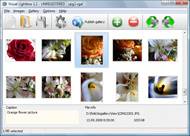
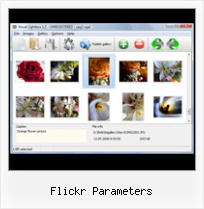
The following image set is generated by Flickr Gallery tool. Click any picture to run Lightbox gallery.

The photo gallery above is an in-page usage demo of Lightbox gallery that uses images from Flickr. The photo gallery created with Flickr Gallery wizard is placed inside the html page. You can also check the full-page demo web gallery. This example takes whole browser area to show the website gallery.How To Autoplay Slideshow In Flickr

How to Use

Step 1. Adding flickr images to your own gallery.


Locate the photo, photoset or photostream you want to use in your Flickr slideshow. Click on it to see the photo on its own page.

Copy URL of the flickr page.

Select Add images from Flickr... from the 'Add' button on the Toolbar.

Add images from Flickr

In the appeared window paste URL of the flickr page. Specify also the number of photos you want to add from the flickr page. Flickr Gallery will now include these photos in your project.

Add images from Flickr

If you have included the photos that you do not wish to be in your web gallery, you can easily remove them. Select all images that you wish to remove from photo gallery, and select Delete images. from the Images menu. You can pick and choose pictures by holding the CTRL while clicking the pictures you like.

Step 2. Adding caption.

The name of the photo on flickr page will automatically appear in the caption. When you select a photo you'll see the various info about it, such as: Path, Size, date of last change and Caption. You can add any comment or text about the photo (up to 512 symbols).

Step 3. Gallery properties.

Change the name of your flickr album, the size and quality of your pictures with Flickr Gallery. From the Gallery menu, select Properties or use "Edit Gallery Properties" button on the toolbar.

On the first tab of the Gallery Properties window you can change the name of your photo album and enable/disable the following properties: Slide Show, Auto play Slide Show, Zoom effect, Overlay Shadow. You can also set the Overlay shadow color and select the Engine you want to use (jQuery or Prototype + script.aculo.us).

On the second tab of the Gallery Properties window you can select the thumbnail you want to use, set the Thumbnails Resolution, Thumbnails Quality, Thumbnails Titles. Select Thumbnails Format (save in PNG or JPG format). Specify the Number of columns in you photo album and the Page color.

On the third tab of the Gallery Properties window you can select the template, Image resolution and Image quality of your pictures and change the Watermark.

You can set up the various sizes for exported images.

Control the quality of output PNG or JPEG format image by defining output "Image quality" and "Thumbnail quality" parameters (0%…100%).

Step 4. Save your photo gallery as project file.

When you exit Flickr Gallery application, you'll be asked if you want to save your project. The project consists of the pictures you choose to put on your web photo gallery and all your settings. It's a good idea to save the project, because that will allow you to change the project in case you decide to do something different with future galleries. So click Yes, then enter a name for your project. To select the location of your project, just click the Browse folders button and choose a different location. Then click Save.

Flickr Dashboard Mac Flickr Parameters

Download Flickr Gallery


Download Flickr Gallery Download Free Edition
for Windows
Download Flickr Gallery Download Free Edition
for MAC

Flickr Gallery is free for non-commercial use.

A small fee is required for business use. Flickr Gallery Business Edition additionally provides an option to remove the Flickr Gallery. Com credit line as well as a feature to put your own logo to images. After you conclude the payment via the secure form, you will receive a license key instantly by e-mail that turns the Flickr Gallery Free Edition into a Business one. You can select the most appropriate payment method: credit card, bank transfer, PayPal, check etc. Also you can get Business Edition for free if you help with translating Flickr Gallery into your native language, please contact us at for more info.

Jquery Flickr Samples

Buy Flickr GalleryBuy Business Edition
for Windows

$49
Single Website
$69
Unlimited Websites
Buy Flickr GalleryBuy Business Edition
for MAC

$49
Single Website
$69
Unlimited Websites

Support

For general help, feature requests, troubleshooting contact Customer Support at . Make sure to include details on your browser, a link (or relevant code), operating system and Flickr Gallery version.Flickr Album In Website

Feedback

    * I tried Flickr Gallery and for me its a very cool and usefull application. Its so easy to manage my galleries and it looks very nice.

    * Let me start just congratulating you, good job, really. I am trying out the free version before I buy it. It works great.

    * Just bought the business version of Flickr Gallery and I just had to write and say how impressed I am with it. Really easy to use, intuitive interface and generates a truly professional presentation. Seldom have I been so pleased with a software purchase. Thank you.Jquery Similar To Flickr

    * I LOVE your free Lightbox2 software tool and will purchase the business version shortly. I have seen the Lightbox JS effect used with video tutorials and I was hoping you have a version for video that I can purchase.
Video LightBox: http://videolightbox.com

FAQ

Q:I purchased your business license today but I don't see any way to update so the watermark is either missing or replace with mine.What do I do?

A:Free edition of Flickr Gallery doesn't allow you to remove our watermark.

Register your Flickr Gallery application at first. Use reg. key from the license message you received after the purchase. After the registration you can remove watermarks.

Open Gallery->Properties->Templates: Watermark. Click to disable this option or use your own watermark.


RELATED

Parameter (Flickr API-1.2 API) Class Parameter. java.lang.Object com.aetrion.flickr.Parameter. public class Parameter. extends java.lang.Object. Class encapsulating Author: Anthony Eden. Constructor Summary. Parameter(java.lang.String name, long value)

com.kelvinluck.flickr.Flickr This class in combination with FlickrResponseListener provides a convienient way to interact with the Flickr API from AS 2. The implementation should abstract away any processing of XML and to sign a call. Parameters. urlArguments. An Object containing name

Joomla! slideshow module and plugin | ARI Soft - Joomla web Joomla! module created slideshow based on images from server or Flickr Main Parameters. Flickr Parameters. Image Parameters. Copyright © 2011 ARI Soft Joomla!

Embedding Flickr Photos This is a factory class and an instance of it is created passing a Flickr API key. getPhotoSizes - This method sends a Flickr Request using the Flickr API method flickr.photos.getSizes and parameters - API Key and photo_id

Comparison Parameters adjusted to emulate an image with artifacts as typically seen on the Flickr HDR groups The parameters for Image 7 were adjusted to highlight the potential for artifacts with the Photomatix software

Flickr SlideShow Widget using AJAX Extender AJAX SlideShow control with very interactive live example using Flickr API. We will use the Array of Images retrieved from Flickr and will show it as slideshow. Flickr Rest API web method flickr.photos.search can be used to get photos. There are some parameters to direct the search

Flick r S lideShow lite The page will use the parameters in the URL (these were constructed by the selection page) to make a request to Flickr for the. XML containing the 1) It uses JavaScript to parse the parameters on its URL and uses those to determine. what

Flickr Parameters : Flickr Gallery Flickr Parameters. Flickr Gallery is an excellent program that is friendly to amateur web developers, but at the same time is powerful enough to meet the needs of more advanced users.. Widget Code Flickr Slideshow

Flickr: "parameters" Flickr is almost certainly the best online photo management and sharing application in the world. Show off your favorite photos and videos to the world, securely and privately show content to your friends and family, or blog the photos and videos

Uploading and geo-tagging photos on Flickr using Uploading and geo-tagging photos on Flickr using Silverlight's HttpWebRequest A signed Flickr API call involves the following : Sort all of the parameters passed to the service. Append the parameters' key and value properties to your shared secret. Calculate the MD5 hash for this string

QtFlickrAPI: QtFlickr Class Reference Fetches data from Flickr API with GET method. Parameters: method. Flickr API method. request data from Flickr API with POST method. Parameters: method. Flickr API method. request

Flickr RSS: Generate Custom Flickr Feeds To gain a better control over RSS feeds of Flickr images, here is a simple tool called Flickr RSS feed generator. It enables you to create custom RSS feeds for Flicks using parameters like tags, tag mode, sorting order and maximum number of images to return

Flickr - YDN Get started using Flickr photo-community web services Learn how to use the Flickr API through descriptions of its queries and parameters. In addition, the documentation also inculdes sample code to help get you started

HyBing - HyBing You can set the Flickr parameters using default Joomla bot configuration screen, as well as, setting the parameters in the content. In addition, because Easy Flickr pulls images from Flickr, your content will look differently when a different image is displayed

plugins:flickr - Geeklog France [flickr:] will display a photo's thumbnail which links to the actual [flickr_gallery:] will embed super flexible galeries from any flickr account or group, using different parameters to customise it

How To Use Slickr Flickr To Create a Slideshow Or Gallery Step by step instructions of how to get the most of the Flickr photos using slideshows and galleries slickr-flickr tag="bahamas" The Slickr Flickr Attributes (Parameters) are as follows: id – the Flickr ID of

Accessing Flickr with XProc The Flickr APIs of course don't allow the secret to be a parameter because that would expose the secret which would defeat its purpose. But from an XProc perspective, it's convenient to have a that contains the key, token, and secret which we can just pass around together

Flickr Code Discuss developing against the Flickr web services API. Reply to constructing API signature with parameters Posted 10 hours ago. Reply to constructing API signature with parameters Posted 10 hours ago. constructing API signature with parameters Posted 10 hours ago

FlickrFly | roblog.com To allow more users to successfully fly to Google Earth from your Flickr Image, just add a "querystring" parameter with the Flickr photo id. Option 1: Parameters as Flickr Tags. Parameters can be added as Flickr Tags in the format

Easy Flickr Bot - Joomla! Extensions Directory Don't want to spend too much time searching for an image for your content? Want to have content matching image automatically? Easy Flickr is a Joomla bot, with one important feature. You can set the Flickr parameters using default Joomla bot

A Flickr Badge using WordPress Shortcodes | Themocracy Flickr provides a neat little snippet of javaScript to supply various image galleries direct to your site - a so-named Flickr badge. Here's a good way using WordPress shortcodes to grab a gallery

CoolEye " Nductiv Embed CoolIris Gallery With Flickr, Picasa, and YouTube This plugin adds the shortcodewhich embeds a CoolIris wall into your post or page. The parameters tell CoolEye. what source to get the gallery from: YouTube, Flickr, Picasa, or Media RSS feed. In addition. there are parameters that

DarksideCookie | flickrVIEWR – A flickr viewer in Silverlight and then you append any method parameters to the querystring. string url = GetPhotoInfoUrl(method, parameters); After that it is time to call flickr. Fortunately this is not that hard. All I have to do is call the DownloadString method passing in the url and a couple of handlers I have

Flickr.Net Source Release 1.4.3 | Wackylabs.net parameters.Add("method", "flickr.groups.search"); parameters.Add("text", text); if if( perPage > 0 ) parameters.Add("per_page", perPage.ToString()); if

