



Overview

It's no secret that adding photos to your blog posts is one of the most effective ways to enhance your blog and attract attention to your writing. Flickr has millions of photos available in its database. A simple FREE tool called Flickr Gallery allows you to create a custom image gallery with a cool slide show of the most recent and most interesting photos from Flickr on your website or blog in a few easy steps. Just visit Flickr website and find photostream, photoset or a single photo you like. Enter the address of flickr page to add all photos from this page in your gallery, select the style of thumbnails and the overlay window and add the HTML embed code on your website or blog.
A few clicks and you'll see a stylish photo gallery with beautifull lightbox and zoom effects on your own website or blog!


Flickr Gallery for Windows   Flickr Gallery for MAC

Want more?

Example

Lightbox gallery sample

The following image set is generated by Flickr Gallery tool. Click any picture to run Lightbox gallery.

The sample above is an in-page usage demo of Lightbox tool with Flickr images. The slideshow created with Flickr Gallery application is placed inside the page layout. You can also check the full-page demo website gallery. This example takes whole browser area to show the web gallery.Positioning Flickr Slideshow On Website

How to Use

Step 1. Adding flickr images to your own gallery.


Locate the photo, photoset or photostream you want to use in your Flickr slideshow. Click on it to see the photo on its own page.

Copy URL of the flickr page.

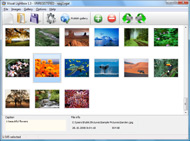
Select Add images from Flickr... from the 'Add' button on the Toolbar.

Add images from Flickr

In the appeared window paste URL of the flickr page. Specify also the number of photos you want to add from the flickr page. Flickr Gallery will now include these photos in your project.

Add images from Flickr

If you have included the photos that you do not wish to be in your web gallery, you can easily remove them. Select all images that you wish to remove from photo gallery, and select Delete images. from the Images menu. You can pick and choose pictures by holding the CTRL while clicking the pictures you like.

Step 2. Adding caption.

The name of the photo on flickr page will automatically appear in the caption. When you select a photo you'll see the various info about it, such as: Path, Size, date of last change and Caption. You can add any comment or text about the photo (up to 512 symbols).

Step 3. Gallery properties.

Change the name of your flickr album, the size and quality of your pictures with Flickr Gallery. From the Gallery menu, select Properties or use "Edit Gallery Properties" button on the toolbar.

On the first tab of the Gallery Properties window you can change the name of your photo album and enable/disable the following properties: Slide Show, Auto play Slide Show, Zoom effect, Overlay Shadow. You can also set the Overlay shadow color and select the Engine you want to use (jQuery or Prototype + script.aculo.us).

On the second tab of the Gallery Properties window you can select the thumbnail you want to use, set the Thumbnails Resolution, Thumbnails Quality, Thumbnails Titles. Select Thumbnails Format (save in PNG or JPG format). Specify the Number of columns in you photo album and the Page color.

On the third tab of the Gallery Properties window you can select the template, Image resolution and Image quality of your pictures and change the Watermark.

You can set up the various sizes for exported images.

Control the quality of output PNG or JPEG format image by defining output "Image quality" and "Thumbnail quality" parameters (0%…100%).

Step 4. Save your photo gallery as project file.

When you exit Flickr Gallery application, you'll be asked if you want to save your project. The project consists of the pictures you choose to put on your web photo gallery and all your settings. It's a good idea to save the project, because that will allow you to change the project in case you decide to do something different with future galleries. So click Yes, then enter a name for your project. To select the location of your project, just click the Browse folders button and choose a different location. Then click Save.

Flickr Slideshow Asp Net Flickr Slideshow Google Desktop

Download Flickr Gallery


Download Flickr Gallery Download Free Edition
for Windows
Download Flickr Gallery Download Free Edition
for MAC

Flickr Gallery is free for non-commercial use.

A small fee is required for business use. Flickr Gallery Business Edition additionally provides an option to remove the Flickr Gallery. Com credit bar as well as a feature to put your own logo to images. After you conclude the payment via the secure order form, you will receive a license key instantly by email that turns the Flickr Gallery Free Edition into a Business one. You can select the most appropriate payment method: bank transfer, PayPal, check, credit card etc. Also you can get Business Edition for free if you help with translating Flickr Gallery into your native language, please contact us at for more info.

Code For Displaying Flickr Gallery

Buy Flickr GalleryBuy Business Edition
for Windows

$49
Single Website
$69
Unlimited Websites
Buy Flickr GalleryBuy Business Edition
for MAC

$49
Single Website
$69
Unlimited Websites

Support

For general help, feature requests, troubleshooting contact Customer Support at . Make sure to include details on your operating system, browser, a link (or relevant code) and Flickr Gallery version.Flickr Free Upgrade

Feedback

    * Just bought the business version of Flickr Gallery and I just had to write and say how impressed I am with it. Really easy to use, intuitive interface and generates a truly professional presentation. Seldom have I been so pleased with a software purchase. Thank you.

    * I find Flickr Gallery (and lightbox2) a great tool and was about to proceed in its purchase.

    * I'm absolutely loving Flickr Gallery Business and Video LightBox. Amazing, quick and painless, to create a custom, browser independent gallery. And it works first time - every time! Best value for money I've seen in quite a while...Remove Flickr Photos From Google

    * I downloaded your trial version to see if I could get it to work with my website, and I am almost there (I have been looking for something like this for ages)..

FAQ

Q:How do I embed the lightbox image gallery into an existing page?

A:To install Flickr Gallery gallery on your page you should:

1. Create your gallery in Flickr Gallery and publish it on a local drive in any test folder.
2. Open index.html file from the saved folder in any text editor.
3. Copy code for the HEAD section and paste it inside the HEAD section of you own webpage, for example:

<head>
...
<!-- Start Flickr Gallery.com HEAD section -->
<link rel="stylesheet" href="engine/css/vlightbox.css" type="text/css" />
<style>#vlightbox a#vlb{display:none}</style>
<link rel="stylesheet" href="engine/css/Flickr Gallery.css" type="text/css" media="screen" />
<script src="engine/js/jquery.js" type="text/javascript"></script>
<script src="engine/js/jquery.tools.min.js" type="text/javascript"></script>
<script src="engine/js/visuallightbox.js" type="text/javascript"></script>
<!-- End Flickr Gallery.com HEAD section -->

...
</head>


4. Copy code for the BODY section and paste it inside the Body section of you own webpage in the place where you want to have a gallery, for example:

<body>
...
<!-- Start Flickr Gallery.com BODY section -->
<div id="vlightbox">
<a rel="lightbox_vlb" href="data/images/dscn6831.jpg" title="DSCN6831"><img src="data/thumbnails/dscn6831.png"><span></span></a>
<a rel="lightbox_vlb" href="data/images/dscn6823.jpg" title="DSCN6823"><img src="data/thumbnails/dscn6823.png"><span></span></a>
<a rel="lightbox_vlb" href="data/images/dscn6819.jpg" title="DSCN6819"><img src="data/thumbnails/dscn6819.png"><span></span></a>
<a id="vlb" href="http://Flickr Gallery.com">Photo Gallery For Web by Flickr Gallery.com v2.1</a>
</div>
<!-- End Flickr Gallery.com BODY section -->

...
</body>


5. Copy 'data' folder with images and thumbnails and 'engine' folder with .css and .js files into the same folder with your own webpage.
You can find the example on our website:
http://www.Flickr Gallery.com/#example


RELATED

Google Gadgets: Flickr Random Photos Flickr Random Photos. Displays random photos from Flickr on your desktop. Flere oplysninger © 2011 Google - Politik til beskyttelse af personlige oplysninger - Servicevilkår - Meddelelser om ophavsret

Embed Flickr Slideshows On Any Website FlickrSlidr is a free web app that lets you embed your Flickr slideshows on any website or blog. Next post: Backup Your Google Docs With GDocBackup. Read More On: Flickr, Slideshow. Author: Tehseen Baweja. Tehseen likes to write about Internet tools that make life easier. Check out his

flickr Software - Free Download flickr - Top 4 Download flickr Software - Free Download flickr - Top 4 Download - Free Download Software Flickr plugin for Wallpaper Slideshow Pro allows you to display Flickr photos as desktop wallpaper

Flickr: Using Pictures on Your Web Site | AssortedStuff The easiest is to let flickr create the slide show for you. flickr Slide Show Generator gives you the code to use the "classic" slide show format, the one flickr used to use that was

Google Gadgets: Flickr Desktop also, there needs to be some way to resize it without using the size multiplier and go backwards and forwards in the slideshow. Khawaja. Report this comment. can u also add a memory to the flickr desktop as sometimes the picture goes away too

Flickr and image news and downloads on CNET Come to CNET for the latest news stories and articles, and software downloads related to Flickr and image

Flickr Slideshow Gadget : Flickr Gallery Flickr Slideshow Gadget. Make it easy for people to find all your photos on the site! Try Flickr Gallery! As I said before, The Google Photos gadget is my favorite method for delivering ads to myself. It's designed to display a slide show of images on your desktop, from whatever

Searching for flickr - Yahoo! Widgets 1,000s of free Widgets help you save time by bringing your favorite content and services right to you Flickr Watchr brings new photos from your favorite Flickr contact or group right to your desktop! Leave

Facebook : How to, Tutorial & Troubleshooting Google Desktop have released a gadget for Facebook users: Slideshow If you add the gadget to your Google Desktop, you can view the Facebook photos of your Facebook friends randomly

12 Slideshow Tools For Photographers - Tim Stanley Why is it so hard to create a professional looking slide show of digital images on a web site? Flickr has a desktop upload tool that's a little less painful, but it's not as easy as Picasa to upload a batch of files

Widgets and desktop enhancements posts - Webware - Page 21 Read all 'Widgets and desktop enhancements' posts on Webware. The Flickr slide show implementation is pretty slick, although I got a little confused trying to paste in the slide show URL, only to get a dead-end. Users need only paste in an album URL, and Google Talk will

ProgrammableWeb Tag Search:: slideshow Gimme Shiny is a JavaScript slideshow of the most popular images today from Flickr and Flickr. Google Desktop Slideshow. Slideshow viewer for your Google Desktop Sidebar

Another way to embed Flickr Slideshows in your blog Looking for a good way to show a whole bunch of photos on your blog or website without creating a single page a million miles Pictobrowser lets you create your own slideshow using images that share a tag, fall into a set, or are part of a group

16 Useful adobe air desktop application You Should Know GMDesk is an application that lets you run Gmail, Google Calendar, Google Docs and Google Maps as a stand-alone application to do all your mail handling, calendar event reading etc with. No need to open it up in a web browser, or have it clutter your workspace. Flickr Desktop Search:

Away with Applications: The Death of the Desktop A Flickr slideshow? Sure. But for Google to offer those in addition to the hundreds of other possible options, would clutter the interface beyond usability. What's needed is a universal method of accessing functionality: a way of harnessing

FLICKR TOOLBOX: 100+ Tools For Flickr Addicts Flickr is back in the news this week with reports that it will add video. But we're still loving the photo-sharing element: here's 100+ ways to get even

Download Facebook albums and Flickr photos from Desktop Fotobounce is a Free software that can be used to download your facebook albums from desktop,view your flickr photos and manage photos stored in your computer

Google Desktop | Flickr - Photo Sharing!

Slideshows for Your Photos If you want a customizable slideshow and you know some JavaScript, there's an AJAX slideshow control launched by Google as part of their API for feeds. You can use it for any MediaRSS photo feed (like the feeds from Flickr), change the number

Vista Flickr Wallpaper Changer by gPhotoShow.com Flickr Wallpaper Changer 1.1.0. Flickr plugin for Wallpaper Slideshow Pro allows you to display Flickr photos as desktop wallpaper. background camera changer designs desktop desktop enhancement digital digital camera display email flickr fun desktop google hide icons image images manager microsoft

WackyB.co.nz Instant Messenger Help and Support - WackyB A little bit of everything Instant Messenger related from tutorials to support for Yahoo Instant Messenger, MSN Messenger, ICQ, Trillian, Hello, Google Talk etc and a dash of smileys WackyB Flickr Desktop SlideShow requires a minimum of Windows XP to run and internet access (to download your

2008 " Widgetop News We just made our new Photo Slideshow widget available on the Widgetop web desktop and on our downloads page. This widgets displays slide shows from images in RSS feeds. Either select the most recent feed from Flickr or Photobucket or enter your own feed URL

Richardcqz dot Com | Tag Archive | flickr consumer, digital, excel, flickr, frame-or-memory, internet, keep-the-photos, microsoft, photo frame, photos, product, tool, Tutorial browser, Facebook, firefox, flickr, google images, google-chrome, google-picasa, photo, photo slide show, slideshow, supported, the-slideshow

Banish Your Browser With Innovative Adobe AIR Apps | PCWorld These 11 cross-platform apps based on AIR technology will help you streamline your YouTube experience, track client time accurately, stitch photos into one panoramic shot, and much more. mimic Flickr on your desktop, DestroyFlickr makes the image look as good as it can, removing it from the

How to Set A Bing Wallpaper Desktop Slideshow In Windows 7 I still use Google as my default search engine, but I sure do love the stunning photographs Bing displays in its homepage. Bing and RSS-powered desktop

