



Overview

It's no secret that adding photos to your blog posts is one of the most effective ways to enhance your blog and attract attention to your writing. Flickr has millions of photos available in its database. A simple FREE tool called Flickr Gallery allows you to create a custom image gallery with a cool slide show of the most recent and most interesting photos from Flickr on your website or blog in a few easy steps. Just visit Flickr website and find photostream, photoset or a single photo you like. Enter the address of flickr page to add all photos from this page in your gallery, select the style of thumbnails and the overlay window and add the HTML embed code on your website or blog.
A few clicks and you'll see a stylish photo gallery with beautifull lightbox and zoom effects on your own website or blog!


Flickr Gallery for Windows   Flickr Gallery for MAC

Want more?

Example

Lightbox gallery sample

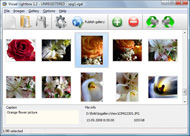
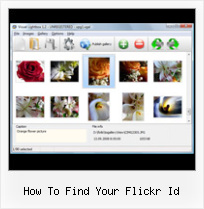
The following image set is generated by Flickr Gallery tool. Click any picture to run Lightbox gallery.

The example above is an in-page usage demo of Lightbox script with Flickr images. The photo gallery created with Flickr Gallery tool is placed inside the html page. You can also check the full-page demo web gallery. This example takes whole browser area to show the web gallery.Flickr Slideshow Without Any Control

How to Use

Step 1. Adding flickr images to your own gallery.


Locate the photo, photoset or photostream you want to use in your Flickr slideshow. Click on it to see the photo on its own page.

Copy URL of the flickr page.

Select Add images from Flickr... from the 'Add' button on the Toolbar.

Add images from Flickr

In the appeared window paste URL of the flickr page. Specify also the number of photos you want to add from the flickr page. Flickr Gallery will now include these photos in your project.

Add images from Flickr

If you have included the photos that you do not wish to be in your web gallery, you can easily remove them. Select all images that you wish to remove from photo gallery, and select Delete images. from the Images menu. You can pick and choose pictures by holding the CTRL while clicking the pictures you like.

Step 2. Adding caption.

The name of the photo on flickr page will automatically appear in the caption. When you select a photo you'll see the various info about it, such as: Path, Size, date of last change and Caption. You can add any comment or text about the photo (up to 512 symbols).

Step 3. Gallery properties.

Change the name of your flickr album, the size and quality of your pictures with Flickr Gallery. From the Gallery menu, select Properties or use "Edit Gallery Properties" button on the toolbar.

On the first tab of the Gallery Properties window you can change the name of your photo album and enable/disable the following properties: Slide Show, Auto play Slide Show, Zoom effect, Overlay Shadow. You can also set the Overlay shadow color and select the Engine you want to use (jQuery or Prototype + script.aculo.us).

On the second tab of the Gallery Properties window you can select the thumbnail you want to use, set the Thumbnails Resolution, Thumbnails Quality, Thumbnails Titles. Select Thumbnails Format (save in PNG or JPG format). Specify the Number of columns in you photo album and the Page color.

On the third tab of the Gallery Properties window you can select the template, Image resolution and Image quality of your pictures and change the Watermark.

You can set up the various sizes for exported images.

Control the quality of output PNG or JPEG format image by defining output "Image quality" and "Thumbnail quality" parameters (0%…100%).

Step 4. Save your photo gallery as project file.

When you exit Flickr Gallery application, you'll be asked if you want to save your project. The project consists of the pictures you choose to put on your web photo gallery and all your settings. It's a good idea to save the project, because that will allow you to change the project in case you decide to do something different with future galleries. So click Yes, then enter a name for your project. To select the location of your project, just click the Browse folders button and choose a different location. Then click Save.

Prototype Flickr Feed How To Find Your Flickr Id

Download Flickr Gallery


Download Flickr Gallery Download Free Edition
for Windows
Download Flickr Gallery Download Free Edition
for MAC

Flickr Gallery is free for non-commercial use.

A small fee is required for business use. Flickr Gallery Business Edition additionally provides an option to remove the Flickr Gallery. Com credit bar as well as a feature to put your own logo to images. After you finish the payment via the secure form, you will receive a license key instantly by e-mail that turns the Flickr Gallery Free Edition into a Business one. You can select the most appropriate payment method: PayPal, bank transfer, check, credit card etc. Also you can get Business Edition for free if you help with translating Flickr Gallery into your native language, please contact us at for more info.

Building Image Galleries Drupal Flickr

Buy Flickr GalleryBuy Business Edition
for Windows

$49
Single Website
$69
Unlimited Websites
Buy Flickr GalleryBuy Business Edition
for MAC

$49
Single Website
$69
Unlimited Websites

Support

For general help, troubleshooting and feature requests contact Customer Support at . Make sure to include details on your Flickr Gallery version, a link (or relevant code), browser and operating system.Blog This From Flickr To Tumblr

Feedback

    * I would like to say that Flickr Gallery is a stunning lil program! Its almost too good to be true i'd say! I've been looking for tutorials to create a lightbox gallery, but just couldnt come right. Im so glad i found Flickr Gallery!

    * First of all, I love you Flickr Gallery. I think it's beautiful! I purchased the lightbox “business edition” yesterday, and I’m very happy how easy it is to use. Found this to be one of the fastest ways to get a gallery on the web. Thanks.

    * Great product by the way and saved me loads of time. I really like your Flickr Gallery program! Very nice.Jquery Diaporama Flickr

    * I LOVE your free Lightbox2 software tool and will purchase the business version shortly. I have seen the Lightbox JS effect used with video tutorials and I was hoping you have a version for video that I can purchase.
Video LightBox: http://videolightbox.com

FAQ

Q:I would like to have a few galleries in one website and even on one page.

A:To create several galleries on your page you should change following parameter in A tag for different galleries:

rel="lightbox_vlb"

For example, for the first gallery you should set rel="lightbox_vlb":

<!-- Start Flickr Gallery.com BODY section -->
<div id="vlightbox">
<a rel="lightbox_vlb" href="data/images/dscn6831.jpg" title="dscn6831" >
<img src="data/thumbnails/dscn6831.png" ><span></span></a>
<a rel="lightbox_vlb" href="data/images/dscn6823.jpg" title="dscn6823">
<img src="data/thumbnails/dscn6823.png"><span></span></a>
<a id="vlb" href="http://Flickr Gallery.com">Photo Gallery For Web by Flickr Gallery.com v2.0</a>
</div>
<!-- End Flickr Gallery.com BODY section -->

and for the second gallery rel="lightbox_vlb1":

<!-- Start Flickr Gallery.com BODY section -->
<div id="vlightbox">
<a rel="lightbox_vlb1" href="data/images/img_0501.jpg" title="img_0501">
<img src="data/thumbnails/img_0501.png"><span></span></a>
<a rel="lightbox_vlb1" href="data/images/img_0481.jpg" title="img_0481">
<img src="data/thumbnails/img_0481.png"><span></span></a>
<a id="vlb" href="http://Flickr Gallery.com">Photo Gallery For Web by Flickr Gallery.com v2.0</a>
</div>
<!-- End Flickr Gallery.com BODY section -->


RELATED

Make your own Flickr search engine with Flash and in this tutorial I'm gonna show you how to interact with the flickr data base, making your own photo search engine, looking for tags on the photos. In here we gonna find all the functions have to interact with the flickr data base, we gonna use a common one, the flickr.photos.search

How To Install Slickr Flickr Wordpress Plugin To use the plugin in a post, page or text widget use the shortcode [slickr-flickr tag="my tag phrase"] If you have no photos in Flickr with this tag then no pictures are displayed. If you a problem finding or setting up your Flickr Id then check out how to find you Flickr Id

How To Find Your Flickr Id : Flickr Gallery How To Find Your Flickr Id. Flickr Gallery is the first software that creates AJAX-powered web image galleries without the need for server-side setup!. Flickr Gallery Jquery Conflict

How to find your Flickr ID in Advice from Camera Cube For starters - here's the plugin I use to display latest pictures from Flickr on this blog. How to find your Flickr ID. For starters – here's the plugin I use to display latest

idGettr — Find your Flickr ID A simple utility for finding your Flickr user id number (also works for groups) Use this tool to find your Flickr user or group id. Just enter the address of your photostream or group pool and it'll find the number for you. An eightface project — Hosted by dreamhost

Make a Photo Mosaic with Flickr Photos Make a Photo Mosaic with Flickr Photos. Flickr is a wonderful platform which can be perfectly integrated with other online applications, Visit Flickr with your Yahoo ID. Make a Photo Mosaic With Flickr photos. Choose a Flickr photo you want to make mosaic, and copy

How to Access Flickr Through Your Cell Phone | eHow.com How to Access Flickr Through Your Cell Phone. Cell phones with Internet access make it much easier to access your Flickr account. You can perform all of the normal functions on Flickr right from your cell phone, including

How to Find Your Friends in Flickr | K-Director.com Do you want to find your friends who are using Flickr too? It's easy to search for photos in Flickr but it's kind of tough to find your friends, especially from Flickr's big users group. Recently Flickr launched a new service, called Find Your

Integrating Flickr into your rails website - Pixellated Visions How to use flickr_fu to show your flickr images on your rails website or blog In this post I'm going to show you how I created the little Flickr stream you can see running down the right hand edge of this site

GetExplored.com Here is a short video tutorial that will show you how to promote your images on GetExplored. Flickr ID on your profile page. If you're signed in to flickr, you can find the ID on

Displaying your flickr photos in an unobtrusive manner If you have a user name set up and your URL does not have the @ id in like my stream does http://www.flickr.com/photos/codepo8/ then you need to find your ID

5 Photo Sharing Sites Which Are Free Alternatives to Flickr Flickr is a great photo sharing site and certainly one of the biggest photo sharing communities on the web. However, Flickr's free accounts are severely constrained which limit its usefulness as a photo sharing service for amateur and hobbyist

Creating a Web Slice for your flickr badge § The Adventures It looks like a lot bit really it's a copy and paste (just remember to change the feed for your flickr ID. Remember to take out my flickr id and replace it with yours

Nate Koechley " How To: Find Your "Friend ID" for Yahoo! My How To: Find Your "Friend ID" for Yahoo! My Web 2.0. I was looking for the url that points to my links on Yahoo!'s MyWeb 2.0 social search and social bookmarking product. When I'm logged in, it shows a clean url, but if you're not logged in as me that generic url wouldn't take you to my links

How to Find a Flickr page from the .jpg's urn Video – 5min.com How to Find a Flickr page from the .jpg's urn - Tekzilla shows you how to Locate Flickr photos from all over the web with the jpg's URL

Build a Photo Gallery Using CakePHP and Flickr " SitePoint Is the Flickr interface doing justice to your stunning snaps? It's time to consider customization! Jonathan shows us the ropes in his hands-on tutorial, as he uses CakePHP and the Flickr API to build an attractive, fully customized gallery that

How To Create & Customize a Flickr Account - August 2007 handout describe how to find the same information and perform the same tasks Your "Home" Page. When you login to your Flickr account, you are taken to your account "

Bram.us " How to find the original Flickr Photo URL and User How to find the original Flickr Photo URL and User from a Static How to find the original Flickr Photo URL and User from a Static Flickr Image URL If you

Now Use Your Google Account To Signup For Flickr There is no need to remember another password and sign up for a new Yahoo email ID, just because you want a Flickr presence. This is good news, both for users and Yahoo. Next post: How To Find Spam Posts Filtered by Facebook On Fan Pages

Flickr Examples in About This Site at PHSNE Members Pages Flickr ID. To use the slide show and galley markup, you must know your Flicker user name If you have not created what Flickr calls a "memorable web address" for your Flicker pages, then you can find your ID in the URL of your photostream at Flicker

Flickr: Help: Yahoo! IDs, signing in and screen names Flickr is almost certainly the best online photo management and sharing application in the world. Show off your favorite photos and videos to the world, securely and privately show content to your friends and family, or blog the photos and videos

Flickr For members who have merged their accounts or who signed up using a Yahoo! ID, this page describes current Yahoo! practices with respect to the Flickr products and services. Information Collection and Use Practices To find out how Yahoo! treats your personal information, please visit

Batch Download Flickr Photos with Flump Flump is a Adobe AIR application that lets you download Flickr photos of any Flickr user to your hard drive. Using this app is straightforward, enter the

How to Cancel Your Flickr Account | eHow.co.uk How to Cancel Your Flickr Account. Canceling your Flickr account is easy to do, but you may want to consider the reasons why you want to cancel your account. If you are having problems with your account and its features, the

How to: Add a Styled Flickr Photo Stream to Your Blog Adding uniquely-styled Flickr photo streams to your blog is easy, and it's just another thing you can leverage to make your blog stand out among the crowd. Today, my goal is simply to walk you through the process of creating

JISC Digital Media - Still Images: Finding Images on Flickr As the Flickr FAQ states: "When you contact a photographer, it's best to include as much info as possible about the photo, yourself, and how you want to use the photo. which you may find useful if you plan to use Flickr to organise your own images

