



Overview

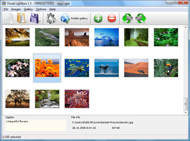
It's no secret that adding photos to your blog posts is one of the most effective ways to enhance your blog and attract attention to your writing. Flickr has millions of photos available in its database. A simple FREE tool called Flickr Gallery allows you to create a custom image gallery with a cool slide show of the most recent and most interesting photos from Flickr on your website or blog in a few easy steps. Just visit Flickr website and find photostream, photoset or a single photo you like. Enter the address of flickr page to add all photos from this page in your gallery, select the style of thumbnails and the overlay window and add the HTML embed code on your website or blog.
A few clicks and you'll see a stylish photo gallery with beautifull lightbox and zoom effects on your own website or blog!


Flickr Gallery for Windows   Flickr Gallery for MAC

Want more?

Example

Lightbox gallery sample

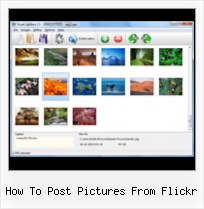
The following image set is generated by Flickr Gallery tool. Click any picture to run Lightbox gallery.

The photo gallery above is an in-page usage demo of Lightbox gallery that uses images from Flickr. The gallery created with Flickr Gallery application is placed inside the page layout. You can also check the full-page demo slideshow. This example takes whole browser area to show the Lightbox gallery that uses images from Flickr.Flickr Autoplay Video

How to Use

Step 1. Adding flickr images to your own gallery.


Locate the photo, photoset or photostream you want to use in your Flickr slideshow. Click on it to see the photo on its own page.

Copy URL of the flickr page.

Select Add images from Flickr... from the 'Add' button on the Toolbar.

Add images from Flickr

In the appeared window paste URL of the flickr page. Specify also the number of photos you want to add from the flickr page. Flickr Gallery will now include these photos in your project.

Add images from Flickr

If you have included the photos that you do not wish to be in your web gallery, you can easily remove them. Select all images that you wish to remove from photo gallery, and select Delete images. from the Images menu. You can pick and choose pictures by holding the CTRL while clicking the pictures you like.

Step 2. Adding caption.

The name of the photo on flickr page will automatically appear in the caption. When you select a photo you'll see the various info about it, such as: Path, Size, date of last change and Caption. You can add any comment or text about the photo (up to 512 symbols).

Step 3. Gallery properties.

Change the name of your flickr album, the size and quality of your pictures with Flickr Gallery. From the Gallery menu, select Properties or use "Edit Gallery Properties" button on the toolbar.

On the first tab of the Gallery Properties window you can change the name of your photo album and enable/disable the following properties: Slide Show, Auto play Slide Show, Zoom effect, Overlay Shadow. You can also set the Overlay shadow color and select the Engine you want to use (jQuery or Prototype + script.aculo.us).

On the second tab of the Gallery Properties window you can select the thumbnail you want to use, set the Thumbnails Resolution, Thumbnails Quality, Thumbnails Titles. Select Thumbnails Format (save in PNG or JPG format). Specify the Number of columns in you photo album and the Page color.

On the third tab of the Gallery Properties window you can select the template, Image resolution and Image quality of your pictures and change the Watermark.

You can set up the various sizes for exported images.

Control the quality of output PNG or JPEG format image by defining output "Image quality" and "Thumbnail quality" parameters (0%…100%).

Step 4. Save your photo gallery as project file.

When you exit Flickr Gallery application, you'll be asked if you want to save your project. The project consists of the pictures you choose to put on your web photo gallery and all your settings. It's a good idea to save the project, because that will allow you to change the project in case you decide to do something different with future galleries. So click Yes, then enter a name for your project. To select the location of your project, just click the Browse folders button and choose a different location. Then click Save.

Nextgen Flickr How To Post Pictures From Flickr

Download Flickr Gallery


Download Flickr Gallery Download Free Edition
for Windows
Download Flickr Gallery Download Free Edition
for MAC

Flickr Gallery is free for non-commercial use.

A small fee is required for business use. Flickr Gallery Business Edition additionally provides an option to remove the Flickr Gallery. Com credit string as well as a feature to put your own logo to images. After you conclude the payment via the secure form, you will receive a license key instantly by email that turns the Flickr Gallery Free Edition into a Business one. You can select the most suitable payment method: credit card, check, bank transfer, PayPal etc. Also you can get Business Edition for free if you help with translating Flickr Gallery into your native language, please contact us at for more info.

Flickr Gallery Background

Buy Flickr GalleryBuy Business Edition
for Windows

$49
Single Website
$69
Unlimited Websites
Buy Flickr GalleryBuy Business Edition
for MAC

$49
Single Website
$69
Unlimited Websites

Support

For general help, feature requests, troubleshooting contact Customer Support at . Make sure to include details on your operating system, browser, Flickr Gallery version and a link (or relevant code).Flickr Slideshow Wordpress Com

Feedback

    * Just bought the business version of Flickr Gallery and I just had to write and say how impressed I am with it. Really easy to use, intuitive interface and generates a truly professional presentation. Seldom have I been so pleased with a software purchase. Thank you.

    * I would like to say that Flickr Gallery is a stunning lil program! Its almost too good to be true i'd say! I've been looking for tutorials to create a lightbox gallery, but just couldnt come right. Im so glad i found Flickr Gallery!

    * This looks like EXACTLY what I need for my site. It would make my job much faster! Love your program. Thank you!!Flickr Iweb Gallery

    * Just a quick thank you for the software though, It's not often you get a free software version of this quality and style! Well done and please continue this amazing gallery. Hope to see more advances.

FAQ

Q:I would like to center all the thumbnails and I cannot figure out how.Can you please help?

A:Try to use <div> tag or <table> tag to center your thumbnails. Flickr Gallery generates a special code.
Just paste it in <div> tag.
You can also place in <dierates a special code.
Just paste it in <div> tag.
You can also place in <div> tag your iframe.
And then use the alignment that you ned.


RELATED

Upload Pictures From Picasa To Flickr Upload Pictures From Picasa To Flickr. If you use Picasa to manage your photos, there is 1. Go here, sign in to Flickr and copy the email address provided. 2

Using Pictures from Flickr If you've ever wondered where and how to get images to use on your Squidoo lenses and other sites, this lens will help you. It shows how to get pictures fro

Flickr: Help: Photos Flickr is almost certainly the best online photo management and sharing application in the world. Show off your favorite photos and videos to the world, securely and privately show content to your friends and family, or blog the photos and videos

How To Upload Pictures To Flickr Last week, I helped you pick out a new digital camera, and showed you how to download your photos to your computer, but which program should you use to manage and share them online? Flickr is still my go-to site for archiving pictures because it

Posting Pictures on Twitter with Twitpic & Flickr I love using Twitter and in general it's a near-perfect service. The 140 character service means that people are forced to be precise and coherent (no windy Here's how to post to Twitter using Flickr. Go to the picture on Flickr that you want to post to Twitter. You

Flickr Photos " Support — WordPress.com It takes care of your image resizing, allows you to tag your photos, and even enables notes and comments to be submitted on each photo by visitors. What's more, with just a few clicks, you can post a photo from your Flickr account onto your WordPress.com blog. Setup

How to Easily Download Multiple Pictures from Flickr Flickr immerses us within a beautiful world of images. Flickr won't allow you download multiple images at a time. Here's the solution

How to Post Pictures On Twitter As long as you can take and send pictures with your phone, you will be able to use any of those services to post pictures to your Twitter account. In order to post pictures from your cell phone, you will have to sign up for a third party web site

How to Post Pics Using Flickr | HelpfulGardener.com How to Post Pics Using Flickr - The HelpfulGardener.com Forum, Winner of BusinessWeek Magazine's Best of the Web Award! Visit the friendly place for home gardeners

How To Post Pictures From Flickr : Flickr Gallery How To Post Pictures From Flickr. Create excellent online photo websites with Flickr Gallery!. Photo Properties Flickr

Gmail, Picasa and Flickr I am new to flickr, after reading your post, it did help me in uploading pictures. On how one can add tags to the pictures you upload via e-mail to Flickr. http://www.tech-recipes.com/internet_tips1220.html. toby May 2, 2008. flickr is nice, but why do i have to pay as soon i have more than 3

Migrate pictures from Flickr to Picasa Looking for a way to migrate or copy your pictures between online photo sharing services like Picasa Web Albums, Flickr or Zooomr? Right now I have all of my digital pictures stored at Picasa, but I also have a few albums stored in Flickr since I

Posting Pictures from Nokia Lifeblog to Flickr - S60Tips.com Furthermore, as its name implies, we can post pictures to our blogs. How can we post picture from Nokia Lifeblog (PC version) to Flickr? If you want to post pictures directly from your device, please check some links at the end of this

Flickr Guide: How to Do Everything with Flickr Flickr Guide will show you how to do everything on Flickr. You can download and backup flickr pictures, set them as rotating wallpapers, browse pictures in 3D, make a screensaver and more. Q: I want to download all my photos from Flickr and burn them on to a DVD

Add pictures from new Flickr? Add pictures from new Flickr? " on: August 14, 2010, 08:08:00 PM " Anyone know how to post new photos from Flickr? They have fixed it so you can't just grab the link anymore because they Anyone know how to post new photos from Flickr? They have fixed it so you can't just grab the link anymore

Sol Young " How-to: Post Flickr images with iPhone WordPress app What if you're shooting with another camera and want to post high quality photos not taken with the iPhone crackerjack cam? Here's the instructions, including detailed pictures, on how I get photos from Flickr in to an iPhone WordPress blog post:

How to post picture on Twitter using Flickr [ Via Email ] How to post picture on Twitter using Flickr [ Via Email ] Good news for Flickr fans using Twitter. No long now you need to follow two step process ( uploading to Flickr and then tweeting about it ) as Flickr and Twitter can inetgrate together

How to automatically upload pictures from your mobile phone How to automatically upload pictures from your mobile phone to Flickr Test Blog " Blog Archive " How to automatically upload pictures from your mobile phone to Flickr linked to this post on October 1, 2007

How to post pictures I do have pictures saved on my computer (on My Pictures), but I can't seem to put them up on Gardenweb. When you post it asks for a URL. Isn't there a Browse feature, where you can locate your photos and post them that way? I am on Flickr, but can't seem to post pictures from there, either

YouTube - How to post pics to forums - photobucket and flickr This is a vd for my forum of how 2 post pics - but if youtube users find it useful thats good 2 - lol. How to post pics to forums - photobucket and flickr

turtle set-up pictures from Flickr part 2 | Pet Turtles And More Photos of turtle tank and aquarium set ups from Flickr.Pictures of red ear sliders, res, diamond back terrapins, and other aquatic turtles taken in their set-up

How do I post pictures from Flickr? - Blogger Help Blogger now supports image uploading for all users, but we also know that a lot of people have Flickr accounts as well. So if you'd like to post pictures using Flickr, here's how. (Prerequisite reading: Flickr Help, How do I get the URL of a photo?

Flickr FAQs How to post flickr photos to tumblr?. I make draftings on my flickr account that I would I want to change the background to "no" simply it wont change and continues at yes. how do i change it?. Flickr won't have me

How to post pictures from flickr? How to post pictures from flickr? This method complies with the Flickr community guidelines on requiring a linkback when you post the image on other sites

How to Post Pictures in Threads Using Flickr | FlowingData Forums How to Post Pictures in Threads Using Flickr. Started 1 year ago by nathany / 1 post There's a link at the top of every Flickr page to create an account

How to Post Your Flickr Pictures On Twitter | eHow.com Tips From Users Like You?This is a user-submitted article. It has not been reviewed by the eHow team, and may not adhere to the site's editorial standards for clarity and factual accuracy. How to Post Your Flickr Pictures On Twitter. Flickr loves Twitter! Sync your Flickr account with Twitter

Guest post: How to use Flickr to find pictures for your ads TBYB! thanks Lise of Frugal in the Fruitlands for writing this excellent two-part tutorial about how to use Flickr photos to illustrate your ads. In this first installment, she walks you through the process of locating and downloading images Guest post: How to use Flickr to find pictures for your ads

How to Find & Use Free Pictures on Flickr A simple guide for finding and using top quality free pictures from flickr.com If you scroll to the bottom of this post you'll see my attribution to "poolie" for the picture of the flickr buttons inserted at the top of this post. My personal method is to link the

