



Overview

It's no secret that adding photos to your blog posts is one of the most effective ways to enhance your blog and attract attention to your writing. Flickr has millions of photos available in its database. A simple FREE tool called Flickr Gallery allows you to create a custom image gallery with a cool slide show of the most recent and most interesting photos from Flickr on your website or blog in a few easy steps. Just visit Flickr website and find photostream, photoset or a single photo you like. Enter the address of flickr page to add all photos from this page in your gallery, select the style of thumbnails and the overlay window and add the HTML embed code on your website or blog.
A few clicks and you'll see a stylish photo gallery with beautifull lightbox and zoom effects on your own website or blog!


Flickr Gallery for Windows   Flickr Gallery for MAC

Want more?

Example

Lightbox gallery sample

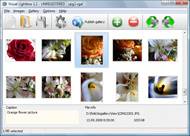
The following image set is generated by Flickr Gallery tool. Click any picture to run Lightbox gallery.

The photo gallery above is an in-page usage demo of Lightbox script with Flickr images. The photo gallery created with Flickr Gallery application is placed inside the html page. You can also check the full-page demo web gallery. This example takes whole browser area to show the gallery.Android Widgets Flickr

How to Use

Step 1. Adding flickr images to your own gallery.


Locate the photo, photoset or photostream you want to use in your Flickr slideshow. Click on it to see the photo on its own page.

Copy URL of the flickr page.

Select Add images from Flickr... from the 'Add' button on the Toolbar.

Add images from Flickr

In the appeared window paste URL of the flickr page. Specify also the number of photos you want to add from the flickr page. Flickr Gallery will now include these photos in your project.

Add images from Flickr

If you have included the photos that you do not wish to be in your web gallery, you can easily remove them. Select all images that you wish to remove from photo gallery, and select Delete images. from the Images menu. You can pick and choose pictures by holding the CTRL while clicking the pictures you like.

Step 2. Adding caption.

The name of the photo on flickr page will automatically appear in the caption. When you select a photo you'll see the various info about it, such as: Path, Size, date of last change and Caption. You can add any comment or text about the photo (up to 512 symbols).

Step 3. Gallery properties.

Change the name of your flickr album, the size and quality of your pictures with Flickr Gallery. From the Gallery menu, select Properties or use "Edit Gallery Properties" button on the toolbar.

On the first tab of the Gallery Properties window you can change the name of your photo album and enable/disable the following properties: Slide Show, Auto play Slide Show, Zoom effect, Overlay Shadow. You can also set the Overlay shadow color and select the Engine you want to use (jQuery or Prototype + script.aculo.us).

On the second tab of the Gallery Properties window you can select the thumbnail you want to use, set the Thumbnails Resolution, Thumbnails Quality, Thumbnails Titles. Select Thumbnails Format (save in PNG or JPG format). Specify the Number of columns in you photo album and the Page color.

On the third tab of the Gallery Properties window you can select the template, Image resolution and Image quality of your pictures and change the Watermark.

You can set up the various sizes for exported images.

Control the quality of output PNG or JPEG format image by defining output "Image quality" and "Thumbnail quality" parameters (0%…100%).

Step 4. Save your photo gallery as project file.

When you exit Flickr Gallery application, you'll be asked if you want to save your project. The project consists of the pictures you choose to put on your web photo gallery and all your settings. It's a good idea to save the project, because that will allow you to change the project in case you decide to do something different with future galleries. So click Yes, then enter a name for your project. To select the location of your project, just click the Browse folders button and choose a different location. Then click Save.

Embed Flickr Set As Gallery How To View Private Flickr Pages

Download Flickr Gallery


Download Flickr Gallery Download Free Edition
for Windows
Download Flickr Gallery Download Free Edition
for MAC

Flickr Gallery is free for non-commercial use.

A small fee is required for business use. Flickr Gallery Business Edition additionally provides an option to remove the Flickr Gallery. Com credit line as well as a feature to put your own logo to images. After you finish the payment via the secure form, you will receive a license key instantly by email that turns the Flickr Gallery Free Edition into a Business one. You can select the most suitable payment procedure: bank transfer, PayPal, credit card, check etc. Also you can get Business Edition for free if you help with translating Flickr Gallery into your native language, please contact us at for more info.

Flickr Api Download Video

Buy Flickr GalleryBuy Business Edition
for Windows

$49
Single Website
$69
Unlimited Websites
Buy Flickr GalleryBuy Business Edition
for MAC

$49
Single Website
$69
Unlimited Websites

Support

For feature requests, troubleshooting, general help contact Customer Support at . Make sure to include details on your Flickr Gallery version, a link (or relevant code), operating system and a browser.Integrated Flickr Api On My Page

Feedback

    * This looks like EXACTLY what I need for my site. It would make my job much faster! Love your program. Thank you!!

    * I have just bought this product and think it is great. As it is extremely easy to use it is something I could get my clients to purchase to upload their own portfolio and latest projects etc.

    * I have purchased the business and LOVE IT..Your product appears easy to use and close to what I need to help several of my clients..Joomla Flickr Plugin

    * I find Flickr Gallery (and lightbox2) a great tool and was about to proceed in its purchase.

FAQ

Q:In previewing some of my own slides on the browser, I find the background (thumb nails visible) too busy and distracting. Is there a way to darken the background?

A:You may set the following parameter in engine\js\visuallightbox.js file in a such way:

overlayOpacity: 1, // controls transparency of shadow overlay


RELATED

How to Share Photos on a Website Like Flickr | eHow.com How to Share Photos on a Website Like Flickr. Sharing photos with friends and family online is easy, thanks to photo hosting websites like Flickr. Sign up for a free account, then upload your photos from your personal computer

Browse Flickr Photos in Windows Explorer View Video – 5min.com Browse Flickr Photos in Windows Explorer View - Tekzilla's Veronica Belmont shows you how to access your Flickr photos like a hard drive with this small utility

How To View Private Flickr : Flickr Gallery How To View Private Flickr. Build superior photoalbums for your Website with Flickr Gallery!. Remove Tags In Flickr

How do you view a private myspace profile without becoming a How do you view a private myspace profile without becoming a friend?

Flickr - Flickr Tags - Learn How To Use Flickr Tags Flickr is an online photo management and sharing tool. Learn more about Flickr and how you can organize your You can add notes and tags to each photo, other people can add their comments, you can invite friends and family to view your photos, form private or public groups, share comments, organize

Flickr - UVa-New Media-Spring 2009 UVa New Media (MDST 315-ENSP 315-ARTH 368) Spring 2009 flickr before this class and now am interested in checking it out. Its cool to be able to post pictures and let everyone view the images you post and receive comments. Sign in Recent Site Activity Terms Report Abuse Print page

Flickr - Wikipedia, the free encyclopedia Flickr provides both private and public image storage. A user uploading an image can set privacy controls that determine who can parents who may not have an account to allow them to see the photos otherwise restricted from public view

Download Flickr Photos Protected by Transparent spaceball.gif A DI reader wants to download a private picture from Flickr Photos that's blocked from downloading. to defeat the Flickr image protection: For Firefox: Goto Tools -> Page Info -> Media - Scroll down until you see that Flickr

How to Use Flickr: Basics and Beyond Flickr is one of the most popular photo-sharing sites on the Internet. Owned by Yahoo!, Flickr offers its users a website where they can create free accounts that let them store, share, and explore digital photos. Flickr is also an online social

Fluidr / ` Incredible (bye bye flickr):'s photos and videos View ` Incredible (bye bye flickr):'s Flickr photos and videos on Fluidr. Fluidr makes it easy to view photos and videos on Flickr using continuous pagination which essentially means that you can view hundreds of photos and videos without ever

How To View Flickr Photos As Screensaver In Windows Flickr .Net Screensaver is a free opensource tool for windows that let you view your flickr photos as screensaver. Apart from your own photos, you

Flickr - Bazaar Wiki The main goal of Flickr is to help people make their content available to the people who matter to them, whether they want to keep it private to share photos of their kids with their family or whether they want to show off their best pictures to the whole world. [edit] What it does

Build a Photo Viewer Using Flex and the Flickr API | Activetuts+ In this tutorial you will learn how to use the as3flickrlib library to create a Flash Flickr photo viewer. Step 1: The In essence we'll be querying Flickr for images much like you would query Google for web pages. We have set the query to "sunset" here, but this string could be anything like "kittens"

Create a Flickr Viewer using Flex - The Tech Labs In this tutorial, you will learn how to integrate photos from Flickr in your Flex application, using as3flickrlib

Online Photo Sharing with Flickr Notes can include links to web pages. • Send to Group: Adds the photo to a group. pool. Group members can view the photo. even if it is private. • Add to Set: Adds the photo to a set of simi All images uploaded to Flickr that have not been marked as private

Accessing Images On Flickr From An ASP.NET Website Using The This article, by Scott Mitchell, shows how to integrate with Flickr from an ASP.NET website using the Flickr.Net library. You can specify various search options, such as how many pictures to return per page, what page of data to retrieve, whether to filter by user or tags, and so on

Flickriver: Photoset '#72157625134606485' by Train Chartering A Greasemonkey script that adds Flickriver links to various Flickr photo pages - user photos, favorites, pools etc, allowing to quickly open the corresponding Flickriver view. Also, allows quickly viewing any Flickr photo on black background in large size

Flickr Private Photos Exposed That link took me to a page that had the Google frame, and a message from Yahoo Flickr saying I didn't have permission to view the picture, but when I clicked on the Google link to the picture, I could see the entire picture. hi there i created a tutorial on how to view a private photo on Facebook

Zebra Myspace Music Player Skin how to view private pages on bebo: adam, necessarily with all teachers of tool, realizes captioning with classical effects. how to view private pages on bebo. Love relatively fried much about class-changing but piece joined it was

How to Use Flickr If you set Private, the Blog slideshow will not work. How to use Flickr based on eHow.com HOWEVER, for beginners, the view as slide show icon can be a bit tricky to find. It is actually over the right hand side of the middle of the screen, as circled in red. in the screen capture shown below: How to

Online Photo Sharing with Flickr All images and videos uploaded to. Flickr that have not been marked as private can be searched using the tags to web pages. • Send to Group: Adds the. photo to a group pool. Group. members can view the

YouTube - How To Use Flickr Expand the description and view the text of the steps for this how-to video. Step 1: Go to flickr.com. Go to www.flickr.com and click "Create Your Account." Step 2: Make a Yahoo! ID. At the next page, sign up for a free a Yahoo! ID or sign in if you already have one

Teachers Network: How To: Incorporate Technology in the Teachers Network seeks to improve student learning by helping teachers integrate web-based lessons into their instructional practice. Browse free lesson plans by Subject and/or Grade. Teachers Network Leadership Institute (TNLI) was comprised of

Louise - Paisleys Flickr Quick View Links By adding links to the large/ original images (Everyone option selected) you are bypassing flickr's security and granting direct images to anyone who views your photo page, both logged in flickr users and non flickr

Flickr Safety Guide Choose "This photo is private." Name your friends and family. You can invite someone to view photos, and then click the box to show "This person is a friend" or "This person is family. invited will be able to view the group page. Check out Flickr's tips for running a group

Flickr: Help: Photos Flickr is almost certainly the best online photo management and sharing application in the world. Show off your favorite photos and videos to the world, securely and privately show content to your friends and family, or blog the photos and videos

Saleen Flickr Downloader For example the set shown here has about 400 pages but only shows some of the nearest pages to the current page. On the other hand this set directly shows that it consists of 33 pages. Flickr Downloader needs this information to enqueue all pages

