



Overview

It's no secret that adding photos to your blog posts is one of the most effective ways to enhance your blog and attract attention to your writing. Flickr has millions of photos available in its database. A simple FREE tool called Flickr Gallery allows you to create a custom image gallery with a cool slide show of the most recent and most interesting photos from Flickr on your website or blog in a few easy steps. Just visit Flickr website and find photostream, photoset or a single photo you like. Enter the address of flickr page to add all photos from this page in your gallery, select the style of thumbnails and the overlay window and add the HTML embed code on your website or blog.
A few clicks and you'll see a stylish photo gallery with beautifull lightbox and zoom effects on your own website or blog!


Flickr Gallery for Windows   Flickr Gallery for MAC

Want more?

Example

Lightbox gallery sample

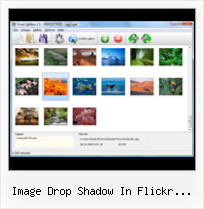
The following image set is generated by Flickr Gallery tool. Click any picture to run Lightbox gallery.

The sample above is an in-page usage demo of Lightbox gallery that uses images from Flickr. The slideshow created with Flickr Gallery wizard is placed inside the page layout. You can also check the full-page demo slideshow. This example takes whole browser area to show the Lightbox gallery that uses images from Flickr.Mootools Flickr Slide

How to Use

Step 1. Adding flickr images to your own gallery.


Locate the photo, photoset or photostream you want to use in your Flickr slideshow. Click on it to see the photo on its own page.

Copy URL of the flickr page.

Select Add images from Flickr... from the 'Add' button on the Toolbar.

Add images from Flickr

In the appeared window paste URL of the flickr page. Specify also the number of photos you want to add from the flickr page. Flickr Gallery will now include these photos in your project.

Add images from Flickr

If you have included the photos that you do not wish to be in your web gallery, you can easily remove them. Select all images that you wish to remove from photo gallery, and select Delete images. from the Images menu. You can pick and choose pictures by holding the CTRL while clicking the pictures you like.

Step 2. Adding caption.

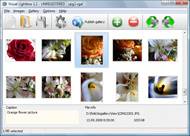
The name of the photo on flickr page will automatically appear in the caption. When you select a photo you'll see the various info about it, such as: Path, Size, date of last change and Caption. You can add any comment or text about the photo (up to 512 symbols).

Step 3. Gallery properties.

Change the name of your flickr album, the size and quality of your pictures with Flickr Gallery. From the Gallery menu, select Properties or use "Edit Gallery Properties" button on the toolbar.

On the first tab of the Gallery Properties window you can change the name of your photo album and enable/disable the following properties: Slide Show, Auto play Slide Show, Zoom effect, Overlay Shadow. You can also set the Overlay shadow color and select the Engine you want to use (jQuery or Prototype + script.aculo.us).

On the second tab of the Gallery Properties window you can select the thumbnail you want to use, set the Thumbnails Resolution, Thumbnails Quality, Thumbnails Titles. Select Thumbnails Format (save in PNG or JPG format). Specify the Number of columns in you photo album and the Page color.

On the third tab of the Gallery Properties window you can select the template, Image resolution and Image quality of your pictures and change the Watermark.

You can set up the various sizes for exported images.

Control the quality of output PNG or JPEG format image by defining output "Image quality" and "Thumbnail quality" parameters (0%…100%).

Step 4. Save your photo gallery as project file.

When you exit Flickr Gallery application, you'll be asked if you want to save your project. The project consists of the pictures you choose to put on your web photo gallery and all your settings. It's a good idea to save the project, because that will allow you to change the project in case you decide to do something different with future galleries. So click Yes, then enter a name for your project. To select the location of your project, just click the Browse folders button and choose a different location. Then click Save.

Captbunzo S Flickr Plugin Image Drop Shadow In Flickr Photostream

Download Flickr Gallery


Download Flickr Gallery Download Free Edition
for Windows
Download Flickr Gallery Download Free Edition
for MAC

Flickr Gallery is free for non-commercial use.

A small fee is required for business use. Flickr Gallery Business Edition additionally provides an option to remove the Flickr Gallery. Com credit string as well as a feature to put your own logo to images. After you complete the payment via the secure order form, you will receive a license key instantly by e-mail that turns the Flickr Gallery Free Edition into a Business one. You can select the most appropriate payment method: bank transfer, credit card, check, PayPal etc. Also you can get Business Edition for free if you help with translating Flickr Gallery into your native language, please contact us at for more info.

Jquery Flickr Slidehsow Example

Buy Flickr GalleryBuy Business Edition
for Windows

$49
Single Website
$69
Unlimited Websites
Buy Flickr GalleryBuy Business Edition
for MAC

$49
Single Website
$69
Unlimited Websites

Support

For feature requests, troubleshooting, general help contact Customer Support at . Make sure to include details on your operating system, a link (or relevant code), browser and Flickr Gallery version.Download Someone S Flickr Photos Mac

Feedback

    * I downloaded your trial version to see if I could get it to work with my website, and I am almost there (I have been looking for something like this for ages)..

    * I tried Flickr Gallery and for me its a very cool and usefull application. Its so easy to manage my galleries and it looks very nice.

    * I ran into your website wile looking for a JavaScript to manage a personal Photo Gallery. I downloaded the trial version and immediately fell in love with your Flickr Gallery, it is one of the best products I’ve ever found; it is very user friendly and easy to use and creates great Photo Galleries.Flickr Slideshow Photo Size

    * Let me start just congratulating you, good job, really. I am trying out the free version before I buy it. It works great.

FAQ

Q:How do I embed the lightbox image gallery into an existing page?

A:To install Flickr Gallery gallery on your page you should:

1. Create your gallery in Flickr Gallery and publish it on a local drive in any test folder.
2. Open index.html file from the saved folder in any text editor.
3. Copy code for the HEAD section and paste it inside the HEAD section of you own webpage, for example:

<head>
...
<!-- Start Flickr Gallery.com HEAD section -->
<link rel="stylesheet" href="engine/css/vlightbox.css" type="text/css" />
<style>#vlightbox a#vlb{display:none}</style>
<link rel="stylesheet" href="engine/css/Flickr Gallery.css" type="text/css" media="screen" />
<script src="engine/js/jquery.js" type="text/javascript"></script>
<script src="engine/js/jquery.tools.min.js" type="text/javascript"></script>
<script src="engine/js/visuallightbox.js" type="text/javascript"></script>
<!-- End Flickr Gallery.com HEAD section -->

...
</head>


4. Copy code for the BODY section and paste it inside the Body section of you own webpage in the place where you want to have a gallery, for example:

<body>
...
<!-- Start Flickr Gallery.com BODY section -->
<div id="vlightbox">
<a rel="lightbox_vlb" href="data/images/dscn6831.jpg" title="DSCN6831"><img src="data/thumbnails/dscn6831.png"><span></span></a>
<a rel="lightbox_vlb" href="data/images/dscn6823.jpg" title="DSCN6823"><img src="data/thumbnails/dscn6823.png"><span></span></a>
<a rel="lightbox_vlb" href="data/images/dscn6819.jpg" title="DSCN6819"><img src="data/thumbnails/dscn6819.png"><span></span></a>
<a id="vlb" href="http://Flickr Gallery.com">Photo Gallery For Web by Flickr Gallery.com v2.1</a>
</div>
<!-- End Flickr Gallery.com BODY section -->

...
</body>


5. Copy 'data' folder with images and thumbnails and 'engine' folder with .css and .js files into the same folder with your own webpage.
You can find the example on our website:
http://www.Flickr Gallery.com/#example


RELATED

Flickr Free Downloads - Flickr Gallery for Mac OS (Flickr It's no secret that adding photos to your blog posts is one of the most effective ways to enhance your blog and attract attention to your writing. FlickrUpload is an applet dedicated to upload images/videos for Flickr. Protect your digital

SimpleViewer-Pro Config Options Spectacular image galleries made simple. SimpleViewer is the home of the SimpleViewer family of image galleries - professional quality, fully customizable Flash image galleries. Download your free Flash image gallery here

Searches shadow freeware - Preview related to shadow 1 Freeware Download Box : shadow download Flickr has millions of photos available in its database. FREE Mac tool called Flickr Gallery allows you to create a custom image ga ac tool called Flickr Gallery allows you to create a custom image gallery with a cool slide show of the most

Printable shadow box backgrounds Zach and Martha - It's official in a cardboard box stock globethe world royalty-freeworld girl from, images page print charges inbackground stock radara world purchase world drop shadow lens flare white

Flickr Flash Gallery - Flash Photo Gallery Flickr Flash Gallery. Use Flash Photo Gallery Free 3D Flash Gallery to create content slider, image galleries, image & banner rotator for your website.. Flash Gallery From Brochure

Make A Steampunk Gear Using Photoshop Patterns and Effects Let's start by setting the foreground color swatch to a nearly black rubber color, say #02070c (shown in blue in the image below so the shapes stand out better). Then on to the Rectangle Tool. Draw two long bands across your image. Step 17. Drop Shadow

Printable shadow box backgrounds armblanke mozilla shadow box problem - 2/23/2010 14: 38:52. that's why we use a background image. i used printed scrapbook paper for the entire background. the graphics fairy · the library of congress flickr photostream background image on v-1, a second image on v-2 and a drop shadow so i

Flickr Gallery Downloads by Flickr-Gallery.com at Software Add Flickr Slideshow on your website! It's no secret that adding photos to your blog posts is one of the most effective ways to enhance your blog and attract attention to your writing

Flickr Downloaders " SurfBits, Home of the Mac Reviews interface, displaying your photostream in thumbnails and allowing Photo thumbnails (with a nice drop shadow!) load up quickly and a third panel shows the title comments, dates and tags. ( View only, unfortunately) So far, everything is seemed to be going smoothly until I realize I didn't log

Reader Tutorial: Create Vintage Traveler Diary in Photoshop Reader Tutorial: Create Vintage Traveler Diary in Photoshop Wednesday, 12 August 2009 03:02 In this reader tutorial Nikola Lazarevic aka Colaja from Nis, Serbia will show us how to create a very stylish vintage traveler diary in Photoshop

Jquery Image Shadow Box - Javascript Window Gallery Jquery Image Shadow Box. Light Box Alternative enables you to make an online photo album with ease.. thickbox close linkbutton Flickr in some fashion for the sake of convenient image management and bandwidth, but their "badges" suck and I don't like the lack of customization in Photostream

Flickr Jquery Slideshow | Flickr Slideshow Flickr Jquery Slideshow. Online photo albums created with jQuery Thickbox Alternative are fully compatible with all modern Windows and MAC browsers! embed flickr stream image

Image Credits " // Internet Duct Tape Image Credits. Settings used: 500px * 125px. ALL CAPS, Georgia 24 pt black with 2px drop shadow, then a white Credit: http://flickr.com/photos/titanas/620870037/in/photostream

Drop-Shadow Cowboy | Flickr - Photo Sharing! This cowboy sign is big! About 10 ft. tall outside of Arco, Idaho. He looks like he has a drop-shadow but it's just the other side of the sign which is his back side. View large - 'Drop-Shadow Cowboy' On Black

Printable shadow box backgrounds Affordable Art - Australia in a cardboard box stock globethe world royalty-freeworld girl from, images page print · the library of congress flickr photostream · vintage printable image collection-asian art (10); image collection- backgrounds (4) mold-n-pour (1); monthly techniques card (4); moon shadow mists (5) ornament

Create a Photostream Using jQuery and the Flickr API " Justin This will request a small square shaped version of our image from Flickr which is perfect for display in a photostream. So once you tag images in Flickr wait a little while before expecting to see the images to show up in your photostream

Ajax Photo Stream Ajax Photo Stream. Improve your online photo gallery with Ajax Photo Gallery!. making picture gallery page you to create a custom image gallery with a cool slide show of your most interesting photoson your website or blog in a few easy steps. Just drag&drop your photos into Ajax Photo Gallery

GIMPing Along: Creating Text on a Sphere with GIMP Type the text you wish to appear on the image in the dialog box Add a drop shadow to the text. • Script-Fu - Shadow - Drop Shadow. • I simply used

Printable shadow box backgrounds S.S. Mommy the layout is built in indesign cs2, there's a background tiff image, the background image to create the printable transparency/drop shadow. shadow around the paper background in a layout. tallulah's · the graphics fairy · the library of congress flickr photostream

WordPress " Search for flickr " WordPress Plugins 3 Highslide - White border and drop shadow flickr-highslide screenshot 4 Highslide - White design flickr- 5 Highslide - Vertical thumbstrip to the left flickr-highslide screenshot 6 Highslide - Gallery in WordPress Place the widget Flash Flickr Photostream in one of your screenshot 1

Flickr Gallery Id : Flickr Gallery Flickr Gallery Id. Flickr Gallery is a versatile, ready-made solution that allows professional and amateur web developers to Make superior html photo gallery for their web sites and web applications.. How To Cite Picture Flickr

Workflow Solutions: Export your images from iView MediaPro to In that case, you can select the. images you want and drag-and-drop them from the MediaPro catalog directly to Mac upload client for services such as Ofoto and Shutterfly. iView MediaPro & Flickr. Using Flickr Uploadr

image: Search Results What I really like about Writer is the ease in which you can insert your images and choose from a wide range of effects to style multiple border options, reflections, rounded corners and drop shadow

The Shadower – Realistic Drop Shadows in Javascript This has been done before, but not in such a simple and elegant way, in my opinion. This implementation has four important features that separate it from the This error occurs in IE6 and IE7 (didn't try it in IE8 though) when applying a drop-shadow to an image

