



Overview

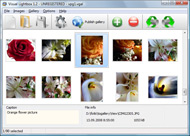
It's no secret that adding photos to your blog posts is one of the most effective ways to enhance your blog and attract attention to your writing. Flickr has millions of photos available in its database. A simple FREE tool called Flickr Gallery allows you to create a custom image gallery with a cool slide show of the most recent and most interesting photos from Flickr on your website or blog in a few easy steps. Just visit Flickr website and find photostream, photoset or a single photo you like. Enter the address of flickr page to add all photos from this page in your gallery, select the style of thumbnails and the overlay window and add the HTML embed code on your website or blog.
A few clicks and you'll see a stylish photo gallery with beautifull lightbox and zoom effects on your own website or blog!


Flickr Gallery for Windows   Flickr Gallery for MAC

Want more?

Example

Lightbox gallery sample

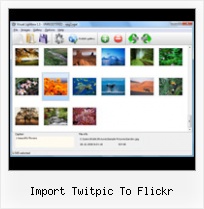
The following image set is generated by Flickr Gallery tool. Click any picture to run Lightbox gallery.

The example above is an in-page usage demo of Lightbox gallery that uses images from Flickr. The website gallery created with Flickr Gallery application is placed inside the html page. You can also check the full-page demo gallery. This example takes whole browser area to show the web gallery.Flickr Slide Show

How to Use

Step 1. Adding flickr images to your own gallery.


Locate the photo, photoset or photostream you want to use in your Flickr slideshow. Click on it to see the photo on its own page.

Copy URL of the flickr page.

Select Add images from Flickr... from the 'Add' button on the Toolbar.

Add images from Flickr

In the appeared window paste URL of the flickr page. Specify also the number of photos you want to add from the flickr page. Flickr Gallery will now include these photos in your project.

Add images from Flickr

If you have included the photos that you do not wish to be in your web gallery, you can easily remove them. Select all images that you wish to remove from photo gallery, and select Delete images. from the Images menu. You can pick and choose pictures by holding the CTRL while clicking the pictures you like.

Step 2. Adding caption.

The name of the photo on flickr page will automatically appear in the caption. When you select a photo you'll see the various info about it, such as: Path, Size, date of last change and Caption. You can add any comment or text about the photo (up to 512 symbols).

Step 3. Gallery properties.

Change the name of your flickr album, the size and quality of your pictures with Flickr Gallery. From the Gallery menu, select Properties or use "Edit Gallery Properties" button on the toolbar.

On the first tab of the Gallery Properties window you can change the name of your photo album and enable/disable the following properties: Slide Show, Auto play Slide Show, Zoom effect, Overlay Shadow. You can also set the Overlay shadow color and select the Engine you want to use (jQuery or Prototype + script.aculo.us).

On the second tab of the Gallery Properties window you can select the thumbnail you want to use, set the Thumbnails Resolution, Thumbnails Quality, Thumbnails Titles. Select Thumbnails Format (save in PNG or JPG format). Specify the Number of columns in you photo album and the Page color.

On the third tab of the Gallery Properties window you can select the template, Image resolution and Image quality of your pictures and change the Watermark.

You can set up the various sizes for exported images.

Control the quality of output PNG or JPEG format image by defining output "Image quality" and "Thumbnail quality" parameters (0%…100%).

Step 4. Save your photo gallery as project file.

When you exit Flickr Gallery application, you'll be asked if you want to save your project. The project consists of the pictures you choose to put on your web photo gallery and all your settings. It's a good idea to save the project, because that will allow you to change the project in case you decide to do something different with future galleries. So click Yes, then enter a name for your project. To select the location of your project, just click the Browse folders button and choose a different location. Then click Save.

Full Screen Flickr Photo Gallery Import Twitpic To Flickr

Download Flickr Gallery


Download Flickr Gallery Download Free Edition
for Windows
Download Flickr Gallery Download Free Edition
for MAC

Flickr Gallery is free for non-commercial use.

A small fee is required for business use. Flickr Gallery Business Edition additionally provides an option to remove the Flickr Gallery. Com credit line as well as a feature to put your own logo to images. After you complete the payment via the secure form, you will receive a license key instantly by e-mail that turns the Flickr Gallery Free Edition into a Business one. You can select the most appropriate payment procedure: credit card, bank transfer, check, PayPal etc. Also you can get Business Edition for free if you help with translating Flickr Gallery into your native language, please contact us at for more info.

Facebook Flickr Slideshow Url

Buy Flickr GalleryBuy Business Edition
for Windows

$49
Single Website
$69
Unlimited Websites
Buy Flickr GalleryBuy Business Edition
for MAC

$49
Single Website
$69
Unlimited Websites

Support

For general help, feature requests, troubleshooting contact Customer Support at . Make sure to include details on your operating system, browser, a link (or relevant code) and Flickr Gallery version.Use Flickr With Shadowbox Js

Feedback

    * I LOVE your free Lightbox2 software tool and will purchase the business version shortly. I have seen the Lightbox JS effect used with video tutorials and I was hoping you have a version for video that I can purchase.
Video LightBox: http://videolightbox.com

    * Another programmes have incredible functionality but no fantastic interface like your product!

    * Just bought the business version of Flickr Gallery and I just had to write and say how impressed I am with it. Really easy to use, intuitive interface and generates a truly professional presentation. Seldom have I been so pleased with a software purchase. Thank you.Blog Flickr Demo

    * I downloaded your trial version to see if I could get it to work with my website, and I am almost there (I have been looking for something like this for ages)..

FAQ

Q:How do I embed the lightbox image gallery into an existing page?

A:To install Flickr Gallery gallery on your page you should:

1. Create your gallery in Flickr Gallery and publish it on a local drive in any test folder.
2. Open index.html file from the saved folder in any text editor.
3. Copy code for the HEAD section and paste it inside the HEAD section of you own webpage, for example:

<head>
...
<!-- Start Flickr Gallery.com HEAD section -->
<link rel="stylesheet" href="engine/css/vlightbox.css" type="text/css" />
<style>#vlightbox a#vlb{display:none}</style>
<link rel="stylesheet" href="engine/css/Flickr Gallery.css" type="text/css" media="screen" />
<script src="engine/js/jquery.js" type="text/javascript"></script>
<script src="engine/js/jquery.tools.min.js" type="text/javascript"></script>
<script src="engine/js/visuallightbox.js" type="text/javascript"></script>
<!-- End Flickr Gallery.com HEAD section -->

...
</head>


4. Copy code for the BODY section and paste it inside the Body section of you own webpage in the place where you want to have a gallery, for example:

<body>
...
<!-- Start Flickr Gallery.com BODY section -->
<div id="vlightbox">
<a rel="lightbox_vlb" href="data/images/dscn6831.jpg" title="DSCN6831"><img src="data/thumbnails/dscn6831.png"><span></span></a>
<a rel="lightbox_vlb" href="data/images/dscn6823.jpg" title="DSCN6823"><img src="data/thumbnails/dscn6823.png"><span></span></a>
<a rel="lightbox_vlb" href="data/images/dscn6819.jpg" title="DSCN6819"><img src="data/thumbnails/dscn6819.png"><span></span></a>
<a id="vlb" href="http://Flickr Gallery.com">Photo Gallery For Web by Flickr Gallery.com v2.1</a>
</div>
<!-- End Flickr Gallery.com BODY section -->

...
</body>


5. Copy 'data' folder with images and thumbnails and 'engine' folder with .css and .js files into the same folder with your own webpage.
You can find the example on our website:
http://www.Flickr Gallery.com/#example


RELATED

PicTag.me - Tag Pictures Of You And Your Friends On Twitter Who says that tagging is only for Facebook? Try PicTag.me now and start tagging yourself all over Twitter! You can also import pictures directly from your TwitPic or Flickr account

Last Import-25 | Flickr - Photo Sharing! Last Import-25 To take full advantage of Flickr, you should use a JavaScript-enabled browser and install the latest version of the Macromedia Flash Player

Twitpic Blocks Posterous' Import Tool; Out Come The Lawyers Well that didn't take long. Halfway into their big 15 importers in 15 days campaign, Posterous has managed to make one of their competitors very angry. Twitpic is so angry, in fact, that they're blocking the service and threatening legal action

Switch to Posterous Share to Facebook, Flickr, & others. Download Posterous IO Tools for TwitPic now. This application requires the Adobe® AIR™ runtime to be installed for Mac OS or Windows. Give it a spin: Tired of sharing your photos in a generic environment with ads cluttering the viewing experience?

Import Twitpic To Flickr : Flickr Gallery Import Twitpic To Flickr. Flickr Slide Show is a versatile, ready-made solution that allows professional and amateur web developers to create superior digital photo albums for their websites and web applications.. Flickr Html Embedded

Make Yourself Known – Embedded Contact Info Once I had the info saved in the file, I uploaded it to TwitPic. Of course many of you use Flickr to get your images seen by others and it is a very fertile location for anyone searching for

Picture2Life | Flickr Home Picture2Life allows you to edit, collage, animate and share your pictures online. Return to Reface Your Facebok App? To select a picture, first you must "connect to a service" and then select "Import my Pictures" to import (or grab) the pictures to your account. Connect Flickr. Go to the

Flickr API Profile Flickr API -- see mashups, code, news, reviews and resources. Plus hundreds of APIs and mashups. Fotoland allows users to create tags on the map and then imports photos that are associated with these tags from flickr

Import flickr photos | Killerstartups.com Reviews for Websites with the tag import flickr photos Search for websites that are related with the tag import flickr photos

Flickr Posts on TechCrunch Obama Situation Room' Photo Is Already Half Way To Becoming Flickr's Most Viewed Pic. 5/3/11 by Alexia Tsotsis. PhotoSync Is A Simple Way To Import Your Flickr Photos Into Facebook. 4/26/11 by Alexia Tsotsis. As Instagram Innovates, Yahoo Product Head Makes "Early Flickr" Comparison

Tag your friends in pictures with PicTag.me | All Twitter Apps Applications that allow Twitter users to upload photographs, are almost as popular as Twitter itself. A large amount of people PicTag.me allows individuals to either upload photographs from their computer or import photographs from Twitpic, Tweetphoto, Flickr and various other image upload

Posterous continues feud with TwitPic, releases new TwitPic Related posts:Twitpic Blocks Posterous' Import Tool; Out Come The Lawyers Well that didn't take long. The new export tool can theoretically export your photos to Flickr, Facebook and other locations on the web, but it's only set up to work with Posterous by default. [via TheNextWeb]

Post by Richard Walker from Google Reader Twitpic is so angry, in fact, that they're blocking the service and threatening legal action. This morning, Posterous introduced their new "Rescue your photos from TwitPic" tool — a one-click way to import your photos from Twitpic over to your Posterous blog

Share your Flickr photos via Twitter | BigBlueBall Flickr has announced that you can now automatically share your photos via Twitter, similar to TwitPic or yfrog

Twitdom " twitpic | The Twitter Applications Directory The Twitter Applications Directory Tweet To Go is a location enabled photo posting Twitter app for Verizon feature phones. PicTag.me. PicTag.me brings Facebook-style photo tagging to Twitter. Import your photos from Flickr, Twitpic, Tweetphoto or other websites or upload your own!

flickr Software - Free Download flickr - Top 4 Download your blog and attract attention to your writing. Flickr has millions of photos available to zoom thumbnails from Facebook, Twitter, MySpace, Amazon, Flickr, Picasa, LinkedIn, Hi5, Twitpic,

Import pictures from Facebook, Flickr, Twitter and others Any internet user can be uploading artistic photos to Flickr, while his friends are tagging him on Facebook, he uses Twitpic or YFrog to tweet some pictures out and have Reading Olapic Blog " Product Features " Import pictures from Facebook, Flickr, Twitter and others. Do you want to try Olapic?

Posterous to TwitPic Users: "Rescue" Photos with New Import Tool Posterous is in the midst of an aggressive 15-day campaign to get users of other services such as Tumblr and Ning to switch to its blogging platform. In this case, simply enter the URL of your TwitPic profile, complete the Twitter OAuth process and Posterous will begin the import process

Tools To Integrate Twitter And Flickr | Twitter Flickr Mash Tools to integrate your Twitter account with Flickr, Uploading TwitPic photos to Flickr automatically, Track Flick photos tags and tweet when any new photo is added

Flickr Review - Photo - AppAppeal Flickr is a photo hosting and sharing site owned by Yahoo!. Special features. Includes creating slideshows, geo-tagging of photos and mobile support

Import/Migrate Images From TwitPic To Flickr Twitpic is a image sharing service, which allows you to quickly upload images for sharing with your Twitter friends and family. Twitpic is very closely

#CapeShoot curated by capetown - Pearltrees Check capetown's curation about #CapeShoot: Photo : yfrog.com/h8lnbmj - Shared by ghadieja // Mandla Hlabisa's photos - @CapeTown beautiful xmas day in the Mother City | Plixi // Haut Espoir // Photo : yfrog.com/h25pfqj - Shared by kulaH86

Turn a Flickr into a flame: Move your photos to Posterous Since Posterous is also a blog, it would make sense to import them in the same order. Along with LiveJournal, Flickr is not listed as an import choice at the switchto page

Mobypicture - Share your adventures with your friends realtime This group doesn't have any postings, send your postings to mobypicture with the hashtag #twitpicmitcha in the title or subject to post it in list. grid. map. Twitpic to Moby. Import Twitpic to Moby. statistics

