
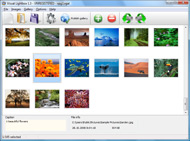



Overview

It's no secret that adding photos to your blog posts is one of the most effective ways to enhance your blog and attract attention to your writing. Flickr has millions of photos available in its database. A simple FREE tool called Flickr Gallery allows you to create a custom image gallery with a cool slide show of the most recent and most interesting photos from Flickr on your website or blog in a few easy steps. Just visit Flickr website and find photostream, photoset or a single photo you like. Enter the address of flickr page to add all photos from this page in your gallery, select the style of thumbnails and the overlay window and add the HTML embed code on your website or blog.
A few clicks and you'll see a stylish photo gallery with beautifull lightbox and zoom effects on your own website or blog!


Flickr Gallery for Windows   Flickr Gallery for MAC

Want more?

Example

Lightbox gallery sample

The following image set is generated by Flickr Gallery tool. Click any picture to run Lightbox gallery.

The sample above is an in-page usage demo of Lightbox gallery that uses images from Flickr. The slideshow created with Flickr Gallery wizard is placed inside the page layout. You can also check the full-page demo slideshow. This example takes whole browser area to show the Lightbox gallery that uses images from Flickr.Adding Captions To Flickr

How to Use

Step 1. Adding flickr images to your own gallery.


Locate the photo, photoset or photostream you want to use in your Flickr slideshow. Click on it to see the photo on its own page.

Copy URL of the flickr page.

Select Add images from Flickr... from the 'Add' button on the Toolbar.

Add images from Flickr

In the appeared window paste URL of the flickr page. Specify also the number of photos you want to add from the flickr page. Flickr Gallery will now include these photos in your project.

Add images from Flickr

If you have included the photos that you do not wish to be in your web gallery, you can easily remove them. Select all images that you wish to remove from photo gallery, and select Delete images. from the Images menu. You can pick and choose pictures by holding the CTRL while clicking the pictures you like.

Step 2. Adding caption.

The name of the photo on flickr page will automatically appear in the caption. When you select a photo you'll see the various info about it, such as: Path, Size, date of last change and Caption. You can add any comment or text about the photo (up to 512 symbols).

Step 3. Gallery properties.

Change the name of your flickr album, the size and quality of your pictures with Flickr Gallery. From the Gallery menu, select Properties or use "Edit Gallery Properties" button on the toolbar.

On the first tab of the Gallery Properties window you can change the name of your photo album and enable/disable the following properties: Slide Show, Auto play Slide Show, Zoom effect, Overlay Shadow. You can also set the Overlay shadow color and select the Engine you want to use (jQuery or Prototype + script.aculo.us).

On the second tab of the Gallery Properties window you can select the thumbnail you want to use, set the Thumbnails Resolution, Thumbnails Quality, Thumbnails Titles. Select Thumbnails Format (save in PNG or JPG format). Specify the Number of columns in you photo album and the Page color.

On the third tab of the Gallery Properties window you can select the template, Image resolution and Image quality of your pictures and change the Watermark.

You can set up the various sizes for exported images.

Control the quality of output PNG or JPEG format image by defining output "Image quality" and "Thumbnail quality" parameters (0%…100%).

Step 4. Save your photo gallery as project file.

When you exit Flickr Gallery application, you'll be asked if you want to save your project. The project consists of the pictures you choose to put on your web photo gallery and all your settings. It's a good idea to save the project, because that will allow you to change the project in case you decide to do something different with future galleries. So click Yes, then enter a name for your project. To select the location of your project, just click the Browse folders button and choose a different location. Then click Save.

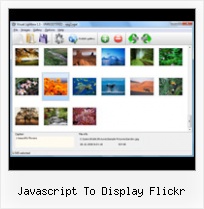
Joomla Embed Flickr Slideshow Javascript To Display Flickr

Download Flickr Gallery


Download Flickr Gallery Download Free Edition
for Windows
Download Flickr Gallery Download Free Edition
for MAC

Flickr Gallery is free for non - commercial use.

A small fee is required for business use. Flickr Gallery Business Edition additionally provides an option to remove the Flickr Gallery. Com credit string as well as a feature to put your own logo to images. After you conclude the payment via the secure order form, you will receive a license key instantly by email that turns the Flickr Gallery Free Edition into a Business one. You can select the most suitable payment procedure: check, bank transfer, credit card, PayPal etc. Also you can get Business Edition for free if you help with translating Flickr Gallery into your native language, please contact us at for more info.

Slideshows Flickr Galleries

Buy Flickr GalleryBuy Business Edition
for Windows

$49
Single Website
$69
Unlimited Websites
Buy Flickr GalleryBuy Business Edition
for MAC

$49
Single Website
$69
Unlimited Websites

Support

For feature requests, troubleshooting, general help contact Customer Support at . Make sure to include details on your browser, operating system, Flickr Gallery version and a link (or relevant code).Embedded Flickr Show Autoplay

Feedback

    * First of all, your product is fantasitc. I looked at the others and your code generator app was insanely easy to use.

    * Just bought the business version of Flickr Gallery and I just had to write and say how impressed I am with it. Really easy to use, intuitive interface and generates a truly professional presentation. Seldom have I been so pleased with a software purchase. Thank you.

    * I just tried the application, It is wonderful idea. Like you said in the website "few clicks without writing a single line of code" because most of the people is not web designers".Changing Flickr Slideshow Background Color

    * I have purchased the business and LOVE IT..Your product appears easy to use and close to what I need to help several of my clients..

FAQ

Q:Is it possible to load a gallery from within image? So the gallery loads externally?

A:You should start the gallery onClick:

1) Add the following function into the <head> tag:

<script type="text/javascript">
function showLightBox()
{ Lightbox.start(document.getElementById('firstImage'));}
</script>

2) Specify the onClick event for the image (or link):
<img src="thumbnail_gr.jpg" onClick="javascript:showLightBox()" title="Click to see the demo" style="cursor: pointer;">
3) Set the ID for any image in your gallery (id="firstImage"), for example add it to the first image:
<a rel="lightbox_vlb" href="data/images/dscn6831.jpg" title="dscn6831" id="firstImage">
4) Use 'display: none;' property for your gallery in engine\css\vlightbox.css. Just change the following code:

#vlightbox a{
display:-moz-inline-stack;
display:inline-block;
zoom:1;
*display:inline;
position:relative;
vertical-align:top;
margin:3px;
width:160px;
font-family:Trebuchet,Tahoma,Arial,sans-serif;
font-size:11px;
font-weight:normal;
text-align:center;
opacity:0.87;
}

to:

#vlightbox a{
display:-moz-inline-stack;
display:none;
zoom:1;
*display:inline;
position:relative;
vertical-align:top;
margin:3px;
width:160px;
font-family:Trebuchet,Tahoma,Arial,sans-serif;
font-size:11px;
font-weight:normal;
text-align:center;
opacity:0.87;
}

RELATED

Yuan.CC Flickr Experiments Display Flickr Photo with Notes. Back to Scriptlet. What is this? In Flickr, we can add notes on a photo to explan details of it. This scriptlet can display not only your flickr photo in your web pages or blog articles, but also the notes you made on it

Flickr Photoshow | JavaScript Image Display Flickr Photoshow. JavaScript Image Display from Hot Scripts. Photoshow helps website writers and publishers to automatically select Flickr images for publishing. With Photoshow, all you need to do is to define s

Flickr Badge Html : Flickr Gallery Flickr Badge Html. Flickr Slide Show creates Vista-style javascript photo gallery with minimum effort!. Add Flickr Slideshow To Tumblr Blog

Flickr Archives - etc: a stream of geek consciousness Quick links to good stuff: webdev, css, web design,digital photography, firefox,weblogging, Photoshop, movable type etc

can't display Flickr Flash Badge in a block | drupal.org I am trying to embed the Flickr Flash badge into the footer on my site by directly adding the code to a block, then displaying it in the footer. However, all it displays is the beginning and ending comments and the word flickr. I'm assuming this is a javascript issue and the input format?

WordPress " Javascript Flickr Badge " WordPress Plugins Javascript Flickr Badge uses pure javascript to place a Flickr badge in your widget-enabled sidebar to display recent photos. Animations (using Script.aculo.us): Shuffle, Zoom (just like Flickr's Flash Badge), Vertical Scroll, more to come

Custom Flickr Badge API Documentation | Elliot Swan Once we include the JavaScript in our page, it will output some HTML for browsers to display. I checked the Flickr forums, and discovered many other Flickr users have been unable to display photos by tag using the "tag" parameter

Building a Flickr Flash Display, Part 1 Building a Flickr Flash Display, Part 1. Resources: Kelvin Luck's flashr library, the fla In an earlier attempt I had ( link here ) separated the flickr request, the styling and the JavaScript logic for the Flickr Badge, to be able to work separately with the different aspects

Slideshow Flickr Javascript | Flickr Slideshow Slideshow Flickr Javascript. Make professional automate web photo gallery for your web site with jQuery Thickbox Alternative! flickr slideshows example

Flickriver - A new way to view Flickr photos and more Flickriver - view images as a 'river of photos' and more You can place your badge on your Flickr profile, Blog or Website. Add to your iGoogle or Netvibes page. Flickriver widget for iGoogle or Netvibes can display almost any Flickriver view - most interesting today, by user, by group,

Javascript Flickr Badge - WordPress Widget Plugin | American Javascript Flickr Badge displays photos from Flickr, with optional tag filtering, with client-side javascript. Several eye-catching effects available. Presenting the Javascript Flickr Badge: the lightweight, fast way to promote your Flickr photostream on your blog

cil2010-javascript-apps-handout Code Sample #2: Flickr API - Display Photos (Javascript) – The use script tag to make request to flickr api, specify json format and tag to search

Download Simple Flickr Photos 2.9.9.7 - This WordPress plugin Simple Flickr Photos This WordPress plugin displays Flickr photos on a WP blog This WordPress plugin displays Flickr photos on a WP blog. When setting up the widget, the user has the ability to choose between User, Group or All Public Photos

Compender: Display Your Photos By Adding A Flickr Badge To Display Your Photos By Adding A Flickr Badge To Your Sidebar. Posted by Raymond at 9:23 AM. Displaying photos in your Blogger blog from your Flickr account is quite simple. All you need to do is get the Flickr Badge embed code from Flickr and paste it into an HTML/JavaScript page element

Flickr Flogr is an open source PHP application that can display photos hosted on Flickr as a customizable gallery. Flickrshow is a lightweight, cross-browser JavaScript code that enables you the display your Flickr images as a good looking Ajaxed slideshow. The script is very easy to

Display | Flickr - Photo Sharing! Display To take full advantage of Flickr, you should use a JavaScript-enabled browser and install the latest version of the Macromedia Flash Player

How to add a Flickr-based photo gallery to your website With the growing popularity of using Flickr to manage photos, more and more people are looking for an easy way to display these photos on their website. After some playing around, I've settled with the phpFlickr and Lightbox combination to nicely display photo galleries on a website

Flickrshow Displays Flickr Photosets on Your Website | Web Flickrshow Displays Flickr Photosets on Your Website - Open Source Resources for Web Developers and won't interfere with any other Javascript on your page. Themeable to match your site: You can alter the colour of flickrshow to match your site

Build a Photo Gallery Using CakePHP and Flickr " SitePoint Is the Flickr interface doing justice to your stunning snaps? It's time to consider customization! Jonathan shows us the ropes in his hands-on tutorial, as he uses CakePHP and the Flickr API to build an attractive, fully customized gallery that

Flickrshow – A very simple Javascript slideshow for Flickr Flickrshow - A very simple Javascript slideshow for Flickr Flickrshow can display the latest images uploaded to Flickr in less than 40 characters

A Flickr Badge using WordPress Shortcodes | Themocracy Flickr provides a neat little snippet of javaScript to supply various image galleries direct to your site - a so-named Flickr badge. Here's a good way using WordPress shortcodes to grab a gallery

Using the Flickr API: We Don't Need No Stinkin' Badges On the website we did for musician Martin Sexton, we wanted to display all the photos that were tagged with his name on Flickr, so that his fans could post photos. First, we need to use this piece of JavaScript into the body of our webpage page where we want it to display:

Tutorial: Use the Flickr API, Javascript (jQuery), AJAX and A tutorial on how to build a detailed Flickr photo wall with JavaScript, jQuery, JSON and Ajax

Howto Dynamically Insert Javascript And CSS This is a short and sweet little tutorial to show you how to dynamically inserta new Javascript (or style sheet) into your web pages, and explores how youcan exploit cross-domain includes in your applications

Make your own custom code for a Wordpress-style Flickr badge Most Popular | Javascript | Snippets | Web Building. NOTE: This post has been superceded by a better method to create a custom badge posted here. To create a nicer looking Flickr badge, use Flickr's badge creation tool to get the right user code and content codes for your badge. Go to:

Building a hack using YQL, Flickr and the web – step by step Using YQL I can get photos from flickr with the right license and easily display them. Tags: flickr, hack, HTML, javascript, php, scraping, yql. This entry was posted on Wednesday, March 11th, 2009 at 3:46 pm and is filed under General. You can follow any responses to this entry through the RSS

Create a Fisheye Flickr Image Viewer with Adobe Flex This free tutorial shows you how to create a Flickr fisheye image viewer with Adobe Flex. Demo and source code included. This effect has been replicated in Flex by Ely Greenfield, and we will make use of this Fisheye Component to display some images from Flickr

Flickr Like edit Complete collection of easy-to-use ajax scripts and javascript demos in action. It shows how to write a little code to emulate flickr edit style effect almost perfectly

