



Overview

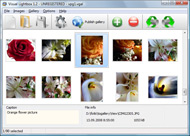
It's no secret that adding photos to your blog posts is one of the most effective ways to enhance your blog and attract attention to your writing. Flickr has millions of photos available in its database. A simple FREE tool called Flickr Gallery allows you to create a custom image gallery with a cool slide show of the most recent and most interesting photos from Flickr on your website or blog in a few easy steps. Just visit Flickr website and find photostream, photoset or a single photo you like. Enter the address of flickr page to add all photos from this page in your gallery, select the style of thumbnails and the overlay window and add the HTML embed code on your website or blog.
A few clicks and you'll see a stylish photo gallery with beautifull lightbox and zoom effects on your own website or blog!


Flickr Gallery for Windows   Flickr Gallery for MAC

Want more?

Example

Lightbox gallery sample

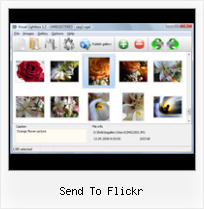
The following image set is generated by Flickr Gallery tool. Click any picture to run Lightbox gallery.

The example above is an in-page usage demo of Lightbox gallery that uses images from Flickr. The gallery created with Flickr Gallery application is placed inside the html page. You can also check the full-page demo gallery. This example takes whole browser area to show the slideshow.Flickr Slideshow Automatically Start

How to Use

Step 1. Adding flickr images to your own gallery.


Locate the photo, photoset or photostream you want to use in your Flickr slideshow. Click on it to see the photo on its own page.

Copy URL of the flickr page.

Select Add images from Flickr... from the 'Add' button on the Toolbar.

Add images from Flickr

In the appeared window paste URL of the flickr page. Specify also the number of photos you want to add from the flickr page. Flickr Gallery will now include these photos in your project.

Add images from Flickr

If you have included the photos that you do not wish to be in your web gallery, you can easily remove them. Select all images that you wish to remove from photo gallery, and select Delete images. from the Images menu. You can pick and choose pictures by holding the CTRL while clicking the pictures you like.

Step 2. Adding caption.

The name of the photo on flickr page will automatically appear in the caption. When you select a photo you'll see the various info about it, such as: Path, Size, date of last change and Caption. You can add any comment or text about the photo (up to 512 symbols).

Step 3. Gallery properties.

Change the name of your flickr album, the size and quality of your pictures with Flickr Gallery. From the Gallery menu, select Properties or use "Edit Gallery Properties" button on the toolbar.

On the first tab of the Gallery Properties window you can change the name of your photo album and enable/disable the following properties: Slide Show, Auto play Slide Show, Zoom effect, Overlay Shadow. You can also set the Overlay shadow color and select the Engine you want to use (jQuery or Prototype + script.aculo.us).

On the second tab of the Gallery Properties window you can select the thumbnail you want to use, set the Thumbnails Resolution, Thumbnails Quality, Thumbnails Titles. Select Thumbnails Format (save in PNG or JPG format). Specify the Number of columns in you photo album and the Page color.

On the third tab of the Gallery Properties window you can select the template, Image resolution and Image quality of your pictures and change the Watermark.

You can set up the various sizes for exported images.

Control the quality of output PNG or JPEG format image by defining output "Image quality" and "Thumbnail quality" parameters (0%…100%).

Step 4. Save your photo gallery as project file.

When you exit Flickr Gallery application, you'll be asked if you want to save your project. The project consists of the pictures you choose to put on your web photo gallery and all your settings. It's a good idea to save the project, because that will allow you to change the project in case you decide to do something different with future galleries. So click Yes, then enter a name for your project. To select the location of your project, just click the Browse folders button and choose a different location. Then click Save.

Flickr Badge Iquery Send To Flickr

Download Flickr Gallery


Download Flickr Gallery Download Free Edition
for Windows
Download Flickr Gallery Download Free Edition
for MAC

Flickr Gallery is free for non - commercial use.

A small fee is required for business use. Flickr Gallery Business Edition additionally provides an option to remove the Flickr Gallery. Com credit string as well as a feature to put your own logo to images. After you finish the payment via the secure form, you will receive a license key instantly by e-mail that turns the Flickr Gallery Free Edition into a Business one. You can select the most appropriate payment mode: bank transfer, credit card, check, PayPal etc. Also you can get Business Edition for free if you help with translating Flickr Gallery into your native language, please contact us at for more info.

Widget Flickr Horizontal Widget

Buy Flickr GalleryBuy Business Edition
for Windows

$49
Single Website
$69
Unlimited Websites
Buy Flickr GalleryBuy Business Edition
for MAC

$49
Single Website
$69
Unlimited Websites

Support

For general help, feature requests, troubleshooting contact Customer Support at . Make sure to include details on your Flickr Gallery version, browser, a link (or relevant code) and operating system.Flickr Hack Resolution

Feedback

    * I have installed Flickr Gallery to trial. All good, loving it!! I want to get an business version of your great programm. I love it - soo easy to use!!

    * Another programmes have incredible functionality but no fantastic interface like your product!

    * Just bought the business version of Flickr Gallery and I just had to write and say how impressed I am with it. Really easy to use, intuitive interface and generates a truly professional presentation. Seldom have I been so pleased with a software purchase. Thank you.Flickr Mini Gallery Jquery

    * I'm absolutely loving Flickr Gallery Business and Video LightBox. Amazing, quick and painless, to create a custom, browser independent gallery. And it works first time - every time! Best value for money I've seen in quite a while...

FAQ

Q:Is it possible to load a gallery from within image? So the gallery loads externally?

A:You should start the gallery onClick:

1) Add the following function into the <head> tag:

<script type="text/javascript">
function showLightBox()
{ Lightbox.start(document.getElementById('firstImage'));}
</script>

2) Specify the onClick event for the image (or link):
<img src="thumbnail_gr.jpg" onClick="javascript:showLightBox()" title="Click to see the demo" style="cursor: pointer;">
3) Set the ID for any image in your gallery (id="firstImage"), for example add it to the first image:
<a rel="lightbox_vlb" href="data/images/dscn6831.jpg" title="dscn6831" id="firstImage">
4) Use 'display: none;' property for your gallery in engine\css\vlightbox.css. Just change the following code:

#vlightbox a{
display:-moz-inline-stack;
display:inline-block;
zoom:1;
*display:inline;
position:relative;
vertical-align:top;
margin:3px;
width:160px;
font-family:Trebuchet,Tahoma,Arial,sans-serif;
font-size:11px;
font-weight:normal;
text-align:center;
opacity:0.87;
}

to:

#vlightbox a{
display:-moz-inline-stack;
display:none;
zoom:1;
*display:inline;
position:relative;
vertical-align:top;
margin:3px;
width:160px;
font-family:Trebuchet,Tahoma,Arial,sans-serif;
font-size:11px;
font-weight:normal;
text-align:center;
opacity:0.87;
}

RELATED

Best Flickr Greasemonkey Scripts | Firefox Facts Many people love Flickr, but that doesn't mean it is perfect. There are a lot of little things that Flickr could do better – and thankfully with a tool like 2. Multi Group Sender – This script enables you to easily send your Flickr images to multiple groups at the same time

Right-click to upload images to Flickr The Sendto Flickr application will add to your right click menu a Send to Flickr button. Right click any image then select Send to Flickr to easily upload

Flickr Software Informer This program uses the .Net Framework to get your photos from Flickr and allows you to display them as a screensaver for Right click any image then select "Send to Flickr" to easily upload photos to your Flickr account

Send to Flickr Can we please have the option to send our pictures to Flickr directly from the device?

Send Project Weblog The Volunteering England organisation has published an article about the SEND Project on their website in regards to our involvement in the On Sunday 15th August the SEND Project Artists were invited to Bridgefest held on a park

Snapzilla - Snapshots from Second Life - flickr support Registered users can enter their flickr upload email address on the Control Panel page. Once your email is entered, you can send new images from Second Life to Snapzilla and flickr at the same time by using flickr@slpics.com as the address instead of pics@slpics.com when sending a snapshot

Flickr® for iPhone® Try the Flickr for the iPhone and share your phoe photos with friends, via email or SMS. Tag, title and resize it before you post, to create the perfect shot

Delivr Create your own personalized eCards using one of over 6,000,000 free creative commons licensed images. Just say no to cheesy online greeting cards :

Sendto Flickr - Blog - Adamant Solutions, Adelaide, South So, to overcome this problem, I have developed some software that takes the pain out of the upload process! Introducing "Sendto Flickr" Add Flickr to the right-click "Send to" menu in Windows. Right click any image then select "Send to Flickr" to easily upload photos to your Flickr account

MountainBoarder.co.nz | Send us Flickr Links Send Flickr Links. Send: Flickr Links. Send us Flickr Links. Cut and paste the embed code Code: I have a Flickr account and would like to contribute but need

Upload photos to Facebook and Flickr etc.using Picasa " Knowliz The best thing about this service is that you can define defaults where you want to always send the files as well as send some files to specific locations just by adding some tags (keywords) for different services. For example, in the image below, I have Flickr and Facebook enabled as default

Send This - Social Patterns Enable people to spontaneously share content or objects they find by sending them to a One approach is to include a link that if invoked expands the optional text field, as Flickr's Share This widget does. Direct sending at Flickr offers the option of adding a cover note

Hooligan Software – Flickr for Android The "Apply Settings" dialog will also let you set a preset as upStream's default by touching-and-holding an entry, applying it to all images sent to Flickr using upStream. In addition, we've spent a long time tweaking upStream from the bottom up

GM Script: Multi Group Sender - Steeev's Flickr Projects Flickr : Multi Group Sender is a Greasemonkey script that lets you send your Flickr photos to multiple groups simultaneously, and lets you save your group selection, so you can easily reselect them for future group submissions

Send Flickr Pictures As Inline Email Attachments Learn how to send a Flickr photograph as inline email attachment without downloading the Flickr photograph

Earthling - EarthLink blog: How To Upload Photos To Flickr Thanks to some teamwork between Helio and Flickr/Yahoo, a glitch that was stopping photos from making it from a Helio device to Flickr has been fixed. Last night I confirmed that you can easily send photos taken on a Drift at up to full 1600 x 1200 to your Flickr account via Pic Msg

Flickr: Tools to upload and share Flickr is almost certainly the best online photo management and sharing application in the world. Show off your favorite photos and videos to the world, securely and privately show content to your friends and family, or blog the photos and videos

Send To Flickr : Flickr Gallery Send To Flickr. Make superior ajax picture gallery for your web site with Flickr Gallery!. Flickr Slideshow Samples

flickr add Software - Free Download flickr add - Top 4 Download flickr add Software - Free Download flickr add - Top 4 Download - Free Download Software flickr how to flickr down how to download flickr flickr wordpress flickr tag flickr blog sendto flickr flickr sets flickr on website flickr flickr photo send to flickr download flickr flickr plugin flickr

Send to Flickr bookmarklet Flickr user David Morrison posts a bookmarklet that lets you send a photo from any web page to your Flickr account

picasa2flickr - flickr upload plugin for picasa 19 July 2008 - Video support (flickr uploadr beta needed) Good news:I have updated the plugin to picasa that allows users to upload their photos to flickr

DropSend - Email large files and send large files Email large files up to 2GB, send big files, it is easy and secure to email using DropSend, Store files on line access your files on line share your files with others archive your data using dropsend

How to Send Flickr Mail - wikiHow To get to your inbox, go to the drop down menu under "You" and at the very end is "mail. Do not send flickr mails saying something like: "Please comment on my photos!

Sendto Flickr - Download Sendto Flickr, free download. Sendto Flickr: Add Flickr to the Send to menu in Windows. If you're a hardcore Flickr fan you probably go through the messy photo uploading process very often

Multi Group Sender It overrides the flickr "Send to Group" button above your photo/video and lets you send your Flickr image or video to multiple groups simultaneously

Send To Flickr Bookmarklet Javascript Code - Vitriolic Humor So I've been having a problem with my "Send To Flickr" Bookmarklet functionality on Flickr, and been in a foul mood about it. I finally got to the right person at Flickr who set me in the right direction and give me permission to post the javascript contents for the bookmarklet here

Review: Flickr Application for BlackBerry | Trumblog I use the Flickr BlackBerry application just about every day to support my Boston Moment project. It's a really useful tool for uploading photos from your BlackBerry to your Flickr photostream and is critical for anyone with a Flickr account who

