
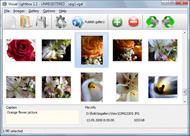




Overview

It's no secret that adding photos to your blog posts is one of the most effective ways to enhance your blog and attract attention to your writing. Flickr has millions of photos available in its database. A simple FREE tool called Flickr Gallery allows you to create a custom image gallery with a cool slide show of the most recent and most interesting photos from Flickr on your website or blog in a few easy steps. Just visit Flickr website and find photostream, photoset or a single photo you like. Enter the address of flickr page to add all photos from this page in your gallery, select the style of thumbnails and the overlay window and add the HTML embed code on your website or blog.
A few clicks and you'll see a stylish photo gallery with beautifull lightbox and zoom effects on your own website or blog!


Flickr Gallery for Windows   Flickr Gallery for MAC

Want more?

Example

Lightbox gallery sample

The following image set is generated by Flickr Gallery tool. Click any picture to run Lightbox gallery.

The sample above is an in-page usage demo of Lightbox with images from Flickr. The photo gallery created with Flickr Gallery software is placed inside the website page. You can also check the full-page demo lightbox gallery. This example takes whole browser area to show the gallery.Export Bridge To Flickr

How to Use

Step 1. Adding flickr images to your own gallery.


Locate the photo, photoset or photostream you want to use in your Flickr slideshow. Click on it to see the photo on its own page.

Copy URL of the flickr page.

Select Add images from Flickr... from the 'Add' button on the Toolbar.

Add images from Flickr

In the appeared window paste URL of the flickr page. Specify also the number of photos you want to add from the flickr page. Flickr Gallery will now include these photos in your project.

Add images from Flickr

If you have included the photos that you do not wish to be in your web gallery, you can easily remove them. Select all images that you wish to remove from photo gallery, and select Delete images. from the Images menu. You can pick and choose pictures by holding the CTRL while clicking the pictures you like.

Step 2. Adding caption.

The name of the photo on flickr page will automatically appear in the caption. When you select a photo you'll see the various info about it, such as: Path, Size, date of last change and Caption. You can add any comment or text about the photo (up to 512 symbols).

Step 3. Gallery properties.

Change the name of your flickr album, the size and quality of your pictures with Flickr Gallery. From the Gallery menu, select Properties or use "Edit Gallery Properties" button on the toolbar.

On the first tab of the Gallery Properties window you can change the name of your photo album and enable/disable the following properties: Slide Show, Auto play Slide Show, Zoom effect, Overlay Shadow. You can also set the Overlay shadow color and select the Engine you want to use (jQuery or Prototype + script.aculo.us).

On the second tab of the Gallery Properties window you can select the thumbnail you want to use, set the Thumbnails Resolution, Thumbnails Quality, Thumbnails Titles. Select Thumbnails Format (save in PNG or JPG format). Specify the Number of columns in you photo album and the Page color.

On the third tab of the Gallery Properties window you can select the template, Image resolution and Image quality of your pictures and change the Watermark.

You can set up the various sizes for exported images.

Control the quality of output PNG or JPEG format image by defining output "Image quality" and "Thumbnail quality" parameters (0%…100%).

Step 4. Save your photo gallery as project file.

When you exit Flickr Gallery application, you'll be asked if you want to save your project. The project consists of the pictures you choose to put on your web photo gallery and all your settings. It's a good idea to save the project, because that will allow you to change the project in case you decide to do something different with future galleries. So click Yes, then enter a name for your project. To select the location of your project, just click the Browse folders button and choose a different location. Then click Save.

Magento And A Flickr Image Gallery Short Videos With Flickr

Download Flickr Gallery


Download Flickr Gallery Download Free Edition
for Windows
Download Flickr Gallery Download Free Edition
for MAC

Flickr Gallery is free for non-commercial use.

A small fee is required for business use. Flickr Gallery Business Edition additionally provides an option to remove the Flickr Gallery. Com credit line as well as a feature to put your own logo to images. After you finish the payment via the secure order form, you will receive a license key instantly by e-mail that turns the Flickr Gallery Free Edition into a Business one. You can select the most suitable payment mode: bank transfer, credit card, PayPal, check etc. Also you can get Business Edition for free if you help with translating Flickr Gallery into your native language, please contact us at for more info.

Flickr Diaporama Param Autoplay

Buy Flickr GalleryBuy Business Edition
for Windows

$49
Single Website
$69
Unlimited Websites
Buy Flickr GalleryBuy Business Edition
for MAC

$49
Single Website
$69
Unlimited Websites

Support

For general help, feature requests, troubleshooting contact Customer Support at . Make sure to include details on your Flickr Gallery version, browser, a link (or relevant code) and operating system.Turn Off Autoplay Flickr Gallery

Feedback

    * Just bought the business version of Flickr Gallery and I just had to write and say how impressed I am with it. Really easy to use, intuitive interface and generates a truly professional presentation. Seldom have I been so pleased with a software purchase. Thank you.

    * I would like to say that Flickr Gallery is a stunning lil program! Its almost too good to be true i'd say! I've been looking for tutorials to create a lightbox gallery, but just couldnt come right. Im so glad i found Flickr Gallery!

    * I have installed Flickr Gallery to trial. All good, loving it!! I want to get an business version of your great programm. I love it - soo easy to use!!Generate Links In Ozio Gallery Flickr

    * Another programmes have incredible functionality but no fantastic interface like your product!

FAQ

Q:Instead of making one page with 40 photos, is there no property to make 2 or more pages?

A:You can do it in the following way:

1. Create your gallery in Flickr Gallery and publish it on a local drive in any test folder.
2. Make two copies of the generated index.html file (for example index1.html and index2.html).
3. Open index.html, index1.html and index2.html files in any text editor.
4. Find code for the gallery inside the BODY tag and cut some part of the images, so you'll have different images on each page.

<!-- Start Flickr Gallery.com BODY section -->
<div class="gallery">
<!-- leave the following code on index.html page -->
<a href="./data/images/1.jpg" rel="lightbox[sample]" title="Best Toy Ever"><img src="./data/thumbnails/1.png" /></a>
<a href="./data/images/8.jpg" rel="lightbox[sample]" title="PrueaMacro"><img src="./data/thumbnails/8.png" /></a>

<!-- leave the following code on index1.html page -->
<a href="./data/images/3.jpg" rel="lightbox[sample]" title="Macro Leaf."><img src="./data/thumbnails/3.png" /></a>
<a href="./data/images/11.jpg" rel="lightbox[sample]" title="Bell Pepper"><img src="./data/thumbnails/11.png" /></a>

<!-- leave the following code on index2.html page -->
<a href="./data/images/5_0.jpg" rel="lightbox[sample]" title="5"><img src="./data/thumbnails/5_0.png" /></a>
<a href="./data/images/6_0.jpg" rel="lightbox[sample]" title="6"><img src="./data/thumbnails/6_0.png" /></a>

<!--[if lte IE 6]><script src="engine/js/pngfix_vlb.js" type="text/javascript"></script><![endif]-->
<a id="vlightbox" href="http://Flickr Gallery.com/">Online Photo Album Sharing by Flickr Gallery.com</a>
</div>
<!-- End Flickr Gallery.com BODY section -->

5. Create links to switch between your pages, for example:
<a href="index.html">1</a>  <a href="index1.html">2</a>  <a href="index2.html">3</a> 


Q:I want to change color of the overlay shadow? How can I do this?

A:Open engine\css\Flickr Gallery.css and find the following code:

#overlay{
position: absolute;
top: 0;
left: 0;
z-index: 90;
width: 100%;
height: 500px;
background-color: #FFF;
filter:alpha(opacity=60);
-moz-opacity: 0.6;
opacity: 0.6;
}

set the background-color parameter :

#overlay{
position: absolute;
top: 0;
left: 0;
z-index: 90;
width: 100%;
height: 500px;
background-color: #FF00FF;
filter:alpha(opacity=60);
-moz-opacity: 0.6;
opacity: 0.6;
}


RELATED

Flickr View subscriptions that Flickr donates through TechSoup for storing, organizing, sharing, and discussing photos and videos. An organization that obtains donated Flickr Pro accounts assigns them to individuals who will own the accounts in their

Flickr opens its doors to video - web - Technology - smh.com.au Yahoo will begin showing homemade videos on its online photo-sharing site, Flickr, to lure people away from YouTube. - The Sydney Morning Herald Flickr's new technology is aimed at amateurs and hobbyists looking for a better way to share short video clips with family and friends

Flickr Adopts Video Sharing The photo-sharing site now allows users to upload short video clips in addition to photos, but makes no attempt to compete with YouTube. Yahoo's Flickr photo-sharing site expanded its online media palette on Tuesday by adding video-sharing capabilities

Flickr Profile - What is Flickr? Flickr was launched in February of 2004 and is the world's most popular repository of images and photographs. Flickr also allows paid members to store short videos no longer than 90 seconds in length and no larger than 150MB

Now Showing: Short-Form Video on Flickr - InternetNews.com Flickr, Yahoo's (NASDAQ: YHOO) popular photo-sharing site, announced yesterday that subscribing users will be able to upload and share short-form video content. they see with the people who matter most to them, be they family and friends, or the world," Flickr

Flickr lets users upload video The Yahoo-owned service on Monday began letting users of its free online photo-sharing service upload Short videos can be posted along with pictures on Flickr pages that let users share images photo-album style with select people, as opposed to

Flickr video: day late, dollar short - iMedia Connection Flickr, the photo-sharing site Yahoo bought back in 2005, will now offer video in an attempt to compete with Google's YouTube, according to an Associated Press report. According to Srivastava, Flickr's privacy settings matched with video should help the Yahoo-owned service

The Pros and Cons of New Video-Sharing on Flickr One of the Web's favourite photo-sharing websites has added video to its multimedia stable. It's one small step for Internet-kind, "Video on Flickr is an extension of what Flickr is already doing with more than two billion photos worldwide - providing a place where people capture and share life's

Flickr - Bazaar Wiki Although Flickr is not really meant to create a complete learning module with, you can create collections of photos and small videos with a certain theme by way of supplement to a learning module. Flickr can thus be used as part of or in addition to Open Educational Resources (OERs)

Flickr Video: Well done but short on time | Outside the Lines After a few years of waiting, Flickr Video has finally arrived. It's well designed, in keeping with its Flickr photo heritage, but the 90-second limit on videos needs to be reconsidered. Read this blog post by Dan Farber on Outside the Lines

What Flickr video means to the rest of us | That's What I Thought Flickr only allows their Pro members to upload videos and as such they are, unwittingly or not, showing that people will pay to upload video. With that being said, I think the type of videos that you'll see uploaded on Flickr will

Video on Flickr! " Flickr Blog Check out some of our favourites in Video on Flickr. And speaking of the beta group, we'd like to thank our members who helped us out (and entertained us) with their uploads. The rock stars include: Brenda Anderson, zyrcster, striatic, Lú_, werewegian,

Flickr Opens Up Video Uploads for Everyone Almost a year ago Flickr added the ability for Pro users to upload up to 90 second videos. Today they're announcing that they've lifted the restriction to

My experience with Flickr video I also can't consolidate all of my video in one place with my photos. I can also understand why Flickr may want to differentiate with short videos

Flickr announces video uploading service | MacNN Flickr announces video uploading service. updated 12:10 am EDT, Wed April 9, 2008. Flickr for video files. Flickr today launched a video hosting service to run alongside its image equivalent, which already boasts around 42 million digital cameras to capture short video clips, with 55-percent of

Flickr moves video to site via 'long photos' - Computerworld Flickr today added support for videos on it photo-sharing site, allowing its members to share short videos taken via cell phone

Lore Sj Why are Flickr denizens in such an uproar over being allowed to post videos? It's a cultural thing. Commentary by Lore Sjöberg. Flickr now allows users to post short videos. This is the worst thing that could happen in this world or any possible alternate timeline, at least if you ask the members

Yahoo adds videos to Flickr photo website | Information Short videos can be posted along with pictures on Flickr pages that let users share images photo-album style with select people, as opposed to the way videos are displayed on YouTube for the world to see. An online Flickr atlas will be continuously updated with videos designated for public

Flickr Adds (Short) Video Online Video News Flickr fanatics can now upload and share video alongside their photos, but those clips will have to be short. The long-awaited Flickr video feature isn't intended to be a YouTube (or even a Yahoo Video) killer, instead, Flickr is trying to make

Flickr: Help: Video Flickr is almost certainly the best online photo management and sharing application in the world. Show off your favorite photos and videos to the world, securely and privately show content to your friends and family, or blog the photos and videos

Flickr adds moving pictures support - MacUser Though uploading video requires a $25/year pro account, Flickr has also upgraded their limits on how much data users can upload, raising the limits to 20MB per photo for pro users, and 10MB per photo for free accounts. Anyways, to celebrate, I've uploaded a short video of me hard at work

How to Make Videos for Flickr From Your Photos Flickr is perfect for sharing short family videos that you have captured with a digital still camera or your mobile phone

Flickr allows all users to upload videos Nearly a year ago, online image sharing site Flickr began allowing paid subscribers to upload videos up to 90 seconds in length. Today, Flickr expand

YouTube - Flickr tutorial 1. Joining yahoo2. Joining flickr3. uploading pictures4. Joining paradox group5. adding picture to paradox group

Flickr.com expands into video - The Globe and Mail Flickr.com fans will begin finding more than just photos on their favourite site from now on. On Tuesday, the popular Yahoo Inc.-owned picture-sharing network announced that in addition to its photo-hosting services the site will allow users to post short digital video clips

Flickr video, keep it short - jon bounds Flickr finally inched out video hosting today, for pro users only and only up to 90 seconds. To tell the truth it's not something that I've been calling for

Yahoo Flickr Flicks: Who's Got Short Shorts? - Search Engine Yahoo Flickr launched videos tonight with a press release and a small yellow badge - an asterisk that adds

Share Videos through Flickr Now - TechShout Online photo sharing community Flickr, has announced the introduction of a video sharing feature. Flickr pro members can now upload personal video

