
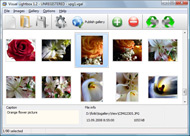
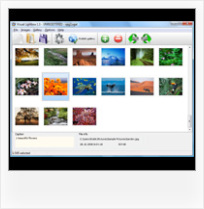


Overview

It's no secret that adding photos to your blog posts is one of the most effective ways to enhance your blog and attract attention to your writing. Flickr has millions of photos available in its database. A simple FREE tool called Flickr Gallery allows you to create a custom image gallery with a cool slide show of the most recent and most interesting photos from Flickr on your website or blog in a few easy steps. Just visit Flickr website and find photostream, photoset or a single photo you like. Enter the address of flickr page to add all photos from this page in your gallery, select the style of thumbnails and the overlay window and add the HTML embed code on your website or blog.
A few clicks and you'll see a stylish photo gallery with beautifull lightbox and zoom effects on your own website or blog!


Flickr Gallery for Windows   Flickr Gallery for MAC

Want more?

Example

Lightbox gallery sample

The following image set is generated by Flickr Gallery tool. Click any picture to run Lightbox gallery.

The example above is an in-page usage demo of Lightbox tool with Flickr images. The gallery created with Flickr Gallery tool is placed inside the website page. You can also check the full-page demo gallery. This example takes whole browser area to show the website gallery.Flickr Gallery Plone

How to Use

Step 1. Adding flickr images to your own gallery.


Locate the photo, photoset or photostream you want to use in your Flickr slideshow. Click on it to see the photo on its own page.

Copy URL of the flickr page.

Select Add images from Flickr... from the 'Add' button on the Toolbar.

Add images from Flickr

In the appeared window paste URL of the flickr page. Specify also the number of photos you want to add from the flickr page. Flickr Gallery will now include these photos in your project.

Add images from Flickr

If you have included the photos that you do not wish to be in your web gallery, you can easily remove them. Select all images that you wish to remove from photo gallery, and select Delete images. from the Images menu. You can pick and choose pictures by holding the CTRL while clicking the pictures you like.

Step 2. Adding caption.

The name of the photo on flickr page will automatically appear in the caption. When you select a photo you'll see the various info about it, such as: Path, Size, date of last change and Caption. You can add any comment or text about the photo (up to 512 symbols).

Step 3. Gallery properties.

Change the name of your flickr album, the size and quality of your pictures with Flickr Gallery. From the Gallery menu, select Properties or use "Edit Gallery Properties" button on the toolbar.

On the first tab of the Gallery Properties window you can change the name of your photo album and enable/disable the following properties: Slide Show, Auto play Slide Show, Zoom effect, Overlay Shadow. You can also set the Overlay shadow color and select the Engine you want to use (jQuery or Prototype + script.aculo.us).

On the second tab of the Gallery Properties window you can select the thumbnail you want to use, set the Thumbnails Resolution, Thumbnails Quality, Thumbnails Titles. Select Thumbnails Format (save in PNG or JPG format). Specify the Number of columns in you photo album and the Page color.

On the third tab of the Gallery Properties window you can select the template, Image resolution and Image quality of your pictures and change the Watermark.

You can set up the various sizes for exported images.

Control the quality of output PNG or JPEG format image by defining output "Image quality" and "Thumbnail quality" parameters (0%…100%).

Step 4. Save your photo gallery as project file.

When you exit Flickr Gallery application, you'll be asked if you want to save your project. The project consists of the pictures you choose to put on your web photo gallery and all your settings. It's a good idea to save the project, because that will allow you to change the project in case you decide to do something different with future galleries. So click Yes, then enter a name for your project. To select the location of your project, just click the Browse folders button and choose a different location. Then click Save.

How Download Video From Flickr Windows Live Gallery Flickr Gadget

Download Flickr Gallery


Download Flickr Gallery Download Free Edition
for Windows
Download Flickr Gallery Download Free Edition
for MAC

Flickr Gallery is free for non - commercial use.

A small fee is required for business use. Flickr Gallery Business Edition additionally provides an option to remove the Flickr Gallery. Com credit string as well as a feature to put your own logo to images. After you finish the payment via the secure form, you will receive a license key instantly by e-mail that turns the Flickr Gallery Free Edition into a Business one. You can select the most appropriate payment mode: bank transfer, credit card, check, PayPal etc. Also you can get Business Edition for free if you help with translating Flickr Gallery into your native language, please contact us at for more info.

Flickr Gallery Plugin For Joomla

Buy Flickr GalleryBuy Business Edition
for Windows

$49
Single Website
$69
Unlimited Websites
Buy Flickr GalleryBuy Business Edition
for MAC

$49
Single Website
$69
Unlimited Websites

Support

For troubleshooting, feature requests and general help contact Customer Support at . Make sure to include details on your Flickr Gallery version, a link (or relevant code), operating system and a browser.Link Panoramio To Flickr

Feedback

    * I LOVE your free Lightbox2 software tool and will purchase the business version shortly. I have seen the Lightbox JS effect used with video tutorials and I was hoping you have a version for video that I can purchase.
Video LightBox: http://videolightbox.com

    * I tried Flickr Gallery and for me its a very cool and usefull application. Its so easy to manage my galleries and it looks very nice.

    * I would like to say that Flickr Gallery is a stunning lil program! Its almost too good to be true i'd say! I've been looking for tutorials to create a lightbox gallery, but just couldnt come right. Im so glad i found Flickr Gallery!Download Flickr Collection

    * I am thrilled with what this tool can do for me thanks for all the hard work that must have gone into it.

FAQ

Q:I would like to reposition the Previous and Next buttons to a position below the images and have them be visible all the time.Where do I have to go to make these changes in the code?

A:Find the css file in the folder generated by gallery:
engine\css\
or in the following folder:
c:\Program Files\Visual LightBox Business\templates\Default\engine\css\

To set their position you should change 15% to something different:
#prevLink:hover, #prevLink:visited:hover { background: url(../images/prevlabel.gif) left 15% no-repeat; }
#nextLink:hover, #nextLink:visited:hover { background: url(../images/nextlabel.gif) right 15% no-repeat; }

For example:
#prevLink:hover, #prevLink:visited:hover { background:url(../images/prevlabel.gif) left 75% no-repeat; }
#nextLink:hover, #nextLink:visited:hover { background: url(../images/nextlabel.gif) right 75% no-repeat;}

RELATED

Woot Windows Sidebar Gadget | WindowsObserver.com Another permanent gadget on my desktop from the Windows 7 Personalization Gallery is the Woot Gadget: This gadget provides you real time info on what the

Download Vista Gadget – Sidebar Plug-ins | My Tech World New to Vista? Do you know you can add more gadgets into your windows vista sidebar? You can download vista gadget from Microsoft official website known as Windows Live Gallery

meraTechPort: Windows Live Photo Gallery Updated, supports Flickr Windows Live Photo Gallery Updated, supports Flickr. Tweet. Windows Live Photo Gallery Beta is updated, as I got this as a critical update in Windows Update. Windows Live Photo Gallery Beta 2.2 is a refresh of the earlier version of beta 2.0

Developing Gadgets for the Windows Sidebar Windows Vista ships with a number of Sidebar gadgets out of the box, but users can download additional gadgets from the Windows Live gallery. These gadgets are also available from the Live gallery for users to click and add

Windows Live Sidebar Gadget - Steve Clayton - Site Home With the release of the Wave 3 of Windows Live you get excellent aggregation of content from Flickr,Twitter and elsewhere and this gadget displays all of that goodness on your desktop with a refresh rate you can set. Check it out on Windows

New Windows Live Photo Gallery Includes Flickr Uploader Microsoft just launched Windows Live Photo Gallery Beta 2, and just like the previous version it is available for both Windows XP SP2 and Vista. In order to get the update you must have the first Beta already installed, and then you must perform

gmail sidebar gadget Using the GMail Reader sidebar gadget for Windows Vista, you can be notified on new items in your GMail inbox as well as browse and access the last 20 mails you received. The gadget is available to download from the Windows Live Gallery. Here's how you configure the gadget:

Windows Live Gadget first steps | Flickr - Photo Sharing! Step 1: Install a web server such as IIS capable of serving XML, JavaScript, and CSS Step 2: Use an IDE such as Visual Studio contrast to the Google scratch pad

Flickr " Gallery | lesterchan.net Lester Chan's Website | lesterchan.net

Maximum PC | Microsoft Reaches Out to Flickr and QuickTime Windows Live Photo Gallery adds lots of great editing and sharing features to Vista's Windows Photo Gallery - and also works with Windows XP. your photos to Yahoo's popular Flickr photo-sharing website. After you install Windows Live Photo Gallery Beta, Windows Update updates it for you

Windows Live Photo Gallery And Flickr | LiveSide.net Windows Live Photo Gallery And Flickr. By Matthew on October 18, 2007 9:16 PM. 5 comments. Kip noted yesterday about WLPG getting an update from Windows Update and included a Microsoft KB link, but what that link doesn't contain was what else might have come with that update

Managing and Sharing Digital Memories using Windows Live It was a great addition to Windows that has seen one major update since, the Windows Live Photo Gallery 2008 release which added major integration and online publishing features with Windows Live and third party online services such as Flickr

Microsoft to Bridge Windows Live Photo Gallery with Flickr That's right, there is the possibility that Windows Live Photo Gallery is connected with Flickr. Last week, Microsoft introduced an upgrade to Windows Photo Gallery, the default viewing and editing application built into the operating system

Windows Sidebar Gadgets | BenHollis.net Xbox Live Gamercard - This very simple Sidebar gadget just shows an Xbox Live Gamercard. When docked, it scales to fit in the sidebar, and when undocked, it's full size (except in Windows 7, where docking doesn't make sense). Please rate this at Windows Live Gallery . (Blog Post)

Windows Live Photo Gallery et FlickR Windows Live Photo Gallery et FlickR. October 18, 2007 08:25 by bgauth Amélioration Windows Live Photo Gallery et HDView Je vais revenir sur un post concernant HDView du mois dernier

Gadget Flickr : Flickr Gallery Gadget Flickr. A few clicks to create stylish photo gallery webpage! Instant Gadgets - Instant Flickr Currently Instant Flickr is only available for the Google Homepage and Desktop/Sidebar, but support for Windows Live, Windows Vista and many others is

Windows Photo Gallery - Wikipedia, the free encyclopedia Windows Live Photo Gallery. Windows Photo Gallery is a photo management, tagging, and In Windows 7, the editing capabilities of Windows Photo Gallery have been removed and as

Upload Videos to YouTube from Windows Live Photo Gallery Upload the videos stored in Windows Live Photo Gallery and Windows Live MovieMaker directly to YouTube using a plugin LiveUpload to YouTube.To use the plugin first install the Windows Live Photo Gallery Beta and/or Windows Live Movie Maker Beta

Five Alternatives to Windows Live Photo Gallery: Best Online Looking into Flickr, Zooomr, Picasa Web Albums, Photobucket, and Kodak EasyShare Gallery as five best alternative to Windows Live Photo Gallery. All five online picture storage services offer decent amount of photo storage for free and lets you

Rob Miles - LiveWriterFickrInkify To install the plugin manually simply copy the dll library files in the zip archive into the plugins directory for Windows Live Writer. This version of the plugin only supports a single Flickr user for a given Windows username on a machine

Windows Live Photo Gallery - Windows 7 features - Microsoft See how Windows Live Photo Gallery can help you organize, perfect, and share your photos and videos

Windows Live Photo Gallery Along with Windows Live Writer Beta 3 there were a bunch of other tools released as part of the Windows Live Suite. It included Windows Messenger Mail Photo Gallery Toolbar OneCare I have been using the Photo Gallery application from

Gadgets & Widgets Drag and drop your photos, and then watch the HP Photo Print Gadget automatically format and print a borderless size of your choice. find these photos in your favorite photo organizer (like HP Photosmart Essentials, Windows Liveâ„¢ Photo Gallery, or Adobe Photoshop Elements)

Windows Live Gallery - Error Get custom content for Windows Live and Windows Vista, including Sidebar, search, Messenger, and more

