


Overview

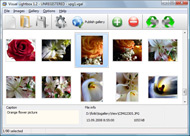
It's no secret that adding photos to your blog posts is one of the most effective ways to enhance your blog and attract attention to your writing. Flickr has millions of photos available in its database. A simple FREE tool called Flickr Gallery allows you to create a custom image gallery with a cool slide show of the most recent and most interesting photos from Flickr on your website or blog in a few easy steps. Just visit Flickr website and find photostream, photoset or a single photo you like. Enter the address of flickr page to add all photos from this page in your gallery, select the style of thumbnails and the overlay window and add the HTML embed code on your website or blog.
A few clicks and you'll see a stylish photo gallery with beautifull lightbox and zoom effects on your own website or blog!


Flickr Gallery for Windows   Flickr Gallery for MAC

Want more?

Example

Lightbox gallery sample

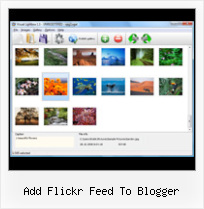
The following image set is generated by Flickr Gallery tool. Click any picture to run Lightbox gallery.

The photo gallery above is an in-page usage demo of Lightbox script with Flickr images. The photo gallery created with Flickr Gallery application is placed inside the html page. You can also check the full-page demo web gallery. This example takes whole browser area to show the gallery.Integrate Flickr Gallery On Website

How to Use

Step 1. Adding flickr images to your own gallery.


Locate the photo, photoset or photostream you want to use in your Flickr slideshow. Click on it to see the photo on its own page.

Copy URL of the flickr page.

Select Add images from Flickr... from the 'Add' button on the Toolbar.

Add images from Flickr

In the appeared window paste URL of the flickr page. Specify also the number of photos you want to add from the flickr page. Flickr Gallery will now include these photos in your project.

Add images from Flickr

If you have included the photos that you do not wish to be in your web gallery, you can easily remove them. Select all images that you wish to remove from photo gallery, and select Delete images. from the Images menu. You can pick and choose pictures by holding the CTRL while clicking the pictures you like.

Step 2. Adding caption.

The name of the photo on flickr page will automatically appear in the caption. When you select a photo you'll see the various info about it, such as: Path, Size, date of last change and Caption. You can add any comment or text about the photo (up to 512 symbols).

Step 3. Gallery properties.

Change the name of your flickr album, the size and quality of your pictures with Flickr Gallery. From the Gallery menu, select Properties or use "Edit Gallery Properties" button on the toolbar.

On the first tab of the Gallery Properties window you can change the name of your photo album and enable/disable the following properties: Slide Show, Auto play Slide Show, Zoom effect, Overlay Shadow. You can also set the Overlay shadow color and select the Engine you want to use (jQuery or Prototype + script.aculo.us).

On the second tab of the Gallery Properties window you can select the thumbnail you want to use, set the Thumbnails Resolution, Thumbnails Quality, Thumbnails Titles. Select Thumbnails Format (save in PNG or JPG format). Specify the Number of columns in you photo album and the Page color.

On the third tab of the Gallery Properties window you can select the template, Image resolution and Image quality of your pictures and change the Watermark.

You can set up the various sizes for exported images.

Control the quality of output PNG or JPEG format image by defining output "Image quality" and "Thumbnail quality" parameters (0%…100%).

Step 4. Save your photo gallery as project file.

When you exit Flickr Gallery application, you'll be asked if you want to save your project. The project consists of the pictures you choose to put on your web photo gallery and all your settings. It's a good idea to save the project, because that will allow you to change the project in case you decide to do something different with future galleries. So click Yes, then enter a name for your project. To select the location of your project, just click the Browse folders button and choose a different location. Then click Save.

Wordpress Embed Flickr Add Flickr Feed To Blogger

Download Flickr Gallery


Download Flickr Gallery Download Free Edition
for Windows
Download Flickr Gallery Download Free Edition
for MAC

Flickr Gallery is free for non - commercial use.

A small fee is required for business use. Flickr Gallery Business Edition additionally provides an option to remove the Flickr Gallery. Com credit bar as well as a feature to put your own logo to images. After you complete the payment via the secure order form, you will receive a license key instantly by e-mail that turns the Flickr Gallery Free Edition into a Business one. You can select the most appropriate payment method: check, credit card, bank transfer, PayPal etc. Also you can get Business Edition for free if you help with translating Flickr Gallery into your native language, please contact us at for more info.

Flickr In Your Website

Buy Flickr GalleryBuy Business Edition
for Windows

$49
Single Website
$69
Unlimited Websites
Buy Flickr GalleryBuy Business Edition
for MAC

$49
Single Website
$69
Unlimited Websites

Support

For troubleshooting, feature requests and general help contact Customer Support at . Make sure to include details on your Flickr Gallery version, operating system, browser and a link (or relevant code).Javascript Flickr Badge

Feedback

    * I LOVE your free Lightbox2 software tool and will purchase the business version shortly. I have seen the Lightbox JS effect used with video tutorials and I was hoping you have a version for video that I can purchase.
Video LightBox: http://videolightbox.com

    * I have installed Flickr Gallery to trial. All good, loving it!! I want to get an business version of your great programm. I love it - soo easy to use!!

    * I find Flickr Gallery (and lightbox2) a great tool and was about to proceed in its purchase.Hack Flickr Album

    * Let me start just congratulating you, good job, really. I am trying out the free version before I buy it. It works great.

FAQ

Q:Is it possible to load a gallery from within image? So the gallery loads externally?

A:You should start the gallery onClick:

1) Add the following function into the <head> tag:

<script type="text/javascript">
function showLightBox()
{ Lightbox.start(document.getElementById('firstImage'));}
</script>

2) Specify the onClick event for the image (or link):
<img src="thumbnail_gr.jpg" onClick="javascript:showLightBox()" title="Click to see the demo" style="cursor: pointer;">
3) Set the ID for any image in your gallery (id="firstImage"), for example add it to the first image:
<a rel="lightbox_vlb" href="data/images/dscn6831.jpg" title="dscn6831" id="firstImage">
4) Use 'display: none;' property for your gallery in engine\css\vlightbox.css. Just change the following code:

#vlightbox a{
display:-moz-inline-stack;
display:inline-block;
zoom:1;
*display:inline;
position:relative;
vertical-align:top;
margin:3px;
width:160px;
font-family:Trebuchet,Tahoma,Arial,sans-serif;
font-size:11px;
font-weight:normal;
text-align:center;
opacity:0.87;
}

to:

#vlightbox a{
display:-moz-inline-stack;
display:none;
zoom:1;
*display:inline;
position:relative;
vertical-align:top;
margin:3px;
width:160px;
font-family:Trebuchet,Tahoma,Arial,sans-serif;
font-size:11px;
font-weight:normal;
text-align:center;
opacity:0.87;
}

RELATED

Add Content with RSS Feeds. ~ The Blog Doctor The Blog Doctor, blogger Hacks, Blog design, Blog Template, SEO, Adsense, Blogging Tips and Tricks, Making money through blogs, PPC Login to the Dashboard and click on Layouts under the name of your blog you want to add the feed to

Blogger and .Mac How to add Blogger, Flickr, Del.icio.us, or any other site to your .Mac Homepage One of the frequently repeated complaints on Apple's support discussion boards for .Mac is that users want to add their Blogger, Flickr, or some other blog to their .Mac homepage

CJU.com - Parsing and Using Blogger & Flickr Feeds with Perl Flickr, thankfully, provides flexibility to syndicate feeds in just about any XML/RSS/Atom format available today. feeds and prints summary output to STDOUT.Modify the $url variable to specify your Blogger feed URL

Flickr like horizontal menu Subscribe RSS Feed ReTweet Share on Facebook Add to Technorati. Do you like Flickr and its simple and clean interface? This tutorial explains how to implement an horizontal menu Flickr-like using CSS and Javascript to show/hide sub-menu: Download this tutorial. Step 1: introduction

Update Twitter and FaceBook status from Blogger feed Twitter, facebook, Laconica, Ping.fm and Hellotxt are now one of the biggest visitors sources for a lot of blogs, so you have to use this services to get more visitors

Add Blog Feed & your Picasa or Flickr Albums with Your Orkut This is a new option being available to all the orkut users which allows you add your blog feed.If you have used same email account for orkut and blogger it will automatically shows your blogs which you can add by simply clicking the add button on the right

Custom Yahoo Pipes/ Flickr Slideshows For Your Blog | Tubetorial Add a Text Input module to allow easy changes to which Flickr tags to search for. Add a Number Input module to specify how many images maximum for our Flickrstream. Run the Pipe with desired parameters. ( Defaults will show.) Save the dynamically-generated RSS feed URL for the Pipe

Add Feedjit Live Traffic Feed to Blogger | Blog Know How Add Feedjit Live Traffic Feed to Blogger. Would you like to know more about the traffic visiting your Blogger blog (Blogspot Blog)? Feedjit is a free tracking tool that tracks visitors to a blog in real time and identifies what pages are visited

Wordpress Flickr – embed Flickr photos in Wordpress blog Then, you click on the right side of the Flickr Widget, which opens up a dialog window, and you add your Flickr RSS feed. May be I'm just too much of a noob and should just switch to Blogger lol

Adding Flickr credits - Blogger Help Adding Flickr credits Blog submitted to Final Appeal Spreadsheet for unlocking. 36 replies. Blogger - Help with other Google products - Getting Started guide © 2011 Google - Privacy Policy - Terms of Service. You may not get the full functionality of this product because

Feed | BTemplates Blogger starts with the novelties of this year, this time presenting a new gadget to subscribe by email or follow by e-mail as they have called. How it works When added, it will automatically add the blog to Feedburner, creates the URL of the feed and use it for mail subscription

Archives PERL script to back up your website using your RSS feed. How to add a Google Calendar to your site. Perl script to add Google Analytics code to your website pages. Why is my table waaay down there? How to create a list of posts from a specific label. How to change the header picture in blogger

chalki-tech-help | Screencast-O-Matic - Free online screen add bloglist in blogger, with "snippets" Blogger.com allows you to add a blog list with a Blogger.com allows you to add a blog list with a difference

Consuming Flickr via RSS — Another Blogger This is a great view of a photo feed, allowing easy click-through to the individual items as desired. Want to know a secret/undocumented Flickr RSS feed hack? Ever wanted to get an RSS 2.0 feed with the full sized photos as "enclosures" (instead of the smaller thumbnails)? Just add "_enc"

How to add google sitemap and feedburner for your blogger.com How to add google sitemap and feedburner for your blogger.com blog I was trying to figure a way to add the sitemap to Google webmaster tools for my blog on blogger.com and to allow user to subscribe my post feed through feedburner. I test my concept on terencechang.blogspot

Adding Google sitemap to blogger.com blog account Since blogger.com account don’t allow you to create a text file or anything else you need to add your site feed (ATOM xml) file as a site map. a syndication feed and this is the only way to add sitemap to your blogger.com account

Blogger Firefox Add-ons firefox is the most-used browser for the everyday web surfer, it is clearly the first choice of Bloggers for many reasons. here FeedBurner Subscribers is a handy add-on for monitoring your RSS readers and hits to your RSS feed

How to Add RSS Feeds To Your Flickr Account | eHow.com How to Add RSS Feeds To Your Flickr Account. RSS feeds make your Flickr account much easier to manage, and people can access your photos easier, too. With an RSS feed, your subscribers can check for new content very easily. Flickr

Blogger Buzz: Flickr Support for Blogger in beta Flickr is using a secure authentication method made possible by the new Blogger's use of Google Accounts. When you want to add a Blogger beta blog to Flickr, Flickr will redirect you to google.com to enter your username and password. Read more about granting access to websites

How to Add a Flickr or Picasa Slideshow to Your Blogger Blog Slideshows can be added to Blogger Blogs from Flickr, Photobucket, Picasa Web Albums or any other photo sharing site. To Add a Slideshow to Your Blog using Flickr or Picasa. Go to your Blog dashboard press "

Add Flickr Group Pictures To Blogger | Flickr Slideshow Add Flickr Group Pictures To Blogger. Don't allow your website visitors to get lost! Try jQuery Thickbox Alternative! create a flickr lightbox

Add Flickr photostream/slideshow widget | Blogger Sentral It will use Blogger slideshow gadget as a base. The slideshow will display 20 of your most recent Flickr photos. The widget makes use of your Flickr photostream feed url, so your first step is to find that url. (for Picasa slideshow, read How to embed Picasa slideshow in a blog)

Adding Flickr To Blogger : Flickr Gallery Adding Flickr To Blogger. Build professional online photo galleries for your Website with Flickr Slide Show!. Flickr Mini Gallery And Lightbox 2

Blogger Buster: Blogumus for your Flickr Photos! Simply visit the Flickr Widget page and use the form to add your Flickr photostream feed URL, then choose the dimensions and background color for your widget. Once you're done, press the "Generate code snippet" button to be presented with a preview of your widget and the code

