


Overview

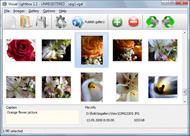
It's no secret that adding photos to your blog posts is one of the most effective ways to enhance your blog and attract attention to your writing. Flickr has millions of photos available in its database. A simple FREE tool called Flickr Gallery allows you to create a custom image gallery with a cool slide show of the most recent and most interesting photos from Flickr on your website or blog in a few easy steps. Just visit Flickr website and find photostream, photoset or a single photo you like. Enter the address of flickr page to add all photos from this page in your gallery, select the style of thumbnails and the overlay window and add the HTML embed code on your website or blog.
A few clicks and you'll see a stylish photo gallery with beautifull lightbox and zoom effects on your own website or blog!


Flickr Gallery for Windows   Flickr Gallery for MAC

Want more?

Example

Lightbox gallery sample

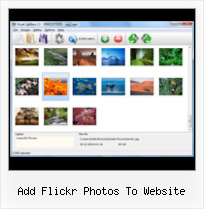
The following image set is generated by Flickr Gallery tool. Click any picture to run Lightbox gallery.

The sample above is an in-page usage demo of Lightbox tool with Flickr images. The slideshow created with Flickr Gallery software is placed inside the website page. You can also check the full-page demo web gallery. This example takes whole browser area to show the slideshow.Hack Flickr Rss Id

How to Use

Step 1. Adding flickr images to your own gallery.


Locate the photo, photoset or photostream you want to use in your Flickr slideshow. Click on it to see the photo on its own page.

Copy URL of the flickr page.

Select Add images from Flickr... from the 'Add' button on the Toolbar.

Add images from Flickr

In the appeared window paste URL of the flickr page. Specify also the number of photos you want to add from the flickr page. Flickr Gallery will now include these photos in your project.

Add images from Flickr

If you have included the photos that you do not wish to be in your web gallery, you can easily remove them. Select all images that you wish to remove from photo gallery, and select Delete images. from the Images menu. You can pick and choose pictures by holding the CTRL while clicking the pictures you like.

Step 2. Adding caption.

The name of the photo on flickr page will automatically appear in the caption. When you select a photo you'll see the various info about it, such as: Path, Size, date of last change and Caption. You can add any comment or text about the photo (up to 512 symbols).

Step 3. Gallery properties.

Change the name of your flickr album, the size and quality of your pictures with Flickr Gallery. From the Gallery menu, select Properties or use "Edit Gallery Properties" button on the toolbar.

On the first tab of the Gallery Properties window you can change the name of your photo album and enable/disable the following properties: Slide Show, Auto play Slide Show, Zoom effect, Overlay Shadow. You can also set the Overlay shadow color and select the Engine you want to use (jQuery or Prototype + script.aculo.us).

On the second tab of the Gallery Properties window you can select the thumbnail you want to use, set the Thumbnails Resolution, Thumbnails Quality, Thumbnails Titles. Select Thumbnails Format (save in PNG or JPG format). Specify the Number of columns in you photo album and the Page color.

On the third tab of the Gallery Properties window you can select the template, Image resolution and Image quality of your pictures and change the Watermark.

You can set up the various sizes for exported images.

Control the quality of output PNG or JPEG format image by defining output "Image quality" and "Thumbnail quality" parameters (0%…100%).

Step 4. Save your photo gallery as project file.

When you exit Flickr Gallery application, you'll be asked if you want to save your project. The project consists of the pictures you choose to put on your web photo gallery and all your settings. It's a good idea to save the project, because that will allow you to change the project in case you decide to do something different with future galleries. So click Yes, then enter a name for your project. To select the location of your project, just click the Browse folders button and choose a different location. Then click Save.

Flickr Album On Your Website Add Flickr Photos To Website

Download Flickr Gallery


Download Flickr Gallery Download Free Edition
for Windows
Download Flickr Gallery Download Free Edition
for MAC

Flickr Gallery is free for non - commercial use.

A small fee is required for business use. Flickr Gallery Business Edition additionally provides an option to remove the Flickr Gallery. Com credit bar as well as a feature to put your own logo to images. After you complete the payment via the secure form, you will receive a license key instantly by e-mail that turns the Flickr Gallery Free Edition into a Business one. You can select the most appropriate payment mode: PayPal, check, credit card, bank transfer etc. Also you can get Business Edition for free if you help with translating Flickr Gallery into your native language, please contact us at for more info.

Embed Flickr Slideshow Div

Buy Flickr GalleryBuy Business Edition
for Windows

$49
Single Website
$69
Unlimited Websites
Buy Flickr GalleryBuy Business Edition
for MAC

$49
Single Website
$69
Unlimited Websites

Support

For feature requests, troubleshooting, general help contact Customer Support at . Make sure to include details on your Flickr Gallery version, browser, a link (or relevant code) and operating system.How To Make Flickr Slideshow Repeat

Feedback

    * First of all, I love you Flickr Gallery. I think it's beautiful! I purchased the lightbox “business edition” yesterday, and I’m very happy how easy it is to use. Found this to be one of the fastest ways to get a gallery on the web. Thanks.

    * I have purchased the business and LOVE IT..Your product appears easy to use and close to what I need to help several of my clients..

    * I have just bought this product and think it is great. As it is extremely easy to use it is something I could get my clients to purchase to upload their own portfolio and latest projects etc.How To Upload Imovie To Flickr

    * I'd like to express my gratitude to your efforts on creating such a nice piece of program and best of all it's free! Keep out the good work and I hope to see new features in the near coming future to rate you 5 star!

FAQ

Q:How can I set the number of thumbnails columns?

A:Open the generated 'engine\css\vlightbox.css' in any text editor and specify the width for your gallery,
for example:

#vlightbox { zoom:1; width: 650px;}

Change this value to have a different number of columns.


RELATED

Adding a Flickr Photo Gallery to Your Website To add the new gallery to your website, you'll need to sign in to Expression Engine in a. separate browser window and Edit the appropriate page entry to display the gallery. From your Flickr home page, click the. Your PhotoStream. link and then select the photo set

Make: Online | HOW TO GPS Tag Photos: Flickr, Mappr, Google Earth Right click / control click and save this file and double click it, it will add my photos to Google Earth, so you can see what I am up to! tutorial I've just written that allows you to geotag Flickr photos from within the Google Earth interface

Displaying your flickr photos in an unobtrusive manner My latest photos on flickr. You only need to insert the SCRIPT once, and the best option is to add it to the end of the document, just before the closing BODY tag. To add a badge all you need to do is add the link inside a DIV with the class flickrbadge and the script does the rest for you

WordPress Tutorial – How to Add Flickr Photo Widget to This Intermediate-level WordPress Tutorial shows how to add Flickr Photo Widget to your WordPress blog's sidebar so that you can display thumbnails of your Flickr photos. The Flickr Widget comes with WordPress 2.5+ on the WordPress.com hosting site

How to Add Flickr photos on my web site | eHow.com How to Add Flickr photos on my web site. If you have some pictures of your own, or photos from a group you admire from Flickr, you can make a badge to put in your website or blog, and this will add to your blog or website greatly

How to add a Flickr-based photo gallery to your website With the growing popularity of using Flickr to manage photos, more and more people are looking for an easy way to display these photos on their website. After some playing around, I've settled with the phpFlickr and Lightbox combination to nicely display photo galleries on a website

Web Design Schools Guide Link to your own site within the photo: Be sure to add a link within your photo's description to get traffic back to your website. Crowdsource images: Make use of Creative Commons Flickr photographs for your website

Link Flickr Photos to Google Website Add your whole Flickr photo album to your Google website while keeping the photos on your site. Your site's readers won't have to go off site to see your Flickr photo album. The Flickr photo album will update on your Google website whenever you

Flickr Tag and browse photos, and upload pictures and short videos with Flickr, a digital photography and media file sharing website. Multiple ways to upload your photos to Flickr—through the web, your mobile device, email or your favorite photo applications

Generate Code To Embed, Add Flickr Photo Album Slideshow On There are times when you want to embed a photo slideshow on flickr onto your blog or website, there are many online services which allows you to it, one of them

Flickr Photo Gallery Flickr Photo Sharing. When you pull out the photos, do friends and family run? There are people out there who really want to see your photography and they're all hanging out at Flickr! Flickr is yahoo's new and very popular photo sharing website

How to Market on Flickr | Small Business Search Marketing Flickr is a web site owned by Yahoo! that offers photo sharing and a host of related services for users of any level — beginners to professionals. More than just being a web site, you should think of Flickr as a community — one with a very strong and active user base

Add video Youtube video, google video, metacafe video search ScriptsMashup contain many scripts dedictated to integrate the best website ressources to your web sites or for a brand new website. SearchFlickr is a complete website with a Flickr photos and images search tool

Options for Easily Adding Flickr Photos to Your Website This page shows a number of the leading options for quickly and easily adding your Flickr photos to your website or blog (WordPress, Joomla, TextPattern). They all offer some options and customizations

How to upload photos to Flickr web site – Photo Gadget Pro Did you know that you can use Photo Gadget Pro for uploading photos directly to your Flickr account? Visit this page for details. Before Photo Gadget Pro can upload pictures to your Flickr account you have to give it permission and to do that you have to visit the Flickr web site

Free Watermark. Add Custom Watermark. Protect Your Photos and Free watermarking software. Add text watermark to any image or photo. Protect your copyright, add comments, timestamps, your logo to images. Prevent unauthorized use of images. Free online service with batch images processing and Flickr, Facbook

USATODAY.com - Flickr of idea on a gaming project led to Caterina Fale and her programmer husband, Stewart Butterfield, transformed an online game project into Flickr. In less than two years, the photo-sharing site now owned by Internet giant Yahoo has turned into one of the Web's fastest-growing Flickr of idea on a gaming project led to photo website

BigHugeLabs: Do fun stuff with your photos Do fun stuff with your digital photos. Create and print personalized motivational posters, calendars, movie posters, magazine covers, badges, mosaics, collages, and a lot more! Buy custom printed calendars, posters, and gifts

FLICKR TOOLBOX: 100+ Tools For Flickr Addicts Flickr is back in the news this week with reports that it will add video. But we're still loving the photo-sharing element: here's 100+ ways to get even

Flickr To Website : Flickr Gallery Flickr has millions of photos available in its database. A simple FREE tool called Flickr Gallery allows you to create a custom image gallery with a cool slide show of the most recent and most interesting photos from Flickr on your website or blog in a few easy steps

Add Flickr Feed To Website | Flickr Slideshow Flickr has millions of photos available in its database. A FREE tool called Flickr Slideshow allows you to create a custom photo gallery with a cool slide show of the most recent and most interesting photos from Flickr on your website or blog in a few easy steps

FlickrHelpr - Show your flickr photos on your website FlickrHelpr is the super simple way to put your flickr photos on your website. It uses the flickr API, so it automatically updates whenever you update your flickr account. You add photos to flickr - your site gets updated

Library of Congress Photos on Flickr - FAQ (Prints and Answers to questions about the Library of Congress pilot project to place photos on Flickr (Prints and Photographs Reading Room, Library of Congress)

Flickr Photos Add a title, description, and tags to each photo. Click Save. If you add a title & description to the photos they will appear on the website as a popup when people hover over that photo with the mouse. This will just be the file name of the photo if you leave the default title there

Flickriver - A new way to view Flickr photos and more Use Flickriver Badge Creator to create a badge linking to your photos, your group or any other Flickriver view. You can place your badge on your Flickr profile, Blog or Website. Add to your iGoogle or Netvibes page While viewing any Flickr photos page, click on the bookmarklet to

flickr add Software - Free Download flickr add - Top 4 Download Flickr has millions of photos available in its database. A simple FREE tool called Flickr Gallery allows you to create a custom image the most recent and most interesting photos from Flickr on your website or blog in a few easy steps. Just

Flickr - Wikipedia, the free encyclopedia Flickr is an image hosting and video hosting website, web services March 29th, 2005: Yahoo buys Flickr, which is an online community to share and discuss personal photos and montages. January 14th, 2007: Yahoo! Photos updated the site with new features, including free full-resolution downloads

