
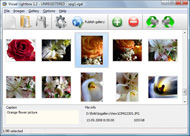



Overview

It's no secret that adding photos to your blog posts is one of the most effective ways to enhance your blog and attract attention to your writing. Flickr has millions of photos available in its database. A simple FREE tool called Flickr Gallery allows you to create a custom image gallery with a cool slide show of the most recent and most interesting photos from Flickr on your website or blog in a few easy steps. Just visit Flickr website and find photostream, photoset or a single photo you like. Enter the address of flickr page to add all photos from this page in your gallery, select the style of thumbnails and the overlay window and add the HTML embed code on your website or blog.
A few clicks and you'll see a stylish photo gallery with beautifull lightbox and zoom effects on your own website or blog!


Flickr Gallery for Windows   Flickr Gallery for MAC

Want more?

Example

Lightbox gallery sample

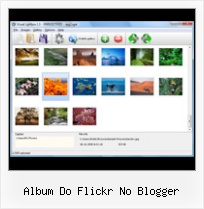
The following image set is generated by Flickr Gallery tool. Click any picture to run Lightbox gallery.

The example above is an in-page usage demo of Lightbox with images from Flickr. The gallery created with Flickr Gallery software is placed inside the page layout. You can also check the full-page demo gallery. This example takes whole browser area to show the gallery.Flickr Gallery Plug In Demo Wordpress

How to Use

Step 1. Adding flickr images to your own gallery.


Locate the photo, photoset or photostream you want to use in your Flickr slideshow. Click on it to see the photo on its own page.

Copy URL of the flickr page.

Select Add images from Flickr... from the 'Add' button on the Toolbar.

Add images from Flickr

In the appeared window paste URL of the flickr page. Specify also the number of photos you want to add from the flickr page. Flickr Gallery will now include these photos in your project.

Add images from Flickr

If you have included the photos that you do not wish to be in your web gallery, you can easily remove them. Select all images that you wish to remove from photo gallery, and select Delete images. from the Images menu. You can pick and choose pictures by holding the CTRL while clicking the pictures you like.

Step 2. Adding caption.

The name of the photo on flickr page will automatically appear in the caption. When you select a photo you'll see the various info about it, such as: Path, Size, date of last change and Caption. You can add any comment or text about the photo (up to 512 symbols).

Step 3. Gallery properties.

Change the name of your flickr album, the size and quality of your pictures with Flickr Gallery. From the Gallery menu, select Properties or use "Edit Gallery Properties" button on the toolbar.

On the first tab of the Gallery Properties window you can change the name of your photo album and enable/disable the following properties: Slide Show, Auto play Slide Show, Zoom effect, Overlay Shadow. You can also set the Overlay shadow color and select the Engine you want to use (jQuery or Prototype + script.aculo.us).

On the second tab of the Gallery Properties window you can select the thumbnail you want to use, set the Thumbnails Resolution, Thumbnails Quality, Thumbnails Titles. Select Thumbnails Format (save in PNG or JPG format). Specify the Number of columns in you photo album and the Page color.

On the third tab of the Gallery Properties window you can select the template, Image resolution and Image quality of your pictures and change the Watermark.

You can set up the various sizes for exported images.

Control the quality of output PNG or JPEG format image by defining output "Image quality" and "Thumbnail quality" parameters (0%…100%).

Step 4. Save your photo gallery as project file.

When you exit Flickr Gallery application, you'll be asked if you want to save your project. The project consists of the pictures you choose to put on your web photo gallery and all your settings. It's a good idea to save the project, because that will allow you to change the project in case you decide to do something different with future galleries. So click Yes, then enter a name for your project. To select the location of your project, just click the Browse folders button and choose a different location. Then click Save.

Flickr Guest Pass Original Download Album Do Flickr No Blogger

Download Flickr Gallery


Download Flickr Gallery Download Free Edition
for Windows
Download Flickr Gallery Download Free Edition
for MAC

Flickr Gallery is free for non - commercial use.

A small fee is required for business use. Flickr Gallery Business Edition additionally provides an option to remove the Flickr Gallery. Com credit bar as well as a feature to put your own logo to images. After you conclude the payment via the secure order form, you will receive a license key instantly by e-mail that turns the Flickr Gallery Free Edition into a Business one. You can select the most suitable payment procedure: PayPal, bank transfer, credit card, check etc. Also you can get Business Edition for free if you help with translating Flickr Gallery into your native language, please contact us at for more info.

Viewer Flickr Private

Buy Flickr GalleryBuy Business Edition
for Windows

$49
Single Website
$69
Unlimited Websites
Buy Flickr GalleryBuy Business Edition
for MAC

$49
Single Website
$69
Unlimited Websites

Support

For general help, feature requests, troubleshooting contact Customer Support at . Make sure to include details on your operating system, browser, a link (or relevant code) and Flickr Gallery version.Flickr Slideshow Widget Embed

Feedback

    * I'd like to express my gratitude to your efforts on creating such a nice piece of program and best of all it's free! Keep out the good work and I hope to see new features in the near coming future to rate you 5 star!

    * I have just bought this product and think it is great. As it is extremely easy to use it is something I could get my clients to purchase to upload their own portfolio and latest projects etc.

    * I LOVE your free Lightbox2 software tool and will purchase the business version shortly. I have seen the Lightbox JS effect used with video tutorials and I was hoping you have a version for video that I can purchase.
Video LightBox: http://videolightbox.comFlickr Screensaver Pc

    * First of all, your product is fantasitc. I looked at the others and your code generator app was insanely easy to use.

FAQ

Q:I would like to center all the thumbnails and I cannot figure out how.Can you please help?

A:Try to use <div> tag or <table> tag to center your thumbnails. Flickr Gallery generates a special code.
Just paste it in <div> tag.
You can also place in <dierates a special code.
Just paste it in <div> tag.
You can also place in <div> tag your iframe.
And then use the alignment that you ned.


RELATED

Photographer No. 1 - Firoze Shakir Blogger No1/Lucknow Street Home > Bollywoods Most Wanted - Photographer No. 1 > Firoze Shakir Blogger No1 2.jpg. Album name: firoz / Firoze Shakir Blogger No1. Keywords:

Blogger configure slide show feed ... - jAlbum forums Re: Blogger configure slide show feed. Posted: 17-Nov-2008 03:00 in response to: Dor. Reply. No it did not work. Also, while I have account with Flickr, I cannot figure how to show only my own flickr photos

Snap.com: Delivering Contextual Content And Advertising Snap Technologies (Snap.com) is a distributed media company that delivers contextual content and advertising via its semantic technology products: Snap Shots, Snap Shots Engage, Snap Shots Addon, LinkBubbles, and KeyLinks to 30+ million users per

New Slideshow Widget for Bloggers. ~ Tips for Bloggers Tips for Bloggers for easy blogging and Making Money. You can also try the Flickr slideshow widget instead of the Blogger one for the Group album. February 18, 2008 10:02 AM. cadria said Photobucket. Hi Vin, I was trying to load a slideshow using Photobucket, but have not had much success. I do get a

Content Search - For Dummies Flickr allows you to create an online photo album, download and name your photos. and collections within your photo album by tag, date, event, or whatever [more ] Found in: Internet

Photo Search: Google Picasa 2 Vs. Adobe Photoshop Album 2 Picasa, the photo software company that Google acquired in last July, has released the second version of its namesake Picasa photo management tool, offer

Downlolad Anyone's Flickr Album | Save Flickr Photos using Download and save Flickr album photos using Flickr AutoDownloadr tool. Free Flickr AutoDownloader to download photos, photo albums from anyone's Flickr account

Free60s - News - Seo TIp - WordPress Tip- Blogger Tip Golf Tip , game Tip, forex Tip , seo Tip, sport Tip, betting Tip ,Download Tools , Themes , Soft ,Game , Movie , Music , Style , Code , Source , Crack , Graphic , Free60s - Seo - WordPress - Blogger - Make Money Online, Tip - Trick, Wordpress Tip

StumbleUpon

The Top 5 Wordpress Plugins for Mom Bloggers " Dear Crissy Following are my current favorite plugins, in no particular order. Mom bloggers who are already using WordPress may find something new to try, and for those of you considering a move to self-hosting, here are a few more good reasons to take the plunge! 1. Flickr Photo Album

Flickr: the world's photo album - Telegraph Three billion photos and counting: how Flickr conquered the web Like most bloggers, most Flickrites are shouting into an abyss. So why do they bother? " Millie Motts", a Flickrite who has uploaded some 7,000 scans from vintage magazines, uses it as a "storage cabinet"

Photo Sharing Public Albums | LoveToKnow Flickr is a public photo sharing service often used by bloggers due to the ease of such as your e-mail address can potentially access your public album

The Album Boutique Blog Brides and Grooms were not meant to live on a hard drive. Read the full story | No discussion yet. New Blogger for Album Boutique. Written by hillary | Posted in Wedding Albums on 18. Jan, 2011. My name is Hillary Frazier, and I'm the newest addition to Album Boutique

Css Flickr Gallery Blogger | Flickr Slideshow Css Flickr Gallery Blogger. jQuery Thickbox Alternative enables you to make an online photo album with ease. embed live flickr stream

CD Cover Meme - Brainiac - The Boston Globe No matter what those four words turn out to be. 3. Finally, visit Flickr's Most "your album cover" though, i think that a few would have been submitted to the flickr pool,

Picasa Web Albums Review - Free Google Tool for Online Photos Picasa Web Albums lets you post photos to the Web directly from Picasa on Windows computers or iPhoto on Macs. Picasa Web Albums also lets you sort and share your photos There is no direct method to post something to Blogger, although any photos you upload from within Blogger are actually stored here

Flickr: Blogger Social '08 Flickr is almost certainly the best online photo management and sharing application in the world. Show off your favorite photos and videos to the world, securely and privately show content to your friends and family, or blog the photos and videos

Flickr vs Picasa Web Albums: Where are tags, Photo notes Google Web Albums provides no API. Support for Blogging. Flickr lets you directly publish a photo to a blog. You can do this from Picasa locally but not from the Web Album interface. Where Google Picasa Web Album Wins: Picasa provides an extremely easy program to upload photos online

How to Integrate Flickr Album on Your Wordpress Blog or blog Integrate Flickr Album on Your Wordpress Blog or blog posts using these Wordpress Plugins really helpful in showing some personal pics on your blog and it is really important to do that

Scripts Tagged photo - Userscripts.org no reviews. 2. 4. 557. Mar 13, 2011. Flickr Commented On. Shows whether or not you have Facebook Album Previous-Next Photo Overlay. Click left side of photo to go to Previous, right side to go to Next. No more aiming

Flickr Photo Album WordPress Plugin I recently came across my all-time favorite WordPress plugin, Flickr Photo Album. The Flickr Photo Album plugin was created by Washington DC web developer Joe Tan for a client at his company Silas Partners

8 Best Wordpress Photo Gallery Plugins " Tips Blogger You can turn your wordpress into a photoblog using some wordpress photo gallery themes given here or using some photo gallery plugins for wordpress. no time. Out of the box configurable "latest images" sidebar widget. Download. Flickr Photo Album. If you are using Flickr, Flickr

how do I upload flickr photo set to blogger slide show how do I upload flickr photo set to blogger slide show You can use the standard Slideshow gadget from Blogger - As source DO NOT use Flickr, but Other - As feed, you need to enter the URL of the feed of your album. Open Flickr, Log and click on Your photos. Search the Feed button, on

Flickr To Blogger : Flickr Gallery Flickr To Blogger. Flickr Gallery is the first software that creates AJAX-powered online image galleries without the need for server-side setup. YouTube - Flickr + Blogger: EM 4 PASSOS Como publicar textos no blogger através do flickr utilizando milhões de fotos compartilhadas

Plugins: Flickr Photo Album This Flickr plugin for WordPress will allow you to pull in your Flickr photosets and display them as albums on your WordPress site. There is a pretty simple template provided, but you can customize the templates 100% to match the look and feel of

Blogger Applet Gallery - Flash Photo Gallery Blogger Applet Gallery. Build superior photoalbums for your Website with Flash Photo Gallery!. Flash Gallery Generator Freeware new york city, photos, flickr photo, flickr api, image gallery, google blogger, thumbnails, lightbox, photostream, photo album

