



Overview

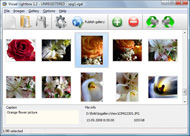
It's no secret that adding photos to your blog posts is one of the most effective ways to enhance your blog and attract attention to your writing. Flickr has millions of photos available in its database. A simple FREE tool called Flickr Gallery allows you to create a custom image gallery with a cool slide show of the most recent and most interesting photos from Flickr on your website or blog in a few easy steps. Just visit Flickr website and find photostream, photoset or a single photo you like. Enter the address of flickr page to add all photos from this page in your gallery, select the style of thumbnails and the overlay window and add the HTML embed code on your website or blog.
A few clicks and you'll see a stylish photo gallery with beautifull lightbox and zoom effects on your own website or blog!


Flickr Gallery for Windows   Flickr Gallery for MAC

Want more?

Example

Lightbox gallery sample

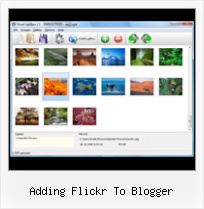
The following image set is generated by Flickr Gallery tool. Click any picture to run Lightbox gallery.

The sample above is an in-page usage demo of Lightbox script with Flickr images. The web gallery created with Flickr Gallery tool is placed inside the website page. You can also check the full-page demo web gallery. This example takes whole browser area to show the slideshow.How To Get Pictures Off Flickr

How to Use

Step 1. Adding flickr images to your own gallery.


Locate the photo, photoset or photostream you want to use in your Flickr slideshow. Click on it to see the photo on its own page.

Copy URL of the flickr page.

Select Add images from Flickr... from the 'Add' button on the Toolbar.

Add images from Flickr

In the appeared window paste URL of the flickr page. Specify also the number of photos you want to add from the flickr page. Flickr Gallery will now include these photos in your project.

Add images from Flickr

If you have included the photos that you do not wish to be in your web gallery, you can easily remove them. Select all images that you wish to remove from photo gallery, and select Delete images. from the Images menu. You can pick and choose pictures by holding the CTRL while clicking the pictures you like.

Step 2. Adding caption.

The name of the photo on flickr page will automatically appear in the caption. When you select a photo you'll see the various info about it, such as: Path, Size, date of last change and Caption. You can add any comment or text about the photo (up to 512 symbols).

Step 3. Gallery properties.

Change the name of your flickr album, the size and quality of your pictures with Flickr Gallery. From the Gallery menu, select Properties or use "Edit Gallery Properties" button on the toolbar.

On the first tab of the Gallery Properties window you can change the name of your photo album and enable/disable the following properties: Slide Show, Auto play Slide Show, Zoom effect, Overlay Shadow. You can also set the Overlay shadow color and select the Engine you want to use (jQuery or Prototype + script.aculo.us).

On the second tab of the Gallery Properties window you can select the thumbnail you want to use, set the Thumbnails Resolution, Thumbnails Quality, Thumbnails Titles. Select Thumbnails Format (save in PNG or JPG format). Specify the Number of columns in you photo album and the Page color.

On the third tab of the Gallery Properties window you can select the template, Image resolution and Image quality of your pictures and change the Watermark.

You can set up the various sizes for exported images.

Control the quality of output PNG or JPEG format image by defining output "Image quality" and "Thumbnail quality" parameters (0%…100%).

Step 4. Save your photo gallery as project file.

When you exit Flickr Gallery application, you'll be asked if you want to save your project. The project consists of the pictures you choose to put on your web photo gallery and all your settings. It's a good idea to save the project, because that will allow you to change the project in case you decide to do something different with future galleries. So click Yes, then enter a name for your project. To select the location of your project, just click the Browse folders button and choose a different location. Then click Save.

Flickr Plugin Blogger Adding Flickr To Blogger

Download Flickr Gallery


Download Flickr Gallery Download Free Edition
for Windows
Download Flickr Gallery Download Free Edition
for MAC

Flickr Gallery is free for non - commercial use.

A small fee is required for business use. Flickr Gallery Business Edition additionally provides an option to remove the Flickr Gallery. Com credit line as well as a feature to put your own logo to images. After you finish the payment via the secure order form, you will receive a license key instantly by email that turns the Flickr Gallery Free Edition into a Business one. You can select the most appropriate payment mode: credit card, check, bank transfer, PayPal etc. Also you can get Business Edition for free if you help with translating Flickr Gallery into your native language, please contact us at for more info.

Slideshow Apps No Flickr

Buy Flickr GalleryBuy Business Edition
for Windows

$49
Single Website
$69
Unlimited Websites
Buy Flickr GalleryBuy Business Edition
for MAC

$49
Single Website
$69
Unlimited Websites

Support

For general help, troubleshooting and feature requests contact Customer Support at . Make sure to include details on your Flickr Gallery version, browser, operating system and a link (or relevant code).How To Embed Flickr Video Tumblr

Feedback

    * I have purchased the business and LOVE IT..Your product appears easy to use and close to what I need to help several of my clients..

    * I LOVE your free Lightbox2 software tool and will purchase the business version shortly. I have seen the Lightbox JS effect used with video tutorials and I was hoping you have a version for video that I can purchase.
Video LightBox: http://videolightbox.com

    * I tried Flickr Gallery and for me its a very cool and usefull application. Its so easy to manage my galleries and it looks very nice.View Private Foto Flickr

    * This looks like EXACTLY what I need for my site. It would make my job much faster! Love your program. Thank you!!

FAQ

Q:Is it possible to load a gallery from within image? So the gallery loads externally?

A:You should start the gallery onClick:

1) Add the following function into the <head> tag:

<script type="text/javascript">
function showLightBox()
{ Lightbox.start(document.getElementById('firstImage'));}
</script>

2) Specify the onClick event for the image (or link):
<img src="thumbnail_gr.jpg" onClick="javascript:showLightBox()" title="Click to see the demo" style="cursor: pointer;">
3) Set the ID for any image in your gallery (id="firstImage"), for example add it to the first image:
<a rel="lightbox_vlb" href="data/images/dscn6831.jpg" title="dscn6831" id="firstImage">
4) Use 'display: none;' property for your gallery in engine\css\vlightbox.css. Just change the following code:

#vlightbox a{
display:-moz-inline-stack;
display:inline-block;
zoom:1;
*display:inline;
position:relative;
vertical-align:top;
margin:3px;
width:160px;
font-family:Trebuchet,Tahoma,Arial,sans-serif;
font-size:11px;
font-weight:normal;
text-align:center;
opacity:0.87;
}

to:

#vlightbox a{
display:-moz-inline-stack;
display:none;
zoom:1;
*display:inline;
position:relative;
vertical-align:top;
margin:3px;
width:160px;
font-family:Trebuchet,Tahoma,Arial,sans-serif;
font-size:11px;
font-weight:normal;
text-align:center;
opacity:0.87;
}

RELATED

Add Flickr Photos with Photo Dropper | Earn Blogger Want to add some Creative Commons licensed photos to your blog posts? Use Photo Dropper WordPress Plugin. With the Photo Dropper plugin, you can easily search

Flickr: 中文Blogger Flickr is almost certainly the best online photo management and sharing application in the world. Show off your favorite photos and videos to the world, securely and privately show content to your friends and family, or blog the photos and videos

Flickr tutorial for bloggers - posting images Video – 5min.com A quick and useful tutorial on how to post photos from flickr to your blog retaining the creative commons license

How to Add a Flickr or Picasa Slideshow to Your Blogger Blog Slideshows can be added to Blogger Blogs from Flickr, Photobucket, Picasa Web Albums or any other photo sharing site. To Add a Slideshow to Your Blog using Flickr or Picasa. Go to your Blog dashboard press "

Embed Flickr slideshows in website ,Blogger, Wordpress Site owner can easily update the slideshows by adding more images to their Flickr account .Know how you can Embed Flickr slideshows in websites ,Blogger and WordPress . How to create Flickr slideshows . Go to pictobrowser . Enter your Flickr username and continue

Add Flickr Slideshow Blogger | Flickr Slideshow Add Flickr Slideshow Blogger. Build professional online photo galleries for your Website with jQuery Thickbox Alternative! Enter the address of flickr page to add all photos from this page in your slideshow, select the style of thumbnails and the overlay window and add the HTML embed code on

Adding Flickr credits - Blogger Help Adding Flickr credits I've been using the 'blog this' button from Flickr a lot. The photo credits are there under the photo when I edit the posting and briefly on the blog but then they disappear. How can I make them permanent? Post reply. Sign in to answer this question

Compender: Display Your Photos By Adding A Flickr Badge To Displaying photos in your Blogger blog from your Flickr account is quite simple. Tip: To center the badge within the page element you will need to add the following line of code to the section of the badge code:

Blogging Tricks and Tips, Wordpress Hacks and Tech Info To see this page as it is meant to appear please use a Javascript enabled browser. How to Add Flickr Yesterday, I was making personal blog for my friend and He wanted to add flickr image slide show in one of his blogger blog. So, I though to make "Continue Reading"

Add Flickr Photos to Wordpress Blog " Joe Duck Add Flickr Photos to WordPress Blog. I think I've blogged this problem before, but given how great it is to post Flickr photos to a blog (even those from others with credit automatically If you have more than one Blogger blog, they'll all need to be associated with the same Google ID

Flickr tools for WordPress bloggers | WereWP PhotoDropper: A lightbox-type interface for adding photos to your posts. We have spoken about Zemanta in a previous post, and this free WordPress plugin brings it to another level by browsing all flickr pictures with Creative Commons license and including the keyword you searched for

The BlogoGalaxy of Famous Bloggers on Flickr I have spend a few hours uploading our Famous Bloggers Club members photos to Flickr to share it with all of you

Techno Juice: PicLens - Slideshow Firefox add-on for Flickr PicLens - Slideshow Firefox add-on for Flickr, Facebook It shows the pictures in a PicLens enabled websites sites such as Flickr, Picasa, Facebook in a slideshow. What's impressive about this extension how seamless it works with the website. All you need to do to

Flickr Slideshow Generator Widget Plugin,embed in Wordpress Flash slide show maker gadget plugin is the best Yahoo Flickr slideshow widget to make free iamge galleries and embed into Facebook, Wordpress, Blogger blogspot

Blogger Buster: A Simple Flickr Photostream Widget for Blogger It's an ideal solution of you prefer a simpler method to display your Flickr photos which does not slow down page-loading time. To add this widget to your Blogger blog, you will need to have your Flickr user or group ID which may look something like this: 8191003@N02

How to add Flickr to Nokia Phones The N Series Nokia Phones which are Symbian OS based is capable of installing a software which allows you to post photographs to your Flickr Account. You just

Archives PERL script to back up Blogger posts and images. PERL script to back up your website using your RSS feed. How to add a Google Calendar to your site. Perl script to add Google Analytics code to your website pages. Why is my table waaay down there? How to create a list of posts from a specific label

Andys Black Hole: Blogger add flickr Photbucket Picasa A place Andy can dump all the things he come across that might be useful to those people living the dream of promoting e-learning. Thursday, November 29, 2007. Blogger add flickr Photbucket Picasa slideshow option. just in case you missed it see

Blogger Buzz: Flickr Support for Blogger in beta Flickr is using a secure authentication method made possible by the new Blogger's use of Google Accounts. When you want to add a Blogger beta blog to Flickr, Flickr will redirect you to google.com to enter your username and password. Read more about granting access to websites

Adding Flickr To Blogger : Flickr Gallery Adding Flickr To Blogger. Build professional online photo galleries for your Website with Flickr Slide Show!. Flickr Mini Gallery And Lightbox 2

Add Flickr photostream/slideshow widget | Blogger Sentral This tutorial will show you how to make a Flickr slideshow/photostream. It will use Blogger slideshow gadget as a base. The slideshow will display 20 of your most recent Flickr photos. The widget makes use of your Flickr photostream feed url, so your first step is to find that url

YouTube - How to Add Flickr Images to Your Blog how to legally add free pictures to your blog from flickr.com 1:42Add toAdded to queue Putting a Flickr Image in your to Blogger Postby matroidus52 views

YouTube, Flickr in Blogger Beta. ~ The Blog Doctor The Blog Doctor, blogger Hacks, Blog design, Blog Template, SEO, Adsense, Blogging Tips and Tricks, Making money through blogs, PPC Login to dashboard of Beta blogger and go to Layouts link of the blog you wish to add the videos to. Then click on Add Page Element in the sidebar

CJU.com - Parsing and Using Blogger & Flickr Feeds with Perl The table above shows the last five entries posted to my blog, as well as the last six photos posted to my photostream on Flickr. For simplicity's sake, I'll be focusing on the Atom format, which is easier to parse, IMO and is the only format currently available via Blogger

Flickr @Techie Blogger Add paypal donation button to blogger and wordpress blogs July 30, 2009 | 14 Comments Add Search form to Blogger Beta Template July 29, 2008 | 13 Comments

