



Overview

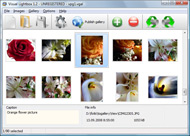
It's no secret that adding photos to your blog posts is one of the most effective ways to enhance your blog and attract attention to your writing. Flickr has millions of photos available in its database. A simple FREE tool called Flickr Gallery allows you to create a custom image gallery with a cool slide show of the most recent and most interesting photos from Flickr on your website or blog in a few easy steps. Just visit Flickr website and find photostream, photoset or a single photo you like. Enter the address of flickr page to add all photos from this page in your gallery, select the style of thumbnails and the overlay window and add the HTML embed code on your website or blog.
A few clicks and you'll see a stylish photo gallery with beautifull lightbox and zoom effects on your own website or blog!


Flickr Gallery for Windows   Flickr Gallery for MAC

Want more?

Example

Lightbox gallery sample

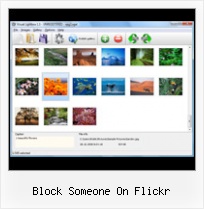
The following image set is generated by Flickr Gallery tool. Click any picture to run Lightbox gallery.

The example above is an in-page usage demo of Lightbox gallery that uses images from Flickr. The web gallery created with Flickr Gallery wizard is placed inside the html page. You can also check the full-page demo slideshow. This example takes whole browser area to show the website gallery.Flickr Private Set Gallery

How to Use

Step 1. Adding flickr images to your own gallery.


Locate the photo, photoset or photostream you want to use in your Flickr slideshow. Click on it to see the photo on its own page.

Copy URL of the flickr page.

Select Add images from Flickr... from the 'Add' button on the Toolbar.

Add images from Flickr

In the appeared window paste URL of the flickr page. Specify also the number of photos you want to add from the flickr page. Flickr Gallery will now include these photos in your project.

Add images from Flickr

If you have included the photos that you do not wish to be in your web gallery, you can easily remove them. Select all images that you wish to remove from photo gallery, and select Delete images. from the Images menu. You can pick and choose pictures by holding the CTRL while clicking the pictures you like.

Step 2. Adding caption.

The name of the photo on flickr page will automatically appear in the caption. When you select a photo you'll see the various info about it, such as: Path, Size, date of last change and Caption. You can add any comment or text about the photo (up to 512 symbols).

Step 3. Gallery properties.

Change the name of your flickr album, the size and quality of your pictures with Flickr Gallery. From the Gallery menu, select Properties or use "Edit Gallery Properties" button on the toolbar.

On the first tab of the Gallery Properties window you can change the name of your photo album and enable/disable the following properties: Slide Show, Auto play Slide Show, Zoom effect, Overlay Shadow. You can also set the Overlay shadow color and select the Engine you want to use (jQuery or Prototype + script.aculo.us).

On the second tab of the Gallery Properties window you can select the thumbnail you want to use, set the Thumbnails Resolution, Thumbnails Quality, Thumbnails Titles. Select Thumbnails Format (save in PNG or JPG format). Specify the Number of columns in you photo album and the Page color.

On the third tab of the Gallery Properties window you can select the template, Image resolution and Image quality of your pictures and change the Watermark.

You can set up the various sizes for exported images.

Control the quality of output PNG or JPEG format image by defining output "Image quality" and "Thumbnail quality" parameters (0%…100%).

Step 4. Save your photo gallery as project file.

When you exit Flickr Gallery application, you'll be asked if you want to save your project. The project consists of the pictures you choose to put on your web photo gallery and all your settings. It's a good idea to save the project, because that will allow you to change the project in case you decide to do something different with future galleries. So click Yes, then enter a name for your project. To select the location of your project, just click the Browse folders button and choose a different location. Then click Save.

How To Download Flickr Online Block Someone On Flickr

Download Flickr Gallery


Download Flickr Gallery Download Free Edition
for Windows
Download Flickr Gallery Download Free Edition
for MAC

Flickr Gallery is free for non-commercial use.

A small fee is required for business use. Flickr Gallery Business Edition additionally provides an option to remove the Flickr Gallery. Com credit bar as well as a feature to put your own logo to images. After you complete the payment via the secure form, you will receive a license key instantly by e-mail that turns the Flickr Gallery Free Edition into a Business one. You can select the most appropriate payment mode: check, bank transfer, credit card, PayPal etc. Also you can get Business Edition for free if you help with translating Flickr Gallery into your native language, please contact us at for more info.

How To Link Flickr

Buy Flickr GalleryBuy Business Edition
for Windows

$49
Single Website
$69
Unlimited Websites
Buy Flickr GalleryBuy Business Edition
for MAC

$49
Single Website
$69
Unlimited Websites

Support

For general help, troubleshooting and feature requests contact Customer Support at . Make sure to include details on your Flickr Gallery version, a link (or relevant code), operating system and a browser.Flickr Lightbox Maker

Feedback

    * This looks like EXACTLY what I need for my site. It would make my job much faster! Love your program. Thank you!!

    * I'm absolutely loving Flickr Gallery Business and Video LightBox. Amazing, quick and painless, to create a custom, browser independent gallery. And it works first time - every time! Best value for money I've seen in quite a while...

    * I ran into your website wile looking for a JavaScript to manage a personal Photo Gallery. I downloaded the trial version and immediately fell in love with your Flickr Gallery, it is one of the best products I’ve ever found; it is very user friendly and easy to use and creates great Photo Galleries.Simpleviewer Pro 2 0 Flickr Example

    * Another programmes have incredible functionality but no fantastic interface like your product!

FAQ

Q:I purchased your business license today but I don't see any way to update so the watermark is either missing or replace with mine.What do I do?

A:Free edition of Flickr Gallery doesn't allow you to remove our watermark.

Register your Flickr Gallery application at first. Use reg. key from the license message you received after the purchase. After the registration you can remove watermarks.

Open Gallery->Properties->Templates: Watermark. Click to disable this option or use your own watermark.


RELATED

2005 July " Flickr Blog When you choose to block someone, it means they: * can't comment on your photos (all comments on your photos Nighthawks features photographs contributed to a variety of night photography groups on Flickr: Night Images, Night Lights, Nighthawks, and Urban Night Shots

How do you write a testimonial for someone on Flickr I want to write a testimonial for someone on flick I want to write a testimonial for someone on flickr; however, I do not see a button or something so I can write one

Buzz by violet blue ® You might be "that guy" if you post information about someone on Flickr from a public website. At present, if you block someone on Flickr you can still see their photos, their profile, their comments in

Forum Topic - On the awfulness of un-contacting a Flickr contact Did you ever make someone a Flickr contact, then realize that you joamox says. I like things to be super neat and tidy, so I clean out contacts on MySpace and Flickr a lot

How To Delete Photos From Flickr : Flickr Gallery How To Delete Photos From Flickr. Just drag and drop your photos or folders with photos and press Flickr Gallery. Block Someone On Flickr. Lightbox For Flickr. Flickr Album Generator. Download Pics From Flickr

Pulling the Flickr sword out of the Yahoo stone That, or someone realizes Flickr's true inherent value and forces the company to sell it. If Yahoo were to put it on the action block, someone else can give it a future, to make real money for itself and its users too, all while

rant " Letters from Grenada Yesterday I had to block someone on Flickr. Flickr! This random dude – who, apparently, first discovered my photo stream when he Googled "Rasta dumptruck" – was commenting on nearly every photo I posted. Which wouldn't have bugged me if the

How to Block Someone on Twitter Social Media & Technology When you block another Twitter user, they cannot follow you, send you an @reply, @mention you, or place you on any of their lists. If you want to block someone on Twitter, first log in to your Twitter account and go to the profile page of the person you want to block from contacting you on Twitter

The Slapdash Sewist: Pattern Giveaway Winner and Flickr Tutorial I recommended a while back that you regularly check your recent activity on flickr to make sure the flickr nasties haven't gotten to you. It is an easy process to block unsavory users and I make a practice of it. To be clear, I haven't blocked someone on flickr before so thanks for the run down

Speed up a Drupal web site by enabling block caching | Nadeau Every block adds to the work Drupal must do to assemble a page, but some blocks are particularly slow. To speed up your site, install the Block Cache module to create cached versions of your slowest blocks

Thomas Hawk Digital Connection " Blog Archive " Use a Swear Update: Apparently a "Fun Blockers" group was set up on Flickr that had the objective of encouraging people to block people and that group has now reportedly been shut down by Flickr staff. Silencing your critics is never a good idea whether you have the power to do so or not

patch which enables a Flickr group pool block | drupal.org patch which enables a Flickr group pool block. Posted by mikegoodwin on April 14, 2007 at patch which enables a Flickr group pool block. Changing title to make it easier to find

How to Use Flickr to Promote a Photography Business | eHow.com How to Use Flickr to Promote a Photography Business. Flickr is a great place to network with professional and amateur photographers, for gaining insight on altering photographs through specialized software programs, and for

Flickr Safety Guide - Yahoo! Product Safety Guides – Yahoo! If someone leaves a comment you don't like, click delete to get rid of it. You can also block people who you don't want commenting on your photos in the future. Control who can see your geotagged photos and videos. Geotagging is matching photos to a location on a map

Dan Heller's Photography Business Blog: Pulling the Flickr That, or someone realizes Flickr's true inherent value and forces the company to sell it. If Yahoo were to put it on the action block, someone else can give it a future, to make real money for itself and its users too, all while

Flickr Safety Guide Block another member. If these safety and privacy features don't prevent inappropriate or unwelcome contact from someone, there are a few ways to block people or remove Now, it could happen that your image may be hosted on Flickr but someone has just linked to the static image element and not

miwaza.com: Flickr Archives New thing about Flickr. "Now you can block obnoxious, unfriendly, annoying, suspicious, When you choose to block someone, it means they: * can't comment on your photos (all comments on your photos made by them are deleted) * are removed

More Crappy Flickr Censorship: Use a Swear Word in a Private I was disturbed today to learn that a Flickr friend of mine Pierre Honeyman had his account deleted by Flickr. The fact that all a bunch of people have to do is block someone to get their account deleted is ludicrous. To make matters worse, on Flickr you don't even *know* who is blocking you

night | Tumblr http://www.flickr.com/photos/madmil/5817048537/ If you could leave flowers on anyone's grave every week whether you knew them or not, who would it be? I just like holding on to someone when I fall asleep and waking up in the middle of the night with someone to kisss lightly on

Red Flags | Nothing But Bonfires Now listen, here's a question I've been meaning to ask, and it's a tricky one so hold tight: when someone makes one of your photos a "favorite" on Flickr, what do you do? No, I don't mean technically. A Flickr pic of mine was stolen and used on someone's profile of a dating site!

Block someone on Facebook profile Then if you scroll to the bottom, you'll be able to type the name of the people you want to block and hit Block'. The actual meaning of blocking someone on Facebook, is that the blocked individual won't be able to contact you nor access your Facebook profile

How to Block Someone on Twitter Twitter, like any form of social media, is made up of a wide variety of different people. Because of the accessibility that the Internet offers, you may come across people that are rude, offensive or otherwise unpleasant to communicate with

6 Flickr Horror Stories | Geekpreneur Vanessa Pike-Russell Most of the people on Flickr are a friendly sort. They're helpful and chatty, and they usually have something nice to say about your

Flickr Photos Get Interesting on the Apple TV — Apple News The only real problem with Apple TV's photo screensaver is that my own photos aren't up to scratch, and the limited ones Apple includes get old pretty quickly. What I really wanted was a way to get Flickr's daily Explore section onto my Apple TV

