



Overview

It's no secret that adding photos to your blog posts is one of the most effective ways to enhance your blog and attract attention to your writing. Flickr has millions of photos available in its database. A simple FREE tool called Flickr Gallery allows you to create a custom image gallery with a cool slide show of the most recent and most interesting photos from Flickr on your website or blog in a few easy steps. Just visit Flickr website and find photostream, photoset or a single photo you like. Enter the address of flickr page to add all photos from this page in your gallery, select the style of thumbnails and the overlay window and add the HTML embed code on your website or blog.
A few clicks and you'll see a stylish photo gallery with beautifull lightbox and zoom effects on your own website or blog!


Flickr Gallery for Windows   Flickr Gallery for MAC

Want more?

Example

Lightbox gallery sample

The following image set is generated by Flickr Gallery tool. Click any picture to run Lightbox gallery.

The sample above is an in-page usage demo of Lightbox gallery that uses images from Flickr. The website gallery created with Flickr Gallery tool is placed inside the website page. You can also check the full-page demo lightbox gallery. This example takes whole browser area to show the gallery.Flickr Ozio Gallery Joomla Tutorial

How to Use

Step 1. Adding flickr images to your own gallery.


Locate the photo, photoset or photostream you want to use in your Flickr slideshow. Click on it to see the photo on its own page.

Copy URL of the flickr page.

Select Add images from Flickr... from the 'Add' button on the Toolbar.

Add images from Flickr

In the appeared window paste URL of the flickr page. Specify also the number of photos you want to add from the flickr page. Flickr Gallery will now include these photos in your project.

Add images from Flickr

If you have included the photos that you do not wish to be in your web gallery, you can easily remove them. Select all images that you wish to remove from photo gallery, and select Delete images. from the Images menu. You can pick and choose pictures by holding the CTRL while clicking the pictures you like.

Step 2. Adding caption.

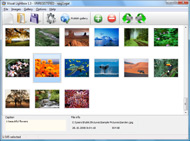
The name of the photo on flickr page will automatically appear in the caption. When you select a photo you'll see the various info about it, such as: Path, Size, date of last change and Caption. You can add any comment or text about the photo (up to 512 symbols).

Step 3. Gallery properties.

Change the name of your flickr album, the size and quality of your pictures with Flickr Gallery. From the Gallery menu, select Properties or use "Edit Gallery Properties" button on the toolbar.

On the first tab of the Gallery Properties window you can change the name of your photo album and enable/disable the following properties: Slide Show, Auto play Slide Show, Zoom effect, Overlay Shadow. You can also set the Overlay shadow color and select the Engine you want to use (jQuery or Prototype + script.aculo.us).

On the second tab of the Gallery Properties window you can select the thumbnail you want to use, set the Thumbnails Resolution, Thumbnails Quality, Thumbnails Titles. Select Thumbnails Format (save in PNG or JPG format). Specify the Number of columns in you photo album and the Page color.

On the third tab of the Gallery Properties window you can select the template, Image resolution and Image quality of your pictures and change the Watermark.

You can set up the various sizes for exported images.

Control the quality of output PNG or JPEG format image by defining output "Image quality" and "Thumbnail quality" parameters (0%…100%).

Step 4. Save your photo gallery as project file.

When you exit Flickr Gallery application, you'll be asked if you want to save your project. The project consists of the pictures you choose to put on your web photo gallery and all your settings. It's a good idea to save the project, because that will allow you to change the project in case you decide to do something different with future galleries. So click Yes, then enter a name for your project. To select the location of your project, just click the Browse folders button and choose a different location. Then click Save.

Flickr Foto Stream Css Blogger Flickr Gallery

Download Flickr Gallery


Download Flickr Gallery Download Free Edition
for Windows
Download Flickr Gallery Download Free Edition
for MAC

Flickr Gallery is free for non - commercial use.

A small fee is required for business use. Flickr Gallery Business Edition additionally provides an option to remove the Flickr Gallery. Com credit bar as well as a feature to put your own logo to images. After you conclude the payment via the secure order form, you will receive a license key instantly by e-mail that turns the Flickr Gallery Free Edition into a Business one. You can select the most suitable payment procedure: PayPal, bank transfer, credit card, check etc. Also you can get Business Edition for free if you help with translating Flickr Gallery into your native language, please contact us at for more info.

How To Get On Explore Flickr

Buy Flickr GalleryBuy Business Edition
for Windows

$49
Single Website
$69
Unlimited Websites
Buy Flickr GalleryBuy Business Edition
for MAC

$49
Single Website
$69
Unlimited Websites

Support

For general help, feature requests, troubleshooting contact Customer Support at . Make sure to include details on your operating system, browser, a link (or relevant code) and Flickr Gallery version.Flickr Embed Set Link

Feedback

    * I'd like to express my gratitude to your efforts on creating such a nice piece of program and best of all it's free! Keep out the good work and I hope to see new features in the near coming future to rate you 5 star!

    * I have purchased the business and LOVE IT..Your product appears easy to use and close to what I need to help several of my clients..

    * I have installed Flickr Gallery to trial. All good, loving it!! I want to get an business version of your great programm. I love it - soo easy to use!!How To Delete All Photos Flickr

    * I downloaded your trial version to see if I could get it to work with my website, and I am almost there (I have been looking for something like this for ages)..

FAQ

Q:I would like to reposition the Previous and Next buttons to a position below the images and have them be visible all the time.Where do I have to go to make these changes in the code?

A:Find the css file in the folder generated by gallery:
engine\css\
or in the following folder:
c:\Program Files\Visual LightBox Business\templates\Default\engine\css\

To set their position you should change 15% to something different:
#prevLink:hover, #prevLink:visited:hover { background: url(../images/prevlabel.gif) left 15% no-repeat; }
#nextLink:hover, #nextLink:visited:hover { background: url(../images/nextlabel.gif) right 15% no-repeat; }

For example:
#prevLink:hover, #prevLink:visited:hover { background:url(../images/prevlabel.gif) left 75% no-repeat; }
#nextLink:hover, #nextLink:visited:hover { background: url(../images/nextlabel.gif) right 75% no-repeat;}

RELATED

Flickr Blogger : Flickr Gallery Flickr Blogger. Make superior ajax picture gallery for your web site with Flickr Gallery! A simple FREE tool called Flickr Gallery allows you to create a custom image gallery with a cool slide show of the most recent and most interesting photos from Flickr on your website or blog in a few easy steps

Blogger's Tour of the Art Gallery of Alberta - a set on Flickr Flickr is almost certainly the best online photo management and sharing application in the world. Show off your favorite photos and videos to the Around 30 prominent Edmonton bloggers and social media types got an exclusive tour of the new Art Gallery of Alberta on January 25, 2010

Blogger " CharlieBrown8989 Filed under: Blogger, Blogging, Digital Arts Gallery, Environment, Nature by charliebrown8989 — Leave a comment Filed under: Blogger, Blogging, Digital Arts Gallery, flickr.com by charliebrown8989

8 Best Wordpress Photo Gallery Plugins " Tips Blogger You can turn your wordpress into a photoblog using some wordpress photo gallery themes given here or using some photo gallery plugins for wordpress. Another Flickr based image gallery plugin which allows you to quickly and easily incorporate your Flickr photos into your wordpress pages and

CJU.com - Parsing and Using Blogger & Flickr Feeds with Perl If you're reading this, you probably already know what Flickr and Blogger are, so I won't waste our time going into that, but you Flickr, thankfully, provides flexibility to syndicate feeds in just

BreadKrumbs: Frequently Asked Questions for Flickr Bloggers A fun rating & comments service for Flickr photos, based on the Flickr API. If it helps you, then I'd like you to help other Flickr Bloggers learn about it too

Create flash slideshow and photo album with Flash Gallery Teach you how to create photo album and photo gallery with Flash Gallery Maker. Flash Gallery Maker makes it easy to share more about you using your photo album/ photo slideshow on SNS websites like Myspace, Facebook, Flickr, Typepad, Blogger, Wordpress, Livejournal

iPhotoWalker: [Tutorial] SimpleViewer 2.1.1 on Blogger (with The [Tutorial] SimpleViewer 2.0 in Blogger (with Flickr integration) might not be applicable to the latest version of the SimpleViewer 2.11. sorry for asking so many!!but after i upload the codes in blogger it says : no images specified in gallery xml

Magasin Cuatro | FalconHive Equipped with 4 ads section and 1 featured content section for your product show-off, Magasin Cuatro is the professional magazine style template that suits Save' to achieve the Flickr Gallery! We care about the author. Magasin Cuatro comes under a Creative Common License. This means it

Flickr tools for WordPress bloggers | WereWP Flickr tools for WordPress bloggers. October 23, 2008. Social networking and social websites are growing more and more popular Flickr Thumbnail Photostream on the contrary displays pictures thanks to the Flickr API. 3. Flickr in a blog gallery. Slickr Gallery is a very fast, bandwidth-friendly

Flickr Photo Sharing | GBTechCouncil.org Use the Flickr photo sharing gallery to view pictures from the Greater Baltimore Technology Council. Also, learn how to use Flickr for your own business

Canon Blogger: Home of the Learning Digital Photography Podcast Tags: Contest, Flickr, gallery, Lexar, photography, photos Flickr, photography, potd composition, Creativity, education, Flickr, Interview, Learning Digital Photography

Embed Flickr slideshows in website ,Blogger, Wordpress Uploading and managing multiple images and photo galleries are difficult tasks for every webmaster .For static websites, there are softwares like Ashampoo photo flickr slideshow blogger ,flickr gallery blogger ,embed flickr slideshow ,embed flickr gallery

Flickr Slideshow Generator Widget Plugin,embed in Wordpress Flash slide show maker gadget plugin is the best Yahoo Flickr slideshow widget to make free iamge galleries and embed into Facebook, Wordpress, Blogger blogspot. How to create Flickr gallery slideshow and embed into Wordpress, Blogger, Facebook

IWBlogger Flickr Photostream | IronWorks Magazine IWBlogger has a Flickr Photostream which includes event photography, rally promotional shots, post images, and best of all—the Snakebit Sam photo archive

BrainSoiled dot com blogger gallery bio flickr contact. Copyright ©2009. BrainSoiled.com All Rights Reserved

Flickr Gallery On Blogger | Flickr Slideshow Flickr Gallery On Blogger. Create fast and straightforward photo gallery for website with jQuery Thickbox Alternative! flickr slideshow embedding

Flickr Photobar Gallery | Codrops After we got a lot of great feedback for our image galleries we decided to follow some of the suggestions and create a gallery that uses the Flickr API. The aim was to build a bottom photobar that one can easily integrate into a website. It is

Flickr Gallery Downloads by Flickr-Gallery.com at Software Add Flickr Slideshow on your website! It's no secret that adding photos to your blog posts is one of the most effective ways to enhance your blog and attract attention to your writing

Flickr tutorial for bloggers - posting images Video – 5min.com A quick and useful tutorial on how to post photos from flickr to your blog retaining the creative commons license

Flickr " Gallery | lesterchan.net Lester Chan's Website | lesterchan.net Welcome to the Me Collection in Flickr Gallery. Contains my personal collection such as my gadget pictures, unboxing pictutes, pictures taken during blogging events, etc

Link Blog Post to Flickr - Gee Blog Gallery Here are the instructions to add a post in Blogger with a picture that is linked to Flickr. If you are new to this whole "blog gallery" thing, start here and keep it simple until you the You will need to hop back and forth between Blogger and Flickr to get this posted so it helps to log in to both

Include Photo Gallery On Blogger - Web Photo Gallery Include Photo Gallery On Blogger. DHTML Popup . The most powerful web gallery software on the Web.. opacity in modalpopup Flickr Slideshow For Blogger : Flickr Gallery. Flickr Slideshow For Blogger. Flickr Slide Show is a slideshow ready-made, professional solution that allows webmasters to

