



Overview

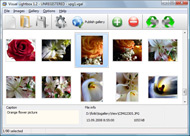
It's no secret that adding photos to your blog posts is one of the most effective ways to enhance your blog and attract attention to your writing. Flickr has millions of photos available in its database. A simple FREE tool called Flickr Gallery allows you to create a custom image gallery with a cool slide show of the most recent and most interesting photos from Flickr on your website or blog in a few easy steps. Just visit Flickr website and find photostream, photoset or a single photo you like. Enter the address of flickr page to add all photos from this page in your gallery, select the style of thumbnails and the overlay window and add the HTML embed code on your website or blog.
A few clicks and you'll see a stylish photo gallery with beautifull lightbox and zoom effects on your own website or blog!


Flickr Gallery for Windows   Flickr Gallery for MAC

Want more?

Example

Lightbox gallery sample

The following image set is generated by Flickr Gallery tool. Click any picture to run Lightbox gallery.

The photo gallery above is an in-page usage demo of Lightbox with images from Flickr. The lightbox gallery created with Flickr Gallery tool is placed inside the website page. You can also check the full-page demo website gallery. This example takes whole browser area to show the Lightbox gallery that uses images from Flickr.Flickr Copy Set From Contact

How to Use

Step 1. Adding flickr images to your own gallery.


Locate the photo, photoset or photostream you want to use in your Flickr slideshow. Click on it to see the photo on its own page.

Copy URL of the flickr page.

Select Add images from Flickr... from the 'Add' button on the Toolbar.

Add images from Flickr

In the appeared window paste URL of the flickr page. Specify also the number of photos you want to add from the flickr page. Flickr Gallery will now include these photos in your project.

Add images from Flickr

If you have included the photos that you do not wish to be in your web gallery, you can easily remove them. Select all images that you wish to remove from photo gallery, and select Delete images. from the Images menu. You can pick and choose pictures by holding the CTRL while clicking the pictures you like.

Step 2. Adding caption.

The name of the photo on flickr page will automatically appear in the caption. When you select a photo you'll see the various info about it, such as: Path, Size, date of last change and Caption. You can add any comment or text about the photo (up to 512 symbols).

Step 3. Gallery properties.

Change the name of your flickr album, the size and quality of your pictures with Flickr Gallery. From the Gallery menu, select Properties or use "Edit Gallery Properties" button on the toolbar.

On the first tab of the Gallery Properties window you can change the name of your photo album and enable/disable the following properties: Slide Show, Auto play Slide Show, Zoom effect, Overlay Shadow. You can also set the Overlay shadow color and select the Engine you want to use (jQuery or Prototype + script.aculo.us).

On the second tab of the Gallery Properties window you can select the thumbnail you want to use, set the Thumbnails Resolution, Thumbnails Quality, Thumbnails Titles. Select Thumbnails Format (save in PNG or JPG format). Specify the Number of columns in you photo album and the Page color.

On the third tab of the Gallery Properties window you can select the template, Image resolution and Image quality of your pictures and change the Watermark.

You can set up the various sizes for exported images.

Control the quality of output PNG or JPEG format image by defining output "Image quality" and "Thumbnail quality" parameters (0%…100%).

Step 4. Save your photo gallery as project file.

When you exit Flickr Gallery application, you'll be asked if you want to save your project. The project consists of the pictures you choose to put on your web photo gallery and all your settings. It's a good idea to save the project, because that will allow you to change the project in case you decide to do something different with future galleries. So click Yes, then enter a name for your project. To select the location of your project, just click the Browse folders button and choose a different location. Then click Save.

Example Of A Flickr Api Photostream Flickr To Flash

Download Flickr Gallery


Download Flickr Gallery Download Free Edition
for Windows
Download Flickr Gallery Download Free Edition
for MAC

Flickr Gallery is free for non-commercial use.

A small fee is required for business use. Flickr Gallery Business Edition additionally provides an option to remove the Flickr Gallery. Com credit string as well as a feature to put your own logo to images. After you conclude the payment via the secure order form, you will receive a license key instantly by e-mail that turns the Flickr Gallery Free Edition into a Business one. You can select the most suitable payment method: credit card, check, bank transfer, PayPal etc. Also you can get Business Edition for free if you help with translating Flickr Gallery into your native language, please contact us at for more info.

Create Flickt Html Gallery In Blogfger

Buy Flickr GalleryBuy Business Edition
for Windows

$49
Single Website
$69
Unlimited Websites
Buy Flickr GalleryBuy Business Edition
for MAC

$49
Single Website
$69
Unlimited Websites

Support

For troubleshooting, feature requests and general help contact Customer Support at . Make sure to include details on your Flickr Gallery version, a link (or relevant code), operating system and a browser.Getflickr Original Size

Feedback

    * I have purchased the business and LOVE IT..Your product appears easy to use and close to what I need to help several of my clients..

    * Another programmes have incredible functionality but no fantastic interface like your product!

    * I ran into your website wile looking for a JavaScript to manage a personal Photo Gallery. I downloaded the trial version and immediately fell in love with your Flickr Gallery, it is one of the best products I’ve ever found; it is very user friendly and easy to use and creates great Photo Galleries.Famous On Flickr

    * This looks like EXACTLY what I need for my site. It would make my job much faster! Love your program. Thank you!!

FAQ

Q:In previewing some of my own slides on the browser, I find the background (thumb nails visible) too busy and distracting. Is there a way to darken the background?

A:You may set the following parameter in engine\js\visuallightbox.js file in a such way:

overlayOpacity: 1, // controls transparency of shadow overlay


RELATED

Flash Flickr Badge Widget for WordPress | American in Spain ATTENTION: I now recommend that you use the Javascript Flickr Badge widget instead. I love the Flickr Flash Badges, but the content of the iframe that you have So I decided to take matters into my own hands While I was investigating the parameters that Flickr's flash file takes, and

Tag Galaxy Browse through Flickr photos in 3D with this flash application. a newer Version of the Adobe Flash Player to view the Tag Galaxy Website. Get it here!

Flickr To Flash : Flickr Gallery Flickr To Flash. Create an effective online photo galleries with Flickr Slideshow!. Flicker Codes For Html

Check on Flickr Experimental flash based search engine for Flickr Check on Flickr is an experimental service which lets you search and explore Flickr using tag information with an entirely Flash-based interface. The aplication retrives pictures from Flickr data base, and use the thumbnails to create mosaics of

Flickrssp (Flickr + Flash) - Jeremy Lwanga's Blog Flickrssp is a php script developed by Brian Sweeting to use the Flickr API with Todd Dominey's Slideshowpro Flash extension. I am pulling in all my flickr public photosets into a customizable flash gallery

Trippermap - get a flash world map of your flickr photos A web service that allows you to put a flash based world map of your Flickr photos on your own website or blog. It's as simple as tagging your photos with a city and country name!

Maps

Flash Flickr SliderShow Flash Flickr SliderShow. by Alessandro Crugnola on June 17, 2010. This is my first WordPress plugin ever! This widget is useful if you want to display a simple flickr slideshow ( with a fade effect between images ) of all your public photostream

Yahoo! Flash (R) Blog " Blog Archive " Flickr: Now Even More The new crossdomain.xml file (located at http://static.flickr.com/crossdomain.xml) now gives all of your Flash apps full access to a whole universe of photographic goodness. And by full access we mean "really-really full", with BitmapData readily acessible for every single photo

Open Source Flash Flickr Photo Gallery Open Source Flash Flickr Photo Gallery. 22 Oct. FlashFlickr PhotoGallery is an open source photo gallery built with Flex 2 / AS3. The application enables users to browse your Flickr pictures, see your sets, tags and notes within your website from a good looking interface

Building a Flickr Flash Display, Part 1 To get photos, you have to provide an API key from www.flickr.com and a user id for the images, you want to show. When that is done, you publish the Flash movie and run it from within the Flash MX authoring tool, a flash runner or a browser

Replacing the Flash Flickr Badge with Dojo | SitePen Blog dojox.image.FlickrBadge uses the new dojox.data.FlickrRestStore, a Dojo Data store implementation that makes it extremely easy and flexible to work between Flickr data sources and Dijits. Tags: dojox, dojox.image, flickr. 9 Responses to "Replacing the Flash Flickr Badge with Dojo"

Flickr SlideShow with SWX - sephiroth.it Create a simple fading slideshow using the SWX Flickr API For this tutorial I've used FlashDevelop as editor, so you don't need to have Flash installed to compile the swf by your own

Flickr Flash As2 - Flash Photo Gallery Flickr Flash As2. Create free flash web photo gallery for your Website with Flash Photo Gallery!. Flash Gallery With Navigation Sample Publish the flickr flash as2 to a local drive or directly to the Internet via a built-in FTP client and add the HTML embed code on your website or blog

Flickr Flash Badge Widget — Widgetbox Get the Flickr Flash Badge widget on Widgetbox.com! Flickr photo badge that uses Flash to display photos that are tagged with terms that you want!

Slide Flickr Flash : Free Flash SlideShow Maker Flash SlideShow w/o Flash! Slide Flickr Flash. A few clicks to create stylish photo gallery webpage!. flash images transitions effect Slide Flickr Flash Overview. This photo slideshow maker is a demonstration of Flash-like behavior implemented solely in Javascript,

Flickr Ditches Flash | ForeverGeek Flickr is no longer using Flash to show photos and notes. They have switched to using DHTML instead. We'll we've gone and done it. In answer to countless requests, photo pages no longer use a Macromedia Flash wrapper to display photos; instead we are using an old technology called "DHTML

Code: Flickr Developer Blog " flash While useable, Flickr's form-based upload needed a refresh that would allow for batch Because of Flash's distribution amongst Flickr users, it was safe to have as a

Flickr: "flash" Flickr is almost certainly the best online photo management and sharing application in the world. Show off your favorite photos and videos to the world, securely and privately show content to your friends and family, or blog the photos and videos

Build a Photo Viewer Using Flex and the Flickr API | Activetuts+ In this tutorial you will learn how to use the as3flickrlib library to create a Flash Flickr photo viewer. Step 1: The

FotoViewr. Stunning photo galleries for your Flickr photos FotoViewr is an elegant, easy to use Flash slideshow component that you can plug into any You don't even need to know how to write code. Privacy Policy | Terms of Service

www.apifinder.com - Get Started with API Programming Using Do you need a programmer's introduction to Web service client development? Try building a simple 'photo of the day' application using the Flickr API (as the source of the photos) and either Actionscript, C#, or Java on the server side

PopPhoto Flash: flickr Learn about Photography from the experts at PopPhoto.com. Browse our variety of camera reviews and read exclusive photo tips to hone your skills. Check out the PopPhoto.com Photography resources now

brevity.org -- Lickr: Flickr, without the Flash People in Photos is a very comprehensive feature that is present in almost every aspect of Flickr now -- it's almost like a whole other dimension to the site. But Lickr included the first crude attempt at something like that, way Update (2005-05-13): Flickr has moved to a non-Flash interface

View Pictures from Flickr or Picasa Web Albums As a Flash Gallery A Flash based online viewer for your photographs in Flickr or Google Picasa Web Albums

Make your own Flickr search engine with Flash and in this tutorial I'm gonna show you how to interact with the flickr data base, making your own photo search engine, looking for tags on the photos

Computer Arts - Making connections with Flash and Flickr For this tutorial we will learn the basics of the Flickr Application Programming Interface (API) and roll it in to an image viewer we can use as our For budding Flash developers, the notion of connecting to a website's

