


Overview

It's no secret that adding photos to your blog posts is one of the most effective ways to enhance your blog and attract attention to your writing. Flickr has millions of photos available in its database. A simple FREE tool called Flickr Gallery allows you to create a custom image gallery with a cool slide show of the most recent and most interesting photos from Flickr on your website or blog in a few easy steps. Just visit Flickr website and find photostream, photoset or a single photo you like. Enter the address of flickr page to add all photos from this page in your gallery, select the style of thumbnails and the overlay window and add the HTML embed code on your website or blog.
A few clicks and you'll see a stylish photo gallery with beautifull lightbox and zoom effects on your own website or blog!


Flickr Gallery for Windows   Flickr Gallery for MAC

Want more?

Example

Lightbox gallery sample

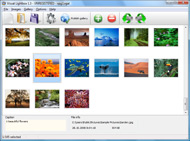
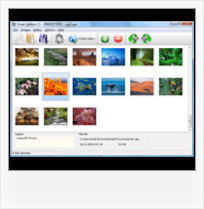
The following image set is generated by Flickr Gallery tool. Click any picture to run Lightbox gallery.

The photo gallery above is an in-page usage demo of Lightbox gallery that uses images from Flickr. The gallery created with Flickr Gallery wizard is placed inside the page layout. You can also check the full-page demo lightbox gallery. This example takes whole browser area to show the Lightbox gallery that uses images from Flickr.Blogger Flickr Lightbox

How to Use

Step 1. Adding flickr images to your own gallery.


Locate the photo, photoset or photostream you want to use in your Flickr slideshow. Click on it to see the photo on its own page.

Copy URL of the flickr page.

Select Add images from Flickr... from the 'Add' button on the Toolbar.

Add images from Flickr

In the appeared window paste URL of the flickr page. Specify also the number of photos you want to add from the flickr page. Flickr Gallery will now include these photos in your project.

Add images from Flickr

If you have included the photos that you do not wish to be in your web gallery, you can easily remove them. Select all images that you wish to remove from photo gallery, and select Delete images. from the Images menu. You can pick and choose pictures by holding the CTRL while clicking the pictures you like.

Step 2. Adding caption.

The name of the photo on flickr page will automatically appear in the caption. When you select a photo you'll see the various info about it, such as: Path, Size, date of last change and Caption. You can add any comment or text about the photo (up to 512 symbols).

Step 3. Gallery properties.

Change the name of your flickr album, the size and quality of your pictures with Flickr Gallery. From the Gallery menu, select Properties or use "Edit Gallery Properties" button on the toolbar.

On the first tab of the Gallery Properties window you can change the name of your photo album and enable/disable the following properties: Slide Show, Auto play Slide Show, Zoom effect, Overlay Shadow. You can also set the Overlay shadow color and select the Engine you want to use (jQuery or Prototype + script.aculo.us).

On the second tab of the Gallery Properties window you can select the thumbnail you want to use, set the Thumbnails Resolution, Thumbnails Quality, Thumbnails Titles. Select Thumbnails Format (save in PNG or JPG format). Specify the Number of columns in you photo album and the Page color.

On the third tab of the Gallery Properties window you can select the template, Image resolution and Image quality of your pictures and change the Watermark.

You can set up the various sizes for exported images.

Control the quality of output PNG or JPEG format image by defining output "Image quality" and "Thumbnail quality" parameters (0%…100%).

Step 4. Save your photo gallery as project file.

When you exit Flickr Gallery application, you'll be asked if you want to save your project. The project consists of the pictures you choose to put on your web photo gallery and all your settings. It's a good idea to save the project, because that will allow you to change the project in case you decide to do something different with future galleries. So click Yes, then enter a name for your project. To select the location of your project, just click the Browse folders button and choose a different location. Then click Save.

Best Flickr Feeds For Your Site Can I Use Flickr Photos On My Blog

Download Flickr Gallery


Download Flickr Gallery Download Free Edition
for Windows
Download Flickr Gallery Download Free Edition
for MAC

Flickr Gallery is free for non - commercial use.

A small fee is required for business use. Flickr Gallery Business Edition additionally provides an option to remove the Flickr Gallery. Com credit string as well as a feature to put your own logo to images. After you complete the payment via the secure order form, you will receive a license key instantly by e-mail that turns the Flickr Gallery Free Edition into a Business one. You can select the most suitable payment procedure: bank transfer, check, PayPal, credit card etc. Also you can get Business Edition for free if you help with translating Flickr Gallery into your native language, please contact us at for more info.

Flickr Streaming Embed

Buy Flickr GalleryBuy Business Edition
for Windows

$49
Single Website
$69
Unlimited Websites
Buy Flickr GalleryBuy Business Edition
for MAC

$49
Single Website
$69
Unlimited Websites

Support

For general help, feature requests, troubleshooting contact Customer Support at . Make sure to include details on your Flickr Gallery version, browser, operating system and a link (or relevant code).Gallery That Works With Flickr Feeds

Feedback

    * I'm absolutely loving Flickr Gallery Business and Video LightBox. Amazing, quick and painless, to create a custom, browser independent gallery. And it works first time - every time! Best value for money I've seen in quite a while...

    * I LOVE your free Lightbox2 software tool and will purchase the business version shortly. I have seen the Lightbox JS effect used with video tutorials and I was hoping you have a version for video that I can purchase.
Video LightBox: http://videolightbox.com

    * Let me start just congratulating you, good job, really. I am trying out the free version before I buy it. It works great.Login Flickr

    * I tried Flickr Gallery and for me its a very cool and usefull application. Its so easy to manage my galleries and it looks very nice.

FAQ

Q:How do I control the SlideShow speed?

A:Open engine\js\visuallightbox.js and find the following code:

slideTime:3, // time to display images during slideshow

Set the time you need.

RELATED

Using Flickr to crop and resize your MailChimp photos Blog. Using Flickr with MailChimp. Posted by Ben on Jul 16, 2010. I'm preparing to send the next MailChimp Newsletter. As usual, I run around the office with my iPhone and snap pictures of new staff members to announce and interesting stuff, like these illustrations from DesignLab:

Fun With Flickr Photos - The Fun Times Guide to Cameras A sample of all of the cool FUN things you can do with Flickr -- the photo storage and organization site!

CNN Features My Photos and Comments ~ Thank you Flickr! Last week I received an email from a CNN.com writer. He was doing a feature on Denver's Ski Train. He found several of my photos on Flickr and wanted to know if I would give him permission to use them. Of course I said yes! For those who

How to identify public domain photos on Flickr :: Free Tech I want to add photos to my blog, and a buddy told me that I can use images from the Yahoo Flickr site. As you can see, Flickr is an extraordinary, massive repository of images and photos that you can indeed use on your blog, even if

Influential Marketing Blog: An Insider's Guide To Marketing Now that I am getting back on the grid after three weeks in Asia, I thought a good follow up post to my time covering the Olympics in Beijing would be sharing some tips on one site that I ended Or if I'm using Flickr tags to help users find my photos, how can I convert that traffic

An Incredibly Easy Way To Legally Use Flickr Photos Flickr is a goldmine of images that you can use to spice up your web site or blog posts. Now anytime I find a Flickr photo that I want to use, legally and easily, all I have to do is copy/paste the code I'm given on the photo's page

How to Embed Flickr Photos in Your WordPress Posts You do not, however, have to have a flickr account to use the photos in your blog posts. Most of my photography I host on Flickr, that way the photos can generate traffic from Flickr to my blog

How I Used Flickr To Power My Blog and Got 1,496,603 Visits Why do I show my work on Flickr? There are a number of reasons, but they boil down to 1,496,603. Let me explain my affair with Flickr. When I started

One random photo from your flickr-stream — blog.kno.at And I like to use my flickr photos outside flickr, e.g. on my personal blog. I'm running the script as-is on the front page of my blog (it's not random because the badge-url I use always gets me the most recent picture from my mobile-phone shots), so it should work with WordPress

Make: Online | HOW TO – Use the Kodak Wi-Fi Camera with Flickr I use Flickr for all my photos, so here's one (of many forthcoming) how-tos on using the Kodak wi-fi camera with Flickr and a Mac. Since I use EVDO (nationwide wireless), I figured I could use that in some way too, but it's not needed for this how-to. The cool thing about EVDO is that I can have my

Nature Blog Network " How Do You Use Flickr? I also use Flickr outside of my blog. For instance, it's been a great tool for uploading photos of moths to share with my friend/co-author so that he can confirm my IDs. Once in a while I have a Flickr photo that can be used for a blog post, but I often end

Flickr Flickr is almost certainly the best online photo management and sharing application in the world. Show off your favorite photos and videos to the world, securely and privately show content to your friends and family, or blog the photos and videos

My Flickr Photos on my WiFi Photo Frame | Martin's Personal Blog My Flickr Photos on my WiFi Photo Frame. Posted on 13/02/2009 by martinrstone| 2 Comments. I really enjoy devices that use my home wireless LAN and Internet gateway . Not so long ago I bought a WiFi Radio which receives internet radio, podcasts and music from my PC media server

Blog Photos – Using Flickr As my blog is self hosted I prefer to use an online photo account as it saves me server space (hubby moans if I put tons on the server). I have a Flickr account, mainly because it was linked to a Yahoo email account I had a million years ago, however anyone can sign up and it is very good

Introduction to Flickr Photo sharing is a segment within social media that allows users to upload and share digital images with other people online. Flickr is recognized among the top photo management and sharing applications in today's industry. This article

Should I Put My Photos On My Website or On Flickr? This post is part of the Friday Q&A section. If you want to ask a question, just write a comment below. Mary H. asks: I blog about animal training, and end up with quite a few good photos I'd like to share with my readers. I put a few photos in

Wild Apricot Blog : Five Ways Nonprofits Can Use Flickr to A couple of weeks ago, I attended a Flickr session at the Non-Profit Technology Conference . A common question asked was "How can we use Flickr to reach new audiences?" A lot of nonprofits have started using Flickr to increase their visibility

How to use Photo Dropper to Add Flickr Images to your Blog I also use Flickr (this post shows you how to find photos on Flickr) Can you please explain this to me a little better the Creative Commons confuses me. If I Download this plug-in on my blog are you saying to go into the settings and select photos that can be used commercially? So that only

How To Find And Use Amazing Photos From Flickr | Super Blogging Flickr is a site where anyone can sign up and upload their photos, so there are millions of great images that you can use. I as a visitor can only confirm that pics definitely grab my attention and I'm more likely to examine the website further Ruchir on December 13th,

Flickr: Tags, Groups, Interestingness and Social Networking Case's Web Development Blog offers tips and how-to advice about HTML, CSS, content development, writing and marketing, and serves as a place to exchange ideas with Web maintainers on campus. My #1 photo on Flickr as ranked. by "Interestingness" Back on January 11th, when I first wrote about using

Code: Flickr Developer Blog On my phone, I use Echofon for twitter, Reeder is my absolute favorite RSS reader of all time (I wish there were a desktop version), Instapaper, AutoStitch to make panorama photos, iTimelapse for time-lapse video, and of course m.flickr.com and the Flickr app for browsing Flickr

Flickr Photo Blog : Flickr Gallery Flickr Photo Blog. Photo album builder allows you to create and publish rich, interactive web photo galleries for your website!. Download Flickr Galleries Os X

How do I show my Flickr photos on my blog? How do I show my Flickr photos on my blog? If you have a Flickr username, you can use it to display your recent photos in the sidebar of your blog by adding a new sidebar item

Lilahpops " Blog Archive " 8 simple steps to add your Flickr I don't actually use it myself as I've always got a variety of tabs open in Firefox. photographyVoter.com says: March 20, 2008 at 8:17 pm. 8 simple steps to add your Flickr photos to your blog feed A simple I have tons of feeds on my iGoogle homepage and the beauty of it is that you can set them

My Flickr App Blog My Flickr App Blog - Blog for the My Flickr web application (on Facebook, for now). Posting new features, neat new Flickr items, and popular Flickr photos

Gmail, Picasa and Flickr I'm a big fan of the Flickr photo sharing and publication service. It is an amazing web application that lets click on the link that says Upload by Email. Copy the email address that is presented to you. This is a personalized email address that you can use to send photos to your

Flickr Guide: How to Do Everything with Flickr Flickr Guide will show you how to do everything on Flickr. You can download and backup flickr pictures, set them as rotating wallpapers, browse pictures in 3D, make a screensaver and more. Q: I am worried that people may use my Flickr photos without attribution. How can I protect my Flickr images ?

Flickr Gallery Plus Makes Flickr Even More Fun To Use I use it for storing photos, searching for interesting photos for my blog posts and to meet like minded people. The best part is the simple and plain interface and the social aspect. The sheer number of users active on Flickr make the whole experience of photography very social and fun

How to: Add a Styled Flickr Photo Stream to Your Blog Adding uniquely-styled Flickr photo streams to your blog is easy, and it's just another thing you can leverage to make your blog stand out among the crowd. Today, my goal is simply to walk you through the process of creating

How to Add Flickr photos on my web site | eHow.com How to Add Flickr photos on my web site. If you have some pictures of your own, or photos from a group you admire from Flickr, you can make a badge to put in your website or blog, and this will add to your blog or website greatly

