


Overview

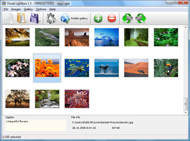
It's no secret that adding photos to your blog posts is one of the most effective ways to enhance your blog and attract attention to your writing. Flickr has millions of photos available in its database. A simple FREE tool called Flickr Gallery allows you to create a custom image gallery with a cool slide show of the most recent and most interesting photos from Flickr on your website or blog in a few easy steps. Just visit Flickr website and find photostream, photoset or a single photo you like. Enter the address of flickr page to add all photos from this page in your gallery, select the style of thumbnails and the overlay window and add the HTML embed code on your website or blog.
A few clicks and you'll see a stylish photo gallery with beautifull lightbox and zoom effects on your own website or blog!


Flickr Gallery for Windows   Flickr Gallery for MAC

Want more?

Example

Lightbox gallery sample

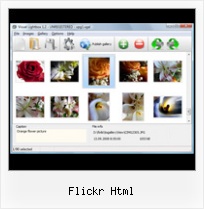
The following image set is generated by Flickr Gallery tool. Click any picture to run Lightbox gallery.

The sample above is an in-page usage demo of Lightbox gallery that uses images from Flickr. The slideshow created with Flickr Gallery wizard is placed inside the page layout. You can also check the full-page demo slideshow. This example takes whole browser area to show the Lightbox gallery that uses images from Flickr.Flickr Add View On Black

How to Use

Step 1. Adding flickr images to your own gallery.


Locate the photo, photoset or photostream you want to use in your Flickr slideshow. Click on it to see the photo on its own page.

Copy URL of the flickr page.

Select Add images from Flickr... from the 'Add' button on the Toolbar.

Add images from Flickr

In the appeared window paste URL of the flickr page. Specify also the number of photos you want to add from the flickr page. Flickr Gallery will now include these photos in your project.

Add images from Flickr

If you have included the photos that you do not wish to be in your web gallery, you can easily remove them. Select all images that you wish to remove from photo gallery, and select Delete images. from the Images menu. You can pick and choose pictures by holding the CTRL while clicking the pictures you like.

Step 2. Adding caption.

The name of the photo on flickr page will automatically appear in the caption. When you select a photo you'll see the various info about it, such as: Path, Size, date of last change and Caption. You can add any comment or text about the photo (up to 512 symbols).

Step 3. Gallery properties.

Change the name of your flickr album, the size and quality of your pictures with Flickr Gallery. From the Gallery menu, select Properties or use "Edit Gallery Properties" button on the toolbar.

On the first tab of the Gallery Properties window you can change the name of your photo album and enable/disable the following properties: Slide Show, Auto play Slide Show, Zoom effect, Overlay Shadow. You can also set the Overlay shadow color and select the Engine you want to use (jQuery or Prototype + script.aculo.us).

On the second tab of the Gallery Properties window you can select the thumbnail you want to use, set the Thumbnails Resolution, Thumbnails Quality, Thumbnails Titles. Select Thumbnails Format (save in PNG or JPG format). Specify the Number of columns in you photo album and the Page color.

On the third tab of the Gallery Properties window you can select the template, Image resolution and Image quality of your pictures and change the Watermark.

You can set up the various sizes for exported images.

Control the quality of output PNG or JPEG format image by defining output "Image quality" and "Thumbnail quality" parameters (0%…100%).

Step 4. Save your photo gallery as project file.

When you exit Flickr Gallery application, you'll be asked if you want to save your project. The project consists of the pictures you choose to put on your web photo gallery and all your settings. It's a good idea to save the project, because that will allow you to change the project in case you decide to do something different with future galleries. So click Yes, then enter a name for your project. To select the location of your project, just click the Browse folders button and choose a different location. Then click Save.

Flash Gallery Using Flickr Flickr Html

Download Flickr Gallery


Download Flickr Gallery Download Free Edition
for Windows
Download Flickr Gallery Download Free Edition
for MAC

Flickr Gallery is free for non-commercial use.

A small fee is required for business use. Flickr Gallery Business Edition additionally provides an option to remove the Flickr Gallery. Com credit string as well as a feature to put your own logo to images. After you conclude the payment via the secure order form, you will receive a license key instantly by e-mail that turns the Flickr Gallery Free Edition into a Business one. You can select the most suitable payment method: credit card, check, bank transfer, PayPal etc. Also you can get Business Edition for free if you help with translating Flickr Gallery into your native language, please contact us at for more info.

Finding Flickr Albums By Using Id

Buy Flickr GalleryBuy Business Edition
for Windows

$49
Single Website
$69
Unlimited Websites
Buy Flickr GalleryBuy Business Edition
for MAC

$49
Single Website
$69
Unlimited Websites

Support

For general help, feature requests, troubleshooting contact Customer Support at . Make sure to include details on your Flickr Gallery version, operating system, browser and a link (or relevant code).Sites Like Flickr

Feedback

    * Let me start just congratulating you, good job, really. I am trying out the free version before I buy it. It works great.

    * I LOVE your free Lightbox2 software tool and will purchase the business version shortly. I have seen the Lightbox JS effect used with video tutorials and I was hoping you have a version for video that I can purchase.
Video LightBox: http://videolightbox.com

    * I have purchased the business and LOVE IT..Your product appears easy to use and close to what I need to help several of my clients..Flickr Show Picture On Own Site

    * I ran into your website wile looking for a JavaScript to manage a personal Photo Gallery. I downloaded the trial version and immediately fell in love with your Flickr Gallery, it is one of the best products I’ve ever found; it is very user friendly and easy to use and creates great Photo Galleries.

FAQ

Q:How do I embed the lightbox image gallery into an existing page?

A:To install Flickr Gallery gallery on your page you should:

1. Create your gallery in Flickr Gallery and publish it on a local drive in any test folder.
2. Open index.html file from the saved folder in any text editor.
3. Copy code for the HEAD section and paste it inside the HEAD section of you own webpage, for example:

<head>
...
<!-- Start Flickr Gallery.com HEAD section -->
<link rel="stylesheet" href="engine/css/vlightbox.css" type="text/css" />
<style>#vlightbox a#vlb{display:none}</style>
<link rel="stylesheet" href="engine/css/Flickr Gallery.css" type="text/css" media="screen" />
<script src="engine/js/jquery.js" type="text/javascript"></script>
<script src="engine/js/jquery.tools.min.js" type="text/javascript"></script>
<script src="engine/js/visuallightbox.js" type="text/javascript"></script>
<!-- End Flickr Gallery.com HEAD section -->

...
</head>


4. Copy code for the BODY section and paste it inside the Body section of you own webpage in the place where you want to have a gallery, for example:

<body>
...
<!-- Start Flickr Gallery.com BODY section -->
<div id="vlightbox">
<a rel="lightbox_vlb" href="data/images/dscn6831.jpg" title="DSCN6831"><img src="data/thumbnails/dscn6831.png"><span></span></a>
<a rel="lightbox_vlb" href="data/images/dscn6823.jpg" title="DSCN6823"><img src="data/thumbnails/dscn6823.png"><span></span></a>
<a rel="lightbox_vlb" href="data/images/dscn6819.jpg" title="DSCN6819"><img src="data/thumbnails/dscn6819.png"><span></span></a>
<a id="vlb" href="http://Flickr Gallery.com">Photo Gallery For Web by Flickr Gallery.com v2.1</a>
</div>
<!-- End Flickr Gallery.com BODY section -->

...
</body>


5. Copy 'data' folder with images and thumbnails and 'engine' folder with .css and .js files into the same folder with your own webpage.
You can find the example on our website:
http://www.Flickr Gallery.com/#example


RELATED

Bullmarket French Bulldogs Photo Stream on Flickr

Top 500 Folders in Bloglines Lifehacker, the Productivity and Software Guide. 34. 5. Flickr: Photos tagged with nature. 35 http://www.flickr.com/photos/special/ 46. 4. gapingvoid. 47. 4. Engage. 48. 4. http://www

Perceived Performance | Torsten Curdt's weblog While tuning your server for performance is a good thing it's not the only thing you should look at. Lately my blog pages felt to be loading a bit slow. Looking latest&size=s&layout=h&source=user&user=88457640%40N00' \ | grep -v "flickr_badge_beacon" \ > /path/to/cache/location/flickr.html

Flickriver - A new way to view Flickr photos and more While viewing any Flickr photos page, click on this button to open the same view on To link to this page, Copy and Paste the following HTML code:

How to Use Flickr This site is a html generator, where we will make some specific html that can Html" tab to go into html edit mode, and find where we. need to paste in the Flickr Slidr

Include Recent flickr Photos with PHP ( Also, it's worth noting that the html created by flickr javascript is not standards compliant. The html that flickr gives you should look something like this:

Flickr - About McDonald's This page redirects to /content/mcd/redirect/flickr.html?site=www.flickr.com/photos/aboutmcdonalds&enc=f60937bc3c5d13c29c06580ed1ba0275&bumper=1&type=mcdonalds&mcd.html&enc=f60937bc3c5d13c29c06580ed1ba0275. McDonalds.com Global Sites RMHC Contact

Google AJAX Feed API - GeoTagged Flickr Example Google AJAX Feed API - Maps - GeoTagged Flickr Photo Example (separate multiple tags with comma)

Urls.html - as3flickrlib - Google Code Packagecom.adobe.webapis.flickr.methodgroups Classpublic class Urls

Class: FlickRaw::Flickr It does the actual request to the flickr server. Raises FailedResponse if the response status is failed. See www.flickr.com/services/api/upload.api.html for more information

Flickr: Allowed HTML You can use the following HTML tags to style your text: If you'd like to include a Flickr photo or video in your text, simply copy and paste its URL between square brackets, like so:

Flickr: Tags, Groups, Interestingness and Social Networking Case's Web Development Blog offers tips and how-to advice about HTML, CSS, content development, writing and marketing, and serves as a place to exchange ideas with Web maintainers on campus

quickr pickr Post Pictures to Xanga, Blogger, and other blogs! quickr flickr is a quickr way to pick multiple Flickr pictures, generate HTML code, and post them to Blogger, Xanga, or any blog

Computer Research & Technology - ETopics CRT (Computer Research & Technology) offers computers, pcs, laptops, digital cameras, ink, toner, cartridges, printers, scanners, Flickr has recently introduced Geo Tagging to pictures in Flickr. Flickr has added a map of the world to their site so you can

new folder This great photo was posted on Flickr today, a house in one of the 'welsh streets' done the sensible thing and intregrated their Flickr photos into their search results

Flickr Html : Flickr Gallery Flickr Html. Flickr Gallery is an excellent program that is friendly to amateur web developers, but at the same time is powerful enough to meet the needs of more advanced users.. Flickr Widget Photo Sets Jquery

Thomas Hawk Digital Connection " Blog Archive " Top 10 Hacks Flickr Hack #8 Image by Thomas Hawk thomashawk.com/2007/01/top-10-hacks-on-flickr.html Flickr Hack #3 Image by Thomas Hawk thomashawk.com/2007/01/top-10-hacks-on-flickr.html

Flickr Slideshow Embed | Flickr Slideshow Just visit Flickr website and find photostream, photoset or a single photo you like. Enter the address of flickr page to add all photos from this page in your slideshow, select the style of thumbnails and the overlay window and add the HTML embed code on your website or blog

Dayton Philharmonic Orchestra Dayton Philharmonic is a regional orchestra with 83 contracted musicians under Music Director and Principal Conductor Neal Gittleman performing at the Benjamin and Marian Schuster Performing Arts Center and Dayton Masonic Center in downtown 0 results found for "flickr.html"

Flickr Flickr is a photo sharing community which provides you with an easy way to post and share public photos on Flickr, however you must be a registered member of Flickr or Yahoo! to

Download Multiple Flickr Pictures in a Batch [Original Images Download Multiple Flickr Pictures in a Batch [Original Images, not Resized Thumbnails] fetched only from public Flickr photostreams though you have an option to authenticate

Introduction to Flickr™ Paste on your own webpage, a forum, your Facebook, or anywhere else HTML is accepted. A Flickr Badge is a quick and easy way to share multiple images at

NAKed and acTIVe - Flickr and Nudity Supporting Naked Activities in Europe and around the World - flickr.html Flickr is Yahoo's online photo management service(?). As such, I created an account there sometime in 2007 as I. In June 2010 this account was summarily deleted by Flickr after someone complained about the non-sexual nudity

Flickr - Wikipedia, the free encyclopedia Flickr is an image hosting and video hosting website, web services suite, and online community created by Ludicorp and later acquired by Yahoo! The core functionality of the site relies on standard HTML and HTTP features, allowing for wide compatibility among platforms and browsers

Flickr galleries How to create a screen grab of your SBI! website and add it to a Flickr gallery 8) Fill in your required settings and Flickr will generate your HTML code automatically, as in the image below:

10 Amazing Wordpress Plugins for Flickr And just to make things that little bit easier here are 10 WP Plugins to integrate Flickr directly into your blog. http://blog.dsetia.com/2009/09/02/various-wp-plugin-for-flickr.html blog.dsetia.com" Blog Archive " Various WP plugin for flickr

Blogger: Redirecting Blogger is a free blog publishing tool from Google for easily sharing your thoughts with the world. Blogger makes it simple to post text, photos and video onto your personal or team blog. The blog that used to be here is now at http://www.enriquedans.com/2005/03/yahoo-compra-flickr.html

