



Overview

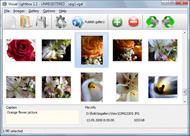
It's no secret that adding photos to your blog posts is one of the most effective ways to enhance your blog and attract attention to your writing. Flickr has millions of photos available in its database. A simple FREE tool called Flickr Gallery allows you to create a custom image gallery with a cool slide show of the most recent and most interesting photos from Flickr on your website or blog in a few easy steps. Just visit Flickr website and find photostream, photoset or a single photo you like. Enter the address of flickr page to add all photos from this page in your gallery, select the style of thumbnails and the overlay window and add the HTML embed code on your website or blog.
A few clicks and you'll see a stylish photo gallery with beautifull lightbox and zoom effects on your own website or blog!


Flickr Gallery for Windows   Flickr Gallery for MAC

Want more?

Example

Lightbox gallery sample

The following image set is generated by Flickr Gallery tool. Click any picture to run Lightbox gallery.

The example above is an in-page usage demo of Lightbox with images from Flickr. The lightbox gallery created with Flickr Gallery application is placed inside the page layout. You can also check the full-page demo website gallery. This example takes whole browser area to show the Lightbox gallery that uses images from Flickr.Adding Captions To Flickr Slideshow

How to Use

Step 1. Adding flickr images to your own gallery.


Locate the photo, photoset or photostream you want to use in your Flickr slideshow. Click on it to see the photo on its own page.

Copy URL of the flickr page.

Select Add images from Flickr... from the 'Add' button on the Toolbar.

Add images from Flickr

In the appeared window paste URL of the flickr page. Specify also the number of photos you want to add from the flickr page. Flickr Gallery will now include these photos in your project.

Add images from Flickr

If you have included the photos that you do not wish to be in your web gallery, you can easily remove them. Select all images that you wish to remove from photo gallery, and select Delete images. from the Images menu. You can pick and choose pictures by holding the CTRL while clicking the pictures you like.

Step 2. Adding caption.

The name of the photo on flickr page will automatically appear in the caption. When you select a photo you'll see the various info about it, such as: Path, Size, date of last change and Caption. You can add any comment or text about the photo (up to 512 symbols).

Step 3. Gallery properties.

Change the name of your flickr album, the size and quality of your pictures with Flickr Gallery. From the Gallery menu, select Properties or use "Edit Gallery Properties" button on the toolbar.

On the first tab of the Gallery Properties window you can change the name of your photo album and enable/disable the following properties: Slide Show, Auto play Slide Show, Zoom effect, Overlay Shadow. You can also set the Overlay shadow color and select the Engine you want to use (jQuery or Prototype + script.aculo.us).

On the second tab of the Gallery Properties window you can select the thumbnail you want to use, set the Thumbnails Resolution, Thumbnails Quality, Thumbnails Titles. Select Thumbnails Format (save in PNG or JPG format). Specify the Number of columns in you photo album and the Page color.

On the third tab of the Gallery Properties window you can select the template, Image resolution and Image quality of your pictures and change the Watermark.

You can set up the various sizes for exported images.

Control the quality of output PNG or JPEG format image by defining output "Image quality" and "Thumbnail quality" parameters (0%…100%).

Step 4. Save your photo gallery as project file.

When you exit Flickr Gallery application, you'll be asked if you want to save your project. The project consists of the pictures you choose to put on your web photo gallery and all your settings. It's a good idea to save the project, because that will allow you to change the project in case you decide to do something different with future galleries. So click Yes, then enter a name for your project. To select the location of your project, just click the Browse folders button and choose a different location. Then click Save.

Create Flickr Random Customize Flickr

Download Flickr Gallery


Download Flickr Gallery Download Free Edition
for Windows
Download Flickr Gallery Download Free Edition
for MAC

Flickr Gallery is free for non - commercial use.

A small fee is required for business use. Flickr Gallery Business Edition additionally provides an option to remove the Flickr Gallery. Com credit string as well as a feature to put your own logo to images. After you complete the payment via the secure order form, you will receive a license key instantly by e-mail that turns the Flickr Gallery Free Edition into a Business one. You can select the most suitable payment method: PayPal, credit card, bank transfer, check etc. Also you can get Business Edition for free if you help with translating Flickr Gallery into your native language, please contact us at for more info.

Best Way To Embed Flickr Slideshow

Buy Flickr GalleryBuy Business Edition
for Windows

$49
Single Website
$69
Unlimited Websites
Buy Flickr GalleryBuy Business Edition
for MAC

$49
Single Website
$69
Unlimited Websites

Support

For general help, feature requests, troubleshooting contact Customer Support at . Make sure to include details on your browser, operating system, a link (or relevant code) and Flickr Gallery version.Wordpress Embed Flickr Video

Feedback

    * I just tried the application, It is wonderful idea. Like you said in the website "few clicks without writing a single line of code" because most of the people is not web designers".

    * I am thrilled with what this tool can do for me thanks for all the hard work that must have gone into it.

    * I tried Flickr Gallery and for me its a very cool and usefull application. Its so easy to manage my galleries and it looks very nice.Download Flickr Photos Url

    * I find Flickr Gallery (and lightbox2) a great tool and was about to proceed in its purchase.

FAQ

Q:Is it possible to load a gallery from within image? So the gallery loads externally?

A:You should start the gallery onClick:

1) Add the following function into the <head> tag:

<script type="text/javascript">
function showLightBox()
{ Lightbox.start(document.getElementById('firstImage'));}
</script>

2) Specify the onClick event for the image (or link):
<img src="thumbnail_gr.jpg" onClick="javascript:showLightBox()" title="Click to see the demo" style="cursor: pointer;">
3) Set the ID for any image in your gallery (id="firstImage"), for example add it to the first image:
<a rel="lightbox_vlb" href="data/images/dscn6831.jpg" title="dscn6831" id="firstImage">
4) Use 'display: none;' property for your gallery in engine\css\vlightbox.css. Just change the following code:

#vlightbox a{
display:-moz-inline-stack;
display:inline-block;
zoom:1;
*display:inline;
position:relative;
vertical-align:top;
margin:3px;
width:160px;
font-family:Trebuchet,Tahoma,Arial,sans-serif;
font-size:11px;
font-weight:normal;
text-align:center;
opacity:0.87;
}

to:

#vlightbox a{
display:-moz-inline-stack;
display:none;
zoom:1;
*display:inline;
position:relative;
vertical-align:top;
margin:3px;
width:160px;
font-family:Trebuchet,Tahoma,Arial,sans-serif;
font-size:11px;
font-weight:normal;
text-align:center;
opacity:0.87;
}

RELATED

FlickrHelpr - Show your flickr photos on your website It uses the flickr API, so it automatically updates whenever you update your flickr account. You add photos to flickr - your site gets updated. Why would you want to use this script? Because you want to customize the look of your flickr site

Flickr For Indexhibit :: Forum :: Indexhibit Forums " Customize. flickr for indexhibit. andrewz. UNITED STATES. 2009-05-23 16:12:55. Permalink Post. YO! any word on a flickr plugin Showing 1 - 20 of 20 posts in Forum > Customize > flickr for indexhibit

Dotnetnuke modules_Silverlight Photo Gallery(Flickr & Picasa This is a Ready-to-Use-and-Deploy Silverlight Gallery module for dotnetnuke. It utilizes the slide.show control advantages to let you publishing highly-customizable photo slideshows like 1: Customize Gallery 2: Simple Slideshow 3: Flickr

Customize Flickr : Flickr Gallery Customize Flickr. Flickr Gallery is the first software that creates AJAX-powered online image galleries without the need for server-side setup.. Flickr Gallery In Bloger

Custom Yahoo Pipes/ Flickr Slideshows For Your Blog | Tubetorial So if someone adds new images to Flickr tagged as "dogs", viewing your SplashCast slideshow again should On the customized Pipe, we do almost the same thing: Use the Flickr module. Add a Text Input module to allow easy changes to which Flickr tags to search for. Add a Number Input module to

Flickr Photo Slideshow Template - Sharendipity A template for creating your own, customized slideshow using a Flickr photo stream

ixt03203 Release 5.0 - IXThemes Shop Full Stretched Design, WYSIWYG Mode, Customized Mini Galleries Widgets, Customized Flickr Photos Widgets, Customized Weather Widgets, XOOPS Engine Compatible, Smarty3 Ready, HTML Correction Mode, Chameleon Mode

10 Best Flickr Uploaders – Upload Photos at Flickr with Ease Flickr is the best solution for photo sharing medium. It has helped photographers and every other user to manage and share their photos very well. While we have You might want to customize upload size, licence info, photoset selection, privacy control, tags and more controls such as batch editing of

Options for Easily Adding Flickr Photos to Your Website This page shows a number of the leading options for quickly and easily adding your Flickr photos to your website or blog (WordPress, Joomla, TextPattern). They all offer some options and customizations

The 7 Best Flickr Add-ons for Greasemonkey Check out our list of the top 7 free Flickr add-ons for Greasemonkey! These scripts allow you to better interact with your photos and your friend's pictures. They add helpful shortcuts, move things around, put html and other Top 7 Flickr Add-Ons: The Best Greasemonkey Scripts to Customize Flickr

How to create customized Flickr profile widgets? | Online Tools Profile widget to make customized widgets with latest or best pictures from your flickr photostream for your profile. Flickr profile widget from Bighugelabs

Flickr photo map : powered by WorldReviewer.com Widget Get the Flickr photo map : powered by WorldReviewer.com widget on Widgetbox.com! Add a map of your geotagged flickr photos to your blog!

Create your own slideFlickr! SlideFlickr is an online Flickr slideshow generator that will help you create and embed Flickr slideshows in less than 10 seconds! Flickr group: http://www.flickr.com/groups/interestingness/ Or You can leave the search box empty and click Preview! 2. Customize your Slideshow (Optional)

Download Fittr Flickr 1.6.1 Free - Google Chrome extension Fittr Flickr Google Chrome extension that displays under your Flickr images some additional technical details customize Flickr | EXIF data | Flickr customizer | customize | Flickr | customizer

yahoo flickr development, yahoo flickr application Yahoo Flickr - yahoo flickr development, yahoo flickr application development, yahoo flickr software development, hire yahoo flickr developers, outsource yahoo flickr development, customized yahoo flickr development, yahoo flickr development

[Tutoriel IPB 2.3.x] Mon réseau (Flickr, YouTube, FaceBook Dans ce tutoriel, nous allons apprendre à intégrer un espace réservé au "réseau" de vos membres, c'est-à-dire les sites auxquelles ils so Customize: [Tutoriel IPB 2.3.x] Mon réseau (Flickr, YouTube, FaceBook, MySpace, Bebo, Blogger) - IPB Skins and Invision Skins from IPB Customize

Flickr | Help | KUUKIE | Custom Business Cards, MiniCards Create and customize premium Business Cards, Mini Cards and Postcards with KUUKIE's unique variable print technology. Even if you don't have a Flickr account, you can still make the cards via gallery

Flickr Photo Books | Business.com Business directory providing information, products, and services for Flickr photo books. Give your business a visual presence with customized Flickr photo books

Flickr: "customize" Flickr is almost certainly the best online photo management and sharing application in the world. Show off your favorite photos and videos to the world, securely and privately show content to your friends and family, or blog the photos and videos

What settings can I customize for the Flickr App? | Yahoo! You can customize whether your Recent Activity list includes the last hour, 24 hours, 7 days, month, or since your last login. To change this setting, click on Options in the Flickr App and select Settings. Choose a timeframe from the pulldown list, and click Save

How To Create & Customize a Flickr Account - August 2007 There are a number of ways you can and should customize your Flickr account. Although it's not required that you customize. your buddy icon, it's a helpful way to identify yourself to your Flickr contacts. If you don't customize your buddy icon you will be represented online by the

Extending customized flickr screensaver to photo viewer ? Extending customized flickr screensaver to photo viewer ?

Customize Flickr Gallery using CSS – Slickr Flickr Wordpress A Flickr Wordpress Plugin that's easy to change the sizes, fonts and colors of your Flickr Gallery using a few simple lines of CSS

Use Flickr Photos for Custom Capital One Cards In the hopes of embracing the web's media-sharing prowess, Capital One is allowing users to tap into their own Flickr accounts in order to customize their credit cards. You don't get to add your customized photo until after you've received a generic card

Customize Thesis: Add Flickr Sidebar Photos Customize Thesis: Add Flickr Sidebar Photos. Share. Follow @nickreese. This tutorial is for those lucky users who run their sites on WordPress using the Chris Pearson's Thesis theme. If you haven't learned about thesis take a few minutes to visit our review of the thesis WordPress theme

