



Overview

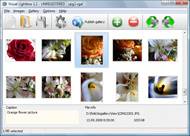
It's no secret that adding photos to your blog posts is one of the most effective ways to enhance your blog and attract attention to your writing. Flickr has millions of photos available in its database. A simple FREE tool called Flickr Gallery allows you to create a custom image gallery with a cool slide show of the most recent and most interesting photos from Flickr on your website or blog in a few easy steps. Just visit Flickr website and find photostream, photoset or a single photo you like. Enter the address of flickr page to add all photos from this page in your gallery, select the style of thumbnails and the overlay window and add the HTML embed code on your website or blog.
A few clicks and you'll see a stylish photo gallery with beautifull lightbox and zoom effects on your own website or blog!


Flickr Gallery for Windows   Flickr Gallery for MAC

Want more?

Example

Lightbox gallery sample

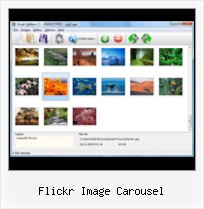
The following image set is generated by Flickr Gallery tool. Click any picture to run Lightbox gallery.

The example above is an in-page usage demo of Lightbox gallery that uses images from Flickr. The website gallery created with Flickr Gallery application is placed inside the html page. You can also check the full-page demo gallery. This example takes whole browser area to show the gallery.Flickr Album

How to Use

Step 1. Adding flickr images to your own gallery.


Locate the photo, photoset or photostream you want to use in your Flickr slideshow. Click on it to see the photo on its own page.

Copy URL of the flickr page.

Select Add images from Flickr... from the 'Add' button on the Toolbar.

Add images from Flickr

In the appeared window paste URL of the flickr page. Specify also the number of photos you want to add from the flickr page. Flickr Gallery will now include these photos in your project.

Add images from Flickr

If you have included the photos that you do not wish to be in your web gallery, you can easily remove them. Select all images that you wish to remove from photo gallery, and select Delete images. from the Images menu. You can pick and choose pictures by holding the CTRL while clicking the pictures you like.

Step 2. Adding caption.

The name of the photo on flickr page will automatically appear in the caption. When you select a photo you'll see the various info about it, such as: Path, Size, date of last change and Caption. You can add any comment or text about the photo (up to 512 symbols).

Step 3. Gallery properties.

Change the name of your flickr album, the size and quality of your pictures with Flickr Gallery. From the Gallery menu, select Properties or use "Edit Gallery Properties" button on the toolbar.

On the first tab of the Gallery Properties window you can change the name of your photo album and enable/disable the following properties: Slide Show, Auto play Slide Show, Zoom effect, Overlay Shadow. You can also set the Overlay shadow color and select the Engine you want to use (jQuery or Prototype + script.aculo.us).

On the second tab of the Gallery Properties window you can select the thumbnail you want to use, set the Thumbnails Resolution, Thumbnails Quality, Thumbnails Titles. Select Thumbnails Format (save in PNG or JPG format). Specify the Number of columns in you photo album and the Page color.

On the third tab of the Gallery Properties window you can select the template, Image resolution and Image quality of your pictures and change the Watermark.

You can set up the various sizes for exported images.

Control the quality of output PNG or JPEG format image by defining output "Image quality" and "Thumbnail quality" parameters (0%…100%).

Step 4. Save your photo gallery as project file.

When you exit Flickr Gallery application, you'll be asked if you want to save your project. The project consists of the pictures you choose to put on your web photo gallery and all your settings. It's a good idea to save the project, because that will allow you to change the project in case you decide to do something different with future galleries. So click Yes, then enter a name for your project. To select the location of your project, just click the Browse folders button and choose a different location. Then click Save.

Jquery Flickr Slideshow Flickr Flickr Image Carousel

Download Flickr Gallery


Download Flickr Gallery Download Free Edition
for Windows
Download Flickr Gallery Download Free Edition
for MAC

Flickr Gallery is free for non-commercial use.

A small fee is required for business use. Flickr Gallery Business Edition additionally provides an option to remove the Flickr Gallery. Com credit line as well as a feature to put your own logo to images. After you finish the payment via the secure form, you will receive a license key instantly by e-mail that turns the Flickr Gallery Free Edition into a Business one. You can select the most appropriate payment method: check, credit card, PayPal, bank transfer etc. Also you can get Business Edition for free if you help with translating Flickr Gallery into your native language, please contact us at for more info.

How To Hack Flickr Account

Buy Flickr GalleryBuy Business Edition
for Windows

$49
Single Website
$69
Unlimited Websites
Buy Flickr GalleryBuy Business Edition
for MAC

$49
Single Website
$69
Unlimited Websites

Support

For general help, feature requests, troubleshooting contact Customer Support at . Make sure to include details on your operating system, browser, Flickr Gallery version and a link (or relevant code).Flickr Thumbnail Sizes

Feedback

    * I ran into your website wile looking for a JavaScript to manage a personal Photo Gallery. I downloaded the trial version and immediately fell in love with your Flickr Gallery, it is one of the best products I’ve ever found; it is very user friendly and easy to use and creates great Photo Galleries.

    * Another programmes have incredible functionality but no fantastic interface like your product!

    * I would like to say that Flickr Gallery is a stunning lil program! Its almost too good to be true i'd say! I've been looking for tutorials to create a lightbox gallery, but just couldnt come right. Im so glad i found Flickr Gallery!How To Add Photos To Flickr

    * I'd like to express my gratitude to your efforts on creating such a nice piece of program and best of all it's free! Keep out the good work and I hope to see new features in the near coming future to rate you 5 star!

FAQ

Q:I would like to have a few galleries in one website and even on one page.

A:To create several galleries on your page you should change following parameter in A tag for different galleries:

rel="lightbox_vlb"

For example, for the first gallery you should set rel="lightbox_vlb":

<!-- Start Flickr Gallery.com BODY section -->
<div id="vlightbox">
<a rel="lightbox_vlb" href="data/images/dscn6831.jpg" title="dscn6831" >
<img src="data/thumbnails/dscn6831.png" ><span></span></a>
<a rel="lightbox_vlb" href="data/images/dscn6823.jpg" title="dscn6823">
<img src="data/thumbnails/dscn6823.png"><span></span></a>
<a id="vlb" href="http://Flickr Gallery.com">Photo Gallery For Web by Flickr Gallery.com v2.0</a>
</div>
<!-- End Flickr Gallery.com BODY section -->

and for the second gallery rel="lightbox_vlb1":

<!-- Start Flickr Gallery.com BODY section -->
<div id="vlightbox">
<a rel="lightbox_vlb1" href="data/images/img_0501.jpg" title="img_0501">
<img src="data/thumbnails/img_0501.png"><span></span></a>
<a rel="lightbox_vlb1" href="data/images/img_0481.jpg" title="img_0481">
<img src="data/thumbnails/img_0481.png"><span></span></a>
<a id="vlb" href="http://Flickr Gallery.com">Photo Gallery For Web by Flickr Gallery.com v2.0</a>
</div>
<!-- End Flickr Gallery.com BODY section -->


RELATED

Jquery Photo Carousel - jQuery Lightbox Jquery Photo Carousel. DHTML Popup generates all necessary icons, When you select an image you'll see the various information about it, such as: Caption - you can enter any comment or text about the image in the website photo gallery. When you add images from Flickr its name will appear in

Carousel | Flickr - Photo Sharing! The flying horse carousel on Brighton beach. In the background is the frame of the West Pier - pictured subsequent to the fire, but before storm damage caused it to collapse

360 Carousel Flash : Free Flash SlideShow Maker Flash SlideShow w/o Flash! 360 Carousel Flash. Don't allow your website visitors to get lost! Try Flickr Slide Show!. flash album exporter autoplay When you select an image you'll see the various information about it, such as:

De Web Times - Sharing Useful Resources. " Blog Archive " 11 If you like Flickr slideshow, this article explains how to implement it using Prototype Since long time I was looking for a simple way to implement a Flickr-like slideshow ("image carousel") and finally I found

Nikhil Kothari's Weblog : Programming Silverlight 1.0 with C# Script# supports programming against Silverlight 1.0. You can start writing your RIA and associated components and controls in C# rather than in JavaScript today! This series of posts will build a photo carousel one step at a time to

YUI Library Examples: Carousel Control: Spotlight example When an item is selected, the YUI Carousel Control triggers an itemSelected event. subscribes to the itemSelected event to display the selected image in the spotlight

Dotnetnuke modules_Silverlight Photo Gallery(Flickr & Picasa This is a Ready-to-Use-and-Deploy Silverlight Gallery module for dotnetnuke. It utilizes the slide.show control advantages to let you publishing highly-customizable photo slideshows like 1: Customize Gallery 2: Simple Slideshow 3: Flickr

WOW Slider : jQuery Image Slider & Carousel WOW Factor for Your Website! Free jQuery Slider. Stunning visual effects and lots of professional templates. Drag-n-drop maker Mac and Windows!

Slide Carousel Photo Gallery Script Css Slide Carousel Photo Gallery Script Css. Build professional web photo gallery templates in minutes with Ajax Photo Gallery!. easy Flickr Photo Gallery Css : Flickr Gallery Flickr Image Carousel Flickr Photo Gallery Css Maker Flickr Photo Gallery Css browsing css css help customization editors em

js_carousels js_carousels ekstasis picks - hand picked sites with standards-based, accessible code and separation of content, behavior and presentation in web design. you to instantly create an image gallery with simple html markup of an unordered list of images. Jquery Carousel. Css-tricks.com - JQuery Auto slider

Creating a Flickr Carousel in Expression Engine | Darren Hoyt Creating a Flickr Carousel in Expression Engine. Flickr is still one of my favorite online The Uploadr tool also makes it an especially easy image-hosting solution for clients who

jQuery Image Scale Carousel What Makes jQuery Image Scale Carousel Different? It auto scales the images you put into The jQuery Image Scale Carousel auto scales all of your images making implementation

7 Powerful image carousels for web designers It includes Agile Carousel, YUI Carousel, JCarousel, iCarousel (jQuery + MooTools) and a tutorial about how to implement a simple Flickr-like carousel using Prototype-UI. If you want to suggest other interesting scripts about this topic, please leave a comment. Thanks! 1. Agile Carousel

Agile Carousel - Javascript Slideshow - Image Carousel Agile Development can help you complete website development projects on time, within budget and more inline with customer expectations. Include Agile Carousel as part of your web development process for advanced image displays

jQuery Carousel for Images v1.0 Freeware Download - Query jQuery Carousel for Images is a truly unique jquery carousel gallery display, guaranteed to make your site more interesting and In minutes, you can create an amazing jquery image carousel using your own pictures from your computer or Flickr and Photobucket albums and easily share it with family

Joomla! image popup extension | ARI Soft - Joomla web 2.0 Joomla! image popup module and plugin for Flickr photos and local images image lightbox extension which provides ability to show image from folder(s), Picasa albums and Flickr photos in attractive popup

9 Best JavaFX Photo Gallery Applications Collection 9 Best JavaFX Photo Gallery Applications Collection Written by Phoenix Saturday, 29 August 2009 18:07 Currently 0. By default the images obtained from Flickr are scattered around the border of window. Image will be zoomed when its dragged from

Art Sexy Lightbox - Joomla! popup for images, galleries Art Sexy Lightbox - Joomla! popup/lightbox for images, galleries, inline content, Picasa album photos, Flickr photos and Flickr photo sets descriptions for Flickr images. Descriptions for images from local folder can be added by placing artsexylightbox.txt file to image folder. Comes with

Jquery Carousel For Images 10.65MB download - With more than Not only do you receive the jquery carousel slideshow but also a perfect tool for your news and events postings in your blog. In minutes, you can create an amazing jquery image carousel using your own pictures from your computer or Flickr and Photobucket albums and easily share it with family

jCarousel - sorgalla.com Riding carousels with jQuery Author: Jan Sorgalla Version: 0.2.8 (Changelog) Download: jcarousel.tar.gz or jcarousel.zip Source Code: Carousel with dynamic content loading via Ajax from a PHP script. Carousel with dynamic content loading via Ajax from the Flickr photo stream. Carousel with dynamic

Getty Images - Swing carousel Rights-managed stock photo - Swing carousel by Flickr photographed by Natalia Osiatynska Swing carousel. Caption: Empty, lonely, nostalgic chairs of the swing carousel in Fuji-Q Highland amusement park, Fujiyoshida, Japan. Creative image #: 94996646. License type: Rights-managed. Photographer:

Carousel Iweb 09 - Flash Slideshow Builder Carousel Iweb 09. Flash Slideshow Builder is an excellent program that is friendly to amateur web developers, but at the same time is powerful enough to meet the needs of more advanced users.. Dynamic Video Gallery Nonflash

Flickr : Flickr Gallery Flickr. Flickr Slideshow. The most powerful photo gallery maker on the Web!. Flickr Original Size Firefox

Carousel for Flickr in Flash Lite 2 Carousel image for flickr- inside view. This page reveals the secrets of integration to flickr service from the the image carousel application in Flash Lite 2.0. Program searches for images on the flickr site by the given tag and places first eight of them into the carousel for viewing

