



Overview

It's no secret that adding photos to your blog posts is one of the most effective ways to enhance your blog and attract attention to your writing. Flickr has millions of photos available in its database. A simple FREE tool called Flickr Gallery allows you to create a custom image gallery with a cool slide show of the most recent and most interesting photos from Flickr on your website or blog in a few easy steps. Just visit Flickr website and find photostream, photoset or a single photo you like. Enter the address of flickr page to add all photos from this page in your gallery, select the style of thumbnails and the overlay window and add the HTML embed code on your website or blog.
A few clicks and you'll see a stylish photo gallery with beautifull lightbox and zoom effects on your own website or blog!


Flickr Gallery for Windows   Flickr Gallery for MAC

Want more?

Example

Lightbox gallery sample

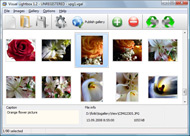
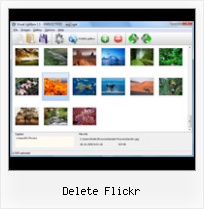
The following image set is generated by Flickr Gallery tool. Click any picture to run Lightbox gallery.

The sample above is an in-page usage demo of Lightbox tool with Flickr images. The slideshow created with Flickr Gallery software is placed inside the website page. You can also check the full-page demo web gallery. This example takes whole browser area to show the slideshow.Drupal Flickr Page

How to Use

Step 1. Adding flickr images to your own gallery.


Locate the photo, photoset or photostream you want to use in your Flickr slideshow. Click on it to see the photo on its own page.

Copy URL of the flickr page.

Select Add images from Flickr... from the 'Add' button on the Toolbar.

Add images from Flickr

In the appeared window paste URL of the flickr page. Specify also the number of photos you want to add from the flickr page. Flickr Gallery will now include these photos in your project.

Add images from Flickr

If you have included the photos that you do not wish to be in your web gallery, you can easily remove them. Select all images that you wish to remove from photo gallery, and select Delete images. from the Images menu. You can pick and choose pictures by holding the CTRL while clicking the pictures you like.

Step 2. Adding caption.

The name of the photo on flickr page will automatically appear in the caption. When you select a photo you'll see the various info about it, such as: Path, Size, date of last change and Caption. You can add any comment or text about the photo (up to 512 symbols).

Step 3. Gallery properties.

Change the name of your flickr album, the size and quality of your pictures with Flickr Gallery. From the Gallery menu, select Properties or use "Edit Gallery Properties" button on the toolbar.

On the first tab of the Gallery Properties window you can change the name of your photo album and enable/disable the following properties: Slide Show, Auto play Slide Show, Zoom effect, Overlay Shadow. You can also set the Overlay shadow color and select the Engine you want to use (jQuery or Prototype + script.aculo.us).

On the second tab of the Gallery Properties window you can select the thumbnail you want to use, set the Thumbnails Resolution, Thumbnails Quality, Thumbnails Titles. Select Thumbnails Format (save in PNG or JPG format). Specify the Number of columns in you photo album and the Page color.

On the third tab of the Gallery Properties window you can select the template, Image resolution and Image quality of your pictures and change the Watermark.

You can set up the various sizes for exported images.

Control the quality of output PNG or JPEG format image by defining output "Image quality" and "Thumbnail quality" parameters (0%…100%).

Step 4. Save your photo gallery as project file.

When you exit Flickr Gallery application, you'll be asked if you want to save your project. The project consists of the pictures you choose to put on your web photo gallery and all your settings. It's a good idea to save the project, because that will allow you to change the project in case you decide to do something different with future galleries. So click Yes, then enter a name for your project. To select the location of your project, just click the Browse folders button and choose a different location. Then click Save.

Prototype Lite Js Slideshow Flickr Delete Flickr

Download Flickr Gallery


Download Flickr Gallery Download Free Edition
for Windows
Download Flickr Gallery Download Free Edition
for MAC

Flickr Gallery is free for non-commercial use.

A small fee is required for business use. Flickr Gallery Business Edition additionally provides an option to remove the Flickr Gallery. Com credit string as well as a feature to put your own logo to images. After you complete the payment via the secure order form, you will receive a license key instantly by email that turns the Flickr Gallery Free Edition into a Business one. You can select the most appropriate payment procedure: credit card, check, PayPal, bank transfer etc. Also you can get Business Edition for free if you help with translating Flickr Gallery into your native language, please contact us at for more info.

Embed Flickr Html Table

Buy Flickr GalleryBuy Business Edition
for Windows

$49
Single Website
$69
Unlimited Websites
Buy Flickr GalleryBuy Business Edition
for MAC

$49
Single Website
$69
Unlimited Websites

Support

For general help, feature requests, troubleshooting contact Customer Support at . Make sure to include details on your Flickr Gallery version, browser, operating system and a link (or relevant code).Flickr Gallery Of The Day

Feedback

    * I ran into your website wile looking for a JavaScript to manage a personal Photo Gallery. I downloaded the trial version and immediately fell in love with your Flickr Gallery, it is one of the best products I’ve ever found; it is very user friendly and easy to use and creates great Photo Galleries.

    * Just a quick thank you for the software though, It's not often you get a free software version of this quality and style! Well done and please continue this amazing gallery. Hope to see more advances.

    * I'm absolutely loving Flickr Gallery Business and Video LightBox. Amazing, quick and painless, to create a custom, browser independent gallery. And it works first time - every time! Best value for money I've seen in quite a while...Make Flickr Autoplay

    * I LOVE your free Lightbox2 software tool and will purchase the business version shortly. I have seen the Lightbox JS effect used with video tutorials and I was hoping you have a version for video that I can purchase.
Video LightBox: http://videolightbox.com

FAQ

Q:Is it possible to load a gallery from within image? So the gallery loads externally?

A:You should start the gallery onClick:

1) Add the following function into the <head> tag:

<script type="text/javascript">
function showLightBox()
{ Lightbox.start(document.getElementById('firstImage'));}
</script>

2) Specify the onClick event for the image (or link):
<img src="thumbnail_gr.jpg" onClick="javascript:showLightBox()" title="Click to see the demo" style="cursor: pointer;">
3) Set the ID for any image in your gallery (id="firstImage"), for example add it to the first image:
<a rel="lightbox_vlb" href="data/images/dscn6831.jpg" title="dscn6831" id="firstImage">
4) Use 'display: none;' property for your gallery in engine\css\vlightbox.css. Just change the following code:

#vlightbox a{
display:-moz-inline-stack;
display:inline-block;
zoom:1;
*display:inline;
position:relative;
vertical-align:top;
margin:3px;
width:160px;
font-family:Trebuchet,Tahoma,Arial,sans-serif;
font-size:11px;
font-weight:normal;
text-align:center;
opacity:0.87;
}

to:

#vlightbox a{
display:-moz-inline-stack;
display:none;
zoom:1;
*display:inline;
position:relative;
vertical-align:top;
margin:3px;
width:160px;
font-family:Trebuchet,Tahoma,Arial,sans-serif;
font-size:11px;
font-weight:normal;
text-align:center;
opacity:0.87;
}

RELATED

Gickr Gickr pulls images from a specific tag on a users Flickr account and turns them into an animated GIF, it will also work on a set of individually uploaded images. Delete

Flickr Will Keep Photos for 90 Days When You Delete Your Not sure why anyone would want to delete their carefully nurtured Flickr account. But, lets say if you got drunk or sleep-clicked and deleted your Flickr

On Flickr Deleting User Accounts | The New York Observer Whether it's Flickr, Facebook, Tumblr, email or any of the many usefuly web-based services that are all the rage now, users should keep in mind that terms of service can change, companies can be bought and mistakes can happen--especially if a

Flickr: How to Delete Set - Tech-Recipes Frequently deleting a set of pictures is the quickest way to thin down a flickr account. This describes how to delete a set of pictures. Warning: D

Apple's iPhoto Makes It Way Too Easy To Delete Your Entire Well, sometimes it apparently works a little too well, to the point of allowing users to delete their entire Flickr libraries in one fell swoop without really meaning to. Oops. The problem stems from the way Apple's popular iPhoto software is integrated with Flickr

Flickr You can delete individual photos that you have on Flickr by selecting the photos that you Or you can delete groups of photos using batch operations

Delete Censorship.org Speak your mind on Delete Censorship Polls. Vote for First Amendment freedoms, your favorite Banned Book, and many more. go to the polls. censorship cases Lauren Myracle's teen/tween fiction series starting with ttyl, the first-ever novel

Flickr accidentally nukes user's 4,000 photos - Feb. 2, 2011 On Tuesday, photo sharing site Flickr mistakenly deleted user Mirco Wilhelm's account, erasing 4,000 photos and five years of photo sharing. "Single support staff members being able to delete all account data without review and chance to undo actions is pretty scary for anyone," he said

Flickr - Wikipedia, the free encyclopedia If a free account is inactive for 90 consecutive days, Flickr reserves the right to delete it.[21] For a free account, no one (including the account owner) can access the original file. If the account is upgraded to a pro account, then the original files are available for download

GM Script: Flickr Group Pool Admin: Warn + Delete - Steeev's Flickr Group Pool Admin: Warn+Delete is a Greasemonkey script that lets you single click to remove images from a group pool, delete all a user's images from a pool, also easily mail a user and remove or ban them all from the group pool page

Bookmarklets for the Flickr "Delete me" group These bookmarklets reportedly no longer work in Flickr. Someone has adapted them for the new Flickr API: click here to find the new versionsWondering what's going on with these 'deleteme' tags and harsh comments on Flickr photos? This is the

Flickr | Yeehee.com Under Technology Tags: account, Brief, change, Delete, Flickr, lets, Mind . Popular photo sharing site Flickr has instituted a new procedure for account deletions, adding a 90-day grace period to the action. Now, whether an account is deleted

Flickr - Blackboard HistoryA photowalk by the Flickr Group Photographers in Perth around Guildford, Western AustraliaFlickr was developed by Ludicorp, a Vancouver-based company, and launched in February 2004. The service emerged out of tools originally created for

How to Delete Any Photo on Flickr Yahoo deleted a controversial caricature of "Joker" Barack Obama from its creator's Flickr account. Why? Someone with an obviously fake name filed a copyright complaint

Flickr Permanently Deletes Yet Another User Without Warning Flickr seems to be getting aggressive about deleting accounts. Last week I wrote about the fact that Thomas Hawk was banned from their forums for pointing out situations where Flickr's staff had made nonreversible deletions of members' accounts

Mass delete your Flickr tags If you've tired of that pesky "naked" tag on all your Flickr photos, Tech Recipes has a quick way to do a clean sweep:

How to delete / remove flickr account permanently? Delete or remove Flickr account permanently. Go to flickr account settings page and click on delete your flickr account link

Flickr: "delete" Flickr is almost certainly the best online photo management and sharing application in the world. Show off your favorite photos and videos to the world, securely and privately show content to your friends and family, or blog the photos and videos

How to Delete Flickr Comments This article will address the topic of deleting Flickr comments.While free speech is valued by all, there is such a thing as a comment (especially an online comment) that is obscene, inappropriate, incomplete, unwanted,

Delete Your Account Information on how to delete your account from all of the major social networking, blogging, shopping, etc. sites and services across the web. Feeling a little regret? We can show you how to get it back, too! How to delete your Flickr account

Flickr cannot login and upload Had no idea until recently, I am facing uploading problem. This time, I cannot login to Flickr and on the sidebar, it always show "You are not currently logged into Flickr" I tried Ope

The Life of Nolan - ...one post at a time Delete. Tags. Autopost. 17 May 2011. 20110517-Most Uncomfortable Chair. This definitely one of Java software developer and Apple fan. Twitter Facebook Friendfeed Buzz Flickr Picasa

How to Delete a Flickr Account - wikiHow wikiHow article about How to Delete a Flickr Account. Click the link "Delete your Flickr account". You will be prompted with a warning that the deletion will be permanent. This means that all the photos and videos that you have added will now be removed. Think

Flickr Will Now Keep Deleted Photos For 90 Days Regret deleting all the pictures from that disastrous birthday party? On Flickr, you now have three months to change your mind

Flickr - Read Reviews & Compare Social Media Tools - oneforty Read 31 user reviews of Flickr. Learn how to use Flickr for share photos & images and share videos

bamcho - ...so I rock up to the border and Delete. Tags. Autopost. Stelvio Pass (download) Click here to download: stelvio-pass-hBFuChaxnqgACgoBIBkd. www.flickr.com/bamcho www.flickr.com/bamcho. Posted. 0 Comments. Edit. Delete. Tags. Autopost

How To Delete Photos From Flickr : Flickr Gallery How To Delete Photos From Flickr. Just drag and drop your photos or folders with photos and press

