
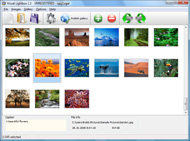



Overview

It's no secret that adding photos to your blog posts is one of the most effective ways to enhance your blog and attract attention to your writing. Flickr has millions of photos available in its database. A simple FREE tool called Flickr Gallery allows you to create a custom image gallery with a cool slide show of the most recent and most interesting photos from Flickr on your website or blog in a few easy steps. Just visit Flickr website and find photostream, photoset or a single photo you like. Enter the address of flickr page to add all photos from this page in your gallery, select the style of thumbnails and the overlay window and add the HTML embed code on your website or blog.
A few clicks and you'll see a stylish photo gallery with beautifull lightbox and zoom effects on your own website or blog!


Flickr Gallery for Windows   Flickr Gallery for MAC

Want more?

Example

Lightbox gallery sample

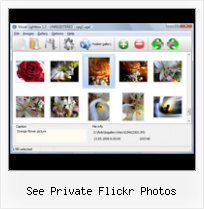
The following image set is generated by Flickr Gallery tool. Click any picture to run Lightbox gallery.

The example above is an in-page usage demo of Lightbox gallery that uses images from Flickr. The gallery created with Flickr Gallery application is placed inside the html page. You can also check the full-page demo gallery. This example takes whole browser area to show the slideshow.Acces To Private Flickr

How to Use

Step 1. Adding flickr images to your own gallery.


Locate the photo, photoset or photostream you want to use in your Flickr slideshow. Click on it to see the photo on its own page.

Copy URL of the flickr page.

Select Add images from Flickr... from the 'Add' button on the Toolbar.

Add images from Flickr

In the appeared window paste URL of the flickr page. Specify also the number of photos you want to add from the flickr page. Flickr Gallery will now include these photos in your project.

Add images from Flickr

If you have included the photos that you do not wish to be in your web gallery, you can easily remove them. Select all images that you wish to remove from photo gallery, and select Delete images. from the Images menu. You can pick and choose pictures by holding the CTRL while clicking the pictures you like.

Step 2. Adding caption.

The name of the photo on flickr page will automatically appear in the caption. When you select a photo you'll see the various info about it, such as: Path, Size, date of last change and Caption. You can add any comment or text about the photo (up to 512 symbols).

Step 3. Gallery properties.

Change the name of your flickr album, the size and quality of your pictures with Flickr Gallery. From the Gallery menu, select Properties or use "Edit Gallery Properties" button on the toolbar.

On the first tab of the Gallery Properties window you can change the name of your photo album and enable/disable the following properties: Slide Show, Auto play Slide Show, Zoom effect, Overlay Shadow. You can also set the Overlay shadow color and select the Engine you want to use (jQuery or Prototype + script.aculo.us).

On the second tab of the Gallery Properties window you can select the thumbnail you want to use, set the Thumbnails Resolution, Thumbnails Quality, Thumbnails Titles. Select Thumbnails Format (save in PNG or JPG format). Specify the Number of columns in you photo album and the Page color.

On the third tab of the Gallery Properties window you can select the template, Image resolution and Image quality of your pictures and change the Watermark.

You can set up the various sizes for exported images.

Control the quality of output PNG or JPEG format image by defining output "Image quality" and "Thumbnail quality" parameters (0%100%).

Step 4. Save your photo gallery as project file.

When you exit Flickr Gallery application, you'll be asked if you want to save your project. The project consists of the pictures you choose to put on your web photo gallery and all your settings. It's a good idea to save the project, because that will allow you to change the project in case you decide to do something different with future galleries. So click Yes, then enter a name for your project. To select the location of your project, just click the Browse folders button and choose a different location. Then click Save.

Flickr Gallery Shadowbox Instead Of Lightbox See Private Flickr Photos

Download Flickr Gallery


Download Flickr Gallery Download Free Edition
for Windows
Download Flickr Gallery Download Free Edition
for MAC

Flickr Gallery is free for non - commercial use.

A small fee is required for business use. Flickr Gallery Business Edition additionally provides an option to remove the Flickr Gallery. Com credit line as well as a feature to put your own logo to images. After you conclude the payment via the secure form, you will receive a license key instantly by email that turns the Flickr Gallery Free Edition into a Business one. You can select the most appropriate payment mode: PayPal, credit card, bank transfer, check etc. Also you can get Business Edition for free if you help with translating Flickr Gallery into your native language, please contact us at for more info.

Flickr Apps Swf

Buy Flickr GalleryBuy Business Edition
for Windows

$49
Single Website
$69
Unlimited Websites
Buy Flickr GalleryBuy Business Edition
for MAC

$49
Single Website
$69
Unlimited Websites

Support

For feature requests, troubleshooting, general help contact Customer Support at . Make sure to include details on your browser, operating system, Flickr Gallery version and a link (or relevant code).Flickr Fotos In Joomla Site

Feedback

    * I LOVE your free Lightbox2 software tool and will purchase the business version shortly. I have seen the Lightbox JS effect used with video tutorials and I was hoping you have a version for video that I can purchase.
Video LightBox: http://videolightbox.com

    * I find Flickr Gallery (and lightbox2) a great tool and was about to proceed in its purchase.

    * I have installed Flickr Gallery to trial. All good, loving it!! I want to get an business version of your great programm. I love it - soo easy to use!!Badge Flickr Into Facebook

    * Another programmes have incredible functionality but no fantastic interface like your product!

FAQ

Q:How do I embed the lightbox image gallery into an existing page?

A:To install Flickr Gallery gallery on your page you should:

1. Create your gallery in Flickr Gallery and publish it on a local drive in any test folder.
2. Open index.html file from the saved folder in any text editor.
3. Copy code for the HEAD section and paste it inside the HEAD section of you own webpage, for example:

<head>
...
<!-- Start Flickr Gallery.com HEAD section -->
<link rel="stylesheet" href="engine/css/vlightbox.css" type="text/css" />
<style>#vlightbox a#vlb{display:none}</style>
<link rel="stylesheet" href="engine/css/Flickr Gallery.css" type="text/css" media="screen" />
<script src="engine/js/jquery.js" type="text/javascript"></script>
<script src="engine/js/jquery.tools.min.js" type="text/javascript"></script>
<script src="engine/js/visuallightbox.js" type="text/javascript"></script>
<!-- End Flickr Gallery.com HEAD section -->

...
</head>


4. Copy code for the BODY section and paste it inside the Body section of you own webpage in the place where you want to have a gallery, for example:

<body>
...
<!-- Start Flickr Gallery.com BODY section -->
<div id="vlightbox">
<a rel="lightbox_vlb" href="data/images/dscn6831.jpg" title="DSCN6831"><img src="data/thumbnails/dscn6831.png"><span></span></a>
<a rel="lightbox_vlb" href="data/images/dscn6823.jpg" title="DSCN6823"><img src="data/thumbnails/dscn6823.png"><span></span></a>
<a rel="lightbox_vlb" href="data/images/dscn6819.jpg" title="DSCN6819"><img src="data/thumbnails/dscn6819.png"><span></span></a>
<a id="vlb" href="http://Flickr Gallery.com">Photo Gallery For Web by Flickr Gallery.com v2.1</a>
</div>
<!-- End Flickr Gallery.com BODY section -->

...
</body>


5. Copy 'data' folder with images and thumbnails and 'engine' folder with .css and .js files into the same folder with your own webpage.
You can find the example on our website:
http://www.Flickr Gallery.com/#example


RELATED

How to Send Flickr Photos Easily in Yahoo! Mail - About Email You don't have to open Flickr to browse your photos and send nicely crafted emails with them. You can do it right in Yahoo! Mail, and it works for others' stunning images, too

JISC Digital Media - Still Images: Finding Images on Flickr Furthermore, many users choose to keep their photos private so they are not publicly searchable. (see Favourites - returning to images you've saved below) You'll need to sign up if you want to contact other users about using their photos, as only members of Flickr

How to Use Flickr: Basics and Beyond Flickr is one of the most popular photo-sharing sites on the Internet. Owned by Yahoo!, Flickr offers its users a website where they can create free accounts that let them store, share, and explore digital photos. Flickr is also an online social

How Every Flickr Photo Ended Up on Sale This Weekend " JMG I have made most of my photos private and will be leaving flickr for good soon because of flickr's "hands-off" attitude towards third-party copyright infringements via their API or RSS feeds. If a photo is private or not viewable by the public, then the API doesn't provide any access to it, no

Flickriver: Photos from Superbaka Flickriver - view images as a 'river of photos' and more Use Flickriver Badge Creator to create a badge linking to your photos, your group or any other Flickriver view. You can place your badge on your Flickr profile, Blog or Website. Add to your iGoogle or Netvibes page

Mobile Fotos • Flickr Browser & Uploader Version: 2.5.1 The Mobile Fotos • Flickr Browser & Uploader iPhone and iPadPhotography app, one of hundreds of Photography apps reviewed by the experts and users at Macworld

Photos from Barack Obama - Flickr Flickr is almost certainly the best online photo management and sharing application in the world. Show off your favorite photos and videos to the world, securely and privately show content to your friends and family, or blog the photos and videos

Private Photos | drupal.org But it would be nice to have the option for users to show private photos. The flickr API has a nice way of allowing this. This would be especially useful once flickrhood integration has taken place. Falbum (for wordpress) has this implementation

How to Create a Flickr Group - wikiHow A private group is suitable for family, friends, and groups of Only these people (invited) will ever get to see the photos within the group

Share Flickr Photos with Your Facebook Friends Publish your new Flickr photos in your Facebook news feed. Keep your With zuPort: Flickr, your Facebook friends will see your Flickr photos appear right inside Facebook, and be able to click through to your photo stream. Take A Look At These Related Posts. Share Private Flickr Photos with Friends,

Why does it need to see our private Flickr photos? | Facebook Topic: Why does it need to see our private Flickr photos? Displaying all 5 posts. Ross If zuPort only posts from our public Flickr photos why does it demand access to our private Flickr photos? It ought to be able to do what it needs without our approval, correct? June 26, 2007 at 12:54am

Flickr See Private : Flickr Gallery Flickr See Private. Online photo albums created with Flickr Slideshow are fully compatible with all modern Windows and MAC browsers!. Jquery Flickr Slideshow Demo

Share your photos with Flickr - Photo-editing software The Which? guide to sharing photos online with photo sharing website Flickr, including using the Flicr uploadr, upgrading to a Flicrk Pro account, tagging, and joing Flickr groups

Sharing Photos With Yahoo! Messenger: Saving Photos to Your Who can see this photo—select Anyone if you want the world of Flickr users to be able to view the photo, or select Only you and, optionally, and friends or and family to keep the photo private. Click the Save Who can see this photo—select Anyone if you want the world of Flickr users to be able to

On Black: See your photos in a new light View your Flickr photos on a gorgeous plain all-black or all-white background (sort of like a framed mat) If you link your account and choose to keep your photos private, no one but you will be able to see your photos On Black

Flickr Windows Wallpaper Changer - Wallpaper Slideshow Pro Plugin How to use Flickr photos as desktop wallpapers with Wallpaper Slideshow Pro The Flickr plugin allows you to download public photos from any Flickr user account and private photos from your account or from users who have authorized you to see them. The Flickr PlugIn can download from:

Create a Flickr Viewer using Flex - The Tech Labs In this tutorial, you will learn how to integrate photos from Flickr in your Flex application, using as3flickrlib

How Nonprofits Can Get the Most out of Flickr organization's private Flickr group. Not only does Flickr help the volunteers exchange photos and information, it. also creates an image bank from want the world to see your photos, so Public is the default privacy setting. If you prefer, you can start

Flickr Private Photos Exposed Private Photos on Flickr Exposed through Google Image Search. Using Google Images is helping find private So now we can all see pictures that are supposed to be private where Google Images has crawled them

Fluidr / Javier Carrete's photos and videos View Javier Carrete's Flickr photos and videos on Fluidr. Fluidr makes it easy to view photos and videos on Flickr using continuous pagination which essentially means that you can view hundreds of photos and videos without ever having to click on

Breaking: Yahoo To Shut Down Yahoo Photos In Favor Of Flickr So migrating "yahoo photo" user to Flickr is tricky, though Yahoo can give users one click transfer of their photo albums to Flickr "sets" (private by default). BTW, why Yahoo is sharing you to move your Photos to Flickr – I have not seen that and have a

Flickr - Wikipedia, the free encyclopedia If a group is private all the members of that group can see the photo. In November 2006 Flickr created a "guest pass" system that allows private photos to be shared with non Flickr members

dannyman.toldme.com : Photos Flickr Reference Manual Description: Photos Flickr is a development version of a plugin that I am writing for WordPress blog software to display a user's Flickr photos within their blog. check to see if we're actually doing any photos before it goes pinging Flickr and setting

Flickr - Bazaar Wiki The main goal of Flickr is to help people make their content available to the people who matter to them, whether they want to keep it private to share photos of their kids with their family or whether they want to show off their best pictures to the whole world. [edit] What it does

Download Flickr Photos Protected by Transparent spaceball.gif A DI reader wants to download a private picture from Flickr Photos that's blocked from downloading. but in the case of protected Flickr images, all you will see on the desktop is a blank 1x1 pixel placeholder image called spaceball.gif

Flickr Apps for IPhone | PCWorld Yahoo's Flickr is one of the most popular photo-sharing Web sites around, and not just because of its strangely intriguing

The World's Best Photos by See-ming Lee 李思明 SML If you are a Flickr user and Log into Flickr you will be able to see your private photos, as well as larger thumbnails. There are literally hundreds of other web tools built around the Flickr API, see Flickr Bits for a bunch of examples

