



Overview

It's no secret that adding photos to your blog posts is one of the most effective ways to enhance your blog and attract attention to your writing. Flickr has millions of photos available in its database. A simple FREE tool called Flickr Gallery allows you to create a custom image gallery with a cool slide show of the most recent and most interesting photos from Flickr on your website or blog in a few easy steps. Just visit Flickr website and find photostream, photoset or a single photo you like. Enter the address of flickr page to add all photos from this page in your gallery, select the style of thumbnails and the overlay window and add the HTML embed code on your website or blog.
A few clicks and you'll see a stylish photo gallery with beautifull lightbox and zoom effects on your own website or blog!


Flickr Gallery for Windows   Flickr Gallery for MAC

Want more?

Example

Lightbox gallery sample

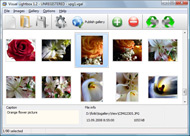
The following image set is generated by Flickr Gallery tool. Click any picture to run Lightbox gallery.

The sample above is an in-page usage demo of Lightbox gallery that uses images from Flickr. The slideshow created with Flickr Gallery software is placed inside the page layout. You can also check the full-page demo website gallery. This example takes whole browser area to show the web gallery.Lightbox From Flickr To Blogger

How to Use

Step 1. Adding flickr images to your own gallery.


Locate the photo, photoset or photostream you want to use in your Flickr slideshow. Click on it to see the photo on its own page.

Copy URL of the flickr page.

Select Add images from Flickr... from the 'Add' button on the Toolbar.

Add images from Flickr

In the appeared window paste URL of the flickr page. Specify also the number of photos you want to add from the flickr page. Flickr Gallery will now include these photos in your project.

Add images from Flickr

If you have included the photos that you do not wish to be in your web gallery, you can easily remove them. Select all images that you wish to remove from photo gallery, and select Delete images. from the Images menu. You can pick and choose pictures by holding the CTRL while clicking the pictures you like.

Step 2. Adding caption.

The name of the photo on flickr page will automatically appear in the caption. When you select a photo you'll see the various info about it, such as: Path, Size, date of last change and Caption. You can add any comment or text about the photo (up to 512 symbols).

Step 3. Gallery properties.

Change the name of your flickr album, the size and quality of your pictures with Flickr Gallery. From the Gallery menu, select Properties or use "Edit Gallery Properties" button on the toolbar.

On the first tab of the Gallery Properties window you can change the name of your photo album and enable/disable the following properties: Slide Show, Auto play Slide Show, Zoom effect, Overlay Shadow. You can also set the Overlay shadow color and select the Engine you want to use (jQuery or Prototype + script.aculo.us).

On the second tab of the Gallery Properties window you can select the thumbnail you want to use, set the Thumbnails Resolution, Thumbnails Quality, Thumbnails Titles. Select Thumbnails Format (save in PNG or JPG format). Specify the Number of columns in you photo album and the Page color.

On the third tab of the Gallery Properties window you can select the template, Image resolution and Image quality of your pictures and change the Watermark.

You can set up the various sizes for exported images.

Control the quality of output PNG or JPEG format image by defining output "Image quality" and "Thumbnail quality" parameters (0%100%).

Step 4. Save your photo gallery as project file.

When you exit Flickr Gallery application, you'll be asked if you want to save your project. The project consists of the pictures you choose to put on your web photo gallery and all your settings. It's a good idea to save the project, because that will allow you to change the project in case you decide to do something different with future galleries. So click Yes, then enter a name for your project. To select the location of your project, just click the Browse folders button and choose a different location. Then click Save.

Set Time In Flickr Embed Slideshow Drupal Flickr Widget

Download Flickr Gallery


Download Flickr Gallery Download Free Edition
for Windows
Download Flickr Gallery Download Free Edition
for MAC

Flickr Gallery is free for non - commercial use.

A small fee is required for business use. Flickr Gallery Business Edition additionally provides an option to remove the Flickr Gallery. Com credit line as well as a feature to put your own logo to images. After you complete the payment via the secure form, you will receive a license key instantly by email that turns the Flickr Gallery Free Edition into a Business one. You can select the most appropriate payment procedure: check, PayPal, bank transfer, credit card etc. Also you can get Business Edition for free if you help with translating Flickr Gallery into your native language, please contact us at for more info.

Flickr Plugin For Galleria

Buy Flickr GalleryBuy Business Edition
for Windows

$49
Single Website
$69
Unlimited Websites
Buy Flickr GalleryBuy Business Edition
for MAC

$49
Single Website
$69
Unlimited Websites

Support

For general help, feature requests, troubleshooting contact Customer Support at . Make sure to include details on your Flickr Gallery version, browser, operating system and a link (or relevant code).Download My Photos From Flickr

Feedback

    * I LOVE your free Lightbox2 software tool and will purchase the business version shortly. I have seen the Lightbox JS effect used with video tutorials and I was hoping you have a version for video that I can purchase.
Video LightBox: http://videolightbox.com

    * I find Flickr Gallery (and lightbox2) a great tool and was about to proceed in its purchase.

    * Let me start just congratulating you, good job, really. I am trying out the free version before I buy it. It works great.Flickr Thumbnails For Website

    * I'd like to express my gratitude to your efforts on creating such a nice piece of program and best of all it's free! Keep out the good work and I hope to see new features in the near coming future to rate you 5 star!

FAQ

Q:How do I embed the lightbox image gallery into an existing page?

A:To install Flickr Gallery gallery on your page you should:

1. Create your gallery in Flickr Gallery and publish it on a local drive in any test folder.
2. Open index.html file from the saved folder in any text editor.
3. Copy code for the HEAD section and paste it inside the HEAD section of you own webpage, for example:

<head>
...
<!-- Start Flickr Gallery.com HEAD section -->
<link rel="stylesheet" href="engine/css/vlightbox.css" type="text/css" />
<style>#vlightbox a#vlb{display:none}</style>
<link rel="stylesheet" href="engine/css/Flickr Gallery.css" type="text/css" media="screen" />
<script src="engine/js/jquery.js" type="text/javascript"></script>
<script src="engine/js/jquery.tools.min.js" type="text/javascript"></script>
<script src="engine/js/visuallightbox.js" type="text/javascript"></script>
<!-- End Flickr Gallery.com HEAD section -->

...
</head>


4. Copy code for the BODY section and paste it inside the Body section of you own webpage in the place where you want to have a gallery, for example:

<body>
...
<!-- Start Flickr Gallery.com BODY section -->
<div id="vlightbox">
<a rel="lightbox_vlb" href="data/images/dscn6831.jpg" title="DSCN6831"><img src="data/thumbnails/dscn6831.png"><span></span></a>
<a rel="lightbox_vlb" href="data/images/dscn6823.jpg" title="DSCN6823"><img src="data/thumbnails/dscn6823.png"><span></span></a>
<a rel="lightbox_vlb" href="data/images/dscn6819.jpg" title="DSCN6819"><img src="data/thumbnails/dscn6819.png"><span></span></a>
<a id="vlb" href="http://Flickr Gallery.com">Photo Gallery For Web by Flickr Gallery.com v2.1</a>
</div>
<!-- End Flickr Gallery.com BODY section -->

...
</body>


5. Copy 'data' folder with images and thumbnails and 'engine' folder with .css and .js files into the same folder with your own webpage.
You can find the example on our website:
http://www.Flickr Gallery.com/#example


RELATED

flickr widget - tags - ThemeForest ThemeForest files tagged with flickr widget

Drupal.org Redesign Yahoo Pipe and Widget Widget. Redesign. Drupal. According to Dries' State of Drupal 2008 presentation backed by a survey with 1367 participants the drupal.org redesign is a very important task for improving the user experience of the Drupal project as a whole. In and created groups on flickr, slideshare and twitter to share

Embed Flickr Gallery In Drupal | Flickr Slideshow Embed Flickr Gallery In Drupal. Build professional online photo galleries for your Website with jQuery Thickbox Alternative! flickr photo gallery widget tags

drupal-widget | Flickr - Photo Sharing! Check out the drupal widget from Netvibes for igoogle, netvibes, mac dashboard, windows vista, windows live, and opera at eco.netvibes.com/widgets/237321/drupal-org

IXThemes Shop : PREMIUM Themes : XOOPS WordPress Drupal IXThemes dot COM is an implementation of innovative methods in the development of qualitative themes and modules for most popular CMS such as WordPress, XOOPS, Drupal Flickr Photos Widgets, AccuWeather Widgets, XOOPS Engine Compatible

Drupal + Flickr test | D'Arcy Norman dot net Drupal + Flickr test. 2006 May 22. tags: drupal, Flickr. by dnorman This time, from a regular old page in Flickr , in a separate window, dragging an image directly into the TinyMCE editor in Drupal

Drupal photos on Fotopedia - The Photo Encyclopedia Drupal (pronunciation: /ˈdruːpəl/) is a free and open source content management system (CMS) and Content Management framework (CMF) written in PHP and distributed under the GNU General Public License. It is used as a back-end system for at least

Creating Drupal modules with Flex : Mihai Corlan Fx Gallery in action, handling pictures from Flickr, Picasa, and a Drupal server the Flickr/Picasa account information, local albums, local pictures, thumbs used by the widget, comments on

Inspire Drupal Theme | Premium Wordpress Themes | ProWP.NET Inspire Drupal theme with Custom Woo Widgets for use in the sidebar and in the widgetized footer: Flickr, Ads Widget, Search, News, Tabs, Feedback, Blog Author Info and Twitter.Inspire Drupal theme is professional design and custom colors

Flickr Browser | drupal.org FlickrBrowser is an extension to the existing flickr module to allow users to browse flickr image sets to select images for flickrfield cck The CCK widget also removes the ability to enter full image sets, so individual images are the only ones

Flickr Slideshow Generator Widget Plugin,embed in Wordpress Flash slide show maker gadget plugin is the best Yahoo Flickr slideshow widget to make free iamge galleries and embed into Facebook, Wordpress, Blogger blogspot

Drupal Flickr : Flickr Gallery Drupal Flickr. Create superior online photo galleries for your Website with Flickr Slideshow!. How To Cite Images From Flickr

Geotagging With the Provincial Drilldown Widget on Vimeo Jeff pulled together a short screencast to show how a good data entry process can work, specifically looking at the provincial drilldown widget that allows users to easily geotag their content. Read the blog post: http://www.developmentseed.org

Recipe for a Flash-Free Flickr Slideshow in Drupal | johanna Drupal, Flickr. If you're in a Flickr photostream or group pool or photo set, there's a " Also, if you're using an embeddable proprietary widget from a third party, you don't have

Introducing Photo widget, floating thumbnails for your Lots of people have contacted me, asking for a version of my Flickr widget that they could use on their website, without having to use Flickr (or Picasa)

Drupal.org - Tools & Technology widget Keep up on the latest news from the drupal community with the drupal Netvibes widget

Drupal widgets for your site, blog, social network, and more Get drupal widgets on Widgetbox.com! Find drupal widgets for your site, blog, social network, and more! Aggregates news and discussion about the drupal.org redesign from GDO, twitter, slideshare, flickr

Drupal It's the flickr widget I mentioned earlier. The purpose of the widget is to include image So the last 2 days we've finished our Todo-widget, this was mainly adding the update functionality and fixing a lot of bugs

CrimsonPen.com | BenK's experiments in Drupal + Technology Make it easy for users to share their Drupal site contributions and activity with friends and followers on it easy to share Drupal nodes and comments with these networks via Janrain Engage's social sharing widget

Drupal Recipes: Building Image Galleries with jQuery and Flickr Covering Flickr, jQuery, and Drupal best practices

Iweb Flash Visual Widget - Flash Slideshow Builder Iweb Flash Visual Widget. 3D Flash Gallery. The most powerful 3D Flash Slideshow software on the Web.. Slideshow Flash Drupal

Blog widgets in Typepad | howforge.com If you don't know what service providers are, the very basic ones are counter services, FeedBurner, Flickr, Technorati and many more. Typepad's blog widgets are the best solution for newbies who want to add pieces of codes to their blog without know-how

Flickr Badge Easily create a Flickr Badge to display photos on your website

A different twitter widget for each #drupal node | Foggy A different twitter widget for each #drupal node. Submitted by We can use this widget and create a drupal block with some PHP code to pull the twitter

Facebook Social Widgets In Drupal | CG Leuschke Photography widget. Random Photos. Home Blog Facebook Social Widgets In Drupal The Comments Widget. Adding the Comments Widget was just a matter of adding another block

