



Overview

It's no secret that adding photos to your blog posts is one of the most effective ways to enhance your blog and attract attention to your writing. Flickr has millions of photos available in its database. A simple FREE tool called Flickr Gallery allows you to create a custom image gallery with a cool slide show of the most recent and most interesting photos from Flickr on your website or blog in a few easy steps. Just visit Flickr website and find photostream, photoset or a single photo you like. Enter the address of flickr page to add all photos from this page in your gallery, select the style of thumbnails and the overlay window and add the HTML embed code on your website or blog.
A few clicks and you'll see a stylish photo gallery with beautifull lightbox and zoom effects on your own website or blog!


Flickr Gallery for Windows   Flickr Gallery for MAC

Want more?

Example

Lightbox gallery sample

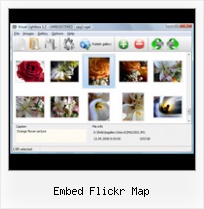
The following image set is generated by Flickr Gallery tool. Click any picture to run Lightbox gallery.

The photo gallery above is an in-page usage demo of Lightbox tool with Flickr images. The slideshow created with Flickr Gallery software is placed inside the html page. You can also check the full-page demo website gallery. This example takes whole browser area to show the Lightbox gallery that uses images from Flickr.Flickr 2

How to Use

Step 1. Adding flickr images to your own gallery.


Locate the photo, photoset or photostream you want to use in your Flickr slideshow. Click on it to see the photo on its own page.

Copy URL of the flickr page.

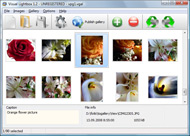
Select Add images from Flickr... from the 'Add' button on the Toolbar.

Add images from Flickr

In the appeared window paste URL of the flickr page. Specify also the number of photos you want to add from the flickr page. Flickr Gallery will now include these photos in your project.

Add images from Flickr

If you have included the photos that you do not wish to be in your web gallery, you can easily remove them. Select all images that you wish to remove from photo gallery, and select Delete images. from the Images menu. You can pick and choose pictures by holding the CTRL while clicking the pictures you like.

Step 2. Adding caption.

The name of the photo on flickr page will automatically appear in the caption. When you select a photo you'll see the various info about it, such as: Path, Size, date of last change and Caption. You can add any comment or text about the photo (up to 512 symbols).

Step 3. Gallery properties.

Change the name of your flickr album, the size and quality of your pictures with Flickr Gallery. From the Gallery menu, select Properties or use "Edit Gallery Properties" button on the toolbar.

On the first tab of the Gallery Properties window you can change the name of your photo album and enable/disable the following properties: Slide Show, Auto play Slide Show, Zoom effect, Overlay Shadow. You can also set the Overlay shadow color and select the Engine you want to use (jQuery or Prototype + script.aculo.us).

On the second tab of the Gallery Properties window you can select the thumbnail you want to use, set the Thumbnails Resolution, Thumbnails Quality, Thumbnails Titles. Select Thumbnails Format (save in PNG or JPG format). Specify the Number of columns in you photo album and the Page color.

On the third tab of the Gallery Properties window you can select the template, Image resolution and Image quality of your pictures and change the Watermark.

You can set up the various sizes for exported images.

Control the quality of output PNG or JPEG format image by defining output "Image quality" and "Thumbnail quality" parameters (0%…100%).

Step 4. Save your photo gallery as project file.

When you exit Flickr Gallery application, you'll be asked if you want to save your project. The project consists of the pictures you choose to put on your web photo gallery and all your settings. It's a good idea to save the project, because that will allow you to change the project in case you decide to do something different with future galleries. So click Yes, then enter a name for your project. To select the location of your project, just click the Browse folders button and choose a different location. Then click Save.

Flickr Lightbox Widgets For Web Embed Flickr Map

Download Flickr Gallery


Download Flickr Gallery Download Free Edition
for Windows
Download Flickr Gallery Download Free Edition
for MAC

Flickr Gallery is free for non-commercial use.

A small fee is required for business use. Flickr Gallery Business Edition additionally provides an option to remove the Flickr Gallery. Com credit line as well as a feature to put your own logo to images. After you conclude the payment via the secure form, you will receive a license key instantly by e-mail that turns the Flickr Gallery Free Edition into a Business one. You can select the most appropriate payment method: PayPal, check, credit card, bank transfer etc. Also you can get Business Edition for free if you help with translating Flickr Gallery into your native language, please contact us at for more info.

Flickr Javascript Widget Iweb

Buy Flickr GalleryBuy Business Edition
for Windows

$49
Single Website
$69
Unlimited Websites
Buy Flickr GalleryBuy Business Edition
for MAC

$49
Single Website
$69
Unlimited Websites

Support

For general help, feature requests, troubleshooting contact Customer Support at . Make sure to include details on your Flickr Gallery version, browser, a link (or relevant code) and operating system.Wordpress Embed Flickr Set

Feedback

    * First of all, your product is fantasitc. I looked at the others and your code generator app was insanely easy to use.

    * Great product by the way and saved me loads of time. I really like your Flickr Gallery program! Very nice.

    * Let me start just congratulating you, good job, really. I am trying out the free version before I buy it. It works great.Add Flickr Photostream To Typepad

    * I would like to say that Flickr Gallery is a stunning lil program! Its almost too good to be true i'd say! I've been looking for tutorials to create a lightbox gallery, but just couldnt come right. Im so glad i found Flickr Gallery!

FAQ

Q:How can I set the number of thumbnails columns?

A:Open the generated 'engine\css\vlightbox.css' in any text editor and specify the width for your gallery,
for example:

#vlightbox { zoom:1; width: 650px;}

Change this value to have a different number of columns.


RELATED

Wordpress Flickr – embed Flickr photos in Wordpress blog WordPress Flickr – embed Flickr photos in WordPress blog. Maybe I'm just slow, but it took me a long time to figure out how to do To embed your own Flickr photos in your WordPress blog you'll need to first add the Flickr Widget by going to the WordPress

How To: Embed Map with Geotagged Photos for Your Blog So you have a bunch of photos geotagged with GPS-capable cameraphones like the Nokia N95 or the Nokia N82 and want to show it off on your blog. Here's the How To: Embed Map with Geotagged Photos for Your Blog | The Nokia BlogGood way to embed your flickr map in your website Tags: Flickr

Flickr Slideshow Embed : Free SlideShow Software Free Slideshow Creator! Flickr Slideshow Embed. Online photo albums created with Flickr Slideshow are fully compatible with all modern Windows and MAC browsers!. Picture Gallery For Website

A map of Flickr videos Flickr videos embedded on a Google Map However, it seems JavaScript is either disabled or not supported by your browser. To view Google Maps, enable JavaScript by changing your browser options, and then try again

lib20 / flickr-slide-shows Resources for library and school technology workshops. Features sessions on WordPress in Libraries, Online Outreach, Google Tools and much more

Flickr Map Embed : Flickr Gallery Flickr Map Embed. Make professional online photo album software in minutes with Flickr Slideshow!. Integrate Flickr Slideshow Jquery

Free google map & flickr mashups and photo gallerys for your Create google map photo galleries using geotagged photosets from flickr. Embed in your own website, blog or share on facebook and twitter

Travolution Blog: Geo-mapping on Flickr When a visitor to a slideshow wants to see where a particular picture or set of images were taken they can now click on the Map function and, voila, a reasonably detailed map appears with an embedded Flickr showreel. Kevin May, editor, Travolution. Posted by Travolution Blogger at 12:49 PM

Map your Flickr or Brightkite Photos on Mapquest using GeoRSS With the help of the Mapquest team (who contacted me via their Twitter - thanks!), we have some great information on how users can easily create a custom map, Then paste into the dialog in Mapquest under the advanced Embed options - The following map displays the Flickr Photo GeoRSS feed

Using Flickr to Geospatially Embed Archaeological Using the GIS overlay as a guide, I recreated the footprint of the 1792 Presidio Quad as a Memory Map in Flickr, accessible by mobile phones and geospatially located. Flickr's map. This gives you a (very) rough lat/long that will allow other people to locate your interpreted data. 6) Embed your

Objects Around The geo locating platform, See what's around you and get additional information on the geotagged objects with a single click or track family & friends. Map without programming Groupon Youtube Yelp Foursquare Android App Windows Mobile App Map without javascript Flickr Facebook Embedded Map Bing Maps

Re-use content - embed Twitter quotes Re-use content - embed Twitter quotes. Facebook and the social web. Facebook Like Button. Facebook Recommendations Flickr - map your sets. Flickr - creating sets. Flickr - upload photos

New Feature - My Flickr Map - Restaurant Widow I have been working on a map for my website; I have experimented with many types of maps - Google, Yahoo, etc. and nothing seems to have exactly what I am looking for; however, I think I like the Flickr map the best. The only problem is I can't

MyPicsMap - Photos of the World Mypicsmap - explore the world through everyone Flickr photos Special thanks to: , Google maps, this website is built on top of the excellent Kohana PHP 5 Framework, photos overlay with

How to Embed Almost Anything in your Website Learn how to embed videos, mp3 music, Flash videos (both swf and flv), pictures, fonts, spreadsheets, charts, maps and everything else into your blog or website. To embed an individual Flickr photograph in your blog, click the "Share This" link (available next to the photo title) and choose embed it

iMapFlickr: Map Your Flickr Photos on Google Maps IssueMap: Easily Create a Map From Excel or CSV Data. Talkwebby: Adds a Shortcut To Comments On Your Embedded Videos. Tubesnack: Free Embeddable Video Player For Your Site. Find more apps for: embeddable, flickr, maps, Mashups. The comments were closed because the article is more than 90 days old

Combining Map Flickr and Flickr allows for easy Online Mapping Although I'm a big fan of Flickr, for a long time one of its major drawbacks was that I couldn't embed Flickr maps. That's it, from that point, all you have to do is link to the map– or better yet– embed it into your website like I did

iMapFlickr - Make Google Maps And Flickr Mashups for Free The iMapFlickr is a free service that allows you to create interactive maps using the flickr and the google which you can either embed in your own website, blog or share on the facebook and twitter. The 3 steps to be followed are – firstly, add a photoset

Mapsack Widget | nyc.locationscout.us Here is a way to imbed your Flickr photos on your website using the Mapsack Flickr Widget, which could be useful for a location scout wishing to present locations to a client at the same time illustra

loc.alize.us - Explore your world through everyone's eyes loc.alize.us displays a massiv amount of photos on a highly interactive world map. Explore photos from everyone's places, selected topics or people you know

JavaScript Embed | Flickr - Photo Sharing! JavaScript Embed

Google Map directions - "Greetings from ..." Postcard Geography You must have the image uploaded on a website (like Picasa, Flickr, Photobucket or any site that gives your HTML embed code) if you want to embed an image in the map. To embed the image, select "Edit HTML". Go to your photosharing website and copy the embed code and paste into the window

Map Maker: Show off where you've been or where you're going Create a map of places you've visited (or want to visit or dream about or know people from) and get HTML code that you can embed in your profile on Flickr, Facebook, My Space, your blog or any other web page. Just click your countries and the map

Flickr Gmap Show for Greasemonkey Use flickr map function with Google Map. Map Organize. Easily browse nearby photos. Location search. Save/Load/Remove location information. Embed single photo map/photoset map on your webpage easily. Screen Shots

Mapufacture - Flickr map If you really like you a map, you can easily get a GeoRSS feed or KML link to view in Share this Map. Embed this map in your webpage. You can easily add this map to your webpage

Flash Gallery Embed Php 5 - Flash Photo Gallery Flash Gallery Embed Php 5. Flash Photo Gallery uses the Tweener engine, which makes it support several tween types for the flash photo gallery transitions, such as Cubic, Bounce or Elastic.. Flash Presentations Fla Templates Forum Free Embed Flickr Map. Flickr Gallery - photo gallery script. Cross

