



Overview

It's no secret that adding photos to your blog posts is one of the most effective ways to enhance your blog and attract attention to your writing. Flickr has millions of photos available in its database. A simple FREE tool called Flickr Gallery allows you to create a custom image gallery with a cool slide show of the most recent and most interesting photos from Flickr on your website or blog in a few easy steps. Just visit Flickr website and find photostream, photoset or a single photo you like. Enter the address of flickr page to add all photos from this page in your gallery, select the style of thumbnails and the overlay window and add the HTML embed code on your website or blog.
A few clicks and you'll see a stylish photo gallery with beautifull lightbox and zoom effects on your own website or blog!


Flickr Gallery for Windows   Flickr Gallery for MAC

Want more?

Example

Lightbox gallery sample

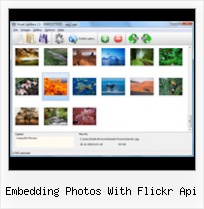
The following image set is generated by Flickr Gallery tool. Click any picture to run Lightbox gallery.

The photo gallery above is an in-page usage demo of Lightbox gallery that uses images from Flickr. The gallery created with Flickr Gallery wizard is placed inside the page layout. You can also check the full-page demo lightbox gallery. This example takes whole browser area to show the Lightbox gallery that uses images from Flickr.Flickr Gallery For Joomla 1 5

How to Use

Step 1. Adding flickr images to your own gallery.


Locate the photo, photoset or photostream you want to use in your Flickr slideshow. Click on it to see the photo on its own page.

Copy URL of the flickr page.

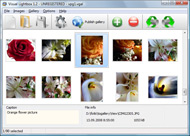
Select Add images from Flickr... from the 'Add' button on the Toolbar.

Add images from Flickr

In the appeared window paste URL of the flickr page. Specify also the number of photos you want to add from the flickr page. Flickr Gallery will now include these photos in your project.

Add images from Flickr

If you have included the photos that you do not wish to be in your web gallery, you can easily remove them. Select all images that you wish to remove from photo gallery, and select Delete images. from the Images menu. You can pick and choose pictures by holding the CTRL while clicking the pictures you like.

Step 2. Adding caption.

The name of the photo on flickr page will automatically appear in the caption. When you select a photo you'll see the various info about it, such as: Path, Size, date of last change and Caption. You can add any comment or text about the photo (up to 512 symbols).

Step 3. Gallery properties.

Change the name of your flickr album, the size and quality of your pictures with Flickr Gallery. From the Gallery menu, select Properties or use "Edit Gallery Properties" button on the toolbar.

On the first tab of the Gallery Properties window you can change the name of your photo album and enable/disable the following properties: Slide Show, Auto play Slide Show, Zoom effect, Overlay Shadow. You can also set the Overlay shadow color and select the Engine you want to use (jQuery or Prototype + script.aculo.us).

On the second tab of the Gallery Properties window you can select the thumbnail you want to use, set the Thumbnails Resolution, Thumbnails Quality, Thumbnails Titles. Select Thumbnails Format (save in PNG or JPG format). Specify the Number of columns in you photo album and the Page color.

On the third tab of the Gallery Properties window you can select the template, Image resolution and Image quality of your pictures and change the Watermark.

You can set up the various sizes for exported images.

Control the quality of output PNG or JPEG format image by defining output "Image quality" and "Thumbnail quality" parameters (0%…100%).

Step 4. Save your photo gallery as project file.

When you exit Flickr Gallery application, you'll be asked if you want to save your project. The project consists of the pictures you choose to put on your web photo gallery and all your settings. It's a good idea to save the project, because that will allow you to change the project in case you decide to do something different with future galleries. So click Yes, then enter a name for your project. To select the location of your project, just click the Browse folders button and choose a different location. Then click Save.

Lightbox Gallery Flickr Photostream Embedding Photos With Flickr Api

Download Flickr Gallery


Download Flickr Gallery Download Free Edition
for Windows
Download Flickr Gallery Download Free Edition
for MAC

Flickr Gallery is free for non-commercial use.

A small fee is required for business use. Flickr Gallery Business Edition additionally provides an option to remove the Flickr Gallery. Com credit bar as well as a feature to put your own logo to images. After you finish the payment via the secure form, you will receive a license key instantly by e-mail that turns the Flickr Gallery Free Edition into a Business one. You can select the most appropriate payment method: bank transfer, check, PayPal, credit card etc. Also you can get Business Edition for free if you help with translating Flickr Gallery into your native language, please contact us at for more info.

Flickr Rss Widget

Buy Flickr GalleryBuy Business Edition
for Windows

$49
Single Website
$69
Unlimited Websites
Buy Flickr GalleryBuy Business Edition
for MAC

$49
Single Website
$69
Unlimited Websites

Support

For general help, feature requests, troubleshooting contact Customer Support at . Make sure to include details on your operating system, browser, a link (or relevant code) and Flickr Gallery version.Vbulletin Flickr Slideshow

Feedback

    * I tried Flickr Gallery and for me its a very cool and usefull application. Its so easy to manage my galleries and it looks very nice.

    * I'm absolutely loving Flickr Gallery Business and Video LightBox. Amazing, quick and painless, to create a custom, browser independent gallery. And it works first time - every time! Best value for money I've seen in quite a while...

    * First of all, I love you Flickr Gallery. I think it's beautiful! I purchased the lightbox “business edition” yesterday, and I’m very happy how easy it is to use. Found this to be one of the fastest ways to get a gallery on the web. Thanks.Saving Flickr With Notes

    * Another programmes have incredible functionality but no fantastic interface like your product!

FAQ

Q:I would like to have a few galleries in one website and even on one page.

A:To create several galleries on your page you should change following parameter in A tag for different galleries:

rel="lightbox_vlb"

For example, for the first gallery you should set rel="lightbox_vlb":

<!-- Start Flickr Gallery.com BODY section -->
<div id="vlightbox">
<a rel="lightbox_vlb" href="data/images/dscn6831.jpg" title="dscn6831" >
<img src="data/thumbnails/dscn6831.png" ><span></span></a>
<a rel="lightbox_vlb" href="data/images/dscn6823.jpg" title="dscn6823">
<img src="data/thumbnails/dscn6823.png"><span></span></a>
<a id="vlb" href="http://Flickr Gallery.com">Photo Gallery For Web by Flickr Gallery.com v2.0</a>
</div>
<!-- End Flickr Gallery.com BODY section -->

and for the second gallery rel="lightbox_vlb1":

<!-- Start Flickr Gallery.com BODY section -->
<div id="vlightbox">
<a rel="lightbox_vlb1" href="data/images/img_0501.jpg" title="img_0501">
<img src="data/thumbnails/img_0501.png"><span></span></a>
<a rel="lightbox_vlb1" href="data/images/img_0481.jpg" title="img_0481">
<img src="data/thumbnails/img_0481.png"><span></span></a>
<a id="vlb" href="http://Flickr Gallery.com">Photo Gallery For Web by Flickr Gallery.com v2.0</a>
</div>
<!-- End Flickr Gallery.com BODY section -->


RELATED

Options for Easily Adding Flickr Photos to Your Website This page shows a number of the leading options for quickly and easily adding your Flickr photos to your website or blog (WordPress, Joomla, TextPattern). They all offer some options and customizations

CoolFlick: Flickr Embedding Cooliris Style Cooliris is one of the best ways to flip through photos, enabling you to scroll through hundreds of photos effortlessly. Flickr is one of the best sites to search for photos. Combine the two and you've got CoolFlick, a service that lays Cooliris

Embedding Flickr Photos Flickr exposes rich sets of open API via Web Services, which allows you to write your own program to fetch Flickr data such as photos, tags, groups and profiles. of cool things with Flickr data. To keep it simple, in this tutorial, I'll explain how to obtain photos corresponding to a

The Lair / decoding flickr picture urls Do not meddle in the affairs of dragons, for you are crunchy and taste good with ketchup to link photos uploaded to Flickr) to a Flickr user account. Stalker wannabes, please start your engines. First place to look was the excellent Flickr API documentation

Flickr API Profile Flickr API -- see mashups, code, news, reviews and resources. Uses the Flickr API to grab all of the most interesting photos from 2005 and display them in a nice Flash interface. Embedding Flickr Photos Using Java. Shows how to fetch data from Flickr using a proxy client library and

Help on how to embed google maps with geotagged flickr photosets iMapFlickr lets you create google map and flickr mashups using using geotagged photos which you can embed in your own website, blog or share on facebook and twitter. No complicated coding required!

Flickr Api As3 - Flash Photo Gallery Flickr Api As3. Creating excellent dynamic 3D Flash Gallery with minimum effort!. Tutorial Flash Membuat Slideshow Publish the flickr api as3 to a local drive or directly to the Internet via a built-in FTP client and add the HTML embed code on your website or blog

Extension:Flickr - MediaWiki share the comments and your other photos with your wiki visitors [edit] Flickr API Key. To use the Flickr API, you need a key. Your type of key will depend on whether you are using the key for commercial or non-commercial purposes and is unique to you

Code: Flickr Developer Blog " Videos in the Flickr API Presumably you've noticed that folks are uploading videos to Flickr, and you're wondering how to work with video in the API? you can display a preview of a video by treating it exactly like any other photo on Flickr. photos AND videos are returned by any method which used to return just photos

oEmbed This allows the consumer to turn a URL to a Flickr photo page into structured data to allow embedding of that photo in the consumer's website. The URL scheme may contain one or more wildcards (specified with an asterisk). Wildcards

Flickr Launches a New Website Dedicated to Developers Flickr, Yahoo's photo sharing service, has rolled out a new website dedicated to Flickr's popular API tools. based on the photo sharing site. And build they have; there are thousands of Flickr tools out there, offering everything from simple widgets to embed photos on your

[WordPress Plugin] Live Flickr comment importer at SANIsoft Uses the Flickr API via the excellent phpFlickr class. Can automatically detect Flickr photos embedded in the post. Can also use a custom field in the post to import comments thus your Photos and posts need not have the same title. Comments on multiple photos can be imported in a single post

Scriptaculous/Prototype examples, JavaScript Flickr API Perhaps you will too, with the directions here. JavaScript Flickr API. For a Yahoo hack allows you to use the Flickr webservices API from JavaScript, with no backend scripting,

WordPress " Flickr foto info " WordPress Plugins This plugin shows a small toolbar over photos from Flickr embedded in your post. Most calls to the Flickr API are done on the client side - so there is minimal additional load or delay on the server. If your photo has geo-location data embedded, shows it as a marker on Google map with

Building a Flickr Flash Display, Part 1 To get photos, you have to provide an API key from www.flickr.com and Embedding the Flash movie. In an earlier attempt I had ( link here ) separated the flickr request, the styling and the JavaScript logic for the Flickr Badge, to be able to work separately with the different aspects. It was done in

Flickr | drupal.org Access photos on Flickr's site via their API. The module provides a and allows the creation of blocks for rendering a user's recent photos and photosets

www.apifinder.com - Get Started with API Programming Using Do you need a programmer's introduction to Web service client development? Try building a simple 'photo of the day' application using the Flickr API (as the source of the photos) and either Actionscript, C#, or Java on the server side

Tools for Flickr Photo Printer. PictureSync. Picmakr. Photo Watermark. Retrievr. RSS2 PDF. Rainbow. Schwag. Search Spell with Flickr. Sprinklr. Steganography. Tag Browser. TAGGL. Tagnautica

60+ Tools To Enhance Your Flickr Experience Being a popular online image platform, Flickr has enabled Internet users to manage and share digital photos easily as long as there's an Internet connection. Powerful new photo search engines that work with the Flickr API. CompFight. Compfight is a

Flickr: Discussing embedding flickr pics in forum in Flickr API Flickr is almost certainly the best online photo management and sharing application in the world. Show off your favorite photos and videos to the world, securely and privately show content to your friends and family, or blog the photos and videos

Download flickr-photos-search - This is a PHP and JavaScript flickr-photos-search This is a PHP and JavaScript tool for searching and embedding Flickr images

Embedding Flickr : Flickr Gallery Embedding Flickr. A few clicks to create stylish photo gallery webpage! Tools for embedding Flickr Slideshows I came across few nice tools to embed Flickr Photos in your blogs or myspace pages, I will make a list of them here and update the post with new tools whenever

Funky Flickr Flex Widgets " SitePoint In this tutorial, Jack demonstrates how to create a small Flex widget to display a set of location-based Flickr photos, and embed it so that it doesn't interfere with your web page content

The Ultimate Guide to Decoding the Flickr API | Nettuts+ Flickr, being the biggest photo management and sharing site in the world, has an impressive API to let developers access and manipulate almost all of its data

Flickr Slideshow Embed : Free SlideShow Software Free Slideshow Creator! Flickr Slideshow Embed. Online photo albums created with Flickr Slideshow are fully compatible with all modern Windows and MAC browsers!. Picture Gallery For Website

Get flickr photos with Classic ASP & Flickr API After trial error here are the script I use to get flickr photos with flickr API and Classic ASP, it may not perfect but at least it worked for me. Here I use 2 flickr API methods. flickr.photosets.getPhotos, to get list photos of a photosets since i store all those screenshots in a photosets

