
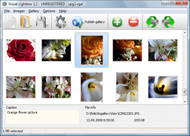



Overview

It's no secret that adding photos to your blog posts is one of the most effective ways to enhance your blog and attract attention to your writing. Flickr has millions of photos available in its database. A simple FREE tool called Flickr Gallery allows you to create a custom image gallery with a cool slide show of the most recent and most interesting photos from Flickr on your website or blog in a few easy steps. Just visit Flickr website and find photostream, photoset or a single photo you like. Enter the address of flickr page to add all photos from this page in your gallery, select the style of thumbnails and the overlay window and add the HTML embed code on your website or blog.
A few clicks and you'll see a stylish photo gallery with beautifull lightbox and zoom effects on your own website or blog!


Flickr Gallery for Windows   Flickr Gallery for MAC

Want more?

Example

Lightbox gallery sample

The following image set is generated by Flickr Gallery tool. Click any picture to run Lightbox gallery.

The photo gallery above is an in-page usage demo of Lightbox script with Flickr images. The lightbox gallery created with Flickr Gallery software is placed inside the website page. You can also check the full-page demo slideshow. This example takes whole browser area to show the Lightbox gallery that uses images from Flickr.Customizing Flickr Slideshow Widget

How to Use

Step 1. Adding flickr images to your own gallery.


Locate the photo, photoset or photostream you want to use in your Flickr slideshow. Click on it to see the photo on its own page.

Copy URL of the flickr page.

Select Add images from Flickr... from the 'Add' button on the Toolbar.

Add images from Flickr

In the appeared window paste URL of the flickr page. Specify also the number of photos you want to add from the flickr page. Flickr Gallery will now include these photos in your project.

Add images from Flickr

If you have included the photos that you do not wish to be in your web gallery, you can easily remove them. Select all images that you wish to remove from photo gallery, and select Delete images. from the Images menu. You can pick and choose pictures by holding the CTRL while clicking the pictures you like.

Step 2. Adding caption.

The name of the photo on flickr page will automatically appear in the caption. When you select a photo you'll see the various info about it, such as: Path, Size, date of last change and Caption. You can add any comment or text about the photo (up to 512 symbols).

Step 3. Gallery properties.

Change the name of your flickr album, the size and quality of your pictures with Flickr Gallery. From the Gallery menu, select Properties or use "Edit Gallery Properties" button on the toolbar.

On the first tab of the Gallery Properties window you can change the name of your photo album and enable/disable the following properties: Slide Show, Auto play Slide Show, Zoom effect, Overlay Shadow. You can also set the Overlay shadow color and select the Engine you want to use (jQuery or Prototype + script.aculo.us).

On the second tab of the Gallery Properties window you can select the thumbnail you want to use, set the Thumbnails Resolution, Thumbnails Quality, Thumbnails Titles. Select Thumbnails Format (save in PNG or JPG format). Specify the Number of columns in you photo album and the Page color.

On the third tab of the Gallery Properties window you can select the template, Image resolution and Image quality of your pictures and change the Watermark.

You can set up the various sizes for exported images.

Control the quality of output PNG or JPEG format image by defining output "Image quality" and "Thumbnail quality" parameters (0%…100%).

Step 4. Save your photo gallery as project file.

When you exit Flickr Gallery application, you'll be asked if you want to save your project. The project consists of the pictures you choose to put on your web photo gallery and all your settings. It's a good idea to save the project, because that will allow you to change the project in case you decide to do something different with future galleries. So click Yes, then enter a name for your project. To select the location of your project, just click the Browse folders button and choose a different location. Then click Save.

Widgetbox Flickr Gallery Troubleshooting Flickr Photostream Fbml

Download Flickr Gallery


Download Flickr Gallery Download Free Edition
for Windows
Download Flickr Gallery Download Free Edition
for MAC

Flickr Gallery is free for non-commercial use.

A small fee is required for business use. Flickr Gallery Business Edition additionally provides an option to remove the Flickr Gallery. Com credit line as well as a feature to put your own logo to images. After you conclude the payment via the secure form, you will receive a license key instantly by e-mail that turns the Flickr Gallery Free Edition into a Business one. You can select the most suitable payment mode: bank transfer, credit card, PayPal, check etc. Also you can get Business Edition for free if you help with translating Flickr Gallery into your native language, please contact us at for more info.

How To Include Flickr In Joomla

Buy Flickr GalleryBuy Business Edition
for Windows

$49
Single Website
$69
Unlimited Websites
Buy Flickr GalleryBuy Business Edition
for MAC

$49
Single Website
$69
Unlimited Websites

Support

For feature requests, troubleshooting, general help contact Customer Support at . Make sure to include details on your Flickr Gallery version, a link (or relevant code), operating system and a browser.Flickr Share This Private Download

Feedback

    * I would like to say that Flickr Gallery is a stunning lil program! Its almost too good to be true i'd say! I've been looking for tutorials to create a lightbox gallery, but just couldnt come right. Im so glad i found Flickr Gallery!

    * Another programmes have incredible functionality but no fantastic interface like your product!

    * I ran into your website wile looking for a JavaScript to manage a personal Photo Gallery. I downloaded the trial version and immediately fell in love with your Flickr Gallery, it is one of the best products I’ve ever found; it is very user friendly and easy to use and creates great Photo Galleries.Flickr Reveal Private Photos

    * I tried Flickr Gallery and for me its a very cool and usefull application. Its so easy to manage my galleries and it looks very nice.

FAQ

Q:How do I embed the lightbox image gallery into an existing page?

A:To install Flickr Gallery gallery on your page you should:

1. Create your gallery in Flickr Gallery and publish it on a local drive in any test folder.
2. Open index.html file from the saved folder in any text editor.
3. Copy code for the HEAD section and paste it inside the HEAD section of you own webpage, for example:

<head>
...
<!-- Start Flickr Gallery.com HEAD section -->
<link rel="stylesheet" href="engine/css/vlightbox.css" type="text/css" />
<style>#vlightbox a#vlb{display:none}</style>
<link rel="stylesheet" href="engine/css/Flickr Gallery.css" type="text/css" media="screen" />
<script src="engine/js/jquery.js" type="text/javascript"></script>
<script src="engine/js/jquery.tools.min.js" type="text/javascript"></script>
<script src="engine/js/visuallightbox.js" type="text/javascript"></script>
<!-- End Flickr Gallery.com HEAD section -->

...
</head>


4. Copy code for the BODY section and paste it inside the Body section of you own webpage in the place where you want to have a gallery, for example:

<body>
...
<!-- Start Flickr Gallery.com BODY section -->
<div id="vlightbox">
<a rel="lightbox_vlb" href="data/images/dscn6831.jpg" title="DSCN6831"><img src="data/thumbnails/dscn6831.png"><span></span></a>
<a rel="lightbox_vlb" href="data/images/dscn6823.jpg" title="DSCN6823"><img src="data/thumbnails/dscn6823.png"><span></span></a>
<a rel="lightbox_vlb" href="data/images/dscn6819.jpg" title="DSCN6819"><img src="data/thumbnails/dscn6819.png"><span></span></a>
<a id="vlb" href="http://Flickr Gallery.com">Photo Gallery For Web by Flickr Gallery.com v2.1</a>
</div>
<!-- End Flickr Gallery.com BODY section -->

...
</body>


5. Copy 'data' folder with images and thumbnails and 'engine' folder with .css and .js files into the same folder with your own webpage.
You can find the example on our website:
http://www.Flickr Gallery.com/#example


RELATED

Facebook - Choosing Between an FBML or IFrame Application One of the strategic decisions that you need to make when you create your Facebook application is deciding whether to use FBML or an IFrame for your canvas page

Flickr supports video now Yeah its true Flickr supports video now. Today when i am uploading the banner of my college e-magazine udgaar in the flickr then what i saw is another option of uploading the videos. Really man it was total good news for me and wish yahoos this

Trend Micro Asia Pacific News Library - Facebook open Used under creative commons from Editor B Flickr photostream In the past the tabs which could be added to these pages have been set up in two ways; the first used the Facebook FBML app

Flickr Slideshow Widget : Free SlideShow Software Free Slideshow Creator! Flickr Slideshow Widget. Create web photo gallery for your Website with Flash SlideShow Maker!. Website Photo Gallery Software

Technology, Books and Other Neat Stuff - From Twitter 08-24-2009 23:00:00: New issue of Web Designer is out with my Silverlight 3/Blend 3 and FBML pieces. 23:09:02: Walking on water: http://www.flickr.com/photos/sbisson/3852914844

Odyssey BMX Boxes | Facebook Welcome to the official Facebook Page of Odyssey BMX. Get exclusive content and interact with Odyssey BMX right from Facebook. Join Facebook to create your own Page or to start connecting with friends

Updates - View an update and leave a comment - Yahoo! Pulse Nick Chill has uploaded a photo to Flickr. Title: Just Missed, Great Blue Heron. Tags: d300s, nature, animal, More: View Nick Chill s photostream. An American Coot (fulica americana) runs on water, while chasing another coot in a display of

Flickr Photostream Fbml : Flickr Gallery Flickr Photostream Fbml. Flickr Gallery generates all necessary icons, images, html, javascripts, css styles automatically!. Plain Slideshow Flickr

Php Fusion Flickr Gallery Php Fusion Flickr Gallery. Ajax Photo Gallery is the best photo gallery software on the Web!. create your photo online

open_source.php - flickr-photosets - Google Code Facebook API / FBML Flickr API Basic Javascript (FBJS) "http://code.google.com/p/flickr-photosets/wiki/CodingGuidelines">Coding Guidelines

How Networked Nonprofits Use Facebook http://www.flickr.com/photos/88526923@N00/2114874155/sizes/m/in/photostream http://www.flickr.com/photos/avlxyz/2077892948/sizes/o/in/photostream

Flex - Fine Dining - Facebook Page Template - ActiveDen This is a FLEX application Show your presence on face book. Customize your facebook page to include slideshow, image gallery, and location through FBML application. This template is made targeted a

Planning 2.0 Favorite Pages. Flickr Badge. Social RSS. Blog postings, Flickr group/photostream, other RSS Use applications (FBML, Flickr badge, RSS) Monitor and Measure. Export data for tracking

English Faculty Library - Web 2: Oxford libraries Flickr Another work in progress, we have an EFL photostream on Flickr . Delicious A work in progress at the moment! We are efloxford on Delicious. Twitter It will be interesting to see how future Facebook applications such as Static FBML allow libraries to tailor their pages to their readers' needs

Flickr Flash Embed - Flash Slideshow Builder Flickr Flash Embed. Use Flash Slideshow Builder Free 3D Flash Gallery to create content slider, image galleries, image & banner rotator for your website.. Slideshow Vertical Em Flash Xml

Most Popular — Widgetbox Mobile web apps, web widgets and rich media powered by the Flite Engagement Platform. 3 installs. Photostream. by drewbie613. flickr fbml. More in: flickr. 3 installs. 106-5 The WOLF's Adopt-a-thon. by trtksu. 106-5 The WOLF's Adopt-A-Thon

Sherry Huffer Sherry Huffer is a technologist in Los Angeles, CA specializing in project management and product development. View Flickr Photostream. Posts. August 22, 01:03 AM. Viral eCommerce store powering the sale of digital downloads, merchandise, hybrid (digital & merch) bundles across social networks, blogs

Flickr: tierramwilson's Photostream Flickr is almost certainly the best online photo management and sharing application in the world. Show off your favorite photos and videos to the world, securely and privately show content to your friends and family, or blog the photos and videos

Absinthe Brands FBML | Interactive Marketing Here we have a facebook landing page show casing all the brands in The Green Movement. flickr photostream. Interested in working with us? Do you have any questions so far? Should you have interest in our services, or would like to work with us on one of your projects, please contact us, today!

AC Social Webinar: Getting started with the Static FBML Our next webinar is for AC Social and will be held on Thursday January 7 at 11:30 am EST. You can register for this webinar series from the training page of ou

Fbml Flickr Gallery | Flickr Slideshow Fbml Flickr Gallery. jQuery Thickbox Alternative is a photo album maker, that allows you to create and publish splendid web photo galleries for your website! flickr slideshow embed guest pass Just visit Flickr website and find photostream, photoset or a single photo you like

Peter Liu Photography - How To Embed A Flickr Slideshow In A I was browsing some Facebook pages and came across one with Flickr slideshows embedded in a tab, and decided I had to know how it From past experience, I knew it had to be Flickr's embed code wrapped somehow inside FBML (Facebook Markup Language)

Add RSS Feeds, Twitter, Youtube, Scribd and More as Facebook Tabs You can add Twitter streams, RSS Feeds, Youtube Channels, Scribd documents and much more to a Facebook Page with no coding. A tab showing your Flickr Photo stream in Facebook page in an elegant format

mlmorg.com " web development My name is Matt Morgan. I'm a freelance web developer based on the east coast. I specialize in modern, user-focused sites. Javascript) slideshow with content pulled from PepsiCo's FlickR Photostream (leveraging the FlickR API)

