



Overview

It's no secret that adding photos to your blog posts is one of the most effective ways to enhance your blog and attract attention to your writing. Flickr has millions of photos available in its database. A simple FREE tool called Flickr Gallery allows you to create a custom image gallery with a cool slide show of the most recent and most interesting photos from Flickr on your website or blog in a few easy steps. Just visit Flickr website and find photostream, photoset or a single photo you like. Enter the address of flickr page to add all photos from this page in your gallery, select the style of thumbnails and the overlay window and add the HTML embed code on your website or blog.
A few clicks and you'll see a stylish photo gallery with beautifull lightbox and zoom effects on your own website or blog!


Flickr Gallery for Windows   Flickr Gallery for MAC

Want more?

Example

Lightbox gallery sample

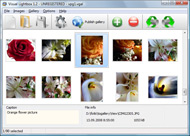
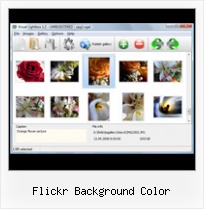
The following image set is generated by Flickr Gallery tool. Click any picture to run Lightbox gallery.

The sample above is an in-page usage demo of Lightbox gallery that uses images from Flickr. The slideshow created with Flickr Gallery software is placed inside the page layout. You can also check the full-page demo website gallery. This example takes whole browser area to show the web gallery.Display Flickr Images At Website

How to Use

Step 1. Adding flickr images to your own gallery.


Locate the photo, photoset or photostream you want to use in your Flickr slideshow. Click on it to see the photo on its own page.

Copy URL of the flickr page.

Select Add images from Flickr... from the 'Add' button on the Toolbar.

Add images from Flickr

In the appeared window paste URL of the flickr page. Specify also the number of photos you want to add from the flickr page. Flickr Gallery will now include these photos in your project.

Add images from Flickr

If you have included the photos that you do not wish to be in your web gallery, you can easily remove them. Select all images that you wish to remove from photo gallery, and select Delete images. from the Images menu. You can pick and choose pictures by holding the CTRL while clicking the pictures you like.

Step 2. Adding caption.

The name of the photo on flickr page will automatically appear in the caption. When you select a photo you'll see the various info about it, such as: Path, Size, date of last change and Caption. You can add any comment or text about the photo (up to 512 symbols).

Step 3. Gallery properties.

Change the name of your flickr album, the size and quality of your pictures with Flickr Gallery. From the Gallery menu, select Properties or use "Edit Gallery Properties" button on the toolbar.

On the first tab of the Gallery Properties window you can change the name of your photo album and enable/disable the following properties: Slide Show, Auto play Slide Show, Zoom effect, Overlay Shadow. You can also set the Overlay shadow color and select the Engine you want to use (jQuery or Prototype + script.aculo.us).

On the second tab of the Gallery Properties window you can select the thumbnail you want to use, set the Thumbnails Resolution, Thumbnails Quality, Thumbnails Titles. Select Thumbnails Format (save in PNG or JPG format). Specify the Number of columns in you photo album and the Page color.

On the third tab of the Gallery Properties window you can select the template, Image resolution and Image quality of your pictures and change the Watermark.

You can set up the various sizes for exported images.

Control the quality of output PNG or JPEG format image by defining output "Image quality" and "Thumbnail quality" parameters (0%…100%).

Step 4. Save your photo gallery as project file.

When you exit Flickr Gallery application, you'll be asked if you want to save your project. The project consists of the pictures you choose to put on your web photo gallery and all your settings. It's a good idea to save the project, because that will allow you to change the project in case you decide to do something different with future galleries. So click Yes, then enter a name for your project. To select the location of your project, just click the Browse folders button and choose a different location. Then click Save.

Jquery Flickr Feed Galelry Flickr Background Color

Download Flickr Gallery


Download Flickr Gallery Download Free Edition
for Windows
Download Flickr Gallery Download Free Edition
for MAC

Flickr Gallery is free for non-commercial use.

A small fee is required for business use. Flickr Gallery Business Edition additionally provides an option to remove the Flickr Gallery. Com credit string as well as a feature to put your own logo to images. After you conclude the payment via the secure form, you will receive a license key instantly by email that turns the Flickr Gallery Free Edition into a Business one. You can select the most suitable payment method: credit card, check, bank transfer, PayPal etc. Also you can get Business Edition for free if you help with translating Flickr Gallery into your native language, please contact us at for more info.

Flickr Gallery Flash Widget

Buy Flickr GalleryBuy Business Edition
for Windows

$49
Single Website
$69
Unlimited Websites
Buy Flickr GalleryBuy Business Edition
for MAC

$49
Single Website
$69
Unlimited Websites

Support

For general help, troubleshooting and feature requests contact Customer Support at . Make sure to include details on your operating system, browser, Flickr Gallery version and a link (or relevant code).Apple Aprture Flickr Watermark

Feedback

    * Another programmes have incredible functionality but no fantastic interface like your product!

    * First of all, I love you Flickr Gallery. I think it's beautiful! I purchased the lightbox “business edition” yesterday, and I’m very happy how easy it is to use. Found this to be one of the fastest ways to get a gallery on the web. Thanks.

    * Great product by the way and saved me loads of time. I really like your Flickr Gallery program! Very nice.Flickr Gallery With Thumbnails For Wp

    * Just bought the business version of Flickr Gallery and I just had to write and say how impressed I am with it. Really easy to use, intuitive interface and generates a truly professional presentation. Seldom have I been so pleased with a software purchase. Thank you.

FAQ

Q:In previewing some of my own slides on the browser, I find the background (thumb nails visible) too busy and distracting. Is there a way to darken the background?

A:You may set the following parameter in engine\js\visuallightbox.js file in a such way:

overlayOpacity: 1, // controls transparency of shadow overlay


RELATED

Flickrslidr Background Color : Flickr Gallery Flickrslidr Background Color. Flickr Gallery is the first software that creates AJAX-powered web image galleries without the need for server-side setup!. Add Captions To Flickr Slideshows

Flickr Badge in Flash - School of Pharmacy write(''); if (document.getElementById) document

Wild Apricot Blog : 4 Ways to Search Flickr by Color We've talked before about good tools that will search Flickr for Creative Commons-licensed images based on the keywords you choose. Now, check out another (more colorful) way to find the pictures you need for your blog or website Just don't be

Flickr Enlarger Flickr Enlarger. Tell Me More [+ HD Video] Flickr Photo URL: Options. Background Color: Black. Gray. White. Custom. Preferred Size: Auto. Medium. Large. Original

On Black: See your photos in a new light View your Flickr photos on a gorgeous plain all-black or all-white background (sort of like a framed mat). A black background helps viewers find detail in black and white photos and other photos with dark areas and makes colors really pop. An

Blogs That Flickr | Weblog: Blogs That Flickr -- Recoded! That Flickr

Your Flickr Photo In Various Background Color I used Flickr's API to fetch my photo from it to this website. I decide to share it with anybody on Flickr who wants to view their picture in various background color by using this url format:

Flickr - Background color for Greasemonkey Changes background color on mouse hover This scripts gives you ability to change background color on flickr photo page. The script displays several shades of gray from white to black. Hovering mouse over it changes the background color to the one the mouse is over

Building a Flickr Flash Display, Part 1 zg_div a:hover, .zg_div a:visited { color:#0063dc; background:inherit !important; text-decoration:none !important; }

oncolour - a simple PHP script to display a photo from Flickr oncolour is a simple PHP script to display a photo from Flickr on a specific background colour + tutorial, example, download, etc

10 useful Greasemonkey scripts for Flickr power users Flickr is one of the best photo sharing and hosting site which is widely used by many photographers and designers. In order to make the navigation in flickr Hovering mouse over it changes the background color to the one the mouse is over. Flickr Follow Comments. This useful script helps

jQuery Flickr Photo Gallery background-color: #000; Example Example jQuery Code $(document).ready(function Add the ez-jquery-flickr directory to your codebase. Simply link the CSS and JS files in your tag as you would normally

Yahoo! Developer Network - Flash Developer Center - Articles The principle child nodes in our elements node are a background image, a title label and our slideshow component. We have broken down the xml used to create the flickr badge. All that is left is to turn it into a Yahoo! Widget. of the background node is set as the background color of the Flash

Flickr Box | Layouts Step 1: Create a new document First of all create a new document 500 by 500 pixels. Now we are going to be filling the background with a dark brown colour, to do this go Edit Fill and use Color with the colour number #2c241f. Step 2: Draw the box

Tutorial: Use the Flickr API, Javascript (jQuery), AJAX and A tutorial on how to build a detailed Flickr photo wall with JavaScript, jQuery, JSON and Ajax. body, html {background: #000; font-size: 12px;} #container {width: 810px; margin: 0 auto 0 auto;} #notice {color: #fff; font-weight: bold; font-size: 15px; font-style: italic;} h1 {font

Adding a Flickr Badge to Vox - The Composing Stick document.write(''); if (document.getElementById)

How to design perfect Twitter background Ultimate Guide My main advice: never use default blue Twitter background. If you're not that into designing your Twitter background at least choose another Twitter template

Flickr Widgets The Synthetic Approach to Information Discovery Start of Flickr Badge --> .zg_div {margin:0px 5px 5px 0px; width:117px;} .zg_div_inner {border: solid 1px #000000; background-color:#ffffff; color:#666666; text-align:center; font-family:arial, helvetica; font-size:11px;

Flickr: background-color's Photostream Flickr is almost certainly the best online photo management and sharing application in the world. Show off your favorite photos and videos to the world, securely and privately show content to your friends and family, or blog the photos and videos

Flickriver: Photos from Color-de-la-vida Flickriver - view images as a 'river of photos' and more etc, allowing to quickly open the corresponding Flickriver view. Also, allows quickly viewing any Flickr photo on black background in large size

25 Paper Background Textures From Flickr | Best Design Options Here are paper background textures from Flickr. Includes colorful paper scans, grungy backgrounds, wrinkled paper, crumpled paper and many more

Getting your ASCII on with Flickr - Nihilogic If the "blocks" option is on, we simply set the background of the character span to be the same color as the character itself. background color, the original image is downscaled to a 1x1 pixel Canvas and the color of this single pixel is read and used as

Using and Creating Themes: Using Images as Backgrounds | My Be sure that the Image option is selected in the Background section, then click the Change Image button. Tip: Select the Color option instead of Image if you want to use a solid color as the background. Now you have two options for finding an image to use—your local computer or Flickr

Flickr badge on Wiki How do I add a flickr badge to my sidebar? I have a flickr badge, a combination of pictures on a flicker account. It displays in a frame, several pictures and it moves them around the frame. I have

Flickr Photos Are Getting a Massive Overhaul As of today, users can start seeing bigger, bolder Flickr photo pages with prettier controls and more apparent options for learning more about each Now if they could just give us the option of setting our corner of Flickr's background color to 18% gray instead of white

Twilight Layout | Friendster-Layouts.com Thousands of Free Friendster Layouts for Your Friendster Profile (http://farm4.static.flickr.com/3432/3371616037_f5594f5731_o.jpg); background-attachment: fixed; background-position: center; background-repeat: no

