



Overview

It's no secret that adding photos to your blog posts is one of the most effective ways to enhance your blog and attract attention to your writing. Flickr has millions of photos available in its database. A simple FREE tool called Flickr Gallery allows you to create a custom image gallery with a cool slide show of the most recent and most interesting photos from Flickr on your website or blog in a few easy steps. Just visit Flickr website and find photostream, photoset or a single photo you like. Enter the address of flickr page to add all photos from this page in your gallery, select the style of thumbnails and the overlay window and add the HTML embed code on your website or blog.
A few clicks and you'll see a stylish photo gallery with beautifull lightbox and zoom effects on your own website or blog!


Flickr Gallery for Windows   Flickr Gallery for MAC

Want more?

Example

Lightbox gallery sample

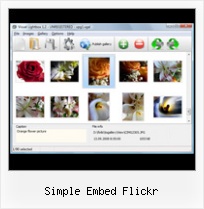
The following image set is generated by Flickr Gallery tool. Click any picture to run Lightbox gallery.

The photo gallery above is an in-page usage demo of Lightbox gallery that uses images from Flickr. The website gallery created with Flickr Gallery application is placed inside the page layout. You can also check the full-page demo slideshow. This example takes whole browser area to show the Lightbox gallery that uses images from Flickr.Hack Flickr Private Photos

How to Use

Step 1. Adding flickr images to your own gallery.


Locate the photo, photoset or photostream you want to use in your Flickr slideshow. Click on it to see the photo on its own page.

Copy URL of the flickr page.

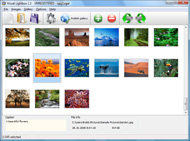
Select Add images from Flickr... from the 'Add' button on the Toolbar.

Add images from Flickr

In the appeared window paste URL of the flickr page. Specify also the number of photos you want to add from the flickr page. Flickr Gallery will now include these photos in your project.

Add images from Flickr

If you have included the photos that you do not wish to be in your web gallery, you can easily remove them. Select all images that you wish to remove from photo gallery, and select Delete images. from the Images menu. You can pick and choose pictures by holding the CTRL while clicking the pictures you like.

Step 2. Adding caption.

The name of the photo on flickr page will automatically appear in the caption. When you select a photo you'll see the various info about it, such as: Path, Size, date of last change and Caption. You can add any comment or text about the photo (up to 512 symbols).

Step 3. Gallery properties.

Change the name of your flickr album, the size and quality of your pictures with Flickr Gallery. From the Gallery menu, select Properties or use "Edit Gallery Properties" button on the toolbar.

On the first tab of the Gallery Properties window you can change the name of your photo album and enable/disable the following properties: Slide Show, Auto play Slide Show, Zoom effect, Overlay Shadow. You can also set the Overlay shadow color and select the Engine you want to use (jQuery or Prototype + script.aculo.us).

On the second tab of the Gallery Properties window you can select the thumbnail you want to use, set the Thumbnails Resolution, Thumbnails Quality, Thumbnails Titles. Select Thumbnails Format (save in PNG or JPG format). Specify the Number of columns in you photo album and the Page color.

On the third tab of the Gallery Properties window you can select the template, Image resolution and Image quality of your pictures and change the Watermark.

You can set up the various sizes for exported images.

Control the quality of output PNG or JPEG format image by defining output "Image quality" and "Thumbnail quality" parameters (0%…100%).

Step 4. Save your photo gallery as project file.

When you exit Flickr Gallery application, you'll be asked if you want to save your project. The project consists of the pictures you choose to put on your web photo gallery and all your settings. It's a good idea to save the project, because that will allow you to change the project in case you decide to do something different with future galleries. So click Yes, then enter a name for your project. To select the location of your project, just click the Browse folders button and choose a different location. Then click Save.

Random Flickr Jquery Gallery Simple Embed Flickr

Download Flickr Gallery


Download Flickr Gallery Download Free Edition
for Windows
Download Flickr Gallery Download Free Edition
for MAC

Flickr Gallery is free for non - commercial use.

A small fee is required for business use. Flickr Gallery Business Edition additionally provides an option to remove the Flickr Gallery. Com credit string as well as a feature to put your own logo to images. After you conclude the payment via the secure order form, you will receive a license key instantly by e-mail that turns the Flickr Gallery Free Edition into a Business one. You can select the most appropriate payment procedure: bank transfer, check, credit card, PayPal etc. Also you can get Business Edition for free if you help with translating Flickr Gallery into your native language, please contact us at for more info.

Slideshow Flickr Rss Html

Buy Flickr GalleryBuy Business Edition
for Windows

$49
Single Website
$69
Unlimited Websites
Buy Flickr GalleryBuy Business Edition
for MAC

$49
Single Website
$69
Unlimited Websites

Support

For troubleshooting, feature requests and general help contact Customer Support at . Make sure to include details on your operating system, browser, a link (or relevant code) and Flickr Gallery version.Insert Flickr Photo Gallery Into Webpage

Feedback

    * I downloaded your trial version to see if I could get it to work with my website, and I am almost there (I have been looking for something like this for ages)..

    * First of all, your product is fantasitc. I looked at the others and your code generator app was insanely easy to use.

    * I ran into your website wile looking for a JavaScript to manage a personal Photo Gallery. I downloaded the trial version and immediately fell in love with your Flickr Gallery, it is one of the best products I’ve ever found; it is very user friendly and easy to use and creates great Photo Galleries.Flickr Embedded Image Gallery

    * I tried Flickr Gallery and for me its a very cool and usefull application. Its so easy to manage my galleries and it looks very nice.

FAQ

Q:I would like to center all the thumbnails and I cannot figure out how.Can you please help?

A:Try to use <div> tag or <table> tag to center your thumbnails. Flickr Gallery generates a special code.
Just paste it in <div> tag.
You can also place in <dierates a special code.
Just paste it in <div> tag.
You can also place in <div> tag your iframe.
And then use the alignment that you ned.


RELATED

WP Flickr Plugin Embed Flickr Photos To WordPress Posts Flickr, the largest photo sharing website where amateur to Pro photographers have an WP-Flickr WordPress plugin allows you to embed Flickr images into WordPress blog posts

flickr Software - Free Download flickr - Top 4 Download Flickr has millions of photos available in its database. A simple flickr gallery lightbox jquery flickr slideshow flickr wordpress flickr how to flickr plugin flickr blog flickr embed flickr add flickr jquery flickr embed slideshow flickr photo gallery how to download flickr

Embed Flickr Slideshows on your Blog If you have a good collection of photos on Flickr, you can show them as slideshows on your blog. flickrSLiDR is a simple service which allows you to easily flickrSLiDR is a simple service which allows you to easily embed the classic Flickr slideshows on your website or blog

Simple Flickr Slideshow | Flickr Slideshow Simple Flickr Slideshow. How to make photo gallery for web site in minutes with jQuery Thickbox Alternative. Enter the address of flickr page to add all photos from this page in your slideshow, select the style of thumbnails and the overlay window and add the HTML embed code on your website or blog

How to Embed Flickr Slideshow on Website How to Embed Flickr Slideshow on Website This tutorial shows simple steps for embed flickr slideshow on website without any flash or xml skills

Flickr Slideshow Embed : Free SlideShow Software Free Slideshow Creator! Flickr Slideshow Embed. Online photo albums created with Flickr Slideshow are fully compatible with all modern Windows and MAC browsers!. Picture Gallery For Website

oEmbed: An Open Format for Embedding Media oEmbed is a newly released spec from Cal Henderson (of Flickr), Mike Malone and Leah Culver (of Pownce), and Richard Crowley (of OpenDNS) that allows web sites to quickly and easily embed media when a user posts a link directly to that resource

10 ways to easily improve your website using embed codes We're a full-service web design and development company, helping businesses, non-profits, campaigns and agencies. While Flickr allows you to share a slideshow through email and not lose any of its elegance, in four simple steps you can generate the embed code

Flickr Schedulr uploads photos automatically on schedules Flickr Schedulr allows you to create a queue of pictures to be uploaded, along with their titles, descriptions, tags, and the photoset into which they should end up. recommend things which are simple and easy to implement. Take an example of Embedding Flickr Slideshows on Blogpost or webpage

Embed Flickr slideshow on your website in minutes with Flickr A simple FREE tool called Flickr Gallery allows you to embed a custom image gallery, or a cool slideshow with beautiful lightbox and zoom effects of the most interesting photos from Flickr.com on your website or blog in a few easy steps

A Simple Way to Embed Flickr Photos onto Your Blog A simple guide for how to make a flash banner for your personal or business websites with flash banner maker, a very easy-to-use software. A Simple Way to Embed Flickr Photos onto Your Blog

Create and Embed Flickr Slideshows with Slideoo.com Slideoo is a new web tool for Flickr users that lets you create horizontal streaming slideshows of your Flickr photos. While the tool is currently functional

Best free flickr embed downloads. one freeware to create Flickr has millions of photos available in its database. A simple slide show of the most interesting photos from Flickr on your website or blog in a few

Flickr Gallery 3.2.3 Freeware Download - Add Flickr Slideshow Download Freeware Flickr Gallery. A simple FREE tool called Flickr Gallery allows you to embed a custom image gallery, or a cool slideshow with beautiful lightbox and zoom effects of the most interesting photos from Flickr.com on your website or

Thomas Thurman / Flickr-Embed - search.cpan.org Flickr-Embed-0.01 [Download] [Browse] 30 Jan 2009. Links [ Discussion Simple embedding of Flickr pictures into HTML. 0.01. 67998 Uploads, 22593 Distributions

Embedding Flickr Photos In this article, I'll explain how to fetch data from Flickr using a proxy client library and displaying the data in a Visual Web We can do lots of cool things with Flickr data. To keep it simple, in this tutorial, I'll explain how to obtain photos

Embed Powerpoint Slides as Flash Presentations in your Blog But if you don't have a flickr pro account, you can just attach a unique tag to all these Excerpt -- Just two weeks ago, we shared a simple hack to embed Powerpoint presentations slides in your website using Flickr slideshow or Google Picasa web albums

kuanhoong dot com " 8 alternate ways to embed flickr photos With Flickr, you can upload your photos to Flickr and even share your photos in your webpages. It is simple to install and can be used to access images within Flickr groups or photosets, or using a tag-based search. 2. flickrSLiDR. flickrSLiDR allows you to easily embed the classic flickr slideshows on

How to Embed Photos and Slideshows from Picasa, Flickr and To overcome these limitations, try uploading your photos to a popular photo sharing service, and then use simple HTML code to embed them — either individually, as an album, or in a slideshow — on your site. Picasa, Flickr and Photobucket are popular photo sharing services

How To Embed Flickr Albums : Flickr Gallery How To Embed Flickr Albums. Make professional automate web photo gallery for your web site with Flickr Gallery!. Flickr Simple Gallery

Mini-feature: Auto-embed Flickr sets and tags - The Official If you're a flickr user, give it a try by emailing post@posterous.com now. Got a URL or online embed you'd like auto-expanded? Fire us a note at help@posterous.com. We want to make it brain-dead simple to post everything you I get no indication that a flickr embed is even available on the page

Embedding A Flickr SlideShow In Your Blog Sidebar | The Have you speculated if it is possible to embed a Flickr Slideshow in a sidebar rather than in a post? Well Betsy asked because she wants to add one to her Merit

Flickr Photo Slideshow Creator App, embed script code gallery slideshows for embedding into html web site page or the dynamic jsp, aspx (asp.net) , or asp website by using the best Yahoo Flickr flash slides script code generator. application on your PC. There are simple steps for you make your autoplay and loop image album slideshows for

How to Embed Almost Anything in your Website Learn how to embed videos, mp3 music, Flash videos (both swf and flv), pictures, fonts, spreadsheets, charts, maps and everything else into your blog or website

Simple Flickr Slideshow Script " DanielAndrade.net Simple Flickr Slideshow Script. Sometime ago, I wanted to do something to show the pictures in a flickr set in a easy way for my websites. I wanted to make a link that would open a small After reading the paulstamatiou.com s HowTo: Embedded Flickr Slideshows, I decided to release my script to the web

How to Embed Flickr Slideshow on Website There are a lot of fancy slideshows in your flickr account, but how to embed them into your blog or website? This tutorial shows simple steps for embed flickr slideshow on website without any flash or xml skills

Embed Flickr photos on your website or blog I've noticed many bloggers and website owners recently that have some kind of rotating photos section to add a little bit of life to their sites. I personally think it's good, especially for sites that are mostly text

