



Overview

It's no secret that adding photos to your blog posts is one of the most effective ways to enhance your blog and attract attention to your writing. Flickr has millions of photos available in its database. A simple FREE tool called Flickr Gallery allows you to create a custom image gallery with a cool slide show of the most recent and most interesting photos from Flickr on your website or blog in a few easy steps. Just visit Flickr website and find photostream, photoset or a single photo you like. Enter the address of flickr page to add all photos from this page in your gallery, select the style of thumbnails and the overlay window and add the HTML embed code on your website or blog.
A few clicks and you'll see a stylish photo gallery with beautifull lightbox and zoom effects on your own website or blog!


Flickr Gallery for Windows   Flickr Gallery for MAC

Want more?

Example

Lightbox gallery sample

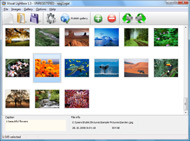
The following image set is generated by Flickr Gallery tool. Click any picture to run Lightbox gallery.

The sample above is an in-page usage demo of Lightbox gallery that uses images from Flickr. The website gallery created with Flickr Gallery tool is placed inside the website page. You can also check the full-page demo lightbox gallery. This example takes whole browser area to show the gallery.Auto Backup To Flickr Using Flickrfs

How to Use

Step 1. Adding flickr images to your own gallery.


Locate the photo, photoset or photostream you want to use in your Flickr slideshow. Click on it to see the photo on its own page.

Copy URL of the flickr page.

Select Add images from Flickr... from the 'Add' button on the Toolbar.

Add images from Flickr

In the appeared window paste URL of the flickr page. Specify also the number of photos you want to add from the flickr page. Flickr Gallery will now include these photos in your project.

Add images from Flickr

If you have included the photos that you do not wish to be in your web gallery, you can easily remove them. Select all images that you wish to remove from photo gallery, and select Delete images. from the Images menu. You can pick and choose pictures by holding the CTRL while clicking the pictures you like.

Step 2. Adding caption.

The name of the photo on flickr page will automatically appear in the caption. When you select a photo you'll see the various info about it, such as: Path, Size, date of last change and Caption. You can add any comment or text about the photo (up to 512 symbols).

Step 3. Gallery properties.

Change the name of your flickr album, the size and quality of your pictures with Flickr Gallery. From the Gallery menu, select Properties or use "Edit Gallery Properties" button on the toolbar.

On the first tab of the Gallery Properties window you can change the name of your photo album and enable/disable the following properties: Slide Show, Auto play Slide Show, Zoom effect, Overlay Shadow. You can also set the Overlay shadow color and select the Engine you want to use (jQuery or Prototype + script.aculo.us).

On the second tab of the Gallery Properties window you can select the thumbnail you want to use, set the Thumbnails Resolution, Thumbnails Quality, Thumbnails Titles. Select Thumbnails Format (save in PNG or JPG format). Specify the Number of columns in you photo album and the Page color.

On the third tab of the Gallery Properties window you can select the template, Image resolution and Image quality of your pictures and change the Watermark.

You can set up the various sizes for exported images.

Control the quality of output PNG or JPEG format image by defining output "Image quality" and "Thumbnail quality" parameters (0%…100%).

Step 4. Save your photo gallery as project file.

When you exit Flickr Gallery application, you'll be asked if you want to save your project. The project consists of the pictures you choose to put on your web photo gallery and all your settings. It's a good idea to save the project, because that will allow you to change the project in case you decide to do something different with future galleries. So click Yes, then enter a name for your project. To select the location of your project, just click the Browse folders button and choose a different location. Then click Save.

Flickr Gallery With Stats Flickr Color After Upload

Download Flickr Gallery


Download Flickr Gallery Download Free Edition
for Windows
Download Flickr Gallery Download Free Edition
for MAC

Flickr Gallery is free for non - commercial use.

A small fee is required for business use. Flickr Gallery Business Edition additionally provides an option to remove the Flickr Gallery. Com credit string as well as a feature to put your own logo to images. After you conclude the payment via the secure form, you will receive a license key instantly by email that turns the Flickr Gallery Free Edition into a Business one. You can select the most suitable payment procedure: bank transfer, check, PayPal, credit card etc. Also you can get Business Edition for free if you help with translating Flickr Gallery into your native language, please contact us at for more info.

Something Similar To Flickr

Buy Flickr GalleryBuy Business Edition
for Windows

$49
Single Website
$69
Unlimited Websites
Buy Flickr GalleryBuy Business Edition
for MAC

$49
Single Website
$69
Unlimited Websites

Support

For troubleshooting, feature requests and general help contact Customer Support at . Make sure to include details on your Flickr Gallery version, operating system, a link (or relevant code) and a browser.Aperture Publish To Flickr

Feedback

    * First of all, your product is fantasitc. I looked at the others and your code generator app was insanely easy to use.

    * First of all, I love you Flickr Gallery. I think it's beautiful! I purchased the lightbox “business edition” yesterday, and I’m very happy how easy it is to use. Found this to be one of the fastest ways to get a gallery on the web. Thanks.

    * Just bought the business version of Flickr Gallery and I just had to write and say how impressed I am with it. Really easy to use, intuitive interface and generates a truly professional presentation. Seldom have I been so pleased with a software purchase. Thank you.Roy Tanck Flickr Widget Wordpress Com

    * I ran into your website wile looking for a JavaScript to manage a personal Photo Gallery. I downloaded the trial version and immediately fell in love with your Flickr Gallery, it is one of the best products I’ve ever found; it is very user friendly and easy to use and creates great Photo Galleries.

FAQ

Q:I would like to have a few galleries in one website and even on one page.

A:To create several galleries on your page you should change following parameter in A tag for different galleries:

rel="lightbox_vlb"

For example, for the first gallery you should set rel="lightbox_vlb":

<!-- Start Flickr Gallery.com BODY section -->
<div id="vlightbox">
<a rel="lightbox_vlb" href="data/images/dscn6831.jpg" title="dscn6831" >
<img src="data/thumbnails/dscn6831.png" ><span></span></a>
<a rel="lightbox_vlb" href="data/images/dscn6823.jpg" title="dscn6823">
<img src="data/thumbnails/dscn6823.png"><span></span></a>
<a id="vlb" href="http://Flickr Gallery.com">Photo Gallery For Web by Flickr Gallery.com v2.0</a>
</div>
<!-- End Flickr Gallery.com BODY section -->

and for the second gallery rel="lightbox_vlb1":

<!-- Start Flickr Gallery.com BODY section -->
<div id="vlightbox">
<a rel="lightbox_vlb1" href="data/images/img_0501.jpg" title="img_0501">
<img src="data/thumbnails/img_0501.png"><span></span></a>
<a rel="lightbox_vlb1" href="data/images/img_0481.jpg" title="img_0481">
<img src="data/thumbnails/img_0481.png"><span></span></a>
<a id="vlb" href="http://Flickr Gallery.com">Photo Gallery For Web by Flickr Gallery.com v2.0</a>
</div>
<!-- End Flickr Gallery.com BODY section -->


RELATED

DemoBlog@Case: Flickr Archives I highly recommend using one of Flickr's uploading tools to upload your photos. After you are all setup with an account and have uploaded some photos, you are all ready to display them on your blog. Flickr refers to this as a "Flickr Badge" for your

Great Flickr add-ons | E-Mail & Internet | Macworld If you think you've seen all Flickr can do, you may be in for a surprise. An abundance of Flickr add-ons and related Web sites make the photo-sharing experience faster, nimbler, and more fun

Assigning the Color Profile | Pioneer Woman Photography | Ree Do you ever get frustrated that your photos look DIFFERENT after you upload them to your website or to Flickr than they looked when you edited them in Photoshop or Look at the color in this shot. Now, look at what happens to the photo after I upload it to Flickr: You'll notice that it totally

Extending Flickr's Functionalities: Top 25 Free Flickr Tools Read our list of the top 25 free Flickr tools. These free Flickr tools and add-ons allow you to do other things aside from uploading and sharing your photos. These free Flickr tools let you create cool slideshows, mosaics, and more

Choosing Color Themes with Adobe's Kuler and Live Color AECbytes Tips and Tricks article on Adobe's kuler and Live Color Create > From an Image, click the Upload button, and select the image file on your computer. You can alternatively click the flickr button to extract colors from others' photos. Larger image. After the image appears, you can

The Great Flickr Tools Collection Here You find the best Official and Third Party Flickr tools. ---- Flickr is a revolution in photo storage, sharing and organization, making image management an easy, natural and collaborative pr by bermudes in Official, API, and tools

How to upload pictures to Flickr from Lightroom 3 | Video Upload pictures to Flickr from Lightroom 3 | After tidying up your digital images in Lightroom, you might find that you want to share them. Happily, Lightroom 3 allows you to upload your pictures directly to Flickr. See how with this clip

How to paint anything the color of the Golden Gate Bridge Want to paint your home the same color as the Golden Gate Bridge? I did, so I made a few calls, including one to the purchasing manager of the Golden Gate Bridge itself. Here's what I learned: The official paint is called "Golden Gate

Useful Tools for Flickr Desktop Applications Flickr Finder - Mac OS X application for browsing your photos. 1001 for Mac OS X is a desktop client to be used in conjunction

60+ Tools To Enhance Your Flickr Experience Being a popular online image platform, Flickr has enabled Internet users to manage and share digital photos easily as long as there's an Internet connection

Flickr Reviews - Viewpoints Read Flickr reviews and find out why people rate it 4.0 out of 5.00 stars. People say, 'Fascinating boredom buster. Eye candy galore

Customize Flickr Gallery using CSS – Slickr Flickr Wordpress It's likely you might want to modify is the highlight color when the visitor moves their cursor over a thumbnail in the Flickr gallery for new Flickr accounts it takes 3-5 working days after you upload your fifth photo

Visual Communication And Video Publishing - Selected Tools PicBite: Upload a picture, resize it, add comments to it, and get it converted in various formats. Flickr Color Selectr: Pick a color and get Flickr pictures that feature that particular color in them After you have added your comments, you can share it via a direct

How To Upload Pictures To Flickr : Flickr Gallery How To Upload Pictures To Flickr. Flickr Slide Show is a versatile, ready-made solution that allows professional and amateur web developers to create superior digital photo albums for their websites and web applications.. Flickr Slideshow Xml

Color management in Photo Sharing Sites [Archive] - Digital [Archive] Color management in Photo Sharing Sites Digital Printing and Color Management One thing i noticed with Flickr is it adds a bit of saturation and sharpening after your upload

10 Adobe AIR Applications To View, Download And Share Photos With the power of Adobe AIR technology and Flickr API, these 10 awesome AIR applications will make view, download and share photos on Flickr easy. Besides that, FotoBooth also allow users to upload photo to Flickr account after capture and editing the photos

The Great Flickr Tools Collection Looking for Flickr Tools, hacks and services for a powerful photo sharing experience? Flickr is a revolution in photo storage, sharing and organization ,

Flickr vs Picasa Web Albums | PriteshGupta.com What if your digital camera is full of Pictures and you want to share with friends and relatives, Of course you wont mail them. You will probably like upload it

Janine's Blog: Resolving Flickr color saturation loss on upload Resolving Flickr color saturation loss on upload. sRGB and Adobe RGB are colorspaces, which are interpreted to define the range of colors that a device will display. sRGB is a smaller subset of possible colors than Adobe RGB. My flickr friends never had the color problems like me. Maybe they

Simply Stated - Blogs - Home & Organizing - Real Simple Color is what you're after here. Whether it's the top of a building or the carpet in a waiting room. You can I highly suggest using a free photo management site like Flickr to upload them. In Flickr, you can arrange your photos into sets, or folders according to color

Upload to Flickr Upload your BigHugeLabs.com creations to your Flickr account. After clicking the link below, you will be sent over to Flickr where they will explain how you can give your permission for this

The Flickr Handbook - Bighow.com The Flickr Handbook for sharing photos online is a free online resource that aggregates advice and tools from the best resources on using Flickr to the maximum - all on one page - and is updated frequently

How To - Flickroom In the Flickr page that is seen below, you need to click on the "Next" button below the text that Open the upload manager (using the upload icon at the top ) and click on the Browse button there. Select photos in the file chooser dialog and they will be uploaded. After the photos are

social media ghetto | Roland Tanglao's Weblog After 6 days with Color here are some musings: To me, the idea of a co-locative co-temporal automatically created without passwords and users social network aka "co-created photo and video commons" is great; not sure if that's dr: Surprised by the paucity of real-time geotagged photos on flickr

Critiques of Flickr Video | online photo tutorials Flickr recently gave users the possibility to upload video. While there has been an outrage over the YouTube-ization of flickr; the idea is not inherently

MMSface: Upload Photos Via MMS To Hi5, Flickr & MySpace MMSface is a new website which lets you upload photos to Flickr, Hi5 and MySpace directly from your mobile phone using MMS or through email. Tiltomo: Tool For Searching Flickr Images By Color & Theme. PhotoSync: Transfer & Sync Your Flickr Photos To Facebook. FlickSourcer:

Upload To Flickr And More Via FFTP (Faux FTP) | Webmonkey Upload To Flickr And More Via FFTP (Faux FTP) By Scott Gilbertson about various ways to bulk upload files to sites like Flickr or YouTube, but wouldn't it

