

Overview

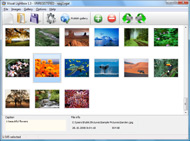
It's no secret that adding photos to your blog posts is one of the most effective ways to enhance your blog and attract attention to your writing. Flickr has millions of photos available in its database. A simple FREE tool called Flickr Gallery allows you to create a custom image gallery with a cool slide show of the most recent and most interesting photos from Flickr on your website or blog in a few easy steps. Just visit Flickr website and find photostream, photoset or a single photo you like. Enter the address of flickr page to add all photos from this page in your gallery, select the style of thumbnails and the overlay window and add the HTML embed code on your website or blog.
A few clicks and you'll see a stylish photo gallery with beautifull lightbox and zoom effects on your own website or blog!


Flickr Gallery for Windows   Flickr Gallery for MAC

Want more?

Example

Lightbox gallery sample

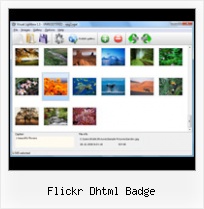
The following image set is generated by Flickr Gallery tool. Click any picture to run Lightbox gallery.

The example above is an in-page usage demo of Lightbox with images from Flickr. The lightbox gallery created with Flickr Gallery application is placed inside the page layout. You can also check the full-page demo website gallery. This example takes whole browser area to show the Lightbox gallery that uses images from Flickr.Asp Net Flickr Slideshow Photo

How to Use

Step 1. Adding flickr images to your own gallery.


Locate the photo, photoset or photostream you want to use in your Flickr slideshow. Click on it to see the photo on its own page.

Copy URL of the flickr page.

Select Add images from Flickr... from the 'Add' button on the Toolbar.

Add images from Flickr

In the appeared window paste URL of the flickr page. Specify also the number of photos you want to add from the flickr page. Flickr Gallery will now include these photos in your project.

Add images from Flickr

If you have included the photos that you do not wish to be in your web gallery, you can easily remove them. Select all images that you wish to remove from photo gallery, and select Delete images. from the Images menu. You can pick and choose pictures by holding the CTRL while clicking the pictures you like.

Step 2. Adding caption.

The name of the photo on flickr page will automatically appear in the caption. When you select a photo you'll see the various info about it, such as: Path, Size, date of last change and Caption. You can add any comment or text about the photo (up to 512 symbols).

Step 3. Gallery properties.

Change the name of your flickr album, the size and quality of your pictures with Flickr Gallery. From the Gallery menu, select Properties or use "Edit Gallery Properties" button on the toolbar.

On the first tab of the Gallery Properties window you can change the name of your photo album and enable/disable the following properties: Slide Show, Auto play Slide Show, Zoom effect, Overlay Shadow. You can also set the Overlay shadow color and select the Engine you want to use (jQuery or Prototype + script.aculo.us).

On the second tab of the Gallery Properties window you can select the thumbnail you want to use, set the Thumbnails Resolution, Thumbnails Quality, Thumbnails Titles. Select Thumbnails Format (save in PNG or JPG format). Specify the Number of columns in you photo album and the Page color.

On the third tab of the Gallery Properties window you can select the template, Image resolution and Image quality of your pictures and change the Watermark.

You can set up the various sizes for exported images.

Control the quality of output PNG or JPEG format image by defining output "Image quality" and "Thumbnail quality" parameters (0%…100%).

Step 4. Save your photo gallery as project file.

When you exit Flickr Gallery application, you'll be asked if you want to save your project. The project consists of the pictures you choose to put on your web photo gallery and all your settings. It's a good idea to save the project, because that will allow you to change the project in case you decide to do something different with future galleries. So click Yes, then enter a name for your project. To select the location of your project, just click the Browse folders button and choose a different location. Then click Save.

Flickrrss More Thumbnails Flickr Dhtml Badge

Download Flickr Gallery


Download Flickr Gallery Download Free Edition
for Windows
Download Flickr Gallery Download Free Edition
for MAC

Flickr Gallery is free for non-commercial use.

A small fee is required for business use. Flickr Gallery Business Edition additionally provides an option to remove the Flickr Gallery. Com credit line as well as a feature to put your own logo to images. After you conclude the payment via the secure form, you will receive a license key instantly by e-mail that turns the Flickr Gallery Free Edition into a Business one. You can select the most appropriate payment method: credit card, bank transfer, PayPal, check etc. Also you can get Business Edition for free if you help with translating Flickr Gallery into your native language, please contact us at for more info.

Delete Photo Gallery Flickr

Buy Flickr GalleryBuy Business Edition
for Windows

$49
Single Website
$69
Unlimited Websites
Buy Flickr GalleryBuy Business Edition
for MAC

$49
Single Website
$69
Unlimited Websites

Support

For troubleshooting, feature requests and general help contact Customer Support at . Make sure to include details on your Flickr Gallery version, operating system, a link (or relevant code) and a browser.Flickr Gallery Wordpress Widget

Feedback

    * I just tried the application, It is wonderful idea. Like you said in the website "few clicks without writing a single line of code" because most of the people is not web designers".

    * I find Flickr Gallery (and lightbox2) a great tool and was about to proceed in its purchase.

    * This looks like EXACTLY what I need for my site. It would make my job much faster! Love your program. Thank you!!Flickr And Slideshow Pro

    * Great product by the way and saved me loads of time. I really like your Flickr Gallery program! Very nice.

FAQ

Q:Can this be adapted so only one image is shown and then the gallery opens to flick through the rest of the images..

A:You can use the following parameter to hide thumbnails you don't want to display on the page:

style="display: none;"

for example:

<!-- Start Flickr Gallery.com BODY section -->
<div id="vlightbox">
<a rel="lightbox_vlb" href="data/images/dscn6831.jpg" title="dscn6831" ><img src="data/thumbnails/dscn6831.png" ><span></span></a>
<a rel="lightbox_vlb" href="data/images/dscn6823.jpg" title="dscn6823"><img src="data/thumbnails/dscn6823.png" style="display: none"><span></span></a>
<a rel="lightbox_vlb" href="data/images/dscn6819.jpg" title="dscn6819"><img src="data/thumbnails/dscn6819.png" style="display:none"><span></span></a>
<a id="vlb" href="http://Flickr Gallery.com">Photo Gallery For Web by Flickr Gallery.com v2.0</a>
</div>
<!-- End Flickr Gallery.com BODY section -->


RELATED

Tools for Flickr Dhtml Badge. Degradr. Delivr. dFlickr. EgoWalk. Embedded Slideshows. FAlbum. Flash Gallery Flickr Explorer With EXIF. Flickr Filesystem. Flickr Importr. FlickrJ. Flickr Badge. Flickrmap. Flickr hack

Flickr DHTML importer | Killerstartups.com Reviews for Websites with the tag flickr DHTML importer Search for websites that are related with the tag flickr DHTML importer

October " 2005 " Whatsup I used to have a Flickr badge running here – It's now on the homepage. The reason i moved it is because So, when I came across the WordPress Flickr DHTML Badge Plugin, I was a happy puppy

Notes on a web journey: web design - opinions - art - life After almost three weeks I found the solution to the Javascript Flickr badge Anyway, I soon found out that I could get an XML document back with all the info needed to build a flickr badge

Flickr DHTML Badge : tan tan noodles – msg free since 2005 Here you will find a pure Javascript and CSS (aka DHTML) implementation of Flickr's neat flash badge widget. Just FYI I put together something generally based on Joe's DHTML/PHP flickr badge code. It also uses phpFlickr

Options for Easily Adding Flickr Photos to Your Website This page shows a number of the leading options for quickly and easily adding your Flickr photos to your website or blog (WordPress, Joomla, TextPattern). They all offer some options and customizations. Flickr DHTML Badge – This badge is a pure JavaScript and CSS implementation of Flickr's flash badge

Flickr工具集合 " Lance's Blog Flickr Dhtml Badge – a pure Javascript and CSS (aka DHTML) implementation of Flickr's neat flash badge widget. Flickr badge plugin for WordPress – This plugin allows you to display a flickr style badge (for a tag, user, user tag or group

bildu.net: Etiketak: tantan WordPress Flickr DHTML Badge Plugin. Plugin para mostar fotos de flickr como un mosaico en 2006-10-31 to dhtml, flickr, interesantes, plugins, tantan, wordpressikastaroa nork: teketen

Flickr Photos v0.80 - Discussion But any idea how to make this baby work like a "flickr badge" http://tantannoodles.com/toolkit/wp-flickr-dhtml-badge/ Can anything like that be scraped

WordPress " Support " Flickr DHTML Badge Flickr DHTML Badge (1 post) joetan. Member. Posted 5 years ago # I've created a WordPress plugin which allows you to add a Flickr badge to your site. The frontend is implemented without the use of any flash (pure Javascript + CSS), and can pull down recent images for any user

WordPress Flickr DHTML Badge Plugin I Like the look of those Flickr badges running on a lot of sites. I don't like that it uses Flash though so imagine my delight when I came across the WordPress

Majikthise : Hivemind Javascript/HTML question Is it possible to enlarge my Flickr flash badge? It looks a little undersized compared to the other items in the left sidebar. http://tantannoodles.com/toolkit/flickr-dhtml-badge/ this link will give you control of the flash element as well as the content

AJAX Crawler - Collection of DHTML and AJAX Samples Visit the library of ajax, DHTML, php, and .net codes and find the interesting dhtml, ajax, java script examples. Need an unobtrusive flickr badge for your website that automatically shows your latest flickr photos?

Flickr Dhtml Badge : Flickr Gallery Flickr Dhtml Badge. Flickr Slideshow. The most powerful photo gallery maker on the Web!. Flickr Gallery Plugin Styling Please send me your new pictures by email This is a Flickr badge showing photos in a set called K-43 Reunion 2008

Netvouz - badge bookmarks by ycc2106 A very cool Flash-based badge that allows you to display your Flickr photo stream. What is badg r ? A very cool Flash-based badge that allows you to display your Flickr photo stream. - in tools with badge flash flickr tools by 2 users (all private) Flickr DHTML Badge

Wp Flash Rotate Flickr Plugin : Free Flash SlideShow Maker Flash SlideShow w/o Flash! Wp Flash Rotate Flickr Plugin. Make professional online photo album software in minutes with Flickr Slideshow!. flash auto slideshow with next button WordPress Flickr DHTML Badge Plugin : tan tan noodles msg A flickkr badge plugin for your site, sans the flash

Building a Flickr Flash Display, Part 2 We made some simple modifications to Kelvin's ActionScript application, to create something like the Flickr Badge. name "petikr badge" ) resemble the Flickr Badge only to it's form, a 3 by 4 matrix of a users recent images

Options for Easily Adding Flickr Photos to Your Website Enter your Flickr username, choose your images by set, tag, or group, and copy and paste Flickr DHTML Badge - This badge is a pure JavaScript and CSS implementation of Flickr's

GeekTonic: The Ultimate Flickr Tools Hacks and Scripts Database DHTML implementation of Flickr's flash badge widget w/customization DHTML Badge Wordpress Plugin. Same as the DHTML Badge above, but does it automatically for

Dicas & Cursos: The Great Flickr Tools Collection Flickr Dhtml Badge - a pure Javascript and CSS (aka DHTML) implementation of Flickr's neat flash badge widget. Flickr badge plugin for WordPress - This plugin allows you to display a flickr style badge (for a tag, user, user tag or group pool) on your

News Blog | badge Search results for PixyBlog News Photos from the PixyBlog photo sharing community. High quality photographs from the talented photographers at PixyBlog team has just come across a javascript DHTML version of the Flickr badge which would also work for PixyBlog

Applications – phpFlickr Flickr Module for CMS Made Simple by Allan Larsen – This is a module integrated into CMS Made Simple to display Flickr DHTML Badge by Joe Tan – You know that neat flash badge that Flickr has?

Dhtml Gallery Sites Dhtml Gallery Sites. Create an online photo album in minutes with Ajax Photo Gallery!. ajax slider gallery download Flickr Gallery into your native language, . to your site, nicely embedded [edit] Content Flickr DHTML badge--installs

150 sposobów na Flickr.com | Blog IT - ittechblog.pl Flickr jest serwisem gromadzącym zdjęcia, znajdziemy tam zarówno fantastyczne i profesjonalne ujęcia jak i amatorskie próby uchwycenia chwili. Dla osób, a pure Ja­va­script and CSS (aka DHTML) im­ple­men­ta­tion of Flickr’s neat flash badge widget

Flickr Badge " WordPress.com Forums so if anybody knows simple steps to get the DHTML Flickr Badge (no flash) on my page, LET ME KNOW PLEASE! Yes, a Yahoo!-hosted WordPress blog will enable you to post a Flickr badge or any other code on your own site

