



Overview

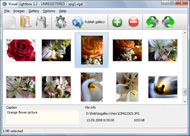
It's no secret that adding photos to your blog posts is one of the most effective ways to enhance your blog and attract attention to your writing. Flickr has millions of photos available in its database. A simple FREE tool called Flickr Gallery allows you to create a custom image gallery with a cool slide show of the most recent and most interesting photos from Flickr on your website or blog in a few easy steps. Just visit Flickr website and find photostream, photoset or a single photo you like. Enter the address of flickr page to add all photos from this page in your gallery, select the style of thumbnails and the overlay window and add the HTML embed code on your website or blog.
A few clicks and you'll see a stylish photo gallery with beautifull lightbox and zoom effects on your own website or blog!


Flickr Gallery for Windows   Flickr Gallery for MAC

Want more?

Example

Lightbox gallery sample

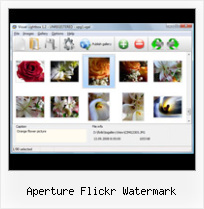
The following image set is generated by Flickr Gallery tool. Click any picture to run Lightbox gallery.

The sample above is an in-page usage demo of Lightbox gallery that uses images from Flickr. The website gallery created with Flickr Gallery tool is placed inside the website page. You can also check the full-page demo lightbox gallery. This example takes whole browser area to show the gallery.How To View Black Flickr

How to Use

Step 1. Adding flickr images to your own gallery.


Locate the photo, photoset or photostream you want to use in your Flickr slideshow. Click on it to see the photo on its own page.

Copy URL of the flickr page.

Select Add images from Flickr... from the 'Add' button on the Toolbar.

Add images from Flickr

In the appeared window paste URL of the flickr page. Specify also the number of photos you want to add from the flickr page. Flickr Gallery will now include these photos in your project.

Add images from Flickr

If you have included the photos that you do not wish to be in your web gallery, you can easily remove them. Select all images that you wish to remove from photo gallery, and select Delete images. from the Images menu. You can pick and choose pictures by holding the CTRL while clicking the pictures you like.

Step 2. Adding caption.

The name of the photo on flickr page will automatically appear in the caption. When you select a photo you'll see the various info about it, such as: Path, Size, date of last change and Caption. You can add any comment or text about the photo (up to 512 symbols).

Step 3. Gallery properties.

Change the name of your flickr album, the size and quality of your pictures with Flickr Gallery. From the Gallery menu, select Properties or use "Edit Gallery Properties" button on the toolbar.

On the first tab of the Gallery Properties window you can change the name of your photo album and enable/disable the following properties: Slide Show, Auto play Slide Show, Zoom effect, Overlay Shadow. You can also set the Overlay shadow color and select the Engine you want to use (jQuery or Prototype + script.aculo.us).

On the second tab of the Gallery Properties window you can select the thumbnail you want to use, set the Thumbnails Resolution, Thumbnails Quality, Thumbnails Titles. Select Thumbnails Format (save in PNG or JPG format). Specify the Number of columns in you photo album and the Page color.

On the third tab of the Gallery Properties window you can select the template, Image resolution and Image quality of your pictures and change the Watermark.

You can set up the various sizes for exported images.

Control the quality of output PNG or JPEG format image by defining output "Image quality" and "Thumbnail quality" parameters (0%…100%).

Step 4. Save your photo gallery as project file.

When you exit Flickr Gallery application, you'll be asked if you want to save your project. The project consists of the pictures you choose to put on your web photo gallery and all your settings. It's a good idea to save the project, because that will allow you to change the project in case you decide to do something different with future galleries. So click Yes, then enter a name for your project. To select the location of your project, just click the Browse folders button and choose a different location. Then click Save.

Flickr Bikini Gallery Aperture Flickr Watermark

Download Flickr Gallery


Download Flickr Gallery Download Free Edition
for Windows
Download Flickr Gallery Download Free Edition
for MAC

Flickr Gallery is free for non-commercial use.

A small fee is required for business use. Flickr Gallery Business Edition additionally provides an option to remove the Flickr Gallery. Com credit bar as well as a feature to put your own logo to images. After you complete the payment via the secure form, you will receive a license key instantly by email that turns the Flickr Gallery Free Edition into a Business one. You can select the most appropriate payment mode: bank transfer, credit card, check, PayPal etc. Also you can get Business Edition for free if you help with translating Flickr Gallery into your native language, please contact us at for more info.

Slideshow Of Flickr Gallery

Buy Flickr GalleryBuy Business Edition
for Windows

$49
Single Website
$69
Unlimited Websites
Buy Flickr GalleryBuy Business Edition
for MAC

$49
Single Website
$69
Unlimited Websites

Support

For feature requests, troubleshooting, general help contact Customer Support at . Make sure to include details on your Flickr Gallery version, a link (or relevant code), operating system and a browser.Embed Flickr Stream Wordpress

Feedback

    * I LOVE your free Lightbox2 software tool and will purchase the business version shortly. I have seen the Lightbox JS effect used with video tutorials and I was hoping you have a version for video that I can purchase.
Video LightBox: http://videolightbox.com

    * I am thrilled with what this tool can do for me thanks for all the hard work that must have gone into it.

    * Just a quick thank you for the software though, It's not often you get a free software version of this quality and style! Well done and please continue this amazing gallery. Hope to see more advances.Use Flickr On Your Own Webpage

    * I just tried the application, It is wonderful idea. Like you said in the website "few clicks without writing a single line of code" because most of the people is not web designers".

FAQ

Q:I would like to have a few galleries in one website and even on one page.

A:To create several galleries on your page you should change following parameter in A tag for different galleries:

rel="lightbox_vlb"

For example, for the first gallery you should set rel="lightbox_vlb":

<!-- Start Flickr Gallery.com BODY section -->
<div id="vlightbox">
<a rel="lightbox_vlb" href="data/images/dscn6831.jpg" title="dscn6831" >
<img src="data/thumbnails/dscn6831.png" ><span></span></a>
<a rel="lightbox_vlb" href="data/images/dscn6823.jpg" title="dscn6823">
<img src="data/thumbnails/dscn6823.png"><span></span></a>
<a id="vlb" href="http://Flickr Gallery.com">Photo Gallery For Web by Flickr Gallery.com v2.0</a>
</div>
<!-- End Flickr Gallery.com BODY section -->

and for the second gallery rel="lightbox_vlb1":

<!-- Start Flickr Gallery.com BODY section -->
<div id="vlightbox">
<a rel="lightbox_vlb1" href="data/images/img_0501.jpg" title="img_0501">
<img src="data/thumbnails/img_0501.png"><span></span></a>
<a rel="lightbox_vlb1" href="data/images/img_0481.jpg" title="img_0481">
<img src="data/thumbnails/img_0481.png"><span></span></a>
<a id="vlb" href="http://Flickr Gallery.com">Photo Gallery For Web by Flickr Gallery.com v2.0</a>
</div>
<!-- End Flickr Gallery.com BODY section -->


RELATED

Apple Aperture 3 Review - New Features Reviewed Apple Aperture 3 is a great application for those who do not want to learn complicated photo editing techniques. Aperture 3's new features make editing easy for the amateur photographer at a reasonable price. Learn more about what this software

YouTube - Adding A Watermark In Aperture Hey Guys, Well we are back. Gerry started off the new videos with this easy one to get back into the swing of things

Creating a Dimensional Watermark - Inside Aperture Aperture makes it easy to add a copyright to your images by including an option to add a watermark when you establish presets. The problem is that the colors of generic watermarks are hidden in some images and clash with

Flickr Aperture 2 Plugin : Flickr Gallery Flickr Aperture 2 Plugin. Flickr Gallery is the first software that creates AJAX-powered online image galleries without the need for server-side setup.. Upload Imovie Files To Flickr

Apple Aperture Apple Aperture is a program designed to help users edit and archive their photos. Aperture is geared towards advanced hobbyists and professional photographers who can make use of the program's post-production tools

The Definite Guide To Watermarks In Apple Aperture " Kremalicious I received quite a few mails in the last days from Aperture users asking for the best way to add your copyright information or any other so called watermark to your images in an Aperture 2 workflow. Especially new users to Aperture find it quite

Aperture -- TUAW Previously known at Flickr as the Flickr Plugin for Aperture, Fraser has re-named the plugin and brought it home to be displayed iPhoto and Aperture) has been updated to resolve an issue with uploading large amounts of pictures to Flickr

Aperture 3 Mini Review " Ben Short Photography Watermarks (2). It is really disappointing that you cannot publish your photos to mobileme/flickr/facebook and have your watermark applied to them. who have spent time making plugins for Aperture such as Flickr Export aren't out of a job yet. General Performance. Aperture

BorderFX for iPhoto and Aperture " SurfBits, Home of the Mac Do you share some of your library online with the likes of Flickr? Do you share photo’s to others or export for printing? to a image, or just have a preset text box to always add a Copyright notice to images you may be adding to Flickr for instance

Aperture to Flickr in one step - O'Reilly Digital Media Blog In my last post I talked about getting your images into Aperture and applying basic adjustments and edits to your images. Now I want to move on to getting your images out of Aperture and getting them in front of

Aperture (software) - Wikipedia, the free encyclopedia and performance in a number of areas, including: Contact sheet printing, Smart Albums, watermarks, lift and stamp, image export, versions created using an external editor. 1.5.3. April 19, upgrading existing Aperture libraries, address issues with publishing photos to MobileMe, Facebook and Flickr

Apple - Aperture - 200+ New Features Now Aperture gives you more powerful tools for import, organization, metadata, search, image adjustments, slideshows, printing, and more

Splash of Style " Setting New Export Presets in Aperture 2 I like adding a watermark to my photos before I upload to Flickr, so I have presets for light, dark, left and right watermarks. I save my watermarks as .psd files, so they can be easily edited again. Back in Aperture, click the box for "Show Watermark" (1) and then click the Choose Image button

Apple Releases Aperture 3 - Worldnews.com This tutorial will show you how to export photos with a watermark using Aperture 3 Please support me and check out my other tutorials @ www. 4:24. This tutorial will show you how to export photos with a watermark using Aperture 3

Snaptophobic's posterous - Filed under 'tutorial' When I first began using Aperture to upload images to places like Flickr, I wasn't aware that I could readily add a watermark to my images. Just for completeness, I always upload to Flickr using the "JPEG - Fit within 1024 x 1024

Why Aperture's Syncing to Flickr, Facebook and MobileMe is As Aperture writers and instructors we pay pretty close attention to the issues that cause pain points (business-speak for the things that drive people nuts)

Watermark Issue In Aperture - O'Reilly Forums In Aperture, when sending email the psd watermark file created in photoshop 3 works fine. when I select same watermark image to use on web site phot

FlickrExport for Aperture (4.0.0) Uploads never make it Tried uploading four photos to Flickr at the same time, didn't get any errors, didn't appear to have any connection problems; Growl reported one at a time that each photo was successfully uploaded

Watermarking images in Aperture | Photo creative 365 Setting a watermark pre-set in Aperture. This is just a really simple way to use Aperture to resize and watermark your images using the image export presets

Geolocation sharing in Aperture 3 | The Woodwork Then click on the "radar" buttons to the right of the Flickr sets in Aperture to force a resync. in my case, it re-uploaded the images instead of just resyncing the metadata, but that bug may have been fixed in Aperture 3.0.1)

Apple - Support - Discussions - Way to attach watermark to When I export my photos in Aperture 3 using the flickr button in the toolbar and use my preset that incorporates a watermark, the watermark is added to the final uploaded version of the photo. I imagine this would be the same for MobileMe too

FlickrExport for Aperture 1.0.9 Download - Photo Editing Software Download Free Photo Editing Software for your PC, Mac or Mobile Phone Description: FlickrExport for Aperture is an export plugin for Aperture 1.5.1 or later that allows direct uploading to Flickr.com

Flickr: Discussing Watermark plugin for Aperture 2.1 in Flickr is almost certainly the best online photo management and sharing application in the world. Show off your favorite photos and videos to the world, securely and privately show content to your friends and family, or blog the photos and videos

watermark downloads on CNET Come to CNET for the software downloads related to watermark

Watermark | /dev/random Watermark is an editing plugin that works with Aperture 2.1 or later. Go to the Library folder in your home directory, find the Application Support folder, and look for the Aperture folder

Impression for Aperture Download from Graphics Software for Impression for Aperture download for mac os x - Impression for Aperture Watermark plugin for Aperture. Features * Adds high FlickrExport for Aperture - FlickrExport for Aperture is an export plugin for Aperture 1.5.1 or later that allows direct uploading to Flickr.com

