
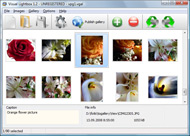
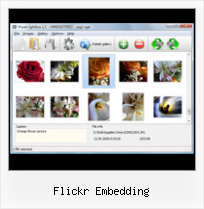



Overview

It's no secret that adding photos to your blog posts is one of the most effective ways to enhance your blog and attract attention to your writing. Flickr has millions of photos available in its database. A simple FREE tool called Flickr Gallery allows you to create a custom image gallery with a cool slide show of the most recent and most interesting photos from Flickr on your website or blog in a few easy steps. Just visit Flickr website and find photostream, photoset or a single photo you like. Enter the address of flickr page to add all photos from this page in your gallery, select the style of thumbnails and the overlay window and add the HTML embed code on your website or blog.
A few clicks and you'll see a stylish photo gallery with beautifull lightbox and zoom effects on your own website or blog!


Flickr Gallery for Windows   Flickr Gallery for MAC

Want more?

Example

Lightbox gallery sample

The following image set is generated by Flickr Gallery tool. Click any picture to run Lightbox gallery.

The photo gallery above is an in-page usage demo of Lightbox script with Flickr images. The website gallery created with Flickr Gallery application is placed inside the website page. You can also check the full-page demo web gallery. This example takes whole browser area to show the slideshow.Script Flickr Like Slideshow Automatic

How to Use

Step 1. Adding flickr images to your own gallery.


Locate the photo, photoset or photostream you want to use in your Flickr slideshow. Click on it to see the photo on its own page.

Copy URL of the flickr page.

Select Add images from Flickr... from the 'Add' button on the Toolbar.

Add images from Flickr

In the appeared window paste URL of the flickr page. Specify also the number of photos you want to add from the flickr page. Flickr Gallery will now include these photos in your project.

Add images from Flickr

If you have included the photos that you do not wish to be in your web gallery, you can easily remove them. Select all images that you wish to remove from photo gallery, and select Delete images. from the Images menu. You can pick and choose pictures by holding the CTRL while clicking the pictures you like.

Step 2. Adding caption.

The name of the photo on flickr page will automatically appear in the caption. When you select a photo you'll see the various info about it, such as: Path, Size, date of last change and Caption. You can add any comment or text about the photo (up to 512 symbols).

Step 3. Gallery properties.

Change the name of your flickr album, the size and quality of your pictures with Flickr Gallery. From the Gallery menu, select Properties or use "Edit Gallery Properties" button on the toolbar.

On the first tab of the Gallery Properties window you can change the name of your photo album and enable/disable the following properties: Slide Show, Auto play Slide Show, Zoom effect, Overlay Shadow. You can also set the Overlay shadow color and select the Engine you want to use (jQuery or Prototype + script.aculo.us).

On the second tab of the Gallery Properties window you can select the thumbnail you want to use, set the Thumbnails Resolution, Thumbnails Quality, Thumbnails Titles. Select Thumbnails Format (save in PNG or JPG format). Specify the Number of columns in you photo album and the Page color.

On the third tab of the Gallery Properties window you can select the template, Image resolution and Image quality of your pictures and change the Watermark.

You can set up the various sizes for exported images.

Control the quality of output PNG or JPEG format image by defining output "Image quality" and "Thumbnail quality" parameters (0%…100%).

Step 4. Save your photo gallery as project file.

When you exit Flickr Gallery application, you'll be asked if you want to save your project. The project consists of the pictures you choose to put on your web photo gallery and all your settings. It's a good idea to save the project, because that will allow you to change the project in case you decide to do something different with future galleries. So click Yes, then enter a name for your project. To select the location of your project, just click the Browse folders button and choose a different location. Then click Save.

Private Flickr View Flickr Embedding

Download Flickr Gallery


Download Flickr Gallery Download Free Edition
for Windows
Download Flickr Gallery Download Free Edition
for MAC

Flickr Gallery is free for non - commercial use.

A small fee is required for business use. Flickr Gallery Business Edition additionally provides an option to remove the Flickr Gallery. Com credit line as well as a feature to put your own logo to images. After you conclude the payment via the secure form, you will receive a license key instantly by e-mail that turns the Flickr Gallery Free Edition into a Business one. You can select the most appropriate payment procedure: PayPal, check, bank transfer, credit card etc. Also you can get Business Edition for free if you help with translating Flickr Gallery into your native language, please contact us at for more info.

A Single User Id Flickr

Buy Flickr GalleryBuy Business Edition
for Windows

$49
Single Website
$69
Unlimited Websites
Buy Flickr GalleryBuy Business Edition
for MAC

$49
Single Website
$69
Unlimited Websites

Support

For general help, feature requests, troubleshooting contact Customer Support at . Make sure to include details on your Flickr Gallery version, operating system, browser and a link (or relevant code).Flickr Slideshow Automatic Javascript

Feedback

    * I'd like to express my gratitude to your efforts on creating such a nice piece of program and best of all it's free! Keep out the good work and I hope to see new features in the near coming future to rate you 5 star!

    * I find Flickr Gallery (and lightbox2) a great tool and was about to proceed in its purchase.

    * I'm absolutely loving Flickr Gallery Business and Video LightBox. Amazing, quick and painless, to create a custom, browser independent gallery. And it works first time - every time! Best value for money I've seen in quite a while...Steal Picture From Flickr

    * Let me start just congratulating you, good job, really. I am trying out the free version before I buy it. It works great.

FAQ

Q:Instead of making one page with 40 photos, is there no property to make 2 or more pages?

A:You can do it in the following way:

1. Create your gallery in Flickr Gallery and publish it on a local drive in any test folder.
2. Make two copies of the generated index.html file (for example index1.html and index2.html).
3. Open index.html, index1.html and index2.html files in any text editor.
4. Find code for the gallery inside the BODY tag and cut some part of the images, so you'll have different images on each page.

<!-- Start Flickr Gallery.com BODY section -->
<div class="gallery">
<!-- leave the following code on index.html page -->
<a href="./data/images/1.jpg" rel="lightbox[sample]" title="Best Toy Ever"><img src="./data/thumbnails/1.png" /></a>
<a href="./data/images/8.jpg" rel="lightbox[sample]" title="PrueaMacro"><img src="./data/thumbnails/8.png" /></a>

<!-- leave the following code on index1.html page -->
<a href="./data/images/3.jpg" rel="lightbox[sample]" title="Macro Leaf."><img src="./data/thumbnails/3.png" /></a>
<a href="./data/images/11.jpg" rel="lightbox[sample]" title="Bell Pepper"><img src="./data/thumbnails/11.png" /></a>

<!-- leave the following code on index2.html page -->
<a href="./data/images/5_0.jpg" rel="lightbox[sample]" title="5"><img src="./data/thumbnails/5_0.png" /></a>
<a href="./data/images/6_0.jpg" rel="lightbox[sample]" title="6"><img src="./data/thumbnails/6_0.png" /></a>

<!--[if lte IE 6]><script src="engine/js/pngfix_vlb.js" type="text/javascript"></script><![endif]-->
<a id="vlightbox" href="http://Flickr Gallery.com/">Online Photo Album Sharing by Flickr Gallery.com</a>
</div>
<!-- End Flickr Gallery.com BODY section -->

5. Create links to switch between your pages, for example:
<a href="index.html">1</a>  <a href="index1.html">2</a>  <a href="index2.html">3</a> 


Q:I want to change color of the overlay shadow? How can I do this?

A:Open engine\css\Flickr Gallery.css and find the following code:

#overlay{
position: absolute;
top: 0;
left: 0;
z-index: 90;
width: 100%;
height: 500px;
background-color: #FFF;
filter:alpha(opacity=60);
-moz-opacity: 0.6;
opacity: 0.6;
}

set the background-color parameter :

#overlay{
position: absolute;
top: 0;
left: 0;
z-index: 90;
width: 100%;
height: 500px;
background-color: #FF00FF;
filter:alpha(opacity=60);
-moz-opacity: 0.6;
opacity: 0.6;
}


RELATED

flickr embed vista freeware, shareware, software download flickr embed vista freeware, shareware, software download - Best Free Vista Downloads - Free Vista software download - freeware, shareware and trialware downloads

Wordpress Flickr – embed Flickr photos in Wordpress blog WordPress Flickr – embed Flickr photos in WordPress blog. Maybe I'm just slow, but it took me a long time to figure out how to do some neat stuff with To embed your own Flickr photos in your WordPress blog you'll need to first add the Flickr Widget by going to the WordPress Dashboard and selecting

Embed Flickr : Flickr Gallery Embed Flickr. Make professional online photo album software in minutes with Flickr Slideshow!. Flickt Pro Account Commercial Use

Embed Flickr photo by hotlinking in easy way | Web 3 If you want to embed any photo from flickr to your website or forum, you can embed any flickr photo by hotlinking it. To hotlink flickr photo do

Flickr Slideshow Embed | Flickr Slideshow Flickr Slideshow Embed. Create superior online photo galleries for your Website with jQuery Thickbox Alternative! bbcode flickr album

Flickriver - A new way to view Flickr photos and more Clickr on one of the buttons below to install: Embed on your Web site. To embed this view, Copy and Paste the following HTML code: Black background (preview): White background (preview) While viewing any Flickr photos page, click on the bookmarklet to open the same view on Flickriver

CoolFlick: Flickr Embedding Cooliris Style Cooliris is one of the best ways to flip through photos, enabling you to scroll through hundreds of photos effortlessly. Flickr is one of the best sites to search for photos. Combine the two and you've got CoolFlick, a service that lays Cooliris

Thomas Thurman / Flickr-Embed - search.cpan.org Flickr-Embed-0.01 [Download] [Browse] 30 Jan 2009. Links [ Discussion Simple embedding of Flickr pictures into HTML. 0.01. 67998 Uploads, 22593 Distributions

Peter Liu Photography - How To Embed A Flickr Slideshow In A I was browsing some Facebook pages and came across one with Flickr slideshows embedded in a tab, and decided I had to know how it was done. From past experience, I knew it had to be Flickr's embed code wrapped somehow inside FBML (Facebook Markup Language)

Mbedr - Embedded Flickr Notes a Flickr photo embedding utility. This utility will allow you to embed a photo from Flickr on your own site while retaining any annotated regions present on the original. I may in the future figure out how to use Flickr's authentication calls to enable sharing of non

flickrSLiDR - My Flickr Slideshow Embedding Tool A blog covering Tech News, Reviews, Guides and Startups from developer and startup guy Paul Stamatiou. Back in 2005 I wrote an article detailing how to embed flickr slideshows within your blog or website

Flickr Gallery for Mac OS, HoudahGeo, Moyea Flash Video MX Add Flickr Slideshow to your website on Mac. Mac Geocoding Know Where you Took that Photo. Embed Flickr slideshow on your website in minutes with Flickr Gallery on Mac OS!

Flickr: "embedding" Flickr is almost certainly the best online photo management and sharing application in the world. Show off your favorite photos and videos to the world, securely and privately show content to your friends and family, or blog the photos and videos

How to Embed Flickr Photos in Your WordPress Posts How to embed Flickr photos into your WordPress posts. I have never tried embedding a Flickr photo :) Usually my blog posts are pretty bland in that aspect as I use my own edited images

Mini-feature: Auto-embed Flickr sets and tags - The Official into a post or an email, and you'll automatically get the Flickr embedded slideshow, shown below. ( Gallery courtesy razorbern aka Bernie DeChant, a personal flickr favorite, and one of the most talented photographers I have ever met.) This works for tag pages too!

Embedding Flickr Photos As mentioned in it's web site, Flickr - almost certainly the best online photo management and sharing application in the world. Flickr exposes rich sets of open API via Web Services, which allows you to write your own program to fetch Flickr data such as

How to Embed Flickr Slideshows | eHow.com How to Embed Flickr Slideshows. If you've always wanted to use all the photos from your Flickr account in a slideshow for your website, blog or Myspace page, there are 2 easy ways to do it. Flickr's official embed tool, SLiDR,

flickr Software - Free Download flickr - Top 4 Download flickr Software - Free Download flickr - Top 4 Download - Free Download Software flickr gallery lightbox jquery flickr slideshow flickr wordpress flickr how to flickr plugin flickr blog flickr embed flickr add flickr jquery flickr

Flickr Slideshow Embed : Free SlideShow Software Free Slideshow Creator! Flickr Slideshow Embed. Online photo albums created with Flickr Slideshow are fully compatible with all modern Windows and MAC browsers!. Picture Gallery For Website

Share this! " Flickr Blog You can set a global preference (from "Only you" to "Anyone on Flickr") on who can use "Share this" and "Send to a friend" via Flickr is a revolution in photo storage, sharing and organization, making photo management an easy, natural and collaborative

kuanhoong dot com " 8 alternate ways to embed flickr photos With Flickr, you can upload your photos to Flickr and even share your photos in your webpages. Below are 8 alternate ways to embed flickr photos onto your webpages

Embed Flickr Plugin | The atareao En fin, empiezo de nuevo. Bueno, bueno, bueno, no podía hacerse esperar, tanto tiempo con el plugin de Picasa, que finalmente tenía que hacer uno para Flickr

How to Embed a Flickr Slideshow in your Facebook Static FBML Embedding a Flickr Slideshow in your Facebook Static FBML Application Tab Page is easy. A tutorial on how to add your Flickr slideshow

Slideflickr.com SlideFlickr is an online Flickr slideshow generator that will help you create and embed Flickr slideshows in less than 10 seconds!

How to Use Flickr How to Use Flickr (and embed a slideshow into a Blog or Web Page) Once we have a Yahoo account, we can click Embedding the Flickr Slideshow into a Blog, or Web Page etc. Now that we have it all set up on Flickr, the next thing to do is to embed this. same

Embed Flickr Slideshows - flickrSLiDR Create code to embed Flickr slideshows within your website or blog

How to embed Flickr slideshows Blogger Paul Stamatiou details how to embed the default Flickr slideshows on your own web page or blog. All you need to do is embed the following on your page (minus the line breaks)

