



Overview

It's no secret that adding photos to your blog posts is one of the most effective ways to enhance your blog and attract attention to your writing. Flickr has millions of photos available in its database. A simple FREE tool called Flickr Gallery allows you to create a custom image gallery with a cool slide show of the most recent and most interesting photos from Flickr on your website or blog in a few easy steps. Just visit Flickr website and find photostream, photoset or a single photo you like. Enter the address of flickr page to add all photos from this page in your gallery, select the style of thumbnails and the overlay window and add the HTML embed code on your website or blog.
A few clicks and you'll see a stylish photo gallery with beautifull lightbox and zoom effects on your own website or blog!


Flickr Gallery for Windows   Flickr Gallery for MAC

Want more?

Example

Lightbox gallery sample

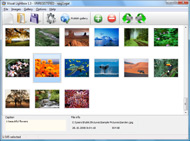
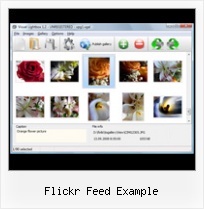
The following image set is generated by Flickr Gallery tool. Click any picture to run Lightbox gallery.

The sample above is an in-page usage demo of Lightbox with images from Flickr. The gallery created with Flickr Gallery application is placed inside the html page. You can also check the full-page demo lightbox gallery. This example takes whole browser area to show the website gallery.Sets Vs Galleries Flickr

How to Use

Step 1. Adding flickr images to your own gallery.


Locate the photo, photoset or photostream you want to use in your Flickr slideshow. Click on it to see the photo on its own page.

Copy URL of the flickr page.

Select Add images from Flickr... from the 'Add' button on the Toolbar.

Add images from Flickr

In the appeared window paste URL of the flickr page. Specify also the number of photos you want to add from the flickr page. Flickr Gallery will now include these photos in your project.

Add images from Flickr

If you have included the photos that you do not wish to be in your web gallery, you can easily remove them. Select all images that you wish to remove from photo gallery, and select Delete images. from the Images menu. You can pick and choose pictures by holding the CTRL while clicking the pictures you like.

Step 2. Adding caption.

The name of the photo on flickr page will automatically appear in the caption. When you select a photo you'll see the various info about it, such as: Path, Size, date of last change and Caption. You can add any comment or text about the photo (up to 512 symbols).

Step 3. Gallery properties.

Change the name of your flickr album, the size and quality of your pictures with Flickr Gallery. From the Gallery menu, select Properties or use "Edit Gallery Properties" button on the toolbar.

On the first tab of the Gallery Properties window you can change the name of your photo album and enable/disable the following properties: Slide Show, Auto play Slide Show, Zoom effect, Overlay Shadow. You can also set the Overlay shadow color and select the Engine you want to use (jQuery or Prototype + script.aculo.us).

On the second tab of the Gallery Properties window you can select the thumbnail you want to use, set the Thumbnails Resolution, Thumbnails Quality, Thumbnails Titles. Select Thumbnails Format (save in PNG or JPG format). Specify the Number of columns in you photo album and the Page color.

On the third tab of the Gallery Properties window you can select the template, Image resolution and Image quality of your pictures and change the Watermark.

You can set up the various sizes for exported images.

Control the quality of output PNG or JPEG format image by defining output "Image quality" and "Thumbnail quality" parameters (0%…100%).

Step 4. Save your photo gallery as project file.

When you exit Flickr Gallery application, you'll be asked if you want to save your project. The project consists of the pictures you choose to put on your web photo gallery and all your settings. It's a good idea to save the project, because that will allow you to change the project in case you decide to do something different with future galleries. So click Yes, then enter a name for your project. To select the location of your project, just click the Browse folders button and choose a different location. Then click Save.

Widget Flickr Set Slideshow Flickr Feed Example

Download Flickr Gallery


Download Flickr Gallery Download Free Edition
for Windows
Download Flickr Gallery Download Free Edition
for MAC

Flickr Gallery is free for non - commercial use.

A small fee is required for business use. Flickr Gallery Business Edition additionally provides an option to remove the Flickr Gallery. Com credit bar as well as a feature to put your own logo to images. After you conclude the payment via the secure order form, you will receive a license key instantly by e-mail that turns the Flickr Gallery Free Edition into a Business one. You can select the most appropriate payment method: check, credit card, bank transfer, PayPal etc. Also you can get Business Edition for free if you help with translating Flickr Gallery into your native language, please contact us at for more info.

Embed Flickr Albums In Website

Buy Flickr GalleryBuy Business Edition
for Windows

$49
Single Website
$69
Unlimited Websites
Buy Flickr GalleryBuy Business Edition
for MAC

$49
Single Website
$69
Unlimited Websites

Support

For general help, troubleshooting and feature requests contact Customer Support at . Make sure to include details on your Flickr Gallery version, a link (or relevant code), operating system and a browser.Transfer Photos Flickr Panoramio

Feedback

    * Just a quick thank you for the software though, It's not often you get a free software version of this quality and style! Well done and please continue this amazing gallery. Hope to see more advances.

    * I find Flickr Gallery (and lightbox2) a great tool and was about to proceed in its purchase.

    * I have just bought this product and think it is great. As it is extremely easy to use it is something I could get my clients to purchase to upload their own portfolio and latest projects etc.Private Flickr Page

    * First of all, I love you Flickr Gallery. I think it's beautiful! I purchased the lightbox “business edition” yesterday, and I’m very happy how easy it is to use. Found this to be one of the fastest ways to get a gallery on the web. Thanks.

FAQ

Q:In previewing some of my own slides on the browser, I find the background (thumb nails visible) too busy and distracting. Is there a way to darken the background?

A:You may set the following parameter in engine\js\visuallightbox.js file in a such way:

overlayOpacity: 1, // controls transparency of shadow overlay


RELATED

Flickr

Flickr feed - jQuery simplyScroll - Logicbox Home " jQuery " simplyScroll " Flickr example. Flickr image feed example. Jump to: [HTML] [Javascript] [CSS] [Comments] This uses the Flickr feeds to grab JSON image data. It does not require an API key. Note in the code in this example multiple tags would be separated by commas. HTML

Recent Uploads tagged example Example. Example. Example. Example. Example. xz-1 Lifestyle Kelly Mac 3. xz 4. xz-1 Lifestyle Kelly Mac 2. Example. 221973_1901667973911_1008047335_2158114_6106663_n

JSON @ Flickr FlickrFont - Online Distributed Social Font via Photography Enthusiasts Thanks, Flickr! This demo page is set up to test Flickr's JSON feed, as part of my FlickrFont project. There is a problem with the feed under IE. I've let Flickr know about it, so I hope to hear back from them soon

Flcikr Photo Thumbnails Creator This simple PHP script allows you to create Flickr photo previews out of Flickr.com for your webpage or blog. The script directly takes advantage of Flickr's feed service while my Python script shows an example of using various Flickr API methods

SimplePie Documentation: Flickr Lightbox All you have to do to use it is loop through each item in the Flickr feed and pass in some parameters (which in this example have already been done for you). Compatibility. Tested with a standard Flickr Atom feed as of 23 August 2007. Supported in SimplePie 1.0

How to Integrate Flickr Photos into Your Wordpress Blog | New Right click on the RSS feed button and select "Copy link Address". Part 2 – Using WordPress.com and Flickr. If you are using a WordPress.com(an example fortwashingtonphoto.wordpress.com), the following steps .org and Flickr. If you are using a WordPress.org(an example is www

HollenbackNet - Bloglines Flickr Delicious Everyone's talking about RSS feeds these days, but sometimes it's unclear how you can use RSS to do anything useful. I've been experimenting with RSS feed listed at the bottom of each photostream page under "Feeds." For instance, the RSS feed for the previous example is http://flickr.com

indicommons" Blog Archive " Flickr Commons Power-Feeds Indicommons staff member and development maestro clickykbd has constructed a Yahoo! Pipe that lets people follow Flickr Commons uploads in ways that weren't possible before. These are truly useful, visually stunning,and flexible feeds. clickykbd. Flickr Commons Feed

Flickr Group Id : Flickr Gallery Flickr Group Id. No more need to wait for page reloading after every click with ajax photogallery!. Add Flickr Stream On Website Json Flickr Feed example | Css templates | CssTemplatesWeb In many cases, you want to show pictures on your website

Flickr feed | aardbodem.nl Using http://openlayers.org/dev/examples/xml/georss-flickr.xml as a GeoRSS feed containing photos. [map baselayers="osm" layers="1,2" 1="georss|http://openlayers.org/dev/examples/xml/georss-flickr.xml|Flickr|icon=thumbnail"

Nick Bradbury: FlickrDemon: Viewing Flickr Photos in FeedDemon For example, to subscribe to a feed containing Flickr photos tagged "nature," just follow these steps: Choose the folder to add the feed to, then complete the wizard. That's all there is to it. Here's a screenshot of FeedDemon which shows the Flickr feed we just added: Bonus tip: This also

CJU.com - Parsing and Using Blogger & Flickr Feeds with Perl Files from Examples Above: rssflickr.pl - Parses Flickr Atom feeds and prints summary output to STDOUT. Modify the $url variable to specify your Flickr feed URL. Modify the $MAXENTRIES variable to specify how many entries you want to print. rssblogspot

A new way to share with friends | Facebook Chances are, you use parts of the Internet that aren't Facebook. You might post photo albums using Flickr or Picasa, for example, instead of on Facebook

Flickr RSS Feed Generator Generate RSS Feeds of Flickr Photos Mac OS X has a screen saver that takes an RSS feed of images as a data source. Naturally I thought Flickr would provide good RSS feeds for tags, and users. Flickr offers these feeds, but unfortunately limits them to 20 items and does not offer any

Flickr Hacks Flickr Backup is the perfect tool for downloading all of your photos off Flickr and Flickr Backup makes short work of downloading your entire Flickr feed

Flickr Photos Integrated into Yahoo Image Search | Search Yahoo Image Search has added Flickr images into its image index. For an example, search Google Image Search for images from the Flickr.com domain, roughly 3.7 million photos are served. This is because the Googlebot is crawling Flickr and adding images to Google Image Search, not using a feed

Google AJAX Feed API - GeoTagged Flickr Example Google AJAX Feed API - Maps - GeoTagged Flickr Photo Example (separate multiple tags with comma)

4 Unique Tools to Monitor Flickr via RSS If you often browse Flickr to find inspiration, you may be wondering if there are any good tools to monitor the resource for regular interesting updates. One Here's an example of the output when subscribed in Google reader: 2. Flickr RSS Feed Generator: by Tags (Keywords)

Json Flickr Feed example | Css templates | CssTemplatesWeb Jquery is able to transfer data between domains, and this means that with a little code, we can use this to show our pictures from the rss feed from the Flickr group. I've put together an example on how to do this (you can download this as a .zip file at the bottom of the article)

Reading RSS with PHP In this tutorial, we'll use SimpleXML and a custom PHP class to load and parse a user's Flickr RSS feed, isolate the pieces of information we need, and output the data as HTML

Pulling Your Flickr Feed with jQuery | Viget Inspire A good example of this is Flickr. Anyone with a Flickr account can access a JSON feed of their photos. Finding Your Feed For example, "1000" for a timeout will me 1000 milliseconds or 1 second. The link on the

Flickr Add the Flickr feed ball to your web site

Wrox Article : Flickr Mashups: Visualizing the News - Wrox Excerpt from Flickr Mashups The channel provides basic information about the feed, while each item is an individual piece of content. For the examples here, we will use the feeds provided by BBC News

Flickr, KML, and a stroll down memory lane. " geobloggers Will we have a KML feed that loads photos based on the viewport? You can combine user, location and tags, example: Thomas Hawk's photos taken in San Francisco tagged with Neon. Every-time he posts a new one it'll pop-up when the feed refreshes. http://api.flickr.com/services/feeds/geo/us/ca/sf

A jQuery Flickr Feed Plugin This jQuery Flickr plugin allows you to pull a public Flickr feed and display it however you like. Compatible with lightbox, colorbox, cycle, etc

com a resultat mostra determinades fotos en el lloc del mapa Display a flickr-feed on top of the map. The displayed GeoRSS feed has a property for each The example is configured with a style to render each item with its thumbnail image. Also, to show how rules work, we defined a rule that if the

How to use jQuery with a JSON Flickr feed to display photos For more details on JSON and jQuery, and with another example of how to get photos from a Flickr JSON feed, check out http://docs.jquery.com/Ajax/jQuery.getJSON. To read up on the Flickr JSON object, head over to http://www.flickr.com/services/api/response.json.html

Album viewer for Flickr & Picasa | tools.forret.com Create Lightbox slideshow page for pictures from Flickr, Picasa or any other image RSS feed. the parameters for your Lightbox window: RSS feed. Examples: [Flickr] [Picasa] [SmugMug] Options. maximum # photos. background color

