
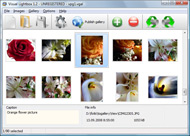



Overview

It's no secret that adding photos to your blog posts is one of the most effective ways to enhance your blog and attract attention to your writing. Flickr has millions of photos available in its database. A simple FREE tool called Flickr Gallery allows you to create a custom image gallery with a cool slide show of the most recent and most interesting photos from Flickr on your website or blog in a few easy steps. Just visit Flickr website and find photostream, photoset or a single photo you like. Enter the address of flickr page to add all photos from this page in your gallery, select the style of thumbnails and the overlay window and add the HTML embed code on your website or blog.
A few clicks and you'll see a stylish photo gallery with beautifull lightbox and zoom effects on your own website or blog!


Flickr Gallery for Windows   Flickr Gallery for MAC

Want more?

Example

Lightbox gallery sample

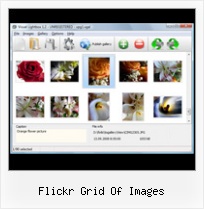
The following image set is generated by Flickr Gallery tool. Click any picture to run Lightbox gallery.

The sample above is an in-page usage demo of Lightbox with images from Flickr. The gallery created with Flickr Gallery application is placed inside the html page. You can also check the full-page demo lightbox gallery. This example takes whole browser area to show the website gallery.Inserting Flickr Galleries In Iweb

How to Use

Step 1. Adding flickr images to your own gallery.


Locate the photo, photoset or photostream you want to use in your Flickr slideshow. Click on it to see the photo on its own page.

Copy URL of the flickr page.

Select Add images from Flickr... from the 'Add' button on the Toolbar.

Add images from Flickr

In the appeared window paste URL of the flickr page. Specify also the number of photos you want to add from the flickr page. Flickr Gallery will now include these photos in your project.

Add images from Flickr

If you have included the photos that you do not wish to be in your web gallery, you can easily remove them. Select all images that you wish to remove from photo gallery, and select Delete images. from the Images menu. You can pick and choose pictures by holding the CTRL while clicking the pictures you like.

Step 2. Adding caption.

The name of the photo on flickr page will automatically appear in the caption. When you select a photo you'll see the various info about it, such as: Path, Size, date of last change and Caption. You can add any comment or text about the photo (up to 512 symbols).

Step 3. Gallery properties.

Change the name of your flickr album, the size and quality of your pictures with Flickr Gallery. From the Gallery menu, select Properties or use "Edit Gallery Properties" button on the toolbar.

On the first tab of the Gallery Properties window you can change the name of your photo album and enable/disable the following properties: Slide Show, Auto play Slide Show, Zoom effect, Overlay Shadow. You can also set the Overlay shadow color and select the Engine you want to use (jQuery or Prototype + script.aculo.us).

On the second tab of the Gallery Properties window you can select the thumbnail you want to use, set the Thumbnails Resolution, Thumbnails Quality, Thumbnails Titles. Select Thumbnails Format (save in PNG or JPG format). Specify the Number of columns in you photo album and the Page color.

On the third tab of the Gallery Properties window you can select the template, Image resolution and Image quality of your pictures and change the Watermark.

You can set up the various sizes for exported images.

Control the quality of output PNG or JPEG format image by defining output "Image quality" and "Thumbnail quality" parameters (0%…100%).

Step 4. Save your photo gallery as project file.

When you exit Flickr Gallery application, you'll be asked if you want to save your project. The project consists of the pictures you choose to put on your web photo gallery and all your settings. It's a good idea to save the project, because that will allow you to change the project in case you decide to do something different with future galleries. So click Yes, then enter a name for your project. To select the location of your project, just click the Browse folders button and choose a different location. Then click Save.

Inurl Flickr Flickr Grid Of Images

Download Flickr Gallery


Download Flickr Gallery Download Free Edition
for Windows
Download Flickr Gallery Download Free Edition
for MAC

Flickr Gallery is free for non - commercial use.

A small fee is required for business use. Flickr Gallery Business Edition additionally provides an option to remove the Flickr Gallery. Com credit string as well as a feature to put your own logo to images. After you conclude the payment via the secure order form, you will receive a license key instantly by email that turns the Flickr Gallery Free Edition into a Business one. You can select the most suitable payment procedure: credit card, bank transfer, PayPal, check etc. Also you can get Business Edition for free if you help with translating Flickr Gallery into your native language, please contact us at for more info.

Embed Flickr Stream In Wordpress

Buy Flickr GalleryBuy Business Edition
for Windows

$49
Single Website
$69
Unlimited Websites
Buy Flickr GalleryBuy Business Edition
for MAC

$49
Single Website
$69
Unlimited Websites

Support

For feature requests, troubleshooting, general help contact Customer Support at . Make sure to include details on your operating system, browser, a link (or relevant code) and Flickr Gallery version.Imovie Project Flickr

Feedback

    * First of all, your product is fantasitc. I looked at the others and your code generator app was insanely easy to use.

    * I downloaded your trial version to see if I could get it to work with my website, and I am almost there (I have been looking for something like this for ages)..

    * I'd like to express my gratitude to your efforts on creating such a nice piece of program and best of all it's free! Keep out the good work and I hope to see new features in the near coming future to rate you 5 star!Flickr Slideshow Time Set

    * This looks like EXACTLY what I need for my site. It would make my job much faster! Love your program. Thank you!!

FAQ

Q:I would like to have a few galleries in one website and even on one page.

A:To create several galleries on your page you should change following parameter in A tag for different galleries:

rel="lightbox_vlb"

For example, for the first gallery you should set rel="lightbox_vlb":

<!-- Start Flickr Gallery.com BODY section -->
<div id="vlightbox">
<a rel="lightbox_vlb" href="data/images/dscn6831.jpg" title="dscn6831" >
<img src="data/thumbnails/dscn6831.png" ><span></span></a>
<a rel="lightbox_vlb" href="data/images/dscn6823.jpg" title="dscn6823">
<img src="data/thumbnails/dscn6823.png"><span></span></a>
<a id="vlb" href="http://Flickr Gallery.com">Photo Gallery For Web by Flickr Gallery.com v2.0</a>
</div>
<!-- End Flickr Gallery.com BODY section -->

and for the second gallery rel="lightbox_vlb1":

<!-- Start Flickr Gallery.com BODY section -->
<div id="vlightbox">
<a rel="lightbox_vlb1" href="data/images/img_0501.jpg" title="img_0501">
<img src="data/thumbnails/img_0501.png"><span></span></a>
<a rel="lightbox_vlb1" href="data/images/img_0481.jpg" title="img_0481">
<img src="data/thumbnails/img_0481.png"><span></span></a>
<a id="vlb" href="http://Flickr Gallery.com">Photo Gallery For Web by Flickr Gallery.com v2.0</a>
</div>
<!-- End Flickr Gallery.com BODY section -->


RELATED

FotoTagger2.13 Free Download - Tag image areas; publish to Downloads: 160, Size: 3.22 MB, License: freeware. Annotate image areas. Grab, collect, organize images. Publish to blog, flickr. FotoTagger is a free software tool for annotating images and image areas quickly and easily,

Building a Flickr widget with Mobile Web Templates - Forum Results' grid. The second visualization consists in a grid of images: it shown only the image thumbnail, without its title, allowing users to have a global overview of the images found. Here, the grid component from Mobile Web Templates is used, as shown by the following code snippet:

Progress.wiki - wosaic - Google Code The resolution is a single number, n, that describes the number of images that will be used to reconstruct the user's source image. This image will be split into roughly an nxn grid of images taken from Flickr, which will be arranged in a pattern the mimics the user's source image

How to Make Isometric Graphics in Flash Encyclopedia Britannica defines isometric drawing as a technique that is "intended to combine the illusion of depth, as in a perspective rendering, with the undistorted presentation of the object's principal dimensions, that is, those parallel to

AS3 XML Image Slideshow (Flickr Slideshhow Style) (Image An Advanced AS3 XML Image Slideshow which is similar as Flickr Slideshhow. Easy,clean and flexible usages for different kinds of needs. Features: 1.XML

How can I use my images from Flickr in MailChimp? | MailChimp.com (Since our Flickr integration is in its first iteration you'll have to pull the images into your gallery one at a time. displayed in a directory on your computer) or a grid of thumbnails

TiltViewer Download Spectacular image galleries made simple. SimpleViewer is the home of the SimpleViewer family of image galleries - professional quality, fully customizable Flash image galleries. Download your free Flash image gallery here

Brain Pickings | Flickr You may recall Flickr Related Tag Browser from pickings past — a sleek web app retrieves Flickr images tagged with your search keyword in a neat grid, surrounded by a radial display of related tags. Clicking each related tag produces the same

Foraging Through Flickr The Fast Way: LAist The FRTB is a simple Flash program that searches through Flickr tags, or keywords, and finds anything you could possibly be looking for. Simply click on one of the images and out pops a small preview of that image with the description that was written about it

Flickr Search Flash App " EddyB The Flickr API really makes it easy to access all of the images on the site, and all of When the images found by the search are loaded initially they are positiond randomly, then as the mouse moves closer to them they form a neat grid. Each image links to its page on Flickr

Annotate image areas. Grab, collect, organize images. Publish FotoTagger can annotate images and image areas, grab and organize images. Add tags pointing to specific objects. Display tags in a form of balloons. Upload/download images to/from Flickr. Publish to blog and HTML. Search, hide notes. Organize

hayley gilmore: online portfolio Flickr is almost certainly the best online photo management and sharing application in the world. Show off your favorite photos and videos to the world, securely and privately show content to your friends and family, or blog the photos and videos

the visible archive: March 2010 Our initial focus was the Flickr set of the State Library of NSW, and our aim was a rich, dynamic, "show everything" interface, building on the A1 Explorer work, but with image-based content. We look for those dates and sort dated images first in the grid

Flickriver: Photos from DanTrotter.net Flickriver - view images as a 'river of photos' and more A Greasemonkey script that adds Flickriver links to various Flickr photo pages - user photos, favorites, pools etc, allowing to quickly open the

Flickr Updates Design of Search Results - Search Engine Watch Yahoo! owned Flickr has given a makeover to its search results page. Now, instead of scrolling through a single stream of images, you see a grid. You ca

WordPress " PictureGrid " WordPress Plugins The Picturegrid wordpress plugin allows you to import your Flickr images into your sidebar, or onto any page. Tags: favourite, flickr, grid, image, photo, photoset, picture, picturgrid, sidebar, widget

SRTM " Stevendkay's Blog Using Flickr API to get the views, faves and comments of your most popular images Flickr API Gamut Grayscale Greyscale grid idea Image Processing Infovis Infoviz map Mapping Matplotlib Monochrome Photography Photoshop poster Python R recession RGB Software SRTM unicode Visualization

Create a Fisheye Flickr Image Viewer with Adobe Flex This free tutorial shows you how to create a Flickr fisheye image viewer with Adobe Flex. Demo and source code included. We will use the FisheyeTile to display a grid of images (by contrast, Fisheye will display a single row). Here we add the

10 Free & Fun Online Picture Games Based On Flickr One of the more recommended places to search out images is Flickr. Flickr makes all the public images easy to mine by providing the Flickr API (Application Programming Interface) for non-commercial use. Of course, that's not for us, the common folk

uplog " " Digesting flickr photos Each time the digest finds newly uploaded photos for a given hour or day it will generate a 500×500 pixel image of up to 100 flickr images fit into a grid (the more images, the smaller they are). The 100 image limit is just to keep the server

Warning: chdir() [function.chdir]: No such file or directory The dynamic grid of images you see here displays images generated from search terms The feed is taken from the Flickr images site and is automatically updated frequently. Mouse over the images to see a larger image. Click the image to get to the original page on the Flickr site

Rob Miles - Moosaic When you reach the image you want to split you can open the image splitting grid by clicking on the Gear icon. of tiles. Each of them is uploaded to Flickr as a separate photograph with a new tag so

Flickr: Philadelphia Grid Project Flickr is almost certainly the best online photo management and sharing application in the world. Show off your favorite photos and videos to the world, securely and privately show content to your friends and family, or blog the photos and videos

Embedding Flickr : Flickr Gallery A simple FREE tool called Flickr Gallery allows you to create a custom image gallery with a cool slide show of the most recent and most interesting photos from Flickr on your website or blog in a few easy steps. This example takes whole browser area to show the slideshow.Flickr Grid Of Images

Picture Manager : Designing Interfaces This is a distinct style of application that many people recognize. Once someone sees a Thumbnail Grid of images or videos in the right context, she knows what to expect: browse, click to view, set up slideshows or playlists, and so on

Getty Images - Chicago at night, from 36,000 feet Royalty-free stock photo - Chicago at night, from 36,000 feet by Flickr photographed by Chris Alexander As the photo was taken at night, streetlights along roads emphasize the lines of the grid

