



Overview

It's no secret that adding photos to your blog posts is one of the most effective ways to enhance your blog and attract attention to your writing. Flickr has millions of photos available in its database. A simple FREE tool called Flickr Gallery allows you to create a custom image gallery with a cool slide show of the most recent and most interesting photos from Flickr on your website or blog in a few easy steps. Just visit Flickr website and find photostream, photoset or a single photo you like. Enter the address of flickr page to add all photos from this page in your gallery, select the style of thumbnails and the overlay window and add the HTML embed code on your website or blog.
A few clicks and you'll see a stylish photo gallery with beautifull lightbox and zoom effects on your own website or blog!


Flickr Gallery for Windows   Flickr Gallery for MAC

Want more?

Example

Lightbox gallery sample

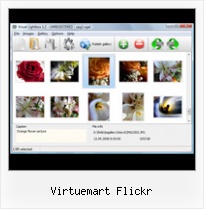
The following image set is generated by Flickr Gallery tool. Click any picture to run Lightbox gallery.

The example above is an in-page usage demo of Lightbox with images from Flickr. The lightbox gallery created with Flickr Gallery application is placed inside the page layout. You can also check the full-page demo website gallery. This example takes whole browser area to show the Lightbox gallery that uses images from Flickr.Blogspot Flickr Gallery

How to Use

Step 1. Adding flickr images to your own gallery.


Locate the photo, photoset or photostream you want to use in your Flickr slideshow. Click on it to see the photo on its own page.

Copy URL of the flickr page.

Select Add images from Flickr... from the 'Add' button on the Toolbar.

Add images from Flickr

In the appeared window paste URL of the flickr page. Specify also the number of photos you want to add from the flickr page. Flickr Gallery will now include these photos in your project.

Add images from Flickr

If you have included the photos that you do not wish to be in your web gallery, you can easily remove them. Select all images that you wish to remove from photo gallery, and select Delete images. from the Images menu. You can pick and choose pictures by holding the CTRL while clicking the pictures you like.

Step 2. Adding caption.

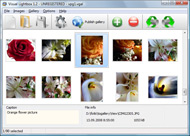
The name of the photo on flickr page will automatically appear in the caption. When you select a photo you'll see the various info about it, such as: Path, Size, date of last change and Caption. You can add any comment or text about the photo (up to 512 symbols).

Step 3. Gallery properties.

Change the name of your flickr album, the size and quality of your pictures with Flickr Gallery. From the Gallery menu, select Properties or use "Edit Gallery Properties" button on the toolbar.

On the first tab of the Gallery Properties window you can change the name of your photo album and enable/disable the following properties: Slide Show, Auto play Slide Show, Zoom effect, Overlay Shadow. You can also set the Overlay shadow color and select the Engine you want to use (jQuery or Prototype + script.aculo.us).

On the second tab of the Gallery Properties window you can select the thumbnail you want to use, set the Thumbnails Resolution, Thumbnails Quality, Thumbnails Titles. Select Thumbnails Format (save in PNG or JPG format). Specify the Number of columns in you photo album and the Page color.

On the third tab of the Gallery Properties window you can select the template, Image resolution and Image quality of your pictures and change the Watermark.

You can set up the various sizes for exported images.

Control the quality of output PNG or JPEG format image by defining output "Image quality" and "Thumbnail quality" parameters (0%…100%).

Step 4. Save your photo gallery as project file.

When you exit Flickr Gallery application, you'll be asked if you want to save your project. The project consists of the pictures you choose to put on your web photo gallery and all your settings. It's a good idea to save the project, because that will allow you to change the project in case you decide to do something different with future galleries. So click Yes, then enter a name for your project. To select the location of your project, just click the Browse folders button and choose a different location. Then click Save.

Show The Html Code Flickr Virtuemart Flickr

Download Flickr Gallery


Download Flickr Gallery Download Free Edition
for Windows
Download Flickr Gallery Download Free Edition
for MAC

Flickr Gallery is free for non - commercial use.

A small fee is required for business use. Flickr Gallery Business Edition additionally provides an option to remove the Flickr Gallery. Com credit string as well as a feature to put your own logo to images. After you conclude the payment via the secure form, you will receive a license key instantly by e-mail that turns the Flickr Gallery Free Edition into a Business one. You can select the most appropriate payment procedure: PayPal, bank transfer, check, credit card etc. Also you can get Business Edition for free if you help with translating Flickr Gallery into your native language, please contact us at for more info.

Json Flickr Small Image

Buy Flickr GalleryBuy Business Edition
for Windows

$49
Single Website
$69
Unlimited Websites
Buy Flickr GalleryBuy Business Edition
for MAC

$49
Single Website
$69
Unlimited Websites

Support

For troubleshooting, feature requests and general help contact Customer Support at . Make sure to include details on your Flickr Gallery version, a link (or relevant code), browser and operating system.Change Flickr Address

Feedback

    * I would like to say that Flickr Gallery is a stunning lil program! Its almost too good to be true i'd say! I've been looking for tutorials to create a lightbox gallery, but just couldnt come right. Im so glad i found Flickr Gallery!

    * I just tried the application, It is wonderful idea. Like you said in the website "few clicks without writing a single line of code" because most of the people is not web designers".

    * I'm absolutely loving Flickr Gallery Business and Video LightBox. Amazing, quick and painless, to create a custom, browser independent gallery. And it works first time - every time! Best value for money I've seen in quite a while...Json Flickr Slideshow

    * I find Flickr Gallery (and lightbox2) a great tool and was about to proceed in its purchase.

FAQ

Q:I would like to have a few galleries in one website and even on one page.

A:To create several galleries on your page you should change following parameter in A tag for different galleries:

rel="lightbox_vlb"

For example, for the first gallery you should set rel="lightbox_vlb":

<!-- Start Flickr Gallery.com BODY section -->
<div id="vlightbox">
<a rel="lightbox_vlb" href="data/images/dscn6831.jpg" title="dscn6831" >
<img src="data/thumbnails/dscn6831.png" ><span></span></a>
<a rel="lightbox_vlb" href="data/images/dscn6823.jpg" title="dscn6823">
<img src="data/thumbnails/dscn6823.png"><span></span></a>
<a id="vlb" href="http://Flickr Gallery.com">Photo Gallery For Web by Flickr Gallery.com v2.0</a>
</div>
<!-- End Flickr Gallery.com BODY section -->

and for the second gallery rel="lightbox_vlb1":

<!-- Start Flickr Gallery.com BODY section -->
<div id="vlightbox">
<a rel="lightbox_vlb1" href="data/images/img_0501.jpg" title="img_0501">
<img src="data/thumbnails/img_0501.png"><span></span></a>
<a rel="lightbox_vlb1" href="data/images/img_0481.jpg" title="img_0481">
<img src="data/thumbnails/img_0481.png"><span></span></a>
<a id="vlb" href="http://Flickr Gallery.com">Photo Gallery For Web by Flickr Gallery.com v2.0</a>
</div>
<!-- End Flickr Gallery.com BODY section -->


RELATED

Virtuemart Flash : Free Flash SlideShow Maker Flash SlideShow w/o Flash! Virtuemart Flash. Create excellent website photo galleries with minimum effort!. image flash slideshow like ebays Flickr and Photobucket support. Use most interesting photos from Flickr and Photobucket on your site or blog in a few easy steps

Atomix :: Online Stores - Web Design Adelaide, E-commerce Online Stores - Atomix web design Adelaide is a leading online store developer specialising in e-commerce. There are many platforms used to create an online site including Oscommerce, Virtuemart, Magento, Zen Cart and Cre Loaded

Manuel Reil: web development, joomla, virtuemart | Welcome to Manuel Reil entwickelt, hostet und betreut Webseiten (Joomla/Wordpress) und Webshops (virtuemart/oxid eshop) web developer and hoster of web sites, especially joomla and virtuemart. my xing profile. my flickr profile. my twitter profile. my facebook profile. my twitter msgs. Twitter / manuelreil

All blog entries - Give Me A Job So I Can Move To Canada Give Me A Job So I Can Move To Canada - a website version of Pauls Resume qik module qik plugin qik video skype png spotify translate virtemart logos virtuemart virtuemart manufacturers virtuemart module. Arty Flickr Fotos

VIP Web Design - When only the best will do! To have a website, you need 3 things: VIP Web Design. 1. Domain Name 2. Web Designer 3. Hosting Space We can provide you with all 3 and so much more!

YouTube - Free joomla themes, website templates, downloads Project Underground Joomla Philippines CMS development experts www.projectunderground.vze.com free download website Themes design templates CSS psd SEO php F calendar modules plugins java, javascrips applet,community builder, virtuemart, ajax, flickrslide, flickr

Friendster - joomla developer Project Underground, Project, Underground, projectunderground, www.projectunderground.vze.com,Free, Joomla, CSS, templates, Download, downloads, website, layout, open, open source, web design, design, themes for CMS, blogs and forums. Free HTML

Opensource News | Tag Archive | flickr modflickr is the easiest way to display your flickr© galleries on your Joomla! Photo Feed (Picasa or Flickr) – Articles – Modules – Custom Content

Search - Joomla! Extensions Directory Assuming flickr is required, the following results were found. This feature can be enabled in 2 simple steps: 1) Enter the call back URL in your Authentication flow at Flickr

Frontpage Raşit Özdemir Twitter Facebook flickr RSS-Feed. Latest Tweet. RT @JoomlaDownloads: Joomla User Group Treffen in Hamburg. Mit Yootheme und Thomas Kahl von Virtuemart Expert http://bit.ly/mKJM6F und h by YOOtheme Cuma, 20 Mayıs 2011 10:56

Home All American Kicking - Helping kickers, punters, & snappers improve through individual attention! National Scouting Competition, Mini-Camps, & one-on-one lessons nationwide!

Virtuemart Shockwave Gallery - Flash Photo Gallery Virtuemart Shockwave Gallery. Flash Photo Gallery is a photo album maker, that allows you to create and publish splendid 3D Flash Slideshows for your website!. Video Playlist Editor Fla Flash

Tags - photos | joommaster.com Find Tag. photos. Joommaster shared joomla templates,joomla extensions, wordpress themes,php scripts,null templates, null extensions and more popup for photos, galleries, external pages, Picasa album photos, Flickr photos and inline content

Winterwind Farm Winterwind farm is a breeder of Miniture Donkeys and Colored Angora Goats. Flickr. Products For Sale. Etsy Store. Contact Us. VirtueMart Product Scroller. Ram $500.00. Siver Sport Wt. CVM/Mohair Yarn $10.00. Silver CVM/Silk Fingering Yarn $9.00. Gray 2ply CVM Yarn $12.00. VirtueMart Shopping Cart. Your Cart is

Joomla! E-commerce with VirtueMart | Flickr - Photo Sharing! E-commerce with VirtueMart by suhreed, on Flickr">

Home Joomla! - the dynamic portal engine and content management system Kahl von Virtuemart Expert http://bit.ly/mKJM6F und h Contact. John Q. Public. 10018 New York, NY. United States. call. 1-212-5555-1. Social Bookmarks. Twitter Facebook RSS-Feed Flickr. About Joomla! Features

Art Nicebox - Joomla! lightbox for images, galleries Art Nicebox - Joomla! lightbox for images, galleries, external pages, Flickr photos with slideshow effect

Blog at Enlightened IT Development - Web Design & Development Expert programmers and designers in PHP, Joomla, Wordpress, Oscommerce, Drupal, web design, CSS, XHTML, flash solutions and services Flickr. Posted by admin April 18, 2011, under Joomla | No Comments. This is a test post from , a fancy photo sharing thing. " " Read more. Pagination issue in virtuemart

Flickr support for Rokin Gallery This Rokin Gallery extension enables Flickr support. Install, enter your Yahoo Id, download the set's information and done. Flickr Gallery extension uses your Flickr set's albums, and stores the

Quite a Few Problems you could try a custon URL link in your menu to the category list, rather than a component link to the VirtueMart Component. Secondly, a quick update to VirtueMart 1.0.7 got the add to cart and checkout buttons back - pass the dunce

Preventes concerts Retrouvez toutes nos préventes pour les meilleurs concerts de Salsa et profitez de nos tarifs préférentiels ainsi que de la sécurité Paypal ! Flickr. RSS-Feed. A la une. Home. Help. About us. News. Contacts. Legacy. Newsletters. Services. Sitemap. Report an error. Your opinion. Links. Partners

Joomla! Blogs VirtueMart - a free, easy to use and up-to-date e-commerce solution. Fully integrated into a free, but professional Content Management System. Lots of photos from the event can be found on Flickr using the #jd11gr hashtag

Virtuemart Mod Flash Slideshow - Flash Slideshow Builder Virtuemart Mod Flash Slideshow. Create an attractive flash image slider with 3D slice effects and transitions!. Flash Configurable Promo Gallery

~Claire keim the girl: claire keim~ ~claire keim nude~ Claire keim the girl. claire keim the girl, claire keim baise, claire keim nude, claire keim nude, claire keim nude, claire keim, claire keim nude, claire keim the girl, claire keim collages

I am Bored So I Blog Airplane Wing [Flickr] Joomla Virtuemart Producten ex BTW, Factuur Swiz workshop. Joomla! / Virtuemart / WordPress Excel Export. Flex Password match check

Virtuemart Flickr : Flickr Gallery Virtuemart Flickr. Create fast and straightforward photo gallery for website with Flickr Gallery!. Album Importeren In Flickr

