
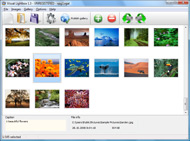




Overview

It's no secret that adding photos to your blog posts is one of the most effective ways to enhance your blog and attract attention to your writing. Flickr has millions of photos available in its database. A simple FREE tool called Flickr Gallery allows you to create a custom image gallery with a cool slide show of the most recent and most interesting photos from Flickr on your website or blog in a few easy steps. Just visit Flickr website and find photostream, photoset or a single photo you like. Enter the address of flickr page to add all photos from this page in your gallery, select the style of thumbnails and the overlay window and add the HTML embed code on your website or blog.
A few clicks and you'll see a stylish photo gallery with beautifull lightbox and zoom effects on your own website or blog!


Flickr Gallery for Windows   Flickr Gallery for MAC

Want more?

Example

Lightbox gallery sample

The following image set is generated by Flickr Gallery tool. Click any picture to run Lightbox gallery.

The photo gallery above is an in-page usage demo of Lightbox gallery that uses images from Flickr. The gallery created with Flickr Gallery wizard is placed inside the page layout. You can also check the full-page demo lightbox gallery. This example takes whole browser area to show the Lightbox gallery that uses images from Flickr.Flickr Most Recent Rss

How to Use

Step 1. Adding flickr images to your own gallery.


Locate the photo, photoset or photostream you want to use in your Flickr slideshow. Click on it to see the photo on its own page.

Copy URL of the flickr page.

Select Add images from Flickr... from the 'Add' button on the Toolbar.

Add images from Flickr

In the appeared window paste URL of the flickr page. Specify also the number of photos you want to add from the flickr page. Flickr Gallery will now include these photos in your project.

Add images from Flickr

If you have included the photos that you do not wish to be in your web gallery, you can easily remove them. Select all images that you wish to remove from photo gallery, and select Delete images. from the Images menu. You can pick and choose pictures by holding the CTRL while clicking the pictures you like.

Step 2. Adding caption.

The name of the photo on flickr page will automatically appear in the caption. When you select a photo you'll see the various info about it, such as: Path, Size, date of last change and Caption. You can add any comment or text about the photo (up to 512 symbols).

Step 3. Gallery properties.

Change the name of your flickr album, the size and quality of your pictures with Flickr Gallery. From the Gallery menu, select Properties or use "Edit Gallery Properties" button on the toolbar.

On the first tab of the Gallery Properties window you can change the name of your photo album and enable/disable the following properties: Slide Show, Auto play Slide Show, Zoom effect, Overlay Shadow. You can also set the Overlay shadow color and select the Engine you want to use (jQuery or Prototype + script.aculo.us).

On the second tab of the Gallery Properties window you can select the thumbnail you want to use, set the Thumbnails Resolution, Thumbnails Quality, Thumbnails Titles. Select Thumbnails Format (save in PNG or JPG format). Specify the Number of columns in you photo album and the Page color.

On the third tab of the Gallery Properties window you can select the template, Image resolution and Image quality of your pictures and change the Watermark.

You can set up the various sizes for exported images.

Control the quality of output PNG or JPEG format image by defining output "Image quality" and "Thumbnail quality" parameters (0%…100%).

Step 4. Save your photo gallery as project file.

When you exit Flickr Gallery application, you'll be asked if you want to save your project. The project consists of the pictures you choose to put on your web photo gallery and all your settings. It's a good idea to save the project, because that will allow you to change the project in case you decide to do something different with future galleries. So click Yes, then enter a name for your project. To select the location of your project, just click the Browse folders button and choose a different location. Then click Save.

Download From Flickr Mac Flickr Integration Website

Download Flickr Gallery


Download Flickr Gallery Download Free Edition
for Windows
Download Flickr Gallery Download Free Edition
for MAC

Flickr Gallery is free for non-commercial use.

A small fee is required for business use. Flickr Gallery Business Edition additionally provides an option to remove the Flickr Gallery. Com credit string as well as a feature to put your own logo to images. After you conclude the payment via the secure form, you will receive a license key instantly by e-mail that turns the Flickr Gallery Free Edition into a Business one. You can select the most suitable payment procedure: PayPal, credit card, bank transfer, check etc. Also you can get Business Edition for free if you help with translating Flickr Gallery into your native language, please contact us at for more info.

Feed Flickr Gallery

Buy Flickr GalleryBuy Business Edition
for Windows

$49
Single Website
$69
Unlimited Websites
Buy Flickr GalleryBuy Business Edition
for MAC

$49
Single Website
$69
Unlimited Websites

Support

For general help, troubleshooting and feature requests contact Customer Support at . Make sure to include details on your Flickr Gallery version, a link (or relevant code), operating system and a browser.Flickr Embed Preview

Feedback

    * Just a quick thank you for the software though, It's not often you get a free software version of this quality and style! Well done and please continue this amazing gallery. Hope to see more advances.

    * Let me start just congratulating you, good job, really. I am trying out the free version before I buy it. It works great.

    * I just tried the application, It is wonderful idea. Like you said in the website "few clicks without writing a single line of code" because most of the people is not web designers".Embed Yahoo Flickr Map

    * Great product by the way and saved me loads of time. I really like your Flickr Gallery program! Very nice.

FAQ

Q:How do I embed the lightbox image gallery into an existing page?

A:To install Flickr Gallery gallery on your page you should:

1. Create your gallery in Flickr Gallery and publish it on a local drive in any test folder.
2. Open index.html file from the saved folder in any text editor.
3. Copy code for the HEAD section and paste it inside the HEAD section of you own webpage, for example:

<head>
...
<!-- Start Flickr Gallery.com HEAD section -->
<link rel="stylesheet" href="engine/css/vlightbox.css" type="text/css" />
<style>#vlightbox a#vlb{display:none}</style>
<link rel="stylesheet" href="engine/css/Flickr Gallery.css" type="text/css" media="screen" />
<script src="engine/js/jquery.js" type="text/javascript"></script>
<script src="engine/js/jquery.tools.min.js" type="text/javascript"></script>
<script src="engine/js/visuallightbox.js" type="text/javascript"></script>
<!-- End Flickr Gallery.com HEAD section -->

...
</head>


4. Copy code for the BODY section and paste it inside the Body section of you own webpage in the place where you want to have a gallery, for example:

<body>
...
<!-- Start Flickr Gallery.com BODY section -->
<div id="vlightbox">
<a rel="lightbox_vlb" href="data/images/dscn6831.jpg" title="DSCN6831"><img src="data/thumbnails/dscn6831.png"><span></span></a>
<a rel="lightbox_vlb" href="data/images/dscn6823.jpg" title="DSCN6823"><img src="data/thumbnails/dscn6823.png"><span></span></a>
<a rel="lightbox_vlb" href="data/images/dscn6819.jpg" title="DSCN6819"><img src="data/thumbnails/dscn6819.png"><span></span></a>
<a id="vlb" href="http://Flickr Gallery.com">Photo Gallery For Web by Flickr Gallery.com v2.1</a>
</div>
<!-- End Flickr Gallery.com BODY section -->

...
</body>


5. Copy 'data' folder with images and thumbnails and 'engine' folder with .css and .js files into the same folder with your own webpage.
You can find the example on our website:
http://www.Flickr Gallery.com/#example


RELATED

Flickr & Nokia join forces Flickr is almost certainly the best online photo management and sharing application in the world. Show off your favorite photos and videos to the world, securely and privately show content to your friends and family, or blog the photos and videos

Kentico CMS for ASP.NET - Flickr Slideshow ASP.NET CMS .NET open content management system portal C# VB.NET free Flickr Slideshow Flickr Slideshow Web Part makes it really simple to embed an interactive slideshow of any of your photo sets into your Kentico-powered web site

Flickr Tests Twitter Integration With Email Uploads Watch out TwitPic, Flickr is finally waking up to the power of letting users share links to their photos over Twitter. Flickr members can now sign up for the Flickr Twitter Beta, which allows them to link their Flickr and Twitter accounts (using

Picnik Blog " Blog Archive " Flickr and Picnik Together At Last! The Flickr/Picnik integration that everyone's been eagerly waiting for is here! Both Picnik and Flickr teams have been tirelessly toiling to make this the best integration ever

Flickr | drupal.org Access photos on Flickr's site via their API. The module provides a [flickr-photo:id=230452326,size=s] and [flickr-photoset:id=72157594262419167,size=m]

CIC " Integrating a Flickr photo map on your website In my previous Flickr images post I focused on the built-in Flickr functions of RapidWeaver and the various Flickr image integration plugins available for both Wordpress Fear not, you do not need to be a big web wizard to unleash the power of Flickr and put great photo effects on your website

Map Projects:Photos and Flickr Integration - Google Mapki FlickR - GeoBloggers - GoogleMaps Integration - Started as a private webtool to organize The website will then import photos from flickr associated with that tag

Flickr On My Website : Flickr Gallery Flickr On My Website. Digital picture albums made with Flickr Gallery are high-end web applications that look and behave exactly like desktop apps!. Drupal Flickr Thumbnails In A Grid

Upload to Flickr | Shutter - Feature-rich Screenshot Tool You can upload screenshots from Shutter to Flickr via the Postr program - this guide shows you how. Mail (will not be published) (required) Website. Notify me of followup comments via e-mail. Find us on Launchpad. Screenshots

Jeffrey Friedl's Blog " Jeffrey's "Export to Flickr You can use this, for example, to auto-create publish-service collections for all the sets and/or groups the photos belong to at Flickr. It's exceedingly complex under the hood, so I'll label this "beta": a catalog backup is suggested before giving it a try. 20110207.214

Convio Online Help: Integrating Flickr Into Your TeamRaiser Event The Convio integration with the Flickr photo-sharing Web site application (owned by Yahoo! Inc.) enables your participants to easily share their TeamRaiser photos online by automatically posting the photos in an event-specific photo album on the Flickr Web site

Picnik Picnik lets you edit all your photos online, from one easy place

Flickr Integration With MailChimp | MailChimp Email Marketing In the MailChimp V5 release, we've made it super easy to link your Flickr photos to your MailChimp account, pull them into your image gallery, and use 'em in your email campaigns

Nikon Launches Wi-Fi Coolpix S51c with Flickr Integration Nikon Launches Wi-Fi Coolpix S51c with Flickr Integration. msparkes —Like its predecessor, the S7c, the new Nikon Coolpix S51c digital camera is Wi-Fi-ready, allowing you to email or upload pictures straight from the device. special website, or send images to Blackberrys, Flickr and even

Google and Flickr integration with Gtalkr Website Gtalkr is a Flash-based web app designed to bring your Google apps (Gmail and Google Talk) together with Flickr, YouTube, and newsfeeds for an all-in-one media and communications mega-package. Google and Flickr integration with Gtalkr

Flickr Integration – thelongmile | 2010 Flickr Integration. Just a small update but thankfully the integration flickr gallery google it Layout life mac move Music news Old People personal Photo Photography post privacy rant Rants Raves server site smoking Stats Survey talking Tech Technology thinking Thoughts Twitter Update Website wired

Flickr Adds Full Facebook Integration Following on the heels of Yahoo! who announced deeper integration with Facebook into their products, Flickr announced this morning that the company has also rolled out their own integrations with Facebook. Now when Facebook users upload photos

Website design, ecommerce web design based in Scarborough Icoms is a Website Design agency based in Scarborough, North Yorkshire. 04 Querceus Jquery and Flickr Integration. Pause. Frontpage Slideshow (version 2.0.0) - Copyright © 2006-2008 by JoomlaWorks. Welcome to your new website. Icoms Ltd. are a website design agency based in Scarborough, North Yorkshire

Flickr Hooks Up With Facebook for Photo Sharing Love Photo sharing website Flickr has announced a new Facebook integration tool that syncs you Flickr photos to your Facebook account. Flickr's sync tools are built on top of parent company Yahoo's Updates platform, and will push photo thumbnails, titles and descriptions to your Facebook feed

Options for Easily Adding Flickr Photos to Your Website This page shows a number of the leading options for quickly and easily adding your Flickr photos to your website or blog (WordPress, Joomla, TextPattern). They all offer some options and customizations

Flickr + Facebook! - Blogrunner Photo sharing website Flickr has announced a new Facebook integration tool that syncs you Flickr photos to your Facebook account. Flickr Adds Full Facebook Integration. Following on the heels of Yahoo! who announced deeper integration with

Flickr API website integration | Web design London | Joe Smalley A tutorial on how to integrate the Flickr API into your website with PHP to display your photos Flickr API integration on my (now old) website

Flickr and YouTube integration for websites, DNN YouTube Add videos and images to your website from social sharing sites YouTube and Flickr. Fast and easy no need for heavy bandwidth use for your website. DNN youtube and flickr modules,

Flickr Integration with Drupal | David Grant You are hereBlogs / David Grant's blog / Flickr Integration with Drupal flickr recently with a pro account. I'm gradually moving all my pictures there. There is some Drupal integration using the flickr module. There is a page that shows all my flickr sets within my website. David

Flickr Gallery Website Integration | Flickr Slideshow Flickr Gallery Website Integration. Web photo album? With jQuery Thickbox Alternative, you need just 4 simple steps to get your web photo album ready! embed flickr gallery indexhibit

Max Dunn's Web Site - RoR and Flickr In this lesson, we will learn how to integrate Flickr pictures into our web site. Files. First get the flickr rails files add them to your Rails home

Flickr Hooks Up With Facebook for Photo-Sharing Love Photo-sharing website Flickr has announced a new Facebook integration tool that syncs your Flickr photos to your Facebook account. Flickr's sync tools are built on top of parent company Yahoo's Updates platform, and will push photo thumbnails, titles and descriptions to your Facebook feed

New Flickr Integration! This post is using the all new Flicker Integration feature that pulls in images from your Flickr image sets automatically. This sticky post is using the all new Flicker Integration feature that pulls in images from your Flickr image sets automatically

