


Overview

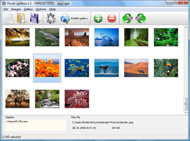
It's no secret that adding photos to your blog posts is one of the most effective ways to enhance your blog and attract attention to your writing. Flickr has millions of photos available in its database. A simple FREE tool called Flickr Gallery allows you to create a custom image gallery with a cool slide show of the most recent and most interesting photos from Flickr on your website or blog in a few easy steps. Just visit Flickr website and find photostream, photoset or a single photo you like. Enter the address of flickr page to add all photos from this page in your gallery, select the style of thumbnails and the overlay window and add the HTML embed code on your website or blog.
A few clicks and you'll see a stylish photo gallery with beautifull lightbox and zoom effects on your own website or blog!


Flickr Gallery for Windows   Flickr Gallery for MAC

Want more?

Example

Lightbox gallery sample

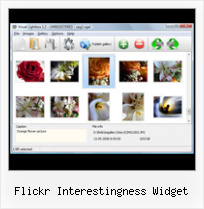
The following image set is generated by Flickr Gallery tool. Click any picture to run Lightbox gallery.

The example above is an in-page usage demo of Lightbox script with Flickr images. The photo gallery created with Flickr Gallery tool is placed inside the html page. You can also check the full-page demo web gallery. This example takes whole browser area to show the web gallery.Flickr Feed Widget

How to Use

Step 1. Adding flickr images to your own gallery.


Locate the photo, photoset or photostream you want to use in your Flickr slideshow. Click on it to see the photo on its own page.

Copy URL of the flickr page.

Select Add images from Flickr... from the 'Add' button on the Toolbar.

Add images from Flickr

In the appeared window paste URL of the flickr page. Specify also the number of photos you want to add from the flickr page. Flickr Gallery will now include these photos in your project.

Add images from Flickr

If you have included the photos that you do not wish to be in your web gallery, you can easily remove them. Select all images that you wish to remove from photo gallery, and select Delete images. from the Images menu. You can pick and choose pictures by holding the CTRL while clicking the pictures you like.

Step 2. Adding caption.

The name of the photo on flickr page will automatically appear in the caption. When you select a photo you'll see the various info about it, such as: Path, Size, date of last change and Caption. You can add any comment or text about the photo (up to 512 symbols).

Step 3. Gallery properties.

Change the name of your flickr album, the size and quality of your pictures with Flickr Gallery. From the Gallery menu, select Properties or use "Edit Gallery Properties" button on the toolbar.

On the first tab of the Gallery Properties window you can change the name of your photo album and enable/disable the following properties: Slide Show, Auto play Slide Show, Zoom effect, Overlay Shadow. You can also set the Overlay shadow color and select the Engine you want to use (jQuery or Prototype + script.aculo.us).

On the second tab of the Gallery Properties window you can select the thumbnail you want to use, set the Thumbnails Resolution, Thumbnails Quality, Thumbnails Titles. Select Thumbnails Format (save in PNG or JPG format). Specify the Number of columns in you photo album and the Page color.

On the third tab of the Gallery Properties window you can select the template, Image resolution and Image quality of your pictures and change the Watermark.

You can set up the various sizes for exported images.

Control the quality of output PNG or JPEG format image by defining output "Image quality" and "Thumbnail quality" parameters (0%…100%).

Step 4. Save your photo gallery as project file.

When you exit Flickr Gallery application, you'll be asked if you want to save your project. The project consists of the pictures you choose to put on your web photo gallery and all your settings. It's a good idea to save the project, because that will allow you to change the project in case you decide to do something different with future galleries. So click Yes, then enter a name for your project. To select the location of your project, just click the Browse folders button and choose a different location. Then click Save.

Flickr Photoset Blog Widget Flickr Interestingness Widget

Download Flickr Gallery


Download Flickr Gallery Download Free Edition
for Windows
Download Flickr Gallery Download Free Edition
for MAC

Flickr Gallery is free for non-commercial use.

A small fee is required for business use. Flickr Gallery Business Edition additionally provides an option to remove the Flickr Gallery. Com credit bar as well as a feature to put your own logo to images. After you complete the payment via the secure form, you will receive a license key instantly by e-mail that turns the Flickr Gallery Free Edition into a Business one. You can select the most appropriate payment mode: check, bank transfer, credit card, PayPal etc. Also you can get Business Edition for free if you help with translating Flickr Gallery into your native language, please contact us at for more info.

Flickr Simple Logo Link Html Embed

Buy Flickr GalleryBuy Business Edition
for Windows

$49
Single Website
$69
Unlimited Websites
Buy Flickr GalleryBuy Business Edition
for MAC

$49
Single Website
$69
Unlimited Websites

Support

For feature requests, troubleshooting, general help contact Customer Support at . Make sure to include details on your Flickr Gallery version, browser, a link (or relevant code) and operating system.Flickrrss Wordpress Examples

Feedback

    * I just tried the application, It is wonderful idea. Like you said in the website "few clicks without writing a single line of code" because most of the people is not web designers".

    * I'd like to express my gratitude to your efforts on creating such a nice piece of program and best of all it's free! Keep out the good work and I hope to see new features in the near coming future to rate you 5 star!

    * I have purchased the business and LOVE IT..Your product appears easy to use and close to what I need to help several of my clients..Stolen Photos On Flickr

    * Just a quick thank you for the software though, It's not often you get a free software version of this quality and style! Well done and please continue this amazing gallery. Hope to see more advances.

FAQ

Q:Instead of making one page with 40 photos, is there no property to make 2 or more pages?

A:You can do it in the following way:

1. Create your gallery in Flickr Gallery and publish it on a local drive in any test folder.
2. Make two copies of the generated index.html file (for example index1.html and index2.html).
3. Open index.html, index1.html and index2.html files in any text editor.
4. Find code for the gallery inside the BODY tag and cut some part of the images, so you'll have different images on each page.

<!-- Start Flickr Gallery.com BODY section -->
<div class="gallery">
<!-- leave the following code on index.html page -->
<a href="./data/images/1.jpg" rel="lightbox[sample]" title="Best Toy Ever"><img src="./data/thumbnails/1.png" /></a>
<a href="./data/images/8.jpg" rel="lightbox[sample]" title="PrueaMacro"><img src="./data/thumbnails/8.png" /></a>

<!-- leave the following code on index1.html page -->
<a href="./data/images/3.jpg" rel="lightbox[sample]" title="Macro Leaf."><img src="./data/thumbnails/3.png" /></a>
<a href="./data/images/11.jpg" rel="lightbox[sample]" title="Bell Pepper"><img src="./data/thumbnails/11.png" /></a>

<!-- leave the following code on index2.html page -->
<a href="./data/images/5_0.jpg" rel="lightbox[sample]" title="5"><img src="./data/thumbnails/5_0.png" /></a>
<a href="./data/images/6_0.jpg" rel="lightbox[sample]" title="6"><img src="./data/thumbnails/6_0.png" /></a>

<!--[if lte IE 6]><script src="engine/js/pngfix_vlb.js" type="text/javascript"></script><![endif]-->
<a id="vlightbox" href="http://Flickr Gallery.com/">Online Photo Album Sharing by Flickr Gallery.com</a>
</div>
<!-- End Flickr Gallery.com BODY section -->

5. Create links to switch between your pages, for example:
<a href="index.html">1</a>  <a href="index1.html">2</a>  <a href="index2.html">3</a> 


Q:I want to change color of the overlay shadow? How can I do this?

A:Open engine\css\Flickr Gallery.css and find the following code:

#overlay{
position: absolute;
top: 0;
left: 0;
z-index: 90;
width: 100%;
height: 500px;
background-color: #FFF;
filter:alpha(opacity=60);
-moz-opacity: 0.6;
opacity: 0.6;
}

set the background-color parameter :

#overlay{
position: absolute;
top: 0;
left: 0;
z-index: 90;
width: 100%;
height: 500px;
background-color: #FF00FF;
filter:alpha(opacity=60);
-moz-opacity: 0.6;
opacity: 0.6;
}


RELATED

Download Interestingness 1.0 Free - Displays a mesh of flickr Download Interestingness - Displays a mesh of flickr interesting photos C: \ Windows Widgets \ Widget Miscellaneous. Read user reviews (0) Send to friend Subscribe. Submit comment* Interestingness description. Displays a mesh of flickr interesting photos. The Interestingness sidebar gadget was developed

FlickerKaramba Interestingness Free Download FlickerKaramba Interestingness is another simple widget for displaying flickr photos. FlickerKaramba Interestingness is another simple widget for displaying flickr photos

How do I choose photos to show? | Yahoo! Widgets Help You can mark a photo as a favorite in the Flickr Widget by moving the cursor over the photo and clicking the star. Interestingness. Photos rated by Flickr. Created by Flickr; photos

Flickr Link : Flickr Gallery Flickr Link. Web photo album? With Flickr Gallery, you need just 4 simple steps to get your web photo album ready!. Post Flickr Pics On Iweb

Flickriver - A new way to view Flickr photos and more Flickriver - view images as a 'river of photos' and more You can place your badge on your Flickr profile, Blog or Website. Add to your iGoogle or Netvibes page. Flickriver widget for iGoogle or Netvibes can display almost any Flickriver view - most interesting today, by user, by group,

YouTube - Flickr Interestingness Widget http://shinydevelopment.com/interestingness Tags: flickr. widget. dashboard. mac. osx. interestingness. 0 likes, 1 dislikes. Show more. Show less. Link to this comment: Share to: see all. All Comments (0) Respond to this video Sign In or Sign Up now to post a comment! Reply. Share

Download Interestingness, Interestingness 1.0 Download Download Interestingness, Interestingness 1.0 Download The Interestingness sidebar gadget was developed to be a small tool that will display a mesh of flickr interesting photos for the most recent day

Konfabulator - Gallery Even if you don't have photos on Flickr, you should check out the incredible photography shared by other Flickr members by setting the Widgets' photo source to "Interestingness." • Upload large batches of photos to Flickr at once. • Give your photos titles, descriptions, and tags

Building a Volta Control : A Flickr Widget This article illustrates how to create a Volta control around Flickr, the popular image hosting service. A few of the interesting features of Flickr are the possibility of marking photos as favourites, grouping photo pool and Flickr Interestingness

Flickr Interestingness: 7-18-2007 Apple News, Tips and Reviews Here are a couple of photos with Apple related content from Flickr. I have plans of doing this type of post regularly we'll see how that turns out. Wake Up This is a killer angle that shows a near perfect reflection of his computer screen in

Frequently Asked Questions Answers to the most frequently asked questions about BigHugeLabs.com and fd's Flickr Toys. Interestingness is what Flickr calls the criteria used for selecting which photos are shown in Explore

Flickr and iPhone? Things are finally getting serious Flickr releases a lovely iPhone web app that is fast and offers its best features tailored for sharing photos on the go

Flickr Widget - Free software downloads and software reviews A complement to Yahoo's popular Flickr photo sharing service, the new Flickr Widget allows you to display, upload, tag, and organize photos on Flickr, without ever opening a Web browser

Apple - Downloads - Dashboard Widgets - Explore Flickr View a selection of today's "interesting" photos from flickr.com, view individual photographs inside the widget or click through to view the flickr.com site. Everyone loves looking at beautiful and unusual photographs, flickr rates photos like this with a level of "interestingness"

Flickr Widget - Yahoo! Widgets 1,000s of free Widgets help you save time by bringing your favorite content and services right to you

Flickr Photo Quiz - Android Download Flickr Photo Quiz for Android (★★★★★, 100-500 downloads) - Do you want to play and study? So Flickr Photo Quiz is for you

Explore Flickr - The best of flickr on your iPad, iPhone or Explore Flickr Description Where is the old Explore Flickr dashboard widget? This iPad and iPhone app is based on our original Mac OS X dashboard widget (Actually, that widget was the very first piece of Mac software we ever wrote!

Flickr/YUI/Lightbox (Lily) Two minute screencast of building a patch to fetch Flickr "interestingness" pics for a given day. APIs and 3rd party framework JS can be wrapped as Lily objects- in this case, the flickr.interestingness.getList service, the Yahoo YUI Calendar widget and Lokesh Dhakar's Lightbox script

FlickerKaramba Interestingness 0.1 for Linux - FlickerKaramba FlickerKaramba Interestingness is another simple widget for displaying flickr photos This one doesnt use tags it grabs photos from quotinterestingnessquot so you get all kinds of good stuff The widgets dont have borders although it looks

Exploring Interestingness on Flickr | D'Arcy Norman dot net Interestingness everywhere! There are some absolutely amazing photos on Flickr! It would be even cooler if the Flickr Gods had provided an RSS feed for the "10 most

Flickr Interestingness - Tools & Technology widget This module will display photos from the flickr interesting section. Use Netvibes to build your own widgets and distribute them on netvibes and other platforms. Submit your UWA widget. Widget: Flickr Interestingness. Created by nauthiz693

Flickr Interestingness - Google Modules Tags: flickr. Vote: >>Add module. or add to site. Copy & paste this code into your site:

Interestingness | Flickr - Photo Sharing! fd's Flickr Toys has a fun vanity widget that mines the flickr photos deemed to be 'interesting' and shows you the ones that made the list. Here are the first 72 of 430, and they also give the links: 1. Dolphin Crest, 2. Miners, 3. Leaf Points

Flickr Interestingness Widget | My Journey to Macintosh The widget shows a selection of popular images from flickr on a daily basis, it is called Flickr Interestingness and it takes images from the interestingness feed on flickr. So, given that there are apparently still a people willing to read

Flickr Widget - Apps - CNET Australia A complement to Yahoo's popular Flickr photo sharing service, the new Flickr Widget allows you to display, upload, tag, and organize photos on Flickr, without ever opening a Web browser. shared by other Flickr members by setting the widgets' photo source to interestingness

