



Overview

It's no secret that adding photos to your blog posts is one of the most effective ways to enhance your blog and attract attention to your writing. Flickr has millions of photos available in its database. A simple FREE tool called Flickr Gallery allows you to create a custom image gallery with a cool slide show of the most recent and most interesting photos from Flickr on your website or blog in a few easy steps. Just visit Flickr website and find photostream, photoset or a single photo you like. Enter the address of flickr page to add all photos from this page in your gallery, select the style of thumbnails and the overlay window and add the HTML embed code on your website or blog.
A few clicks and you'll see a stylish photo gallery with beautifull lightbox and zoom effects on your own website or blog!


Flickr Gallery for Windows   Flickr Gallery for MAC

Want more?

Example

Lightbox gallery sample

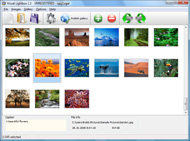
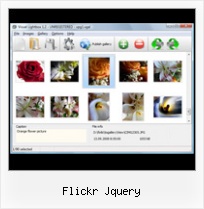
The following image set is generated by Flickr Gallery tool. Click any picture to run Lightbox gallery.

The example above is an in-page usage demo of Lightbox tool with Flickr images. The website gallery created with Flickr Gallery tool is placed inside the website page. You can also check the full-page demo web gallery. This example takes whole browser area to show the gallery.Flickr Album On My Web

How to Use

Step 1. Adding flickr images to your own gallery.


Locate the photo, photoset or photostream you want to use in your Flickr slideshow. Click on it to see the photo on its own page.

Copy URL of the flickr page.

Select Add images from Flickr... from the 'Add' button on the Toolbar.

Add images from Flickr

In the appeared window paste URL of the flickr page. Specify also the number of photos you want to add from the flickr page. Flickr Gallery will now include these photos in your project.

Add images from Flickr

If you have included the photos that you do not wish to be in your web gallery, you can easily remove them. Select all images that you wish to remove from photo gallery, and select Delete images. from the Images menu. You can pick and choose pictures by holding the CTRL while clicking the pictures you like.

Step 2. Adding caption.

The name of the photo on flickr page will automatically appear in the caption. When you select a photo you'll see the various info about it, such as: Path, Size, date of last change and Caption. You can add any comment or text about the photo (up to 512 symbols).

Step 3. Gallery properties.

Change the name of your flickr album, the size and quality of your pictures with Flickr Gallery. From the Gallery menu, select Properties or use "Edit Gallery Properties" button on the toolbar.

On the first tab of the Gallery Properties window you can change the name of your photo album and enable/disable the following properties: Slide Show, Auto play Slide Show, Zoom effect, Overlay Shadow. You can also set the Overlay shadow color and select the Engine you want to use (jQuery or Prototype + script.aculo.us).

On the second tab of the Gallery Properties window you can select the thumbnail you want to use, set the Thumbnails Resolution, Thumbnails Quality, Thumbnails Titles. Select Thumbnails Format (save in PNG or JPG format). Specify the Number of columns in you photo album and the Page color.

On the third tab of the Gallery Properties window you can select the template, Image resolution and Image quality of your pictures and change the Watermark.

You can set up the various sizes for exported images.

Control the quality of output PNG or JPEG format image by defining output "Image quality" and "Thumbnail quality" parameters (0%…100%).

Step 4. Save your photo gallery as project file.

When you exit Flickr Gallery application, you'll be asked if you want to save your project. The project consists of the pictures you choose to put on your web photo gallery and all your settings. It's a good idea to save the project, because that will allow you to change the project in case you decide to do something different with future galleries. So click Yes, then enter a name for your project. To select the location of your project, just click the Browse folders button and choose a different location. Then click Save.

Html Slideshow Creator Flickr Flickr Jquery

Download Flickr Gallery


Download Flickr Gallery Download Free Edition
for Windows
Download Flickr Gallery Download Free Edition
for MAC

Flickr Gallery is free for non-commercial use.

A small fee is required for business use. Flickr Gallery Business Edition additionally provides an option to remove the Flickr Gallery. Com credit bar as well as a feature to put your own logo to images. After you conclude the payment via the secure order form, you will receive a license key instantly by e-mail that turns the Flickr Gallery Free Edition into a Business one. You can select the most appropriate payment method: bank transfer, check, credit card, PayPal etc. Also you can get Business Edition for free if you help with translating Flickr Gallery into your native language, please contact us at for more info.

Linking Flickr To Panoramio

Buy Flickr GalleryBuy Business Edition
for Windows

$49
Single Website
$69
Unlimited Websites
Buy Flickr GalleryBuy Business Edition
for MAC

$49
Single Website
$69
Unlimited Websites

Support

For feature requests, troubleshooting, general help contact Customer Support at . Make sure to include details on your Flickr Gallery version, a link (or relevant code), operating system and a browser.Jquery Json Flickr Set

Feedback

    * I downloaded your trial version to see if I could get it to work with my website, and I am almost there (I have been looking for something like this for ages)..

    * I just tried the application, It is wonderful idea. Like you said in the website "few clicks without writing a single line of code" because most of the people is not web designers".

    * This looks like EXACTLY what I need for my site. It would make my job much faster! Love your program. Thank you!!Emailing Photos To Flickr

    * First of all, your product is fantasitc. I looked at the others and your code generator app was insanely easy to use.

FAQ

Q:How do I embed the lightbox image gallery into an existing page?

A:To install Flickr Gallery gallery on your page you should:

1. Create your gallery in Flickr Gallery and publish it on a local drive in any test folder.
2. Open index.html file from the saved folder in any text editor.
3. Copy code for the HEAD section and paste it inside the HEAD section of you own webpage, for example:

<head>
...
<!-- Start Flickr Gallery.com HEAD section -->
<link rel="stylesheet" href="engine/css/vlightbox.css" type="text/css" />
<style>#vlightbox a#vlb{display:none}</style>
<link rel="stylesheet" href="engine/css/Flickr Gallery.css" type="text/css" media="screen" />
<script src="engine/js/jquery.js" type="text/javascript"></script>
<script src="engine/js/jquery.tools.min.js" type="text/javascript"></script>
<script src="engine/js/visuallightbox.js" type="text/javascript"></script>
<!-- End Flickr Gallery.com HEAD section -->

...
</head>


4. Copy code for the BODY section and paste it inside the Body section of you own webpage in the place where you want to have a gallery, for example:

<body>
...
<!-- Start Flickr Gallery.com BODY section -->
<div id="vlightbox">
<a rel="lightbox_vlb" href="data/images/dscn6831.jpg" title="DSCN6831"><img src="data/thumbnails/dscn6831.png"><span></span></a>
<a rel="lightbox_vlb" href="data/images/dscn6823.jpg" title="DSCN6823"><img src="data/thumbnails/dscn6823.png"><span></span></a>
<a rel="lightbox_vlb" href="data/images/dscn6819.jpg" title="DSCN6819"><img src="data/thumbnails/dscn6819.png"><span></span></a>
<a id="vlb" href="http://Flickr Gallery.com">Photo Gallery For Web by Flickr Gallery.com v2.1</a>
</div>
<!-- End Flickr Gallery.com BODY section -->

...
</body>


5. Copy 'data' folder with images and thumbnails and 'engine' folder with .css and .js files into the same folder with your own webpage.
You can find the example on our website:
http://www.Flickr Gallery.com/#example


RELATED

Flickrush - A jQuery flickr plugin | web design blog Flickrush is a jQuery plugin designed to make it quick and easy to add your flickr photo stream to any web page with minimal effort. Fully customisable you can choose the number of photos, randmise the ordering and style to fit in with any blog

Create a Photostream Using jQuery and the Flickr API " Justin Download jQuery lightBox. jQuery lightBox is a jQuery plugin that can be used to display a gallery of images on the current page using the power and flexibility of jQuery's selectors. Create a Flickr Account and API Key if you don't already have them

Open Source Flickr Photo Gallery Using jQuery - Web Development flickrGallery is an open-source photo gallery for jQuery that allows you to dynamically pull images from a photoset in Flickr. The main functionaliti

flickr add Software - Free Download flickr add - Top 4 Download flickr add Software - Free Download flickr add - Top 4 Download - Free Download Software flickr gallery lightbox jquery flickr slideshow flickr wordpress flickr how to flickr plugin flickr blog flickr embed flickr add

Using the Flickr API: We Don't Need No Stinkin' Badges A while back I wrote about pulling Flickr images using jQuery, but in that example we were using feeds provided by Flickr's services. Feeds are great because they don't require an API key, and with response formats like JSON, its become relatively easy to parse out the information coming in

How To Add Flickr To Wordpress In 5 Simple Steps | A In today's tutorial, I will be showing you how to add your Flickr Photostream to your Wordpress blog using jSon and jQuery. I learned how to do this trick a few

Flickr + jQuery + Salesforce = Awesome^5 [Part 1] " The Well our aim is to build a gallery viewer using images sourced from Flickr. We will be using their webservices API, and one of my favourite jQuery gallery viewer libraries. I've used something similar to build the image carousel in my Force.com Sites Developer Challenge entry, The Cookbook

Tutorial: Use the Flickr API, Javascript (jQuery), AJAX and A tutorial on how to build a detailed Flickr photo wall with JavaScript, jQuery, JSON and Ajax

Flickr Jquery : Flickr Gallery Flickr Jquery. Flickr Gallery. Cross-browser. Cool styles. Easy setup.. Facebook Flickr Slideshow Url It also gives a nice large preview of the image when you mouseover a Add a Flickr widget to any web site with jQuery

rpheath's jquery-flickr at master - GitHub Implements (some of) the Flickr API using jQuery. of the supported Flickr API calls available, allowing the user to "chain" the API call directly to the flickr() object

jquery-flickr - Google Code jQuery Flickr plug-in is a JavaScript interface for Flickr Services API written on top of the jQuery library. When combined with jQuery Litebox, a rich slide show, lightbox plug-in, jQuery Flickr provides a completely client-side solution, for integrating Flickr into your website, perfect for

JQuery Flickr Feed With flick, They make a simple API available, This plugin works by pulling a JSON feed from Flickr and applying the data it gets back to a template. For example, we can generate this list of pictures:

Drupal Recipes: Building Image Galleries with jQuery and Flickr Covering Flickr, jQuery, and Drupal best practices Drupal Recipes: Building Image Galleries Covering Flickr, jQuery, and Drupal best practices Presented by Benjamin Shell from WorkHabit

Download Flickr Menu Design Description: This tutorial I'll explain a simple step-by-step way to implement an Flickr Horizontal Menu Demo in Jquery and CSS. The result is something

Bring Flickr to Your Website Using JSON and jQuery | The Flickr is a great website for hosting and sharing your photos. If you are an amateur photographer who likes to share photos from your latest outdoor adventure, Fear not, because Flickr has developed an API especially for developers, and mixed with a little jQuery and JSON magic, you can update your

A jQuery Flickr Feed Plugin This jQuery Flickr plugin allows you to pull a public Flickr feed and display it however you like. Compatible with lightbox, colorbox, cycle, etc

Ajax requests using jQuery and PHP | Web Development Blog Our last tutorial about the flickr API was an example on how-to search the flickr photo database for images using some short PHP code. This time we will use

jQuery Flickr Photo Gallery Add the ez-jquery-flickr directory to your codebase. Simply link the CSS and JS files in your tag as you would normally. Make sure to leave all of the files in the directory. If you feel stuck just take a look at the example that comes with the download. Hope you like it!

flickr 64 bit download - freeware, shareware - X 64-bit Download flickr 64 bit download - freeware, shareware - X 64-bit Download - x64-bit download - freeware, shareware and software downloads. jQuery carousel div organizing slideshows with pictures from Flickr and Photobucket and picture folders

jQuery.flickrGallery Call the flickrGallery() method on a set of elements to create the flickr gallery element. $('#id').flickrGallery(options); Full API Documentation below. flickrGallery is a jQuery plugin that provides a way to embed flickr images into your site

Listing your photo albums with the Flickr API and jQuery Listing your photo albums with the Flickr API and jQuery. 18 June 2008. Over the last couple of days, I've tidied up a few things on this site. One task was to make a list of albums appear on the left-hand navigation here, underneath Photographs', downloaded automatically from Flickr

How to use jQuery with a JSON Flickr feed to display photos jQuery has a handy little function which allows us to load JSON data using an HTTP GET request, and then process the contents as an array. And with some natty CSS to square things up as a grid, I have nine random (ish) photos from our Flickr group displaying in a nice 3×3 grid

flickr | jQuery Plugins You can have the same image tag functionality as Facebook, flickr and The Fancy Photoset plugin utilizes the power of jQuery and Fancybox to dynamically create photo galleries from your Flickr Photosets

Flickr Jquery - jQuery Lightbox Flickr Jquery. With DHTML Popup comprehensible interface, you need just 4 simple steps to get your photo album website ready!. javascript popup set content type

Flickr: "jquery" Flickr is almost certainly the best online photo management and sharing application in the world. Show off your favorite photos and videos to the world, securely and privately show content to your friends and family, or blog the photos and videos

