
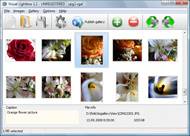



Overview

It's no secret that adding photos to your blog posts is one of the most effective ways to enhance your blog and attract attention to your writing. Flickr has millions of photos available in its database. A simple FREE tool called Flickr Gallery allows you to create a custom image gallery with a cool slide show of the most recent and most interesting photos from Flickr on your website or blog in a few easy steps. Just visit Flickr website and find photostream, photoset or a single photo you like. Enter the address of flickr page to add all photos from this page in your gallery, select the style of thumbnails and the overlay window and add the HTML embed code on your website or blog.
A few clicks and you'll see a stylish photo gallery with beautifull lightbox and zoom effects on your own website or blog!


Flickr Gallery for Windows   Flickr Gallery for MAC

Want more?

Example

Lightbox gallery sample

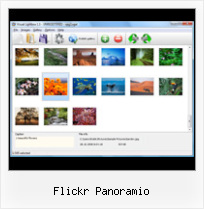
The following image set is generated by Flickr Gallery tool. Click any picture to run Lightbox gallery.

The example above is an in-page usage demo of Lightbox gallery that uses images from Flickr. The lightbox gallery created with Flickr Gallery software is placed inside the html page. You can also check the full-page demo web gallery. This example takes whole browser area to show the gallery.Playback Flicke Slide Show Example

How to Use

Step 1. Adding flickr images to your own gallery.


Locate the photo, photoset or photostream you want to use in your Flickr slideshow. Click on it to see the photo on its own page.

Copy URL of the flickr page.

Select Add images from Flickr... from the 'Add' button on the Toolbar.

Add images from Flickr

In the appeared window paste URL of the flickr page. Specify also the number of photos you want to add from the flickr page. Flickr Gallery will now include these photos in your project.

Add images from Flickr

If you have included the photos that you do not wish to be in your web gallery, you can easily remove them. Select all images that you wish to remove from photo gallery, and select Delete images. from the Images menu. You can pick and choose pictures by holding the CTRL while clicking the pictures you like.

Step 2. Adding caption.

The name of the photo on flickr page will automatically appear in the caption. When you select a photo you'll see the various info about it, such as: Path, Size, date of last change and Caption. You can add any comment or text about the photo (up to 512 symbols).

Step 3. Gallery properties.

Change the name of your flickr album, the size and quality of your pictures with Flickr Gallery. From the Gallery menu, select Properties or use "Edit Gallery Properties" button on the toolbar.

On the first tab of the Gallery Properties window you can change the name of your photo album and enable/disable the following properties: Slide Show, Auto play Slide Show, Zoom effect, Overlay Shadow. You can also set the Overlay shadow color and select the Engine you want to use (jQuery or Prototype + script.aculo.us).

On the second tab of the Gallery Properties window you can select the thumbnail you want to use, set the Thumbnails Resolution, Thumbnails Quality, Thumbnails Titles. Select Thumbnails Format (save in PNG or JPG format). Specify the Number of columns in you photo album and the Page color.

On the third tab of the Gallery Properties window you can select the template, Image resolution and Image quality of your pictures and change the Watermark.

You can set up the various sizes for exported images.

Control the quality of output PNG or JPEG format image by defining output "Image quality" and "Thumbnail quality" parameters (0%…100%).

Step 4. Save your photo gallery as project file.

When you exit Flickr Gallery application, you'll be asked if you want to save your project. The project consists of the pictures you choose to put on your web photo gallery and all your settings. It's a good idea to save the project, because that will allow you to change the project in case you decide to do something different with future galleries. So click Yes, then enter a name for your project. To select the location of your project, just click the Browse folders button and choose a different location. Then click Save.

Flash Gallery Flickr Intergration Flickr Panoramio

Download Flickr Gallery


Download Flickr Gallery Download Free Edition
for Windows
Download Flickr Gallery Download Free Edition
for MAC

Flickr Gallery is free for non-commercial use.

A small fee is required for business use. Flickr Gallery Business Edition additionally provides an option to remove the Flickr Gallery. Com credit string as well as a feature to put your own logo to images. After you conclude the payment via the secure order form, you will receive a license key instantly by e-mail that turns the Flickr Gallery Free Edition into a Business one. You can select the most appropriate payment mode: check, PayPal, bank transfer, credit card etc. Also you can get Business Edition for free if you help with translating Flickr Gallery into your native language, please contact us at for more info.

Full Page Flickr Website

Buy Flickr GalleryBuy Business Edition
for Windows

$49
Single Website
$69
Unlimited Websites
Buy Flickr GalleryBuy Business Edition
for MAC

$49
Single Website
$69
Unlimited Websites

Support

For general help, troubleshooting and feature requests contact Customer Support at . Make sure to include details on your operating system, browser, a link (or relevant code) and Flickr Gallery version.Imge Slideshow Html Code From Flickr

Feedback

    * First of all, your product is fantasitc. I looked at the others and your code generator app was insanely easy to use.

    * I would like to say that Flickr Gallery is a stunning lil program! Its almost too good to be true i'd say! I've been looking for tutorials to create a lightbox gallery, but just couldnt come right. Im so glad i found Flickr Gallery!

    * This looks like EXACTLY what I need for my site. It would make my job much faster! Love your program. Thank you!!Flickr Slideshow Display Title

    * I ran into your website wile looking for a JavaScript to manage a personal Photo Gallery. I downloaded the trial version and immediately fell in love with your Flickr Gallery, it is one of the best products I’ve ever found; it is very user friendly and easy to use and creates great Photo Galleries.

FAQ

Q:How do I embed the lightbox image gallery into an existing page?

A:To install Flickr Gallery gallery on your page you should:

1. Create your gallery in Flickr Gallery and publish it on a local drive in any test folder.
2. Open index.html file from the saved folder in any text editor.
3. Copy code for the HEAD section and paste it inside the HEAD section of you own webpage, for example:

<head>
...
<!-- Start Flickr Gallery.com HEAD section -->
<link rel="stylesheet" href="engine/css/vlightbox.css" type="text/css" />
<style>#vlightbox a#vlb{display:none}</style>
<link rel="stylesheet" href="engine/css/Flickr Gallery.css" type="text/css" media="screen" />
<script src="engine/js/jquery.js" type="text/javascript"></script>
<script src="engine/js/jquery.tools.min.js" type="text/javascript"></script>
<script src="engine/js/visuallightbox.js" type="text/javascript"></script>
<!-- End Flickr Gallery.com HEAD section -->

...
</head>


4. Copy code for the BODY section and paste it inside the Body section of you own webpage in the place where you want to have a gallery, for example:

<body>
...
<!-- Start Flickr Gallery.com BODY section -->
<div id="vlightbox">
<a rel="lightbox_vlb" href="data/images/dscn6831.jpg" title="DSCN6831"><img src="data/thumbnails/dscn6831.png"><span></span></a>
<a rel="lightbox_vlb" href="data/images/dscn6823.jpg" title="DSCN6823"><img src="data/thumbnails/dscn6823.png"><span></span></a>
<a rel="lightbox_vlb" href="data/images/dscn6819.jpg" title="DSCN6819"><img src="data/thumbnails/dscn6819.png"><span></span></a>
<a id="vlb" href="http://Flickr Gallery.com">Photo Gallery For Web by Flickr Gallery.com v2.1</a>
</div>
<!-- End Flickr Gallery.com BODY section -->

...
</body>


5. Copy 'data' folder with images and thumbnails and 'engine' folder with .css and .js files into the same folder with your own webpage.
You can find the example on our website:
http://www.Flickr Gallery.com/#example


RELATED

18 55 Is — Blogs, Pictures, and more on WordPress quantaoflight wrote 2 weeks ago: Taken in Teruel (Spain) Canon EOS 450D + Canon EF-S18-55mm f/3.5-5.6 IS Flickr | 500px | Panoramio P quantaoflight wrote 3 weeks ago: Taken in the Lednice Area (Czech Republic) Canon EOS 450D + 18-55 IS Flickr | Panoramio | Photoblogs

GPS Tagging of Photos - Evaluation of Flickr, Picasa and GPS Tagging of Photos - Evaluation of Flickr, Picasa and Panoramio. Sunday, November 4. 2007. I rode my bicycle around the lake of Zug and used the occasion to try out GPS tagging (this means to add GPS-Information to photos, so they can easily be shown on Maps)

FileGets: Freeware Wally 2.3.0 Details at Miscellaneous Wally is a Qt4 wallpaper changer using multiple sources like files, folders, FTP remote folders, Flickr, Yahoo!, Panoramio, Pikeo, Ipernity, Photobucket, Buzznet, Picasa, Smugmug, and Bing images. It. Windows 2000, Windows XP, Windows Vista, Mac

Photo Around Review for Android Photo Around application for the Android mobile phone operating system allows Mobile Social Network users to search and catalogue images from popular photo sharing websites like Flickr and Panoramio

Wikipedia talk:Upload/Flickr - Wikipedia, the free encyclopedia 5 Panoramio. 6 Flickr license verification. 7 Doubt about license. 8 What if the person on flickr changes the [edit] Panoramio. Is there a similar thing for Panoramio? -- SteelersFanUK06 HereWeGo2010!

Photo-sharing | JasonMorrison.net Android Artwork baby names Blog camera phones Flickr iphone iStockPhoto maps newspapers Nexus One Online News Panoramio Photography Picasa readability stock photos Twitter Usability Web2.0 Panoramio is yet another photo sharing site like Flickr. What sets them apart is their integration with

AroundMe for Android AroundMe integrates to Flickr, Panoramio, YouTube and Wikipedia to offer multiple, Search for Flickr and Panoramio photos. AroundMe helps you to spot what's interesting in your vicinity as well as anywhere else in

Picasa for BlackBerry scrapped? | BlackBerry Cool Google's picture service may be getting dumped for the more buxom Flickr. Will any other services wriggle their way into RIM's heart? Flickr would make more sense, allowing a user to upload an image directly to Flickr, and do some very basic image manipulation. Another thought – Google Panoramio

Flickr: "panoramio" Flickr is almost certainly the best online photo management and sharing application in the world. Show off your favorite photos and videos to the world, securely and privately show content to your friends and family, or blog the photos and videos

Panoramio - Photos by Per@Flickr Photo-sharing community. Discover the world through photos

Geotagging the Also Rans Right now there are three main players in the photo geotagging world – Flickr, Panoramio, and Picasa. actively supports geotagging, such as Flickr, Panoramio, or Picasa, rather than trying to

Elphel Wiki: GeoTagging | Elphel, Inc You can upload JPEGs from Elphel camera to Flickr, Panoramio or any similar service. Here is a Flickr example. And here a Panoramio example. Panoramio can also export your gallery into a map or

Upload Photos Correctly: 10 Tips for More Hits — Internet Putting your best photos on the Web at social sharing sites like Flickr, Picasa, Facebook and Panoramio can lead to increased sales if done correctly. Here are my top tips for using these sites. Decide on the keyword combinations that

Reading Location from EXIF: Picasaweb doesn't read, but Reading Location from EXIF: Picasaweb doesn't read, but Flickr & Panoramio OK The first shows geotag info in Flickr & Panoramio, but does not in Picasa web

Photos | EveryBlock Washington When someone posts a photo taken in your neighborhood on third-party photo-sharing sites Flickr or Panoramio, we map it and link to it, so you can find images near you. The content of the photo can be just about anything. We link to dozens, if

Geocode Your Images After some research, i decided to go for FLICKR, LOCR or panoramio and started by register a user on all sites. sevaral functions included in Flickr are missing ( creating notes

Panoramio API Profile Panoramio API -- see mashups, code, news, reviews and resources. Plus hundreds of APIs and mashups

Panoramio: Upload a photo, 2.0 But I'd like to have a copy on Panoramio so that my images show up in Google Maps. hack together a script to go find images on Flickr and drag them over

Commons:License review - Wikimedia Commons License reviewing is a necessary process for files from Flickr, Picasa, Panoramio, and other external websites that provide images under different licenses. People who upload their material to these web albums choose a license, some which are

Picasa Web Albums georeferencing: How does it compare to How does this newfound ability compare to the georeferencing via Google Earth available for a while now in the standalone version of Picasa (for Windows and Linux), or the georeferencing already available on Flickr and Google's own Panoramio?

Watersportholland.nl Foto's : : : Amsterdam : : Amsterdam : WatersportHolland.nl -- The New Dimension. Images and photo's from Nederland, Netherlands, Holland, Dutch cities and lakes, geographical information and much more Welkom bij Watersportholland Wiki search en watersport images van Flickr en Panoramio (beta fase!

Flickr -> Panoramio for Greasemonkey Creates a link from geotagged photo in Flickr to the same location in Panoramio.com's map

Local SEO Tip: Google Maps loves Panoramio's Geotagged Images If citations are the new link than it appears that georeferences are the new citation. Geotagging of photos, a common georeferenced data type, is gradually Flickr and Panoramio have long had the capacity to geotag and display these images in a mapping context

ATP Electronics GPS PhotoFinder Pro AF-GPSSBK B&H Photo Video Buy now and take advantage of our low prices and great service. Read & review the ATP Electronics GPS PhotoFinder Pro. For more information, please call 800-947-4415 can be used with any GPS-compatible photo software of geotagged-photo compatible sites such as Google Maps, Flickr, and Panoramio

Fryhoo: Countries of the World : Germany : : : : Countries and Cities of the World -- The New Dimension. Images, news, video's, tweets, flickr photo's, mp3 streams and much more interesting stats about your and other countries and cities worldwide. News, twitter, images,internet radio, video's

Wally for Windows 7 - Wallpaper changer using multiple Multiplatform wallpaper changer using multiple sources. Wally is a Qt4 wallpaper changer using multiple sources like files, folders, FTP remote folders, Flickr, Yahoo!, Panoramio, Pikeo, Ipernity, Photobucket, Buzznet, Picasa, Smugmug, Bing, Google, Vladstudio and deviantART images

Flickr Panoramio : Flickr Gallery Flickr Panoramio. Flickr Slide Show enables you to make an online photo album with ease.. Jquery Flickr Display Flickr: Panoramio's Photostream Flickr is almost certainly the best online photo management and sharing application in the world

